Application Version
Platform
3.4.1
Printer
Any
Steps to Reproduce
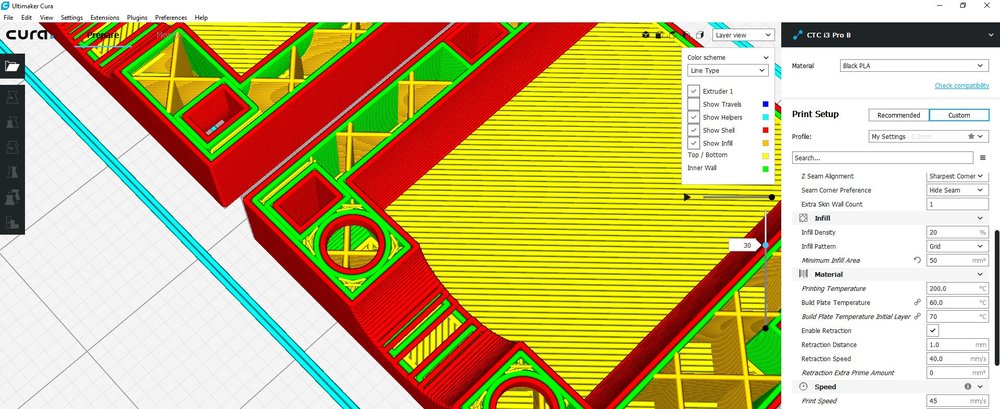
Open the and STL file (the example I used is attached, but also occurs with others). Specify a "Minimum Infill Area" (in my example I used 50mm^2).
Vampire HDMI Mount.zip
Actual Results
Some of the smaller top surface areas dissapear when the "Minimum Infill Area" is specified (as shown in attached screenshot)
Expected results
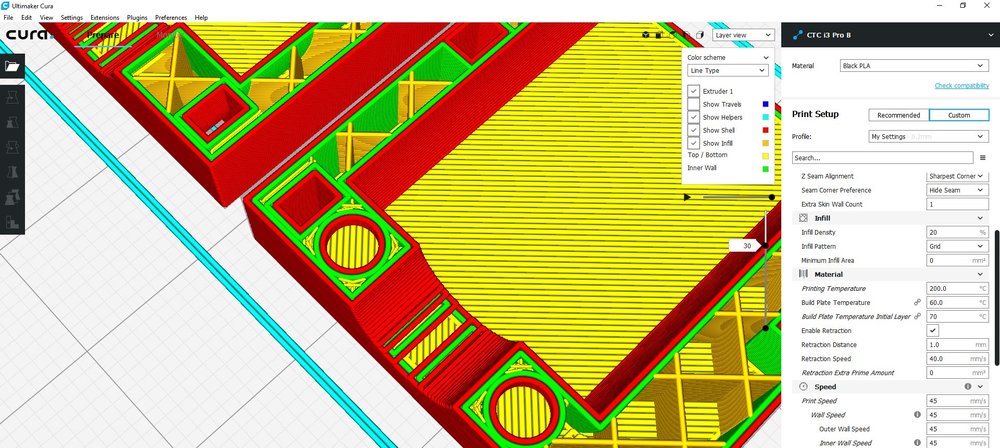
The areas smaller then the specified area should be printed with skin, and the top surface layers should be left intact. (As shown in attached screen shot of how it is without minimum infill area set)
Additional Information
I did mention this on the Ultimaker forum, as can be seen here. https://community.ultimaker.com/topic/23131-minimum-infill-area/ and it was admitted that this feature is broken. However it was also mentioned that this feature would not perform as I expect it to which goes against the description of this feature on the Ultimaker website which explains that this feature does exactly what I expect. Whilst the feature appears to work for the most part, the issue with the missing top skin remains. More screenshots and description can be found on the Ultimaker forum link,
 LemaruX
All 12 comments
@LemaruX Thanks for the find and your report. We'll fix it.
Devs: CURA-5560
 jackha
on 11 Jul 2018
jackha
on 11 Jul 2018
This has been fixed now for version 3.5. Good find!
 Ghostkeeper
on 24 Aug 2018
Ghostkeeper
on 24 Aug 2018
The PR connected to this in CuraEngine is still open...
 ChrisTerBeke
on 26 Sep 2018
ChrisTerBeke
on 26 Sep 2018
Indeed, I closed it because the ticket was tested by QA and such and they marked it as fixed. But I just tried reproducing the bug and it's still there. Nothing was changed for this ticket because the bugfix was done on a branch instead of master and the branch was forgotten to merge. I'm putting it back in Component Test to test again (there is now also a merge conflict with Master).
Ghostkeeper
on 28 Sep 2018
The PR is now merged in master and it seems to work as expected. However it still needs to be tested by our QA team.
Sadly, this won't be fixed in 3.5. We apologize for the extra delay.
 diegopradogesto
on 2 Oct 2018
diegopradogesto
on 2 Oct 2018
Did this fix make it into 3.5.1? Cheers
LemaruX
on 16 Oct 2018
Nope, we didn't pick anything from master. We just fixed some bugs directly in 3.5. This will be available in 3.6. Hopefully it will be available soon.
diegopradogesto
on 16 Oct 2018
Wanted to test this mainly in order to prevent excessive shaking of the printer. In Slic3r this is so useful, I'm looking forward to have this feature working in cura.
 MichaelMichaelMichaelMichaelMichael
on 9 Nov 2018
MichaelMichaelMichaelMichaelMichael
on 9 Nov 2018
Did the fix make it into 3.6?
LemaruX
on 14 Nov 2018
Yes, it should. I just checked with your model and it seems to work. Please be free to try again.
diegopradogesto
on 19 Nov 2018
I think I'm experiencing something related to this issue in Cura 4.4.1. When my Minimum Infill Area is set too high, Cura will not print a bottom layer, but instead start printing infill right away.
In this screenshot you can see that some characters are large enough to get skin, but others get infill directly on them, even though there is just empty space below.
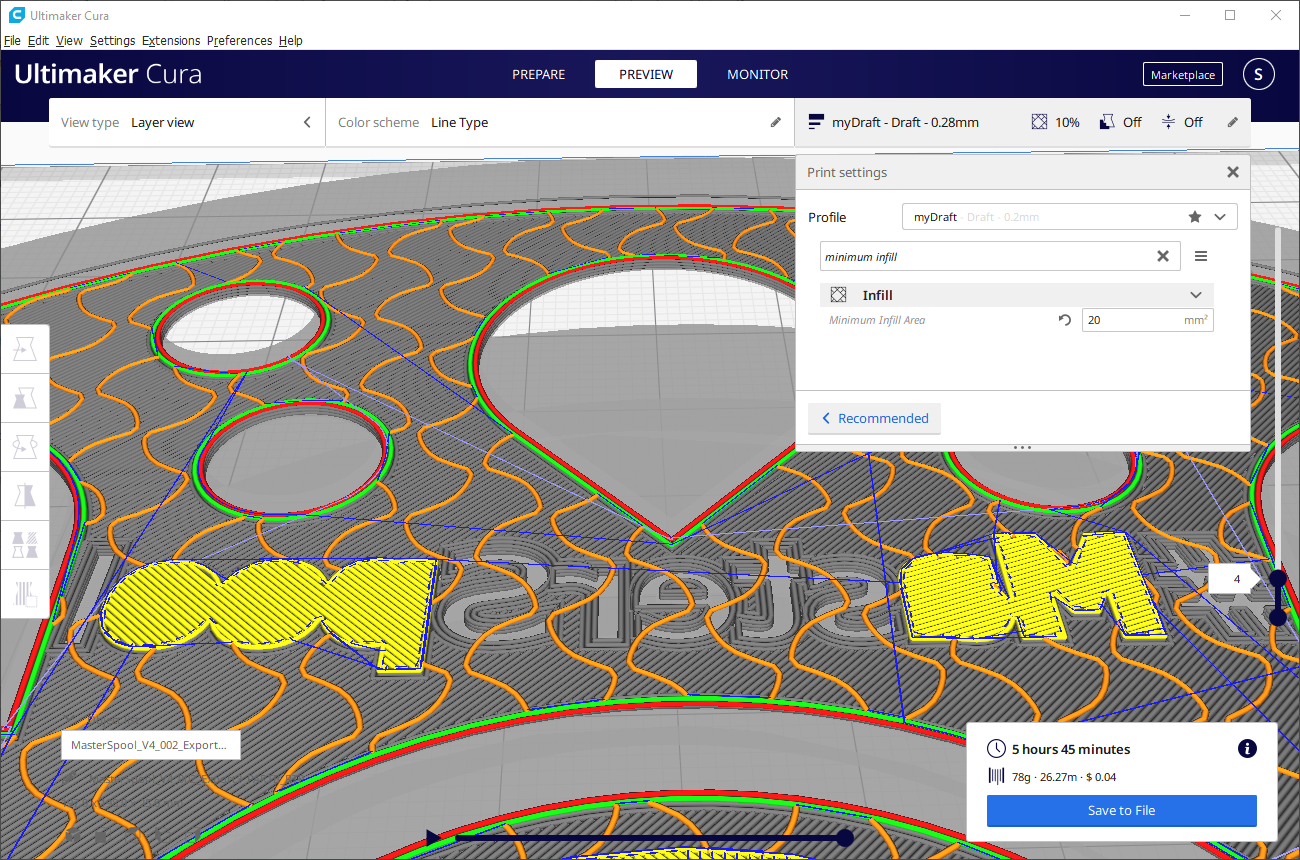
Setting Minimum Infill Area to 0 makes it so that everything gets a proper bottom layer.
Layer Height is .28mm
Bottom Thickness is .8mm
Bottom Layers is 3
 dschraitle
on 2 Feb 2020
dschraitle
on 2 Feb 2020
A similar problem existed in 4.4, which is fixed in 4.5. See also https://github.com/Ultimaker/Cura/issues/7032.
Ghostkeeper
on 4 Feb 2020
Related issues
 mnswamp1
·
3Comments
mnswamp1
·
3Comments
 jornada812
·
3Comments
jornada812
·
3Comments
 wi1k1n
·
3Comments
wi1k1n
·
3Comments
 tomoinn
·
3Comments
tomoinn
·
3Comments
 konvoj
·
3Comments
konvoj
·
3Comments
Most helpful comment
@LemaruX Thanks for the find and your report. We'll fix it.
Devs: CURA-5560