Cura: Small bits of infill left after applying gradual infill steps
Application Version
3.4.0
Platform
Mac OS 10.13.5
Printer
wanhao duplicator i3
Steps to Reproduce
Take my model and slice it.
Actual Results
Expected results
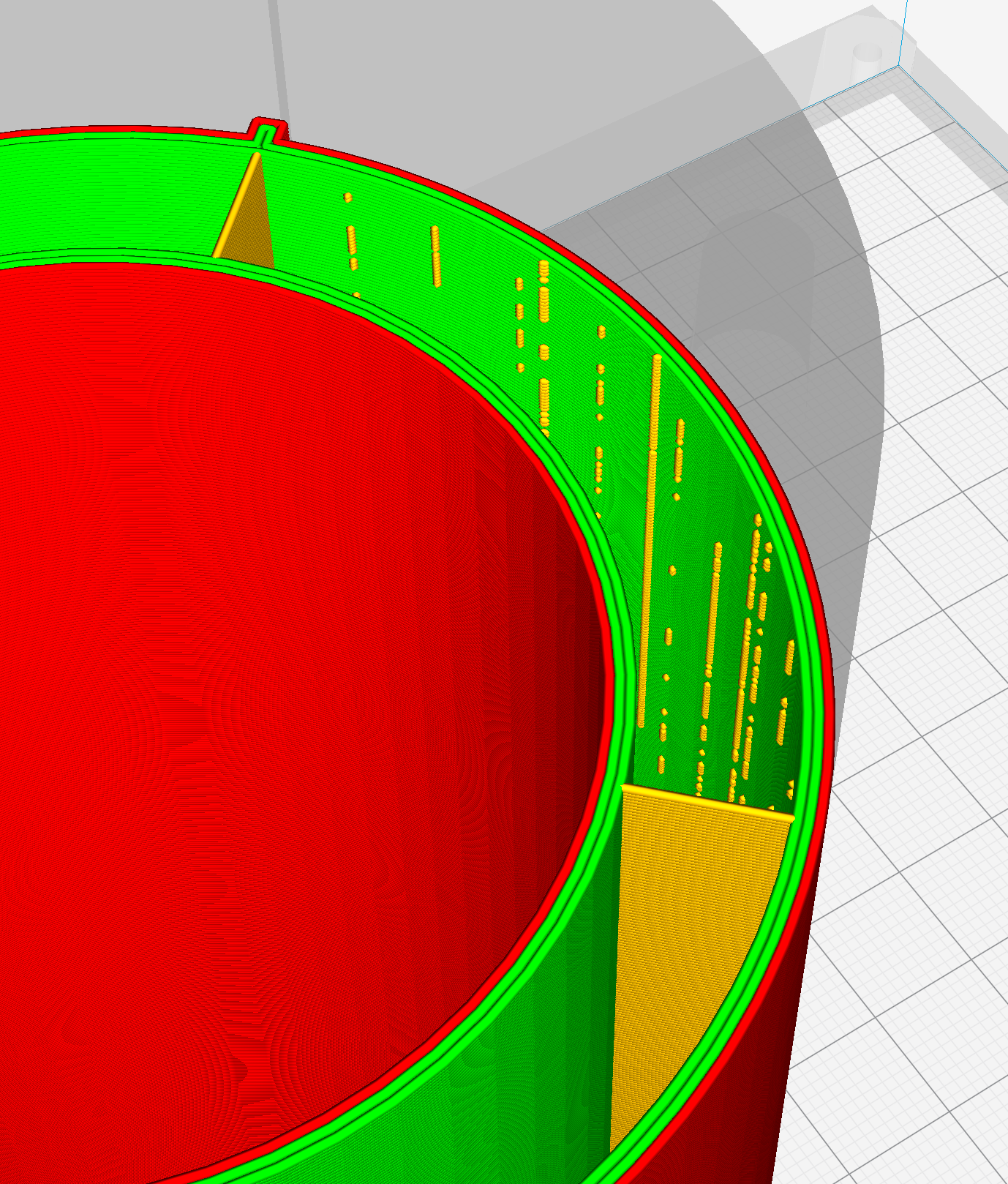
There are no small bumps of support at the places where support would start if not for gradual infill
Additional Information
I have what's basically a cylinder model. I've specified Gradual Infill Steps. It generated very small percentage infill throughout the almost whole model, and the only most top has gradual build up. The problem is - it has these random bits of infill right next to the inside shell. I think they are in the places where infill would start without gradual.
 soswow
All 16 comments
Labelled as bug because it's not really what we want, but if there's not a negative impact on the print's quality its probably not going to be a priority for us. Most infill looks kind of gross compared to the outer shell where aesthetics and surface finish are key.
 ianpaschal
on 10 Jul 2018
ianpaschal
on 10 Jul 2018
Thanks.
It actually has an impact. I can't use this feature atm for these reasons:
- It increases print time. With all those multiple places it needs to visit along the way makes each layer much longer to finish.
- With this - I am forced to disable retraction. With retraction for each of those points it will pull in and out all the time making it very noisy print + with my non-ideal printing head quite often I Am end up with either blocked nozzle or with not enough material when it actually start printing a well.
I haven't cross-validated it, but I have a feeling it wasn't a thing before. Now I see this on all models. It was a great feature, but with this bug it's unusable at least by me.
soswow
on 10 Jul 2018
Hmm. Your problem does not appear to be very severe. But, in an effort to figure out which parts of your project file were causing his bad behavior I compared it to the default settings and daaaaaaaaaaaaaamn. Gradual infill is very messed up at least on the default quality profiles for Prusa i3.
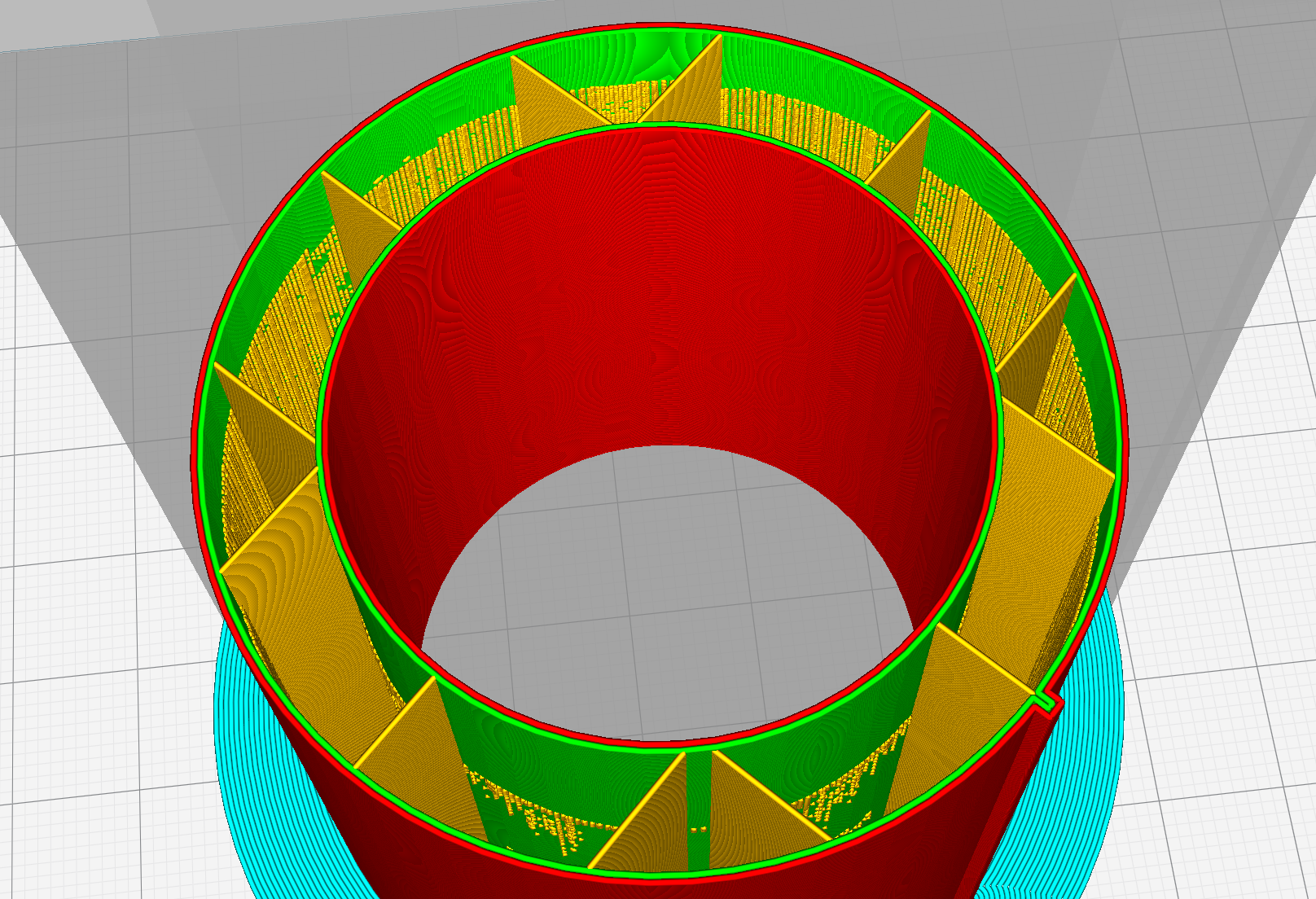
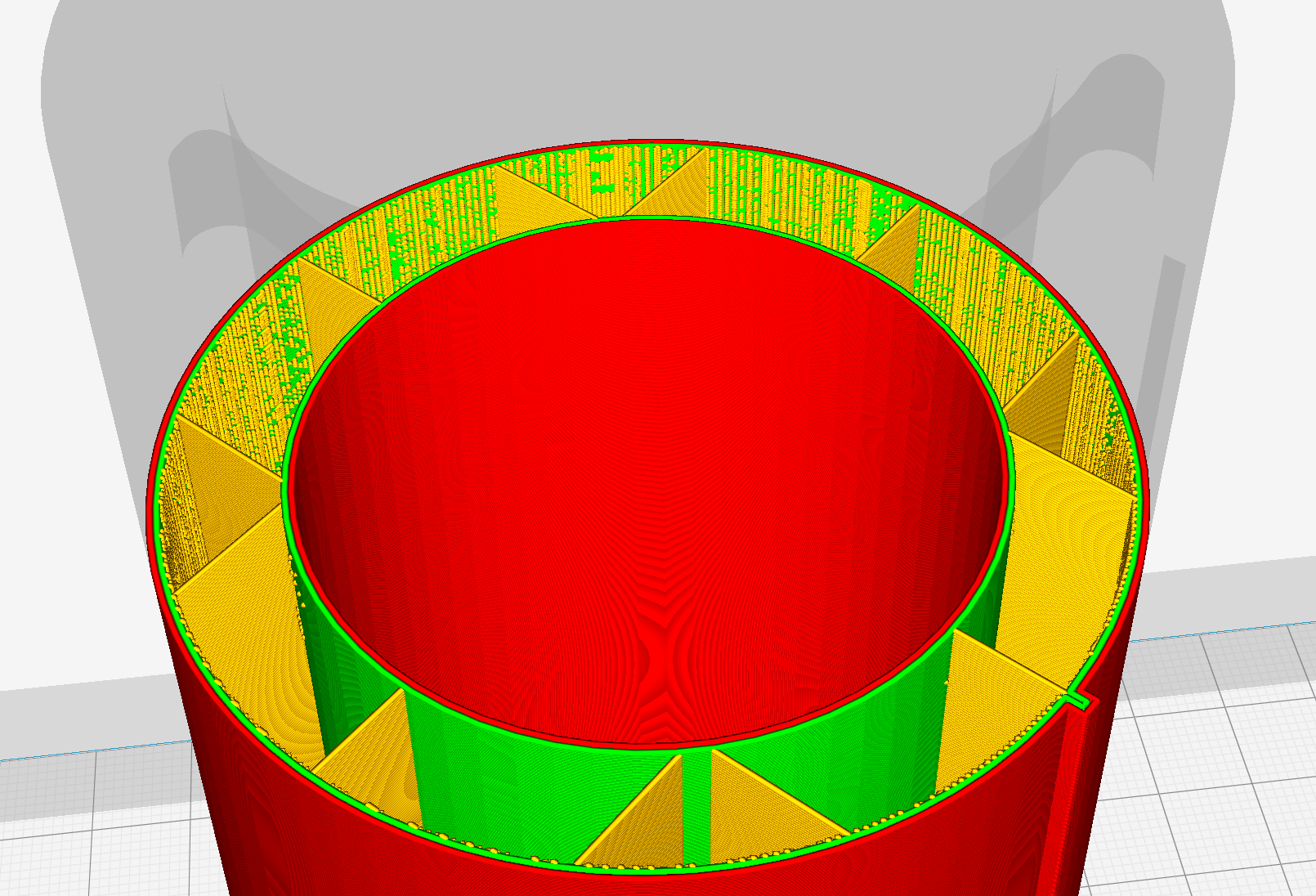
These are just normal 0.1 profile with gradual infill turned on. Very strange behavior indeed.
ianpaschal
on 10 Jul 2018
I've done some research on this. It seems to be caused by the infill overlap (how much the infill lines overlap with the wall).
If you set that to 0, you'll remove the issue on your print, however then you won't get all the strength boost as if there is some overlap.
I also cross checked this with other printers and profiles and the issue seems to be limited to Prusa I3 profiles/printers. I'm making a sticky note for our "what to do about it" board and we'll figure out our plan of action.
ianpaschal
on 18 Jul 2018
My thinking (aloud, because I'm on vacation the rest of the week so the other Cura team members can read this), is that since this is not occurring everywhere, it's not a bug in Cura Engine but in the quality profiles for Prusa I3. This hopefully means that it's a relatively small fix that doesn't require lots of test prints and introduce possible regression for other printers.
ianpaschal
on 18 Jul 2018
Frankly, I don't know exactly what differentiates one "profile" from another 🤷♂️ .
I mean, it's an engine that generates infill, right? And I imagine an engine as a black box function with inputs and one of the inputs is "support infill". Then if there is a chance the output of this function has the artifact we see - it's an engine problem. So, that's where I am unknowledgeable of how and where profile sits in this picture. It could be that there are some meta-parameters that are hardcoded into profile that also come as an argument to this engine function. And it could be only one of the profiles makes this engine generate these artifacts. But never the less - it's the engine that generates them.
soswow
on 18 Jul 2018
Devs: CURA-5583
 alekseisasin
on 19 Jul 2018
alekseisasin
on 19 Jul 2018
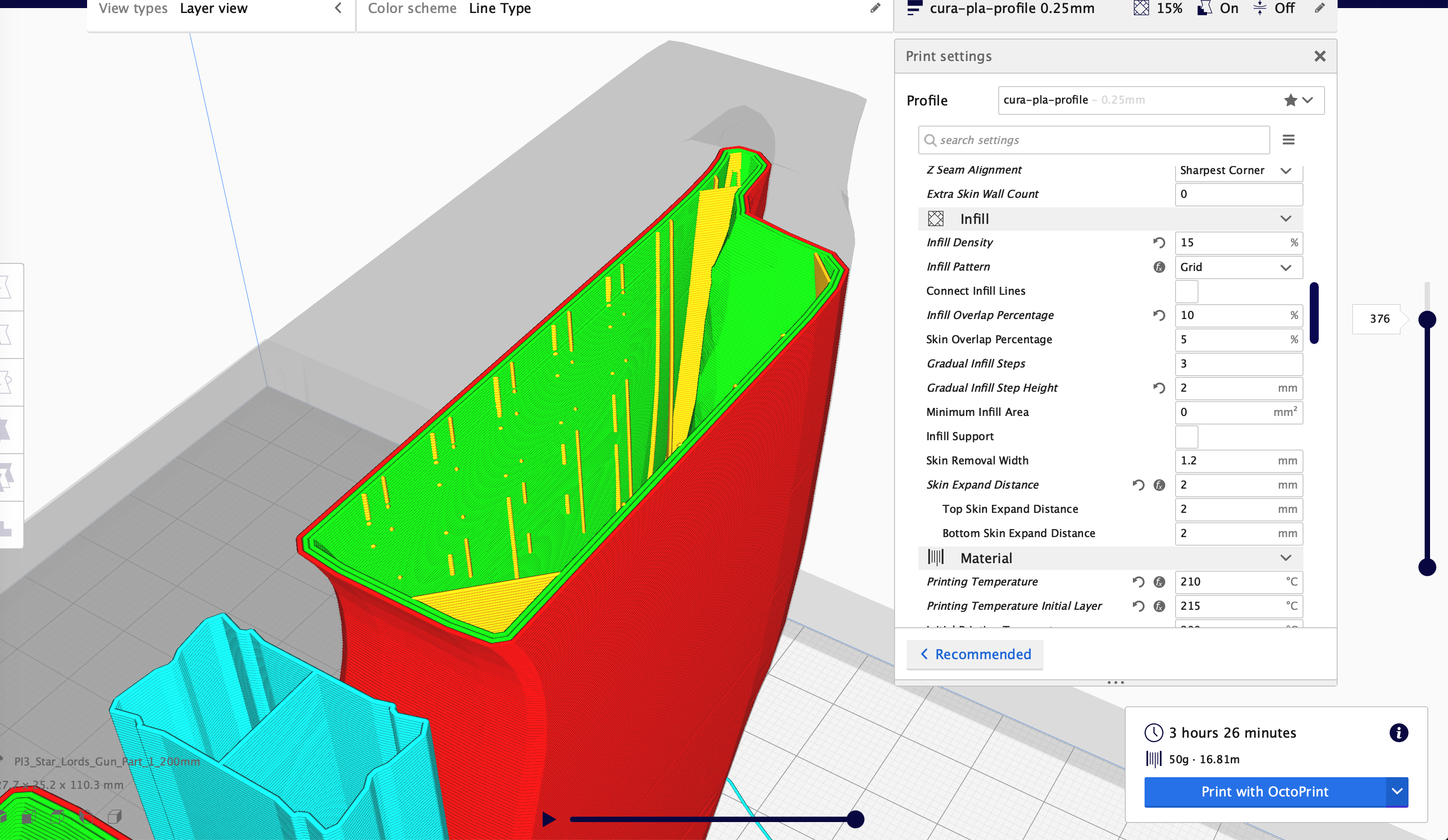
@ianpaschal , Was this actually fixed? I still have it. 4.0.0.
soswow
on 18 Apr 2019
soswow
on 18 Apr 2019
Could you upload a project file rather than just a 3MF file? Your file doesn't contain any settings or the profile that you were using, so it doesn't reproduce.
 Ghostkeeper
on 19 Apr 2019
Ghostkeeper
on 19 Apr 2019
Incidentally, when slicing that 3MF file in the configuration that I happened to have active at the time, I'm getting a segfault: segfault_outerpolygon.zip
Ghostkeeper
on 19 Apr 2019
@Ghostkeeper Sure thing. I am still confused what am I "Saving" vs "exporting" :shrug:
example.3mf.zip
Will this do?
It's a different model. Just happens to be loaded right now.:

soswow
on 19 Apr 2019
@Ghostkeeper The segfault seems to be fix on the latest master. I think it's fixed by https://github.com/Ultimaker/CuraEngine/pull/1042
 LipuFei
on 23 Apr 2019
LipuFei
on 23 Apr 2019
example.3mf.zip
Will this do?
Yup, that does it. I see the same bits on this end now as well.
Ghostkeeper
on 24 Apr 2019
It's a bit hard to trace now since our issue tracker isn't able to link to Github any more, but originally the PR that fixed this issue was https://github.com/Ultimaker/CuraEngine/pull/820.
I can see why this didn't have any effect.
Ghostkeeper
on 24 Apr 2019
Made a slightly better fix here: https://github.com/Ultimaker/CuraEngine/commit/ff00a47977c024e7f1e4499fb6fe4b251ba86a52
Ghostkeeper
on 24 Apr 2019
Related issues
 DamianSepczuk
·
3Comments
DamianSepczuk
·
3Comments
 tomoinn
·
3Comments
tomoinn
·
3Comments
 rudowinger
·
3Comments
rudowinger
·
3Comments
 thopiekar
·
3Comments
thopiekar
·
3Comments
 Nemernemer
·
3Comments
Nemernemer
·
3Comments