Windows files are released.
1.122.3 (2021/01)
- add: added option "undo_max_carets" (default is 200); many editing commands (typing character, BackSp, Delete, etc) are now much faster for >200 carets (before, such commands could last for several minutes, with 30K carets)
- add: lexer CSS: more known properties; fix highlighting inside
@mediablocks - fix: Lexer Detecter didn't detect 'Dockerfile'
 Alexey-T
All 26 comments
Hi @Alexey-T
I don't know how works the undo process and maybe is a nonsense, but is posible following your new implementation, just to bypass the current operation? I mean if I have more of 200 carets and proceed with a change, disable to Cud generates an undo process but just for that operation and preserves previous undo actions.
 JairoMartinezA
on 19 Jan 2021
JairoMartinezA
on 19 Jan 2021
disable to Cud generates an undo process but just for that operation
it sounds like a nonsense, because after the 200 carets change, when I type the 'a', all old UNDO info is useless (cannot be used).
Alexey-T
on 19 Jan 2021
Sure, no problem my bad. Thanks @Alexey-T
JairoMartinezA
on 19 Jan 2021
I wrote a while ago:
Plus there needs to be a BIG, FLASHY announcement if changes are included in a new stable release that will break an existing installation. (Additionally, Cud could and should IMHO try harder to be backwards compatible.)
You wrote:
add: added option "undo_max_carets" (default is 200); many editing commands (typing character, BackSp, Delete, etc) are now much faster for >200 carets (before, such commands could last for several minutes, with 30K carets)
This new option illustrates perfectly what I meant with that. It is quite feasible that someone who only skims the histoy.txt file (or doesn't even read it, perhaps because they're, in a few weeks time, updating from 1.115 to the then current 1.125) will lose data because of this innocent-looking change.
I have no problems at all with that option as such. I DO have a problem that its default is not the OLD behaviour but an arbitrary number you picked out of thin air. The net effect of this change is that the new option may lead to some bad surprises for those unaware of the change.
PLEASE think carefully what you do when you introduce such potentially BREAKING changes. The very minimum would be a line in the history that says in CAPITAL LETTERS that there's a potential pitfall here and that user action may be required. Even better would be to have the new option behave in the same way as the old Cud did.
I know this is a boring and not very sexy post but I can't stand software that potentially pulls the rug from under me.
 tmsg-gh
on 20 Jan 2021
tmsg-gh
on 20 Jan 2021
I understand that 200 value is 'small' and it breaks work of a man who adds 350 carets. but you can tell the same for other values! e.g. 3000. it breaks work if I use 3020 carets... but 3000 carets is slow with undo.
Alexey-T
on 20 Jan 2021
(edited the history.txt file: * add/change: added option "undo_max_carets" (default is 200). Many editing commands are now much faster for >200 carets (before, such commands could last for several minutes, with 30K carets). But now you will loose the undo-information with >200 (by option) carets.)
closed by mistake.
Alexey-T
on 20 Jan 2021
Sometimes I catch error when just edit text or move line up/down.

After press OK won't work lexer.
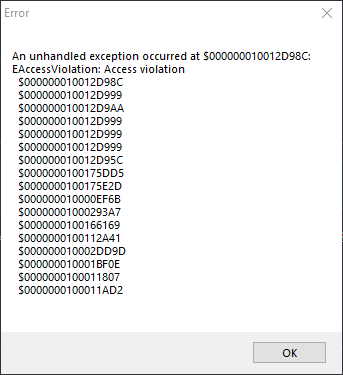
cud 1.222.3x64
lexer Python
 OlehL
on 21 Jan 2021
OlehL
on 21 Jan 2021
I added some range checks in new code, but it was code for multi-carets.
need some 'repro', please.
beta: http://uvviewsoft.com/c/
@OlehL
Alexey-T
on 21 Jan 2021
@OlehL Do you have "brackets_highlight":true ? try to turn off and repro the bug again.
Alexey-T
on 21 Jan 2021
try "bracket_highlight":false - the same.
Last stable cud 1.120.0
OlehL
on 21 Jan 2021
I am going to find stable repro
OlehL
on 21 Jan 2021
I understand that 200 value is 'small' and it breaks work of a man who adds 350 carets. but you can tell the same for other values! e.g. 3000. it breaks work if I use 3020 carets... but 3000 carets is slow with undo.
Sigh. Sometimes I really ask myself whether it makes any sense to open an issue here or add a comment. Either you wilfully misunderstood my comment or you can't be bothered to read and/or understand what I wrote.
My post made it clear that QUOTE:
I DO have a problem that its default is not the OLD behaviour but an arbitrary number you picked out of thin air.
Exactly! An arbitrary number you picked out of thin air (YES! YES! THAT MEANS ANY NUMBER!) is not a proper solution to what I think is the problem here. The proper solution would have been to have the new version behave as the old version did (ie no upper caret limit for undo) and to give people the chance to set one IF THEY WANT THAT. Failing that, a much clearer hint in history.txt should warn users that a potentially dangerous change has been made.
But I am merely repeating myself. This doesn't make any sense.
tmsg-gh
on 21 Jan 2021
The proper solution would have been to have the new version behave as the old version did
Okay, now I got it. you are not OK with any arbitrary number. we have "undo_limit" so can I use this undo_limit as initial value of undo_max_carets? it won't break stuff!
because value 10000000 will not work here in undo_max_carets--- undo_limit will stop the undo at 5000 items.
Alexey-T
on 21 Jan 2021
Made that change- yes, some ANY NUMBER is here but it's ok to have 5000 here, undo_limit is 5000
Why not to set 99999999?
Because program will slow down for N minutes!.
  //[Text/Undo]
  //Undo: Max count of simple commands which can be undone
  "undo_limit": 5000,

  //Undo: When multi-carets editing is performing, and count of carets is too big,
  //clear the Undo-information (to not slow down too much)
  "undo_max_carets": 5000,
@OlehL let's move last talk to #3074
Alexey-T
on 21 Jan 2021
I may be stupid but I don't see the logical connection between the meaning of undo_limit and the meaning of undo_max_carets. Conceptually these two values are entirely independent of each other, aren't they?
Or put differently... a new Cud with this change (both values at 5000) will still not behave like Cud did before.
tmsg-gh
on 21 Jan 2021
Or is one single multi-caret change (say adding a character with 20 carets) indeed 20 separate undo operations? If yes, then you are right but then the undo limit is not as generous as it seems to be!
tmsg-gh
on 21 Jan 2021
I just checked... one change for N multi-carets generates indeed N undo events. Wow... that's a pretty severe limitation and I don't think I would have designed the undo system like that as for me adding one character is a single change (conceptually).
But in this case you are right and the two are indeed connected.
tmsg-gh
on 21 Jan 2021
I may be stupid but I don't see the logical connection between the meaning of undo_limit and the meaning of undo_max_carets. Conceptually these two values are entirely independent of each other, aren't they?
They are not; undo of N carets operation (typing a char, for example) is saving to undo-list N simple items (or N+small_addition). undo_limit 5000 means only 5000 carets (or 4998 or so) can make undo-info, and 6000 carets will not make undo-info for all 6000 carets.
Alexey-T
on 21 Jan 2021
Hi @Alexey-T
I really don't know how works or what happens when someone is doing a multi-caret edition (more than 200 by example), why Cud shows slow? Ok I suppose it is because CT needs to save each change to be able to do an "undo" operation, I suppose, every change is, each deleted char, each added char, etc. Thinking out the box, do you think is possible to code something like:?
- User selects a lot of carets
- CT validate the number of carets comparing with
undo_max_carets - If the number of carets is lower, proceed saving every change to have a normal "undo" operation. (Saving each state while editing)
- But if the number of carets is upper that
undo_max_carets, currently CT just cleans out all undo history. In this part I have a suggestion/question, is possible only save the previous state, switch off the "undo" listener, allow to the user makes all editing what he wants, and in the end when the user cancels all carets (finishing the editing), ask to CT save this new one state? I mean only save the first state and the last state to avoid to CT falls in down performance because is saving every change while the user has a lot of carets? I don't know if I could explain myself.
JairoMartinezA
on 21 Jan 2021
@Jairo-Martinez will read this later...
Release updated to 1.122.5 !
@kvichans @tmsg-gh @OlehL
Alexey-T
on 21 Jan 2021
In this part I have a suggestion/question, is possible only save the previous state, switch off the "undo" listener, allow to the user makes all editing what he wants, and in the end when the user cancels all carets (finishing the editing), ask to CT save this new one state?
it's hard to implement, current Undo code is supporting one undo item per one line. Saving N lines into 1 undo item isn't possible.
Alexey-T
on 22 Jan 2021
it's hard to implement, current Undo code is supporting one undo item per one line. Saving N lines into 1 undo item isn't possible.
Hm... either I misunderstood @Jairo-Martinez' post or you did. My impression is that he wants to completely switch off undo information recording as long as there are more than undo_max_carets defined, NOT have them collected into a single operation.
And given that every single action in a N-caret scenario produces N undo events this does not seem to be an unreasonable idea.
And further... I assume that other operations have that very same "feature". What if I replace say all "a"s in a text with "A"s, perhaps 10,000 of them? I assume this will generate 10,000 undo events and so probably destroy the complete undo information so far collected?!
As it stands Cud's default Undo limit of 5,000 is not as generous as one might think and that will certainly change the way I use some Cud operations as a result.
tmsg-gh
on 22 Jan 2021
I reread the post and the misunderstanding is on my part.
However, to spin his idea a bit further... a possibility to suspend Undo information collection for a period (either for certain operations or via a command) is perhaps not a bad idea.
tmsg-gh
on 22 Jan 2021
My nonsense idea is as follow:
Suppose I have the next text with twenty selected carets:
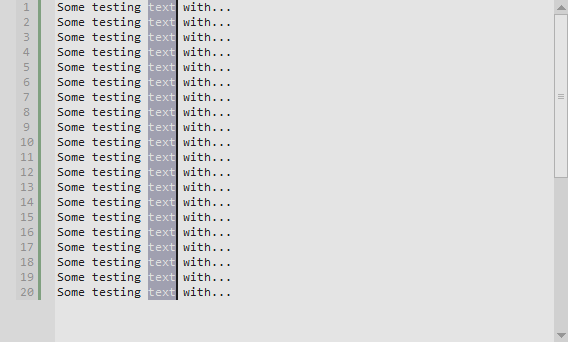
So I proceed with my edition:
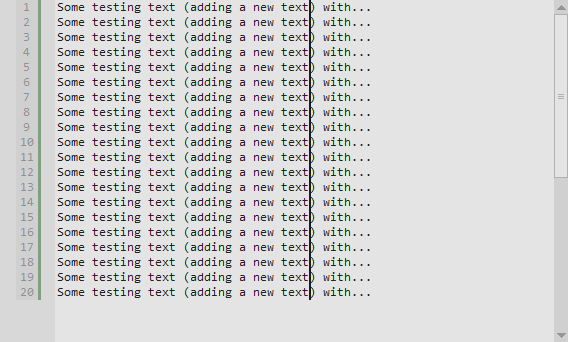
So the idea is to manage the undo operation but for this example and supposing that 20>undo_max_carets save only one undo history per line (1..20) and do not creates one undo operation for each typed char for each line (20 undo operations VS 20*20 (The latest 20 is the number of chars that I have typed)
JairoMartinezA
on 22 Jan 2021
I copied tmsg's post to #3084, to later think about it.
Alexey-T
on 22 Jan 2021
Related issues
Alexey-T
·
5Comments
Alexey-T
·
5Comments
 GHNewbiee
·
7Comments
GHNewbiee
·
7Comments
 xcme
·
5Comments
JairoMartinezA
·
5Comments
xcme
·
5Comments
JairoMartinezA
·
5Comments