Cuckoo: Unbale to access web interface || Cuckoo 2.0.5
Thanks for creating an issue! But first: did you read our community guidelines?
https://cuckoo.sh/docs/introduction/community.html
Yes
My issue is: I'm unable to under the cuckoo.conf file when I'm trying cuckoo web -H 0
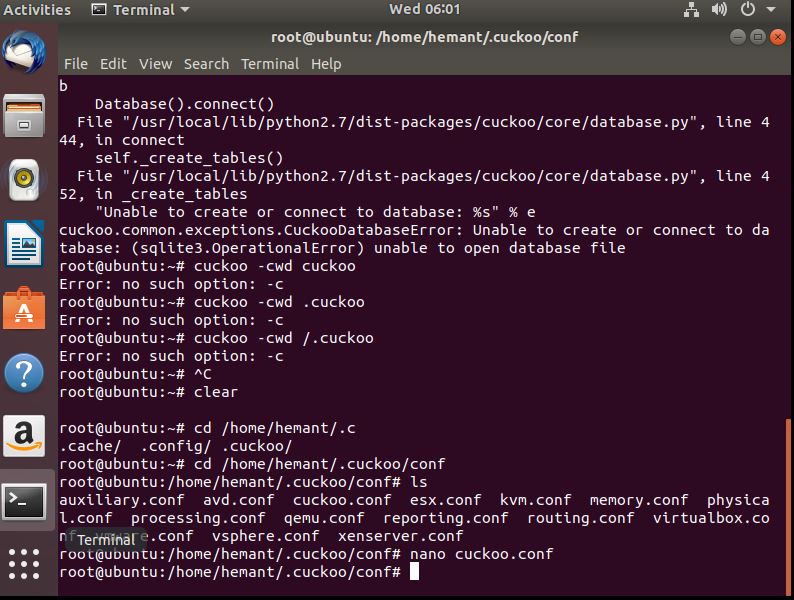
it gives me error:- "Unable to create or connect to database: %s" % e
cuckoo.common.exceptions.CuckooDatabaseError: Unable to create or connect to database: (sqlite3.OperationalError) unable to open database file
My Cuckoo version and operating system are: 2.0.5 /ubuntu 18 || Vm
error.txt
Ware workstation
This can be reproduced by: I have followed these steps so far
1- went to cuckoo.conf updated the result server IP which I got from ifconfig on ubuntu terminal.
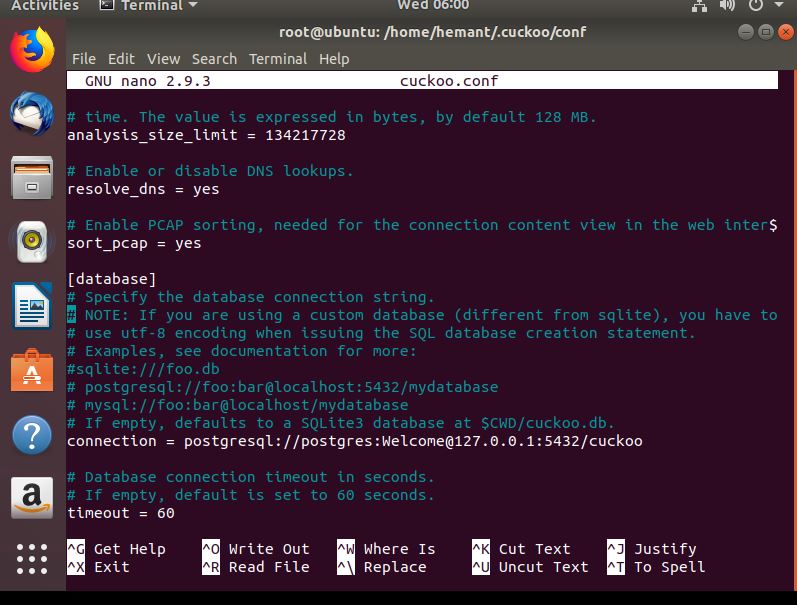
2- tried to update the database Connection under - cuckoo.conf - database
[database]
Specify the database connection string.
NOTE: If you are using a custom database (different from sqlite), you have to
use utf-8 encoding when issuing the SQL database creation statement.
Examples, see documentation for more:
sqlite:///foo.db
postgresql://foo:bar@localhost:5432/mydatabase
mysql://foo:bar@localhost/mydatabase
If empty, defaults to a SQLite3 database at $CWD/cuckoo.db.
connection = postgresql://postgres:Welcome@localhost:5432/postgres
as per the guide I install postgress - sudo apt-get install postgresql libpq-dev
which got installed at this location -
use data base server -
/usr/lib/postgresql/10/binpg_ctl -D var/lib/postgresql/10/main -l logfile start
Ver-10
Cluster- main
port- 5432
status -down
owner- postgress
Data directory - /var/lib/postgresql/10/main
Log file - /var/log/postgresql/postgresql-10-main.log
to find the database and connectivity.
root@ubuntu:~# su - postgres
postgres@ubuntu:~$ psql
psql (10.3 (Ubuntu 10.3-1))
Type "help" for help.
postgres=# \password postgres (changed the password )
postgres=# \conninfo
Result - You are connected to database "postgres" as user "postgres" via socket in "/var/run/postgresql" at port "5432".
psql -l (for list of postgres)
Result :-
root@ubuntu:~# sudo netstat -plunt |grep postgres
tcp 0 0 127.0.0.1:5432 0.0.0.0:* LISTEN 887/postgres
following theses all command I found (which I'm not sure )
Database name as postgres
error.txt
localhost - 127.0.0.1
port - 5432
Password - Welcome
Could you please help how to access the web interface of cuckoo it gives me an error: Unable to create or connect to database: %s" % e
cuckoo.common.exceptions.CuckooDatabaseError: Unable to create or connect to database: (sqlite3.OperationalError) unable to open database file
 hemant080590
All 9 comments
hemant080590
on 23 May 2018
hemant080590
on 23 May 2018
I have attached the error and txt file , let me know what else needed. Please help
hemant080590
on 23 May 2018
Hi All ,
I tried cuckoo -d
and got this thing ;
2018-05-23 07:41:48,507 [cuckoo] CRITICAL: CuckooDatabaseError: Unable to create or connect to database: (psycopg2.OperationalError) FATAL: database "cuckoo" does not exist
how to remove this error.
hemant080590
on 23 May 2018
create the db in psql
 doomedraven
on 23 May 2018
doomedraven
on 23 May 2018
sure I will create that in the meantime I got this error while using cuckoo web command
In order to use the Cuckoo Web Interface it is required to have MongoDB up-and-running and enabled in Cuckoo. Please refer to our official documentation as well as the $CWD/conf/reporting.conf file.
how do I fix this ?
I checked the mongo db service status and it is active
service Mongodb status
mongodb.service - An object/document-oriented database
Loaded: loaded (/lib/systemd/system/mongodb.service; enabled; vendor preset: enabled)
Active: active (running) since Wed 2018-05-23 07:26:41 PDT; 1h 1min ago
Docs: man:mongod(1)
Main PID: 945 (mongod)
Tasks: 23 (limit: 4634)
CGroup: /system.slice/mongodb.service
└─945 /usr/bin/mongod --unixSocketPrefix=/run/mongodb --config /etc/mongodb.conf
hemant080590
on 23 May 2018
READ THE DOCUMENTATION!
check conf/reporing.conf for mongo and enable it
doomedraven
on 23 May 2018
you should read the errors output
doomedraven
on 23 May 2018
thanks, so silly of me. Got is fix.
enabled mongo, reporting.
started the service. and got it fixed , thank you all
hemant080590
on 24 May 2018
Related issues
 jens1o
·
7Comments
jens1o
·
7Comments
 kirill039
·
5Comments
kirill039
·
5Comments
 Tigzy
·
7Comments
Tigzy
·
8Comments
Tigzy
·
7Comments
Tigzy
·
8Comments
 ness993
·
7Comments
ness993
·
7Comments