Cordova-plugin-googlemaps: 'GoogleMaps/GoogleMaps.h' file not found
I'm submitting a ... (check one with "x")
- [ ] question
- [x] any problem or bug report
OS: (check one with "x")
- [ ] Android
- [x] iOS
- [ ] Browser
cordova information: (run $> cordova plugin list)
com.unarin.cordova.beacon 3.7.0 "Proximity Beacon Plugin"
cordova-android-play-services-gradle-release 1.4.1 "cordova-android-play-services-gradle-release"
cordova-android-support-gradle-release 1.4.2 "cordova-android-support-gradle-release"
cordova-custom-config 4.0.2 "cordova-custom-config"
cordova-plugin-admobpro 2.31.6 "AdMob Plugin Pro"
cordova-plugin-app-event 1.2.1 "Application Events"
cordova-plugin-app-version 0.1.9 "AppVersion"
cordova-plugin-camera 4.0.3 "Camera"
cordova-plugin-compat 1.2.0 "Compat"
cordova-plugin-crosswalk-webview 2.4.0 "Crosswalk WebView Engine"
cordova-plugin-customurlscheme 4.3.0 "Custom URL scheme"
cordova-plugin-datepicker 0.9.3 "DatePicker"
cordova-plugin-device 2.0.1 "Device"
cordova-plugin-dialogs 2.0.1 "Notification"
cordova-plugin-email-composer 0.8.3 "EmailComposer"
cordova-plugin-extension 1.5.4 "Cordova Plugin Extension"
cordova-plugin-flashlight 3.2.0 "Flashlight"
cordova-plugin-geolocation 4.0.1 "Geolocation"
cordova-plugin-globalization 1.11.0 "Globalization"
cordova-plugin-googlemaps 2.4.6 "cordova-plugin-googlemaps"
cordova-plugin-image-picker 1.1.1 "ImagePicker"
cordova-plugin-inappbrowser 3.0.0 "InAppBrowser"
cordova-plugin-ionic-keyboard 2.1.2 "cordova-plugin-ionic-keyboard"
cordova-plugin-iroot 0.8.0 "iRoot"
cordova-plugin-mock-location-checker 1.0.1 "MockLocationChecker"
cordova-plugin-multi-window 0.0.3 "cordova-plugin-multi-window"
cordova-plugin-nativestorage 2.2.2 "NativeStorage"
cordova-plugin-splashscreen 5.0.2 "Splashscreen"
cordova-plugin-statusbar 2.4.2 "StatusBar"
cordova-plugin-touchid 0.4.0 "Touch ID"
cordova-plugin-transport-security 0.1.2 "App Transport Security"
cordova-plugin-vibration 2.1.1 "Vibration"
cordova-plugin-whitelist 1.2.3-dev "Whitelist"
cordova-plugin-x-socialsharing 5.1.3 "SocialSharing"
cordova-sqlite-storage 0.7.14 "Cordova sqlite storage plugin"
de.appplant.cordova.plugin.local-notification 0.8.4 "LocalNotification"
org.devgeeks.Canvas2ImagePlugin 0.6.0 "Canvas 2 Image"
phonegap-plugin-barcodescanner 7.1.2 "BarcodeScanner"
phonegap-plugin-push 1.8.4 "PushPlugin"
If you use @ionic-native/google-maps, please tell the package.json (only @ionic-native/core and @ionic-native/google-maps are fine mostly)
@ionic-native/core :
@ionic-native/google-maps :
Current behavior:
Expected behavior:
Screen capture or video record:

 iPMisterX
All 47 comments
You didn't install GoogleMaps cocoapod.
This plugin uses cocoapod since v2.4.5.
You must prepare the environment.
https://github.com/mapsplugin/cordova-plugin-googlemaps/blob/293815d811f3bfe8febd95287cf1a6d23b665846/plugin.xml#L478
 wf9a5m75
on 26 Sep 2018
wf9a5m75
on 26 Sep 2018
Here is how to install cocoapod
https://stackoverflow.com/a/25257238/697856
And if you already cocoapod is installed, your cocoapod is older version.
You need to upgrade it.
$ [sudo] gem install cocoapods
or
$ brew update
$ brew upgrade cocoapods
$ pod setup
Here is another document.
https://developers.google.com/ios/guides/cocoapods
wf9a5m75
on 26 Sep 2018
Ok, Thank you.
iPMisterX
on 26 Sep 2018
Can install V2.4.6 with com.googlemaps.ios ?
iPMisterX
on 26 Sep 2018
CocoaPods too many error :'( And GoogleMaps not install in project
i need re-install platform iOS to install GoogleMaps by CocoaPods
iPMisterX
on 26 Sep 2018
I thank you for the plugin; we use this as one of the core plugins for our app. But you should not be introducing breaking changes on the minor version change... If you now require Cocoapods you should make the version 2.5.1 after 2.4.4. Not 2.4.5 after 2.4.4. These updates cause a world of pain for developers using it.
 bb128b
on 26 Sep 2018
bb128b
on 26 Sep 2018
cocoapod is the official supported way of cordova cli (since cordova-cli 6.4.0 and ios 4.3.0)
Everyone should have it, and should work it.
Even on Windows, Visual Studio support it.
So switching the installing from git repo to cocoapod is not a breaking change.
Main code is not changed at all.
wf9a5m75
on 26 Sep 2018
The minor changes is just small changes.
Please confirm what I changed before reinstalling.
If your project does not related with changes, staying on the same version is fine.
wf9a5m75
on 26 Sep 2018
I still can't get this to work on iOS. Browser and Android are fine but even after a pod install I still can't get this to compile for iOS. I've changed the script to $SCROOT pathing and still can't get it to work.
diff: /Podfile.lock: No such file or directory
[cordova] diff: /Manifest.lock: No such file or directory
 markamccorkle
on 26 Sep 2018
wf9a5m75
on 26 Sep 2018
wf9a5m75
on 26 Sep 2018
markamccorkle
on 26 Sep 2018
wf9a5m75
on 26 Sep 2018
wf9a5m75
on 26 Sep 2018
Thanks for doing a google search for me but that's actually what led me here. The GoogleMaps.h not found is after that script is fixed as a workaround.
markamccorkle
on 26 Sep 2018
I guess I should just ask. Does anyone have this working on iOS 12 using Xcode 10 on Mojave? If it's a yes then I can figure it out I'm sure.
markamccorkle
on 26 Sep 2018
I don't know why Google Maps not install when install your plugin.
I try any way to install Google Maps. But not work.
- remove your plugin
- sudo gem install cocoapods
- pod setup
- install your plugin
Not work 'GoogleMaps/GoogleMaps.h' file not found
Only way to install Google Maps via Pod
I need remove iOS Platform and add iOS Platform back
I see Google Maps is installing when Add Platform
but if just remove plugin and reinstall plugin Google Maps not install
I don't know why
cordova requirements
Java JDK: installed 1.8.0
Android SDK: installed true
Android target: installed android-26
Gradle: installed /Applications/Android Studio.app/Contents/gradle/gradle-4.4/bin/gradle
Requirements check results for ios:
Apple macOS: installed darwin
Xcode: installed [object Object]
ios-deploy: installed [object Object]
CocoaPods: installed [object Object]
ionic info
Cordova CLI: 7.1.0
Ionic CLI Version: 2.1.13
Ionic App Lib Version: 2.1.7
ios-deploy version: 1.9.2
ios-sim version: 6.1.2
OS: macOS
Node Version: v6.9.1
Xcode version: Xcode 9.4.1 Build version 9F2000
Stack
CocoaPods : 1.5.3
Ruby : ruby 2.3.7p456 (2018-03-28 revision 63024) [universal.x86_64-darwin18]
RubyGems : 2.5.2.3
Host : Mac OS X 10.14 (18A389)
Xcode : 9.4.1 (9F2000)
Git : git version 2.15.2 (Apple Git-101.1)
Ruby lib dir : /System/Library/Frameworks/Ruby.framework/Versions/2.3/usr/lib
Repositories : master - https://github.com/CocoaPods/Specs.git @ 5ef5292700fef82ece5c45051498cd9cbfec6b38
Installation Source
Executable Path: /usr/local/bin/pod
Plugins
cocoapods-deintegrate : 1.0.2
cocoapods-plugins : 1.0.0
cocoapods-search : 1.0.0
cocoapods-stats : 1.0.0
cocoapods-trunk : 1.3.0
cocoapods-try : 1.1.0
Remove Plugin (2.4.4)
MBPX:TimeMint MisterX$ cordova plugin remove cordova-plugin-googlemaps
Uninstalling cordova-plugin-googlemaps from android
Subproject Path: CordovaLib
Uninstalling 1 dependent plugins.
Uninstalling com.googlemaps.ios from ios
Uninstalling cordova-plugin-googlemaps from ios
Removing "cordova-plugin-googlemaps"
Removing plugin cordova-plugin-googlemaps from config.xml file...
Removing cordova-plugin-googlemaps from package.json
MBPX:TimeMint MisterX$
Install Plugin (2.4.6)
MBPX:TimeMint MisterX$ cordova plugin add cordova-plugin-googlemaps@latest --variable API_KEY_FOR_ANDROID="XXXXXXXXXXXXXXXXXXXXXXXX" --variable API_KEY_FOR_IOS="XXXXXXXXXXXXXXXXXXXXXXXX"
Installing "cordova-plugin-googlemaps" for android
ANDROID_HOME=/Users/MisterX/Library/Android/sdk
JAVA_HOME=/Library/Java/JavaVirtualMachines/jdk1.8.0_181.jdk/Contents/Home
Subproject Path: CordovaLib
Starting a Gradle Daemon (subsequent builds will be faster)
+-----------------------------------------------------------------
| cordova-android-play-services-gradle-release: 15.+
+-----------------------------------------------------------------
+-----------------------------------------------------------------
| cordova-android-support-gradle-release: 27.+
+-----------------------------------------------------------------
null
The Task.leftShift(Closure) method has been deprecated and is scheduled to be removed in Gradle 5.0. Please use Task.doLast(Action) instead.
at build_bfignb13foi2d7hca08lab1nk.run(/Users/MisterX/Documents/TimeMint/platforms/android/build.gradle:149)
org.xwalk:xwalk_core_library:23+
The JavaCompile.setDependencyCacheDir() method has been deprecated and is scheduled to be removed in Gradle 4.0.
Incremental java compilation is an incubating feature.
The TaskInputs.source(Object) method has been deprecated and is scheduled to be removed in Gradle 4.0. Please use TaskInputs.file(Object).skipWhenEmpty() instead.
:clean
:CordovaLib:clean
BUILD SUCCESSFUL
Total time: 9.565 secs
Subproject Path: CordovaLib
Official document https://github.com/mapsplugin/cordova-plugin-googlemaps-doc/blob/master/v2.3.0/README.md Please consider to buy a beer for us 🍺 https://github.com/mapsplugin/cordova-plugin-googlemaps#buy-us-a-beer
Installing "cordova-plugin-googlemaps" for ios
--[cordova-plugin-googlemaps]------------------------
From version 2.4.5, the cordova-plugin-googlemaps uses CocoaPod.
No longer necessary com.googlemaps.ios plugin.
Automatic uninstalling com.googlemaps.ios plugin...
-----------------------------------------------------
Uninstalling com.googlemaps.ios from android
Uninstalling com.googlemaps.ios from ios
Removing "com.googlemaps.ios"
Removing plugin com.googlemaps.ios from config.xml file...
Removing com.googlemaps.ios from package.json
Official document https://github.com/mapsplugin/cordova-plugin-googlemaps-doc/blob/master/v2.3.0/README.md Please consider to buy a beer for us 🍺 https://github.com/mapsplugin/cordova-plugin-googlemaps#buy-us-a-beer
Adding cordova-plugin-googlemaps to package.json
Saved plugin info for "cordova-plugin-googlemaps" to config.xml
MBPX:TimeMint MisterX$
I still use Hight Sierra but iOS 12 with xcode 10.
Cocoapod is independent system, it should not be related with xcode or os versions.
wf9a5m75
on 26 Sep 2018
I working on iOS 12 using Xcode 9 on Mojave
I will update to Xcode 10 and try again.
Thankyou
iPMisterX
on 26 Sep 2018
or it bug only in Mojave?
iPMisterX
on 26 Sep 2018
@iPMisterX Could you tell me what cocoapod version you use?
$> pod --version
Ok, thank you. For the record, I have added user defined variables in Xcode 10 so the script works correctly and gets passed the pod error but now I am stuck at the .h file not found this thread is discussing. (iOS 12, Xcode 10, Mojave. CocoaPods 1.5.3 (also tried 1.6 beta.1))
markamccorkle
on 26 Sep 2018
CocoaPods : 1.5.3
iPMisterX
on 26 Sep 2018
We do not use Cocoapods... Cocoapods is not required with an Ionic install
using version 3 or 4 and is only an extra.
On Wed, 26 Sep 2018, 20:13 Masashi Katsumata, notifications@github.com
wrote:
@iPMisterX https://github.com/iPMisterX Could you tell me what cocoapod
version you use?$> pod --version
—
You are receiving this because you commented.
Reply to this email directly, view it on GitHub
https://github.com/mapsplugin/cordova-plugin-googlemaps/issues/2434#issuecomment-424835707,
or mute the thread
https://github.com/notifications/unsubscribe-auth/ACK-KUFSas7D8wuHha0rARlf1pAQwBkcks5ue9HSgaJpZM4W6Bif
.
bb128b
on 26 Sep 2018
This is due to using the ionic plugin.
https://github.com/ionic-team/ionic-native-google-maps
markamccorkle
on 26 Sep 2018
@bb128b cocoapod is required by this plugin now.
wf9a5m75
on 26 Sep 2018
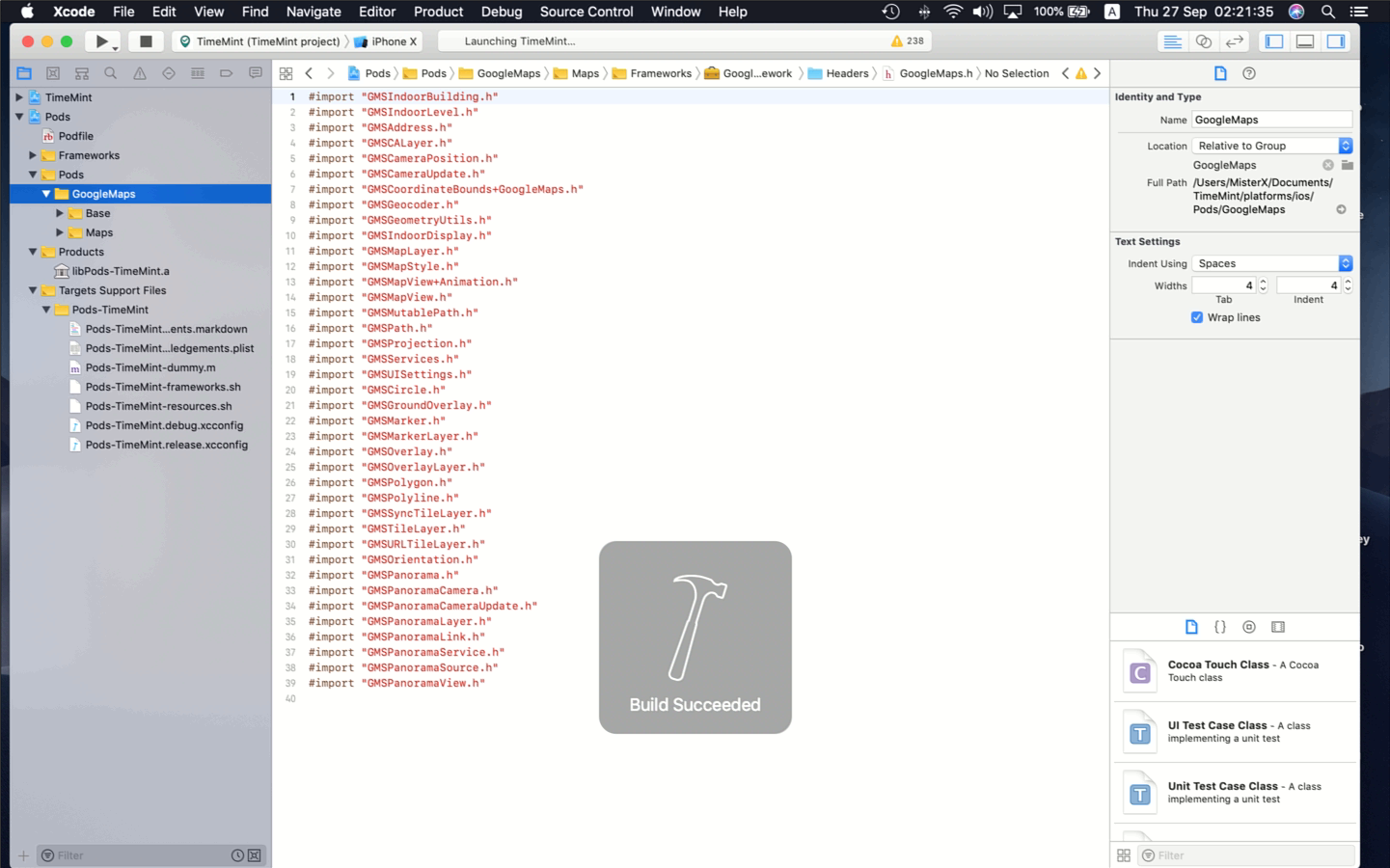
IT WORK
I don't know why again lol
but now just remove and install plugin version 2.4.6
Google Maps is installed via Pods
WHY? in a day not work -*-
I lost all day to fix this
and now I don't know why it work lol
iPMisterX
on 26 Sep 2018
If you want to open your project with xcode, you need to open (your project).xcworkspace file, not (your project).xcodeproj file.

wf9a5m75
on 26 Sep 2018
@iPMisterX Same here. I've been banging away at this all day and all of a sudden a removing of the iOS platform (for the 10th+ time today) and re-adding fixed the issue. Maybe an endpoint was down? Either way, resolved guys. TY for the support.
markamccorkle
on 26 Sep 2018
yes I know I open .xcworkspace file
but all day it not work. I check a Podfile no GoogleMaps line
but now I have pod 'GoogleMaps', '~> 2.7.0' in Podfile
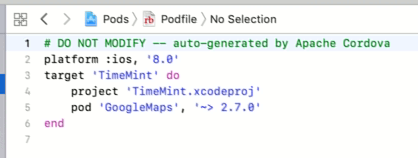
After I see pod 'GoogleMaps', '~> 2.7.0' I know Goole Maps will install 😆
and yes it installed lol
Thank you for any support.
iPMisterX
on 26 Sep 2018
I try to update plugin in another project 2.4.4 -> 2.4.6 after first project work.
it work fine
iPMisterX
on 26 Sep 2018
Congrats, guys.
Ok, let's make a conclusion.
Regarding of the reports, the following steps should solve this problem.
$> cordova platform rm ios
$> cordova plugin rm cordova-plugin-googlemaps

$> [sudo] gem install cocoapods
or
$ brew update
$ brew upgrade cocoapods
$ pod setup

// confirm
$>  pod --version
1.4.0 or above should be fine.


$> cordova plugin add cordova-plugin-googlemaps --variable API_KEY_FOR_ ...

$> cordova platform add ios
If the above steps does not work, try this:
$> cd (your project)/platforms/ios/

$> pod update
Update all pods
Updating local specs repositories
...
Analyzing dependencies
Downloading dependencies
Using GoogleMaps (2.7.0)
Generating Pods project
Integrating client project
Sending stats
Pod installation complete! There is 1 dependency from the Podfile and 1 total pod installed.
Yes this step will solve this problem.
After addd platform iOS. In (your project)/platforms/ios/
Podfile must have pod 'GoogleMaps', '~> 2.7.0' line.
And GoogleMaps in Pods folder
iPMisterX
on 26 Sep 2018
I also needed to add 2 user defined values as well to the build environment. This fixes the previous issue with the Podfile.lock and Manifest.lock files not being found.
PODS_PODFILE_DIR_PATH = ${SRCROOT}/.
PODS_ROOT = ${SRCROOT}/Pods
https://github.com/phonegap/phonegap-plugin-push/issues/2193#issuecomment-424858312
markamccorkle
on 26 Sep 2018
Terminating app due to uncaught exception 'GMSServicesException',
reason: 'Google Maps SDK for iOS requires GoogleMaps.bundle to be
part of your target under 'Copy Bundle Resources''
I did got this after this updates, any idea how to fix it?
 jsitu
on 27 Sep 2018
jsitu
on 27 Sep 2018
@jsitu Please share your project files everything on github including platforms folder.
I can not reproduce your issue on my side, but if you share your project files, I check it.
wf9a5m75
on 27 Sep 2018
@wf9a5m75 I can't share the code publicly in Github, it's our commercial product. We upgraded this morning and now it gives us this issue, trying to rollback to previous version if possible.
jsitu
on 27 Sep 2018
For the people who can't share your code in public place, I provide private support.
Even you want to save the money, please debug by yourself.
wf9a5m75
on 27 Sep 2018
@wf9a5m75 I am gonna send you an email and seek private support in this case (will definitely donate as requested). Thanks.
jsitu
on 27 Sep 2018
I think I found the culprit, I miss the part of running pod update within the platform/ios directory. With that being done now the issue is resolved. Thanks again @wf9a5m75 .
jsitu
on 27 Sep 2018
Congrats!
wf9a5m75
on 27 Sep 2018
Although this problem is already solved, and it is not a bug of this plugin, I keep this thread is open for other people for a while.
wf9a5m75
on 28 Sep 2018
Is there a reason why you have to run pod update inside the directory?
I'm using ionic and had to deal with this strange bug. I usually just use ionic cordova build ios
 arianitu
on 13 Oct 2018
arianitu
on 13 Oct 2018
This worked for me:
cd platforms/ios/myApp
pod deintegrate
pod install
 zx500xl
on 25 Oct 2018
zx500xl
on 25 Oct 2018
@wf9a5m75
After doing the above procedures my build works perfectly on ios, grateful for that issue and its map, after all it is fantastic.
In the Android Internal test, my map does not appear. In emulators, too.
Generating the local build it works.
What can I do or pay attention to?
 mMarcos208
on 22 Nov 2018
mMarcos208
on 22 Nov 2018
Problem solved. Map running on both platforms.
The problem that is I had the signature and the upload made another signature. :)
mMarcos208
on 23 Nov 2018
@wf9a5m75 its not working for me sir
 kapilSoni101
on 15 Mar 2019
kapilSoni101
on 15 Mar 2019
For anyone who can't run it, try it with this.
$> cd (your project)/platforms/ios/
open your Podfile
check this line
platform :ios, '7.0'
modify for this
platform :ios, '8.0'
save and in your terminal type
pod update
 abcluis
on 27 Jan 2020
abcluis
on 27 Jan 2020
Related issues
 lakano
·
4Comments
lakano
·
4Comments
 cedrickbae
·
4Comments
cedrickbae
·
4Comments
 vosecek
·
3Comments
vosecek
·
3Comments
 sebagon
·
4Comments
sebagon
·
4Comments
 BTW18
·
3Comments
BTW18
·
3Comments
Most helpful comment
Congrats, guys.
Ok, let's make a conclusion.
Regarding of the reports, the following steps should solve this problem.
If the above steps does not work, try this: