Cordova-plugin-googlemaps: Question : Curve Polyline available?
I'm submitting a ... (check one with "x")
- [x] question
- [ ] any problem or bug report
- [ ] feature request
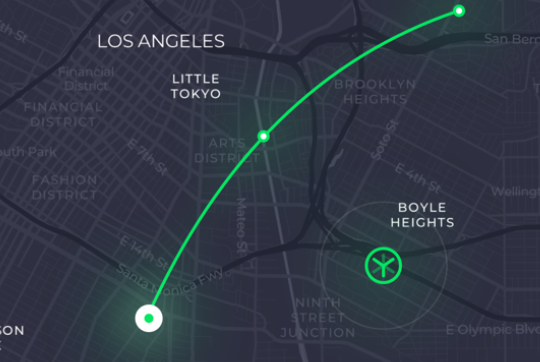
First thanks for this wonderful plugin, my question is : is it possible to make the polyline curved? if so, how?
I want to make something like this
Thanks!
 cedrickbae
All 4 comments
Hey @cedrickbae have you checked out the creator of this plugins documentation page. I think that setting geodesic : true is what you may be looking for. Something like this from the documentation:
map.addPolyline({
points: AIR_PORTS,
'color' : '#AA00FF',
'width': 10,
'geodesic': true
});
EDIT: This is the appropriate link for polyline:
 makers-mark
on 25 Apr 2018
makers-mark
on 25 Apr 2018
@cedrickbae Not implemented yet for short distance.
As @makers-mark says, you can use geodesic, but the curve is calculated based on the Earth level, so I guess it is not your answer.
If you really need to implement the curve polyline, you need to implement it. Here is another example with Google Maps JavaScript API v3.
https://stackoverflow.com/a/34133503
 wf9a5m75
on 25 Apr 2018
wf9a5m75
on 25 Apr 2018
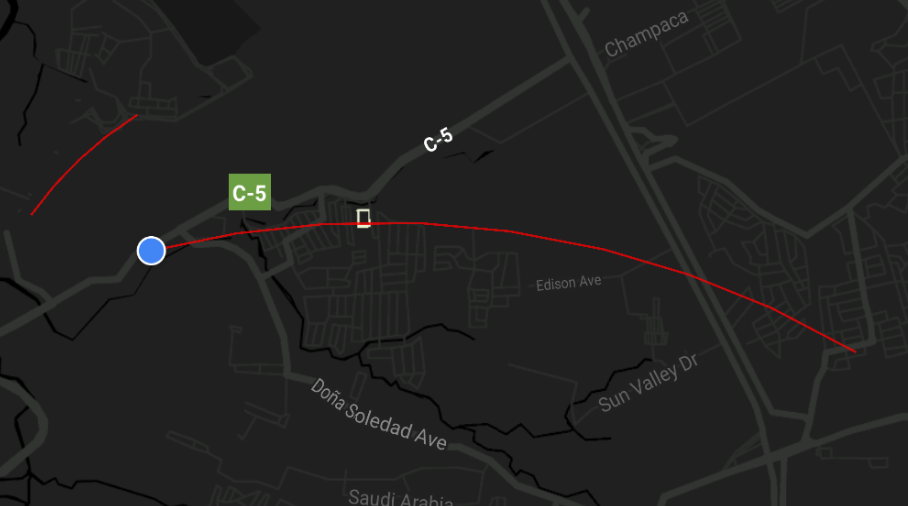
Hi! I did it! I use this code and apply changes to work with this plugin and it works!.
Here is my function
//p1 - 1st coordinates LatLng
//p2 - 2nd coordinates LatLng
// k - curve >0 AND <= 1

add_curved_poly (p1, p2, k) {
    //Calculate distance and heading between two points
    let d : number = Spherical.computeDistanceBetween(p1,p2);
    let h : number = Spherical.computeHeading(p1, p2);

    //Midpoint position
    var p = Spherical.computeOffset(p1, d*0.5, h);

    //Apply some mathematics to calculate position of the circle center
    let x : number = (1-k*k)*d*0.5/(2*k);
    let r : number = (1+k*k)*d*0.5/(2*k);

    var c = Spherical.computeOffset(p, x, h + 90.0);

    //Calculate heading between circle center and two points
    let h1 : number = Spherical.computeHeading(c, p1);
    let h2 : number = Spherical.computeHeading(c, p2);

    //Calculate positions of points on circle border and add them to polyline options
    var numpoints = 100;
    let step : number = (h2 -h1) / numpoints;

    var curvedcoords = [];
    for (var i=0; i < numpoints; i++) {
        var pi = Spherical.computeOffset(c, r, h1 + i * step);
        curvedcoords.push(pi);
    }


    //Draw polyline
    this.map.addPolyline(
      {
        points: newcoords,
        'color' : '#ff0101',
        'width': 1,
        'geodesic': true
      }
    );
  }
Here is the screenshot
cedrickbae
on 25 Apr 2018
Congrats!
wf9a5m75
on 25 Apr 2018
Related issues
 djett41
·
3Comments
djett41
·
3Comments
 battika
·
4Comments
battika
·
4Comments
 sebagon
·
4Comments
sebagon
·
4Comments
 vosecek
·
3Comments
vosecek
·
3Comments
 Tong2203
·
5Comments
Tong2203
·
5Comments
Most helpful comment
Hi! I did it! I use this code and apply changes to work with this plugin and it works!.
Here is my function
Here is the screenshot
