Cordova-plugin-googlemaps: App is crashed when GoogleMaps create
I'm submitting a ... (check one with "x")
- [ ] question
- [x] any problem or bug report
- [ ] feature request
If you choose 'problem or bug report', please select OS: (check one with "x")
- [ ] Android
- [x] iOS
cordova information: (run $> cordova plugin list)
com.googlemaps.ios 2.5.0 "Google Maps SDK for iOS"
cordova-plugin-camera 2.4.1 "Camera"
cordova-plugin-compat 1.1.0 "Compat"
cordova-plugin-console 1.0.5 "Console"
cordova-plugin-crop 0.3.1 "CropPlugin"
cordova-plugin-device 1.1.4 "Device"
cordova-plugin-facebook4 1.9.1 "Facebook Connect"
cordova-plugin-file 4.3.3 "File"
cordova-plugin-googlemaps 2.1.1 "cordova-plugin-googlemaps"
cordova-plugin-ios-localized-strings 1.0.5 "Cordova iOS Localized Strings"
cordova-plugin-splashscreen 4.0.3 "Splashscreen"
cordova-plugin-statusbar 2.2.4-dev "StatusBar"
cordova-plugin-whitelist 1.3.1 "Whitelist"
ionic-plugin-keyboard 2.2.1 "Keyboard"
telerik-imagepicker 2.1.9 "ImagePicker"
If you use @ionic-native/google-maps, please tell the package.json (only @ionic-native/core and @ionic-native/google-maps are fine mostly)
Current behavior:
I' cant show Google Map on iOS.
App is crashed when GoogleMaps create.
Have you hit on any possible causes of the problem?
Expected behavior:
Screen capture or video record:
Related code, data or error log (please format your code or data):
My Ionic conditions
cli packages: (/usr/local/var/nodebrew/node/v8.5.0/lib/node_modules)

    @ionic/cli-utils  : 1.19.1
    ionic (Ionic CLI) : 3.19.1

global packages:

    cordova (Cordova CLI) : 7.1.0

local packages:

    @ionic/app-scripts : 3.1.7
    Cordova Platforms  : ios 4.4.0
    Ionic Framework    : ionic-angular 3.3.0

System:

    ios-deploy : 1.9.2
    ios-sim    : 5.1.0
    Node       : v8.5.0
    npm        : 5.3.0
    OS         : macOS High Sierra
    Xcode      : Xcode 9.2 Build version 9C40b

Environment Variables:

    ANDROID_HOME : not set

Misc:

    backend : pro
  "dependencies": {
    "@angular/common": "4.1.2",
    "@angular/compiler": "4.1.2",
    "@angular/compiler-cli": "4.1.2",
    "@angular/core": "4.1.2",
    "@angular/forms": "4.1.2",
    "@angular/http": "4.1.2",
    "@angular/platform-browser": "4.1.2",
    "@angular/platform-browser-dynamic": "4.1.2",
    "@ionic-native/camera": "^3.12.1",
    "@ionic-native/core": "4.5.2",
    "@ionic-native/crop": "^4.4.2",
    "@ionic-native/facebook": "^4.2.1",
    "@ionic-native/file": "^3.12.1",
    "@ionic-native/google-maps": "^4.5.2",
    "@ionic-native/image-picker": "^3.12.1",
    "@ionic-native/keyboard": "^4.4.2",
    "@ionic-native/splash-screen": "3.10.2",
    "@ionic-native/status-bar": "3.10.2",
    "@types/lodash": "^4.14.85",
    "@types/moment": "^2.13.0",
    "@types/moment-timezone": "^0.5.1",
    "@types/uuid": "^3.4.2",
    "angularfire2": "^5.0.0-rc.3",
    "com.synconset.imagepicker": "https://github.com/Telerik-Verified-Plugins/ImagePicker",
    "cordova-ios": "4.4.0",
    "cordova-plugin-camera": "~2.4.1",
    "cordova-plugin-console": "1.0.5",
    "cordova-plugin-crop": "^0.4.0",
    "cordova-plugin-device": "1.1.4",
    "cordova-plugin-facebook4": "~1.9.1",
    "cordova-plugin-file": "~4.3.3",
    "cordova-plugin-googlemaps": "^2.1.1",
    "cordova-plugin-googlemaps-sdk": "git+https://github.com/mapsplugin/cordova-plugin-googlemaps-sdk.git",
    "cordova-plugin-ios-localized-strings": "^1.0.5",
    "cordova-plugin-splashscreen": "~4.0.1",
    "cordova-plugin-statusbar": "git+https://github.com/apache/cordova-plugin-statusbar.git",
    "cordova-plugin-telerik-imagepicker": "https://github.com/Telerik-Verified-Plugins/ImagePicker",
    "cordova-plugin-whitelist": "1.3.1",
    "dotenv": "^4.0.0",
    "firebase": "^4.6.0",
    "ionic-angular": "3.3.0",
    "ionic-plugin-keyboard": "~2.2.1",
    "ionicons": "3.0.0",
    "rxjs": "5.1.1",
    "sw-toolbox": "3.6.0",
    "zone.js": "0.8.11"
  },
map.ts
import { GoogleMaps,  GoogleMap,  GoogleMapsEvent,  GoogleMapOptions,  CameraPosition,  MarkerOptions,  Marker } from '@ionic-native/google-maps';
import { Component } from "@angular/core/";

@Component({
  selector: 'map',
  templateUrl: 'map.html'
})
export class MapPage {
  map: GoogleMap;
  constructor() { }

  ionViewDidLoad() {
    this.loadMap();
  }

 loadMap() {

    this.map = GoogleMaps.create('map_canvas');

    // Wait the MAP_READY before using any methods.
    this.map.one(GoogleMapsEvent.MAP_READY)
      .then(() => {
        console.log('Map is ready!');
      });
  }
}
map.html
<ion-content>
  <div id="map_canvas" style="height: 100%;"></div>
</ion-content>
And google map api is valid status. in my google api developers console.
 chucker34
All 26 comments
Please share your project files on github.
 wf9a5m75
on 23 Jan 2018
wf9a5m75
on 23 Jan 2018
This project is private.
Can I invite you?
chucker34
on 23 Jan 2018
基本的にKawakamiさんのコードには興味はないです。なのでコードのリークは心配しないでください。
”クラッシュする”のを再現するためには、Kawakamiさんのコードが必要です。なので公開するのが気に障るのであれば、Private repositoryで招待してください
wf9a5m75
on 23 Jan 2018
あとは 次のバージョンを multiple_maps ブランチからインストールしてみるのをお薦めします。いろいろfixしてあるので、もしかしたら解決するかもしれません
wf9a5m75
on 23 Jan 2018
Katsumataさんを招待いたしました。
ご協力ありがとうございます。
chucker34
on 23 Jan 2018
招待してもらいありがとうございます。
ざっとコードを見た感じでは問題なさそうですけどね。
US時間の明日、ビルトしてみます
wf9a5m75
on 23 Jan 2018
ビルドしてみたのですが、白い画面しか表示されないです。特にエラーは出ていませんでした。
wf9a5m75
on 23 Jan 2018
cordova platform rm iosしてからビルドし直してみたのですが、エラーが変わりました
CoreData: annotation: Failed to load optimized model at path '/Users/kawakami/Library/Developer/CoreSimulator/Devices/77A9A30D-7329-4365-B3AF-1ABE7A266A4C/data/Containers/Bundle/Application/9778D708-0463-4406-9279-A97FDFA06187/アプリ名.app/GoogleMaps.bundle/GMSCacheStorage.momd/StorageWithTileVersionID.omo'
というエラーで落ちるようになりました。
なにか解ることはありますか?
chucker34
on 24 Jan 2018
Google Maps SDK for iOSがちゃんとインストールできてないみたいですね
https://github.com/mapsplugin/cordova-plugin-googlemaps-sdk~~
wf9a5m75
on 24 Jan 2018
CoreData: annotation なので、クラッシュには直接は関係ないと思います。他の人のプログラムでも同じメッセージが出ていましたが、クラッシュはしませんでした。
wf9a5m75
on 24 Jan 2018
何度ビルドしても rootPage = ListPageで指定されているListPageが表示されないので、this.rootPage = mapPage にして、直接地図ページに行くようにすると、問題が再現しました。
デバッグしていますが、原因が不明ですね。
wf9a5m75
on 24 Jan 2018
ListPageを表示するには認証フローを通る必要があり、環境変数が必要なので、その確認方法で問題ないと思います。
chucker34
on 25 Jan 2018
(deleted by owner @wf9a5m75)
 karenabrahamyan
on 25 Jan 2018
karenabrahamyan
on 25 Jan 2018
(deleted by owner @wf9a5m75)
karenabrahamyan
on 25 Jan 2018
@karenabrahamyan Please create another issue thread including your git repository URL. Your issue is not related with @chucker34
wf9a5m75
on 25 Jan 2018
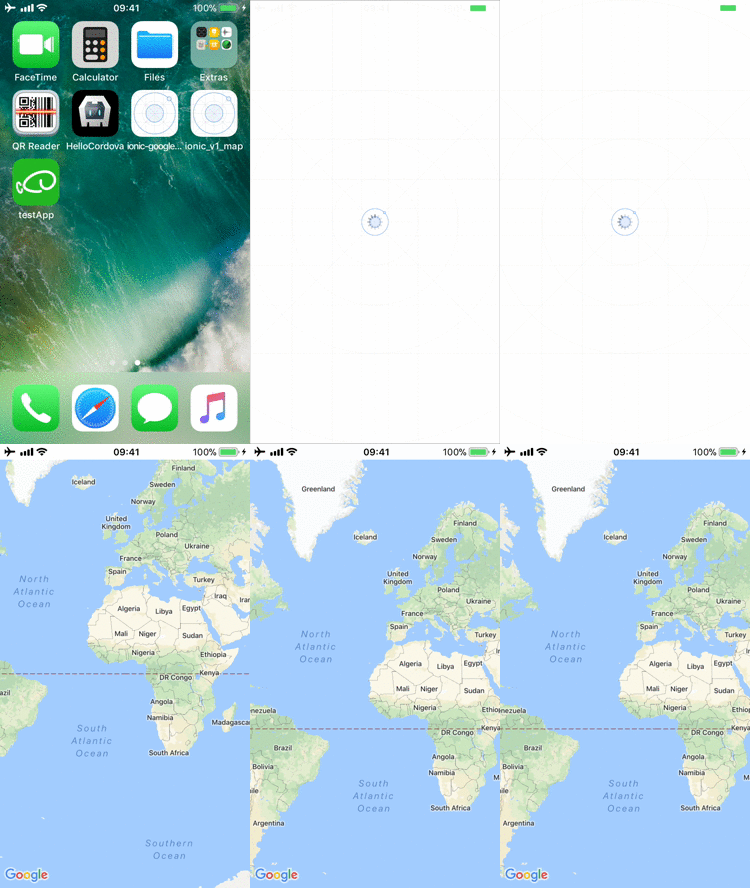
@chucker34 原因が分かりました。アプリ名が日本語なのが問題です。
config.xml内の<name>タグを英語名にして、iosのプラットホームを再インストールし直すと、ちゃんと動作します。
<?xml version='1.0' encoding='utf-8'?>
<widget id="....." version="0.0.1" xmlns="http://www.w3.org/ns/widgets" xmlns:cdv="http://cordova.apache.org/ns/1.0">
    <name>testApp</name>
    <description>釣り方レシピ投稿アプリ</description>
    <author email="hi@ionicframework" href="http://ionicframework.com/">Ionic Framework Team</author>
    <content src="index.html" />
    ...
$> cordova plugin save

$> cordova platform rm ios

$> cordova platform add ios
wf9a5m75
on 26 Jan 2018
これはGoogle Maps SDK for iOSのバグですね。プラグインではないですね。
wf9a5m75
on 26 Jan 2018
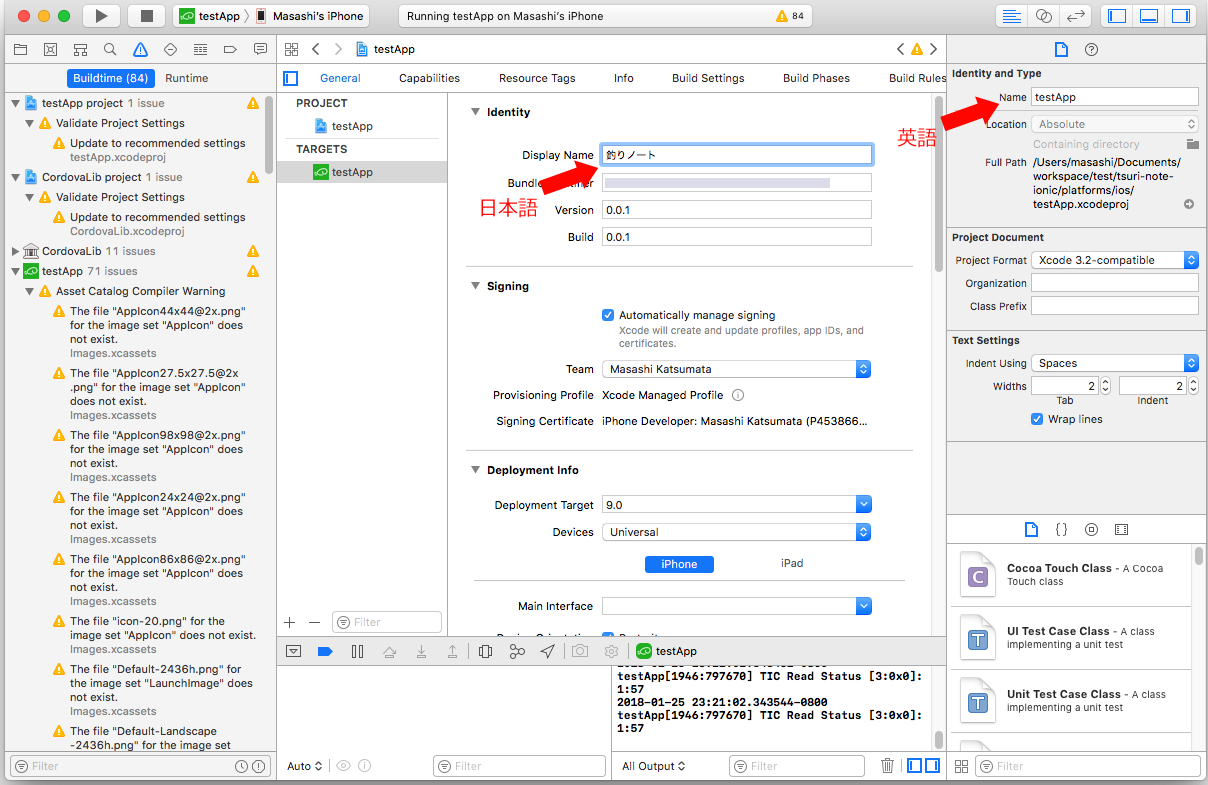
アプリ名を「釣りノート」にする方法ですが、config.xml の <name> タグには英語名に設定しておいて、XCodeでアプリを開いて、DisplayNameを「釣りノート」にすれば可能です。
wf9a5m75
on 26 Jan 2018
ちゃんとした解決方法が見つかりました。config.xmlを以下のように設定すれば、アプリ名を日本語にすることができます。
<?xml version='1.0' encoding='utf-8'?>
<widget id="...." version="0.0.1" xmlns="http://www.w3.org/ns/widgets" xmlns:cdv="http://cordova.apache.org/ns/1.0">
    <name short="釣りノート">TsuriNote</name>
    <description>釣り方レシピ投稿アプリ</description>
    <author email="hi@ionicframework" href="http://ionicframework.com/">Ionic Framework Team</author>
    <content src="index.html" />
   ...
調査ありがとうございます!
マップが起動することを確認しました!
アプリ名は私の環境では日本語になりませんでしたが、こちらは別の問題なので他で方法を探そうと思います!
丁寧にご対応いただきましてありがとうございました!
chucker34
on 26 Jan 2018
Guys, did you find a solution to this?
If so, would you please be able to share it?
 cuginoAle
on 30 Jan 2018
cuginoAle
on 30 Jan 2018
@cuginoAle If you have your problem, please make another issue with your project files on github. I will check it.
This thread case was the Google Maps SDK for iOS crashes if the app name contains non-English characters (such as Japanese).
wf9a5m75
on 30 Jan 2018
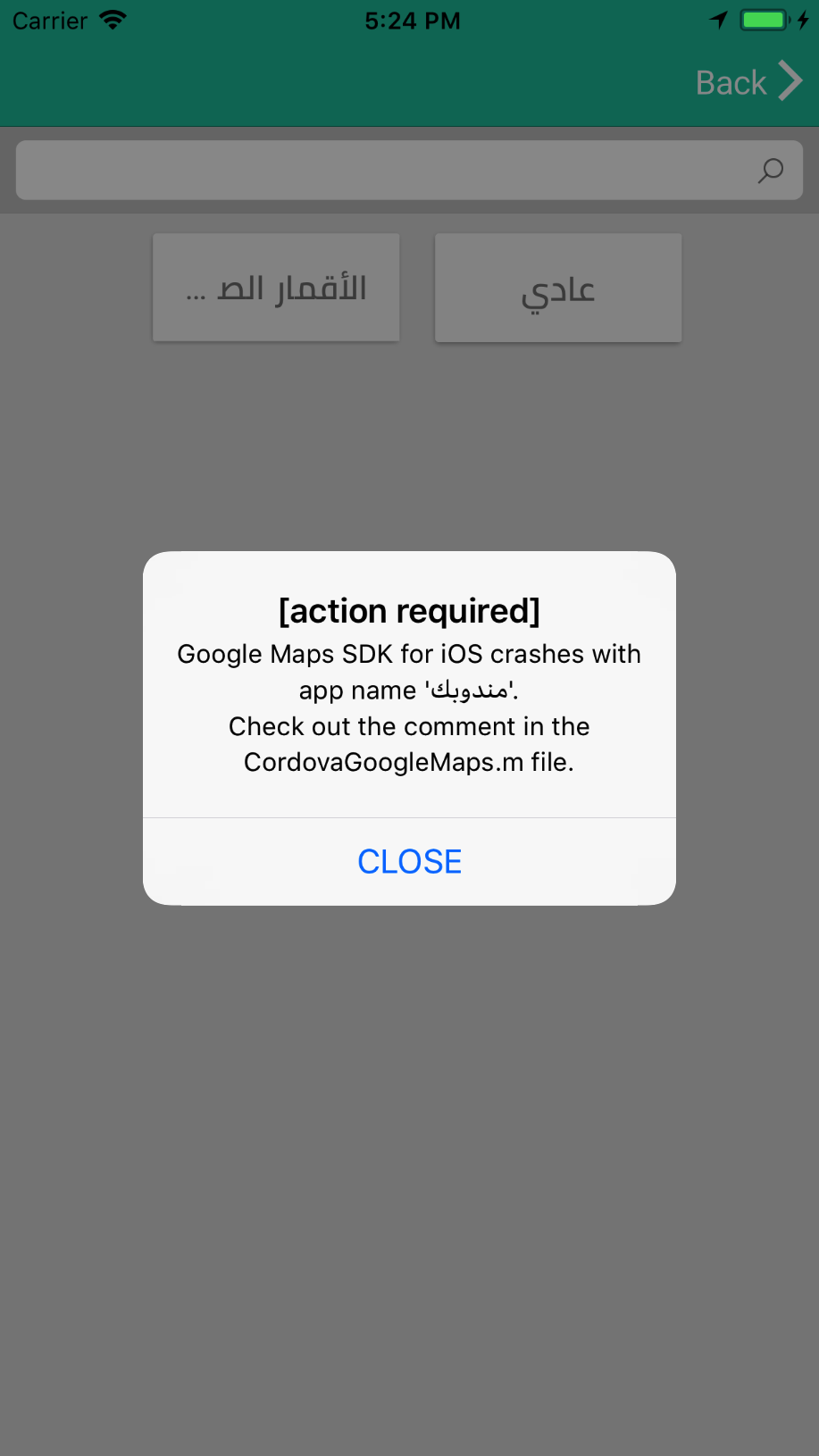
I have the same problem. See screenshot below:
 fmendoza
on 20 Feb 2018
fmendoza
on 20 Feb 2018
Take action as the screenshot
wf9a5m75
on 20 Feb 2018
Got it working using the short attribute in the name tag from config.xml.
In my case I updated my app as follows
From:
<name>مندوبك</name>
To:
<name short="مندوبك">Salesman</name>
Thank you @wf9a5m75
fmendoza
on 20 Feb 2018
For more detailed information, this is the comment on the file "CordovaGoogleMaps.m":
/*---------------------------------------------------------------------------------------
   * If CFBundleExecutable is not English, the Google Maps SDK for iOS will crash.
   * So must be English.
   *
   * If you want to use non-english name for your app, you need to change your config.xml like this.
   *
   * <?xml version='1.0' encoding='utf-8'?>
   * <widget id="(package name)" version="0.0.1" xmlns="http://www.w3.org/ns/widgets" xmlns:cdv="http://cordova.apache.org/ns/1.0">
   *   <name short="(non-english app name)">(english app name)</name>
   *---------------------------------------------------------------------------------------*/
If your app includes any non-english character, just name it like this (on your config.xml):
<name short="(non-english app name)">(english app name)</name>
Cheers!
 amsimoes
on 5 Apr 2018
amsimoes
on 5 Apr 2018
Related issues
 battika
·
4Comments
battika
·
4Comments
 ebellempire
·
3Comments
wf9a5m75
·
3Comments
ebellempire
·
3Comments
wf9a5m75
·
3Comments
 cedrickbae
·
4Comments
cedrickbae
·
4Comments
 vosecek
·
3Comments
vosecek
·
3Comments
Most helpful comment
Got it working using the
shortattribute in thenametag from config.xml.In my case I updated my app as follows
From:
To:
Thank you @wf9a5m75