I use a hotkey on Windows 10 to open CopyQ's main window. Since version 3.9.2, the CopyQ window appears strictly at the mouse position and is often off the screen. (Sorry Google Translate this)
 Ragista
All 11 comments
No sure what you mean by "at the mouse position".
Try clearing geometry/position configuration for CopyQ windows/dialogs:
- Open File Explorer,
- go to
%APPDATA%\copyqfolder, - delete
copyq_geometry.ini.
 hluk
on 14 Sep 2019
hluk
on 14 Sep 2019
I have the same problem and deleting the file does not help.
When I press the shortcut to show the main window, it's upper edge is at the mouse level so if the mouse was at the bottom of the screen then the whole window is basically off the screen.
I have this memory of setting the preference of some kind that controlled this but I can't find it and it could have been some other program that I configured :)
The solution is to reset more settings - I deleted the whole folder and this fixed it.
 pezzage
on 4 Dec 2019
pezzage
on 4 Dec 2019
Hi Lukas, same issue here. I believe it started with the update to 3.9.3 for me. Deleting the geometry file did not fix the issue. Thanks
 jcwing01
on 12 Dec 2019
jcwing01
on 12 Dec 2019
Same bug! Deleting the file does not fix this problem!
Last version without this bug is 3.9.0!
 kasumiru
on 20 Feb 2020
kasumiru
on 20 Feb 2020
Hi, has anyone found an easily solution? I tried deleting the geometry file and reinstalling to a new folder and importing settings and neither worked.
jcwing01
on 27 Feb 2020
Can you explain the problem more in detail?
Do you use "Show/hide main window" shortcut to open the main window?
Can you reproduce it by clicking on the tray icon?
Is "Open windows on current screen" option enabled (in General config tab)?
hluk
on 1 Mar 2020
Hi Lukas,
To be clear this is purely from the shortcut 'show main window under mouse cursor', which as you know aligns the top left corner of the main window with the position of the mouse cursor. This used to adjust for the edges of the monitor so that no part of the main window would be offscreen, however after one of the recent updates, or something I did, it no longer does this. Thanks.
jcwing01
on 1 Mar 2020
Hi, has anyone found an easily solution? I tried deleting the geometry file and reinstalling to a new folder and importing settings and neither worked.
Solution - install 3.9.0. Read my answer.
kasumiru
on 1 Mar 2020
@jcwing01 Thanks for the clarification. It looks like Qt GUI framework (or window manager) moves the window to another screen if its lower right corner is out of current screen. Fixing this.
hluk
on 1 Mar 2020
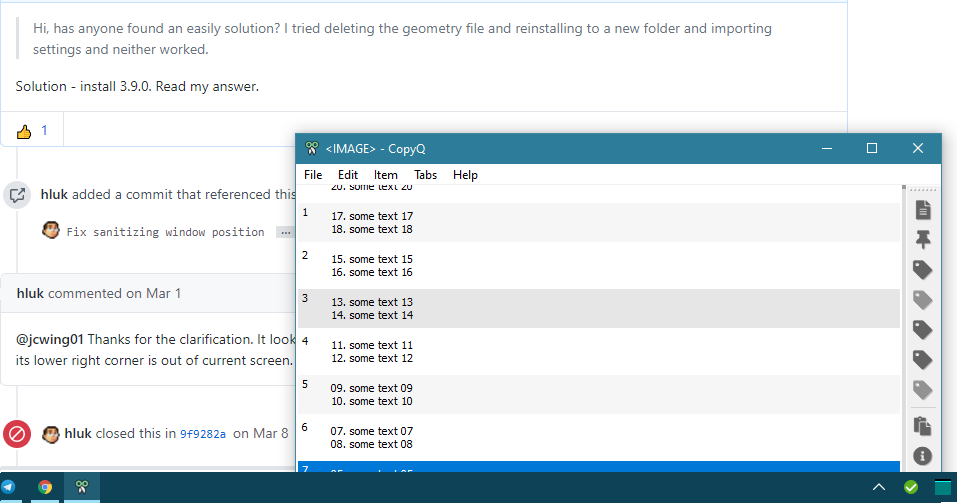
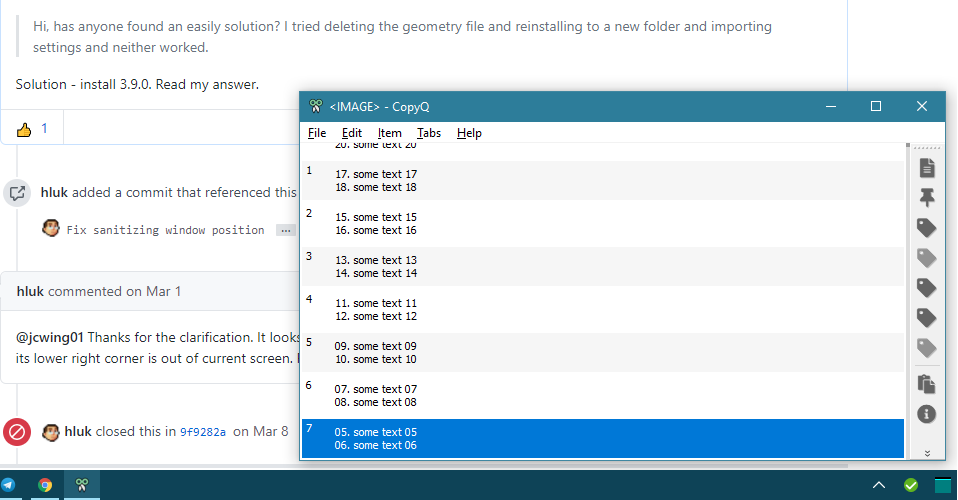
v3.12.0 bug was here! windows 10, screen 1366x768
kasumiru
on 28 Oct 2020
up
kasumiru
on 23 Nov 2020
Related issues
 aksr
·
9Comments
aksr
·
9Comments
 beefeater7
·
8Comments
beefeater7
·
8Comments
 eera5607
·
7Comments
eera5607
·
7Comments
 ujay68
·
9Comments
ujay68
·
9Comments
 reagle
·
4Comments
reagle
·
4Comments