Describe the bug
First encountered in this thread:
Copy in application once doesn't work, but spamming the command allows items to pass through
This commit didn't fix the issue. It may be related to a sister problem, but I don't know. Main window behaves different from Notepad: Always error on first copy, timing is irrelevant.
To Reproduce
[Command]
Name=Copy Repeater
Command="
    copyq:
    disable()

    function popupper() {
        try {
            copy()
            popup(clipboard())
        } catch(e) { popup(e) }
    }

    for (i=0; i<10; i++) {
        popupper()
    }

    enable()"
IsGlobalShortcut=true
Icon=\xf15b
GlobalShortcut=shift+f4
- Open main window
- Select item(s)
- Use command
- Result
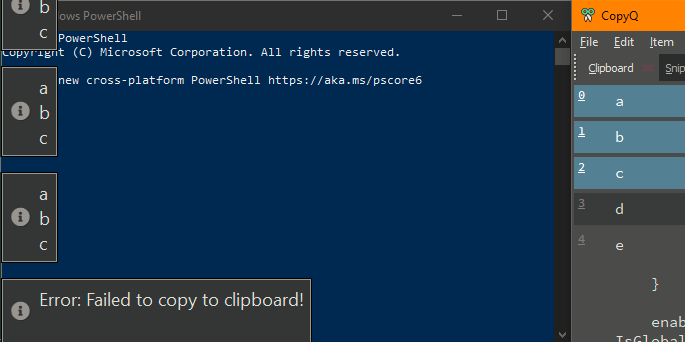
1 error followed by 9 popups of item contents.
Expected behavior
10 popups of item contents. The first is obviously most important.
Version, OS and Environment
CopyQ Clipboard Manager v3.12.0
Qt: 5.13.2
Compiler: GCC
Arch: x86_64-little_endian-llp64
OS: Windows 10 (10.0)
 beefeater7
All 8 comments
Fun little workaround:
[Command]
Name=Copy Repeater
Command="
    copyq:
    disable()

    function popupper() {
        try {
            copy()
            popup(clipboard())
        } catch(e) { popupper() }
    }

    for (i=0; i<10; i++) {
        popupper()
    }

    enable()"
IsGlobalShortcut=true
Icon=\xf15b
GlobalShortcut=shift+f4
Yet, first copy takes forever to fall through, until error gets thrown. @pbodnar
beefeater7
on 13 Jul 2020
@beefeater7, yes, I can confirm that. As in #1438, this seems to be a new bug introduced in v3.12.0, so I guess there will be a common cause.
Yet, first copy takes forever to fall through, until error gets thrown. @pbodnar
Yes, this seems to be intentional - CopyQ waits for a new clipboard content for a while, as introduced by Retry checking if copy() succeeded or throw an error.
 pbodnar
on 13 Jul 2020
pbodnar
on 13 Jul 2020
I can confirm also that auto-repeat setting has no effect on this issue.
I found another edge case where the first copy fails, in global context actually. I'll see if I can isolate it
beefeater7
on 14 Jul 2020
I believe this is same as #1438.
 hluk
on 14 Jul 2020
hluk
on 14 Jul 2020
No, they are actually not. The command used is the same, but not the manner it is used or the problem it triggers.
Do we really have to use a wrapper function to make copy() work in the main window? Because _you_ don't see the issue? The first copy() event clearly misfires, I catch the error and try again, voila it works. (After several seconds of waiting.) I'm sure it's not unsolvable.
If I can't access input() from a Global shortcut in the main window, and copy() once _isn't working_, how do I solve it? I can use my little workaround, make it work for me, yada yada. Or I can make an effort and report the issue. After that it's out of my hands, I don't know C++.
But you are dismissing bugs because you haven't encountered them. I put the effort to make them reproducible, you don't have to _believe_ anything, just try it for yourself. One error, nine successful copies. Have you tried it @hluk?
beefeater7
on 14 Jul 2020
OK, sorry I did not read the command and assumed it has something to with holding the shortcut for a long time.
hluk
on 14 Jul 2020
Unfortunately, I cannot test this on Windows (my VM died some time ago ... again) and on Linux it works well (it's a different code but same idea with waiting on the key to be released).
I assume the error pops up if you remove the loop. Right?
Does the error appear after you release the Shift modifier?
hluk
on 14 Jul 2020
No worries, thanks for reopening. Yes, that error is the norm for "first time" or one-time copy in main window. I tried without the loop.
The second copy and so on in a loop will guaranteed succeed afaict, unless holding down keys, but 1st fails regardless. It's not constant but close to it.
beefeater7
on 15 Jul 2020
Related issues
hluk
·
9Comments
 lepalmtree
·
7Comments
lepalmtree
·
7Comments
 nmat
·
6Comments
nmat
·
6Comments
 aksr
·
9Comments
aksr
·
9Comments
 happysurf
·
9Comments
happysurf
·
9Comments