Copyq: Enter to paste stopped working in macOS (lost Accessibility access?)
Issue
Have been using CopyQ for a while now, and twice now I've had the issue where hitting Enter on an entry would still move it to the top, but would not paste it. Both times it happened after I'd had CopyQ installed for maybe 5 months.
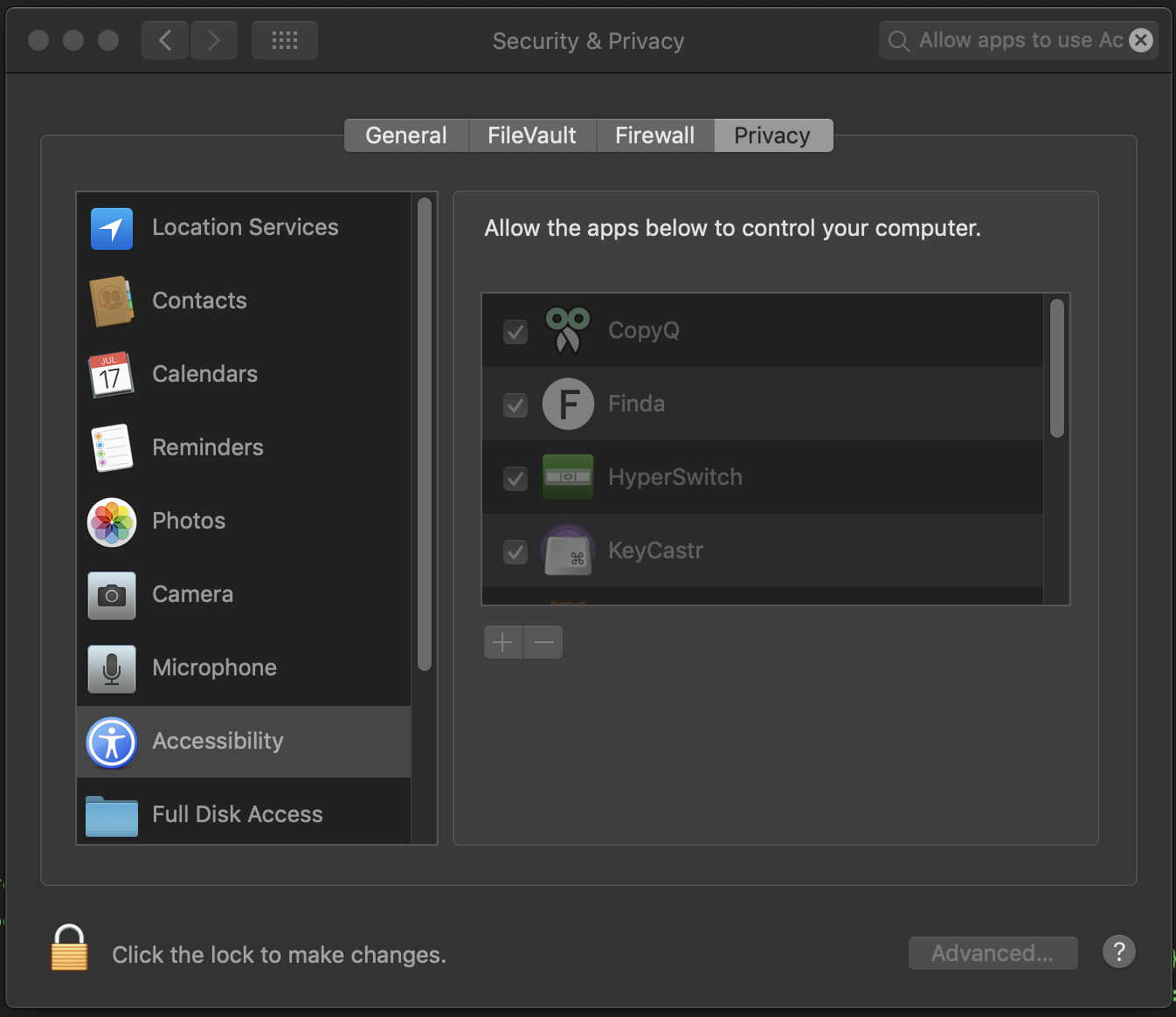
I _think_ the issue is that CopyQ somehow loses its Accessibility access, despite that fact that it still shows up in the relevant section in System Preferences. I recently updated to macOS Mojave, so that might be related somehow.
(I install through Brew and keep updated, currently on v3.6.1)
Workaround
- I went into
System Preferences->Security & Privacy->Privacy->Accessibility(or just searchAllow apps to use Accessibility), clicked the unlock button, then selected CopyQ and removed it (with the - button).
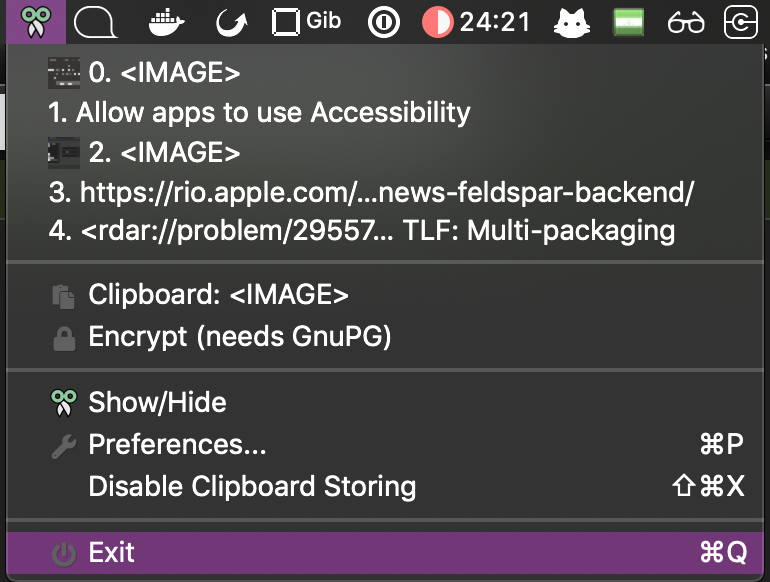
- Then I quit CopyQ through the
Exitbutton and then reopened it:
- Then I tried to paste again by opening CopyQ and pressing Enter, and the prompt to grant Accessibility access came up. I clicked
Open System Preferences, and checked the box next to CopyQ.
This fixed the issue.
 gibfahn
All 12 comments
The workaround probably removes any ability I have to debug at this point, so @hluk if you want to close the issue that's fine by me. Just thought I'd at least document the workaround for future reference.
gibfahn
on 25 Oct 2018
Thanks for sharing the workaround. I've added it to FAQ.
Let me know if it happens again.
 hluk
on 27 Oct 2018
hluk
on 27 Oct 2018
So I just updated CopyQ (via brew cask upgrade), and it happened again.
I got the Unidentified developer prompt from Apple, and now I'm back to the same behaviour I noted in the first comment. Most things work, e.g. copying text shows the notification:
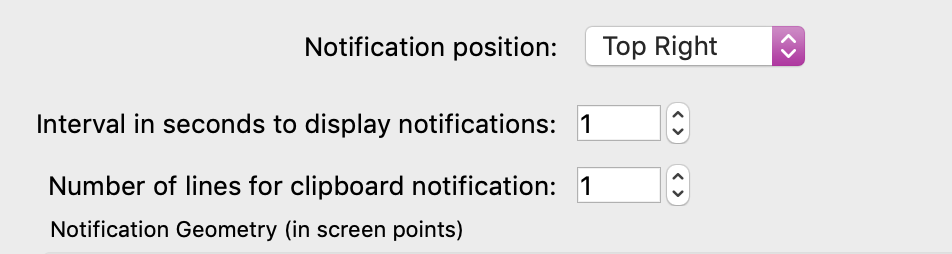
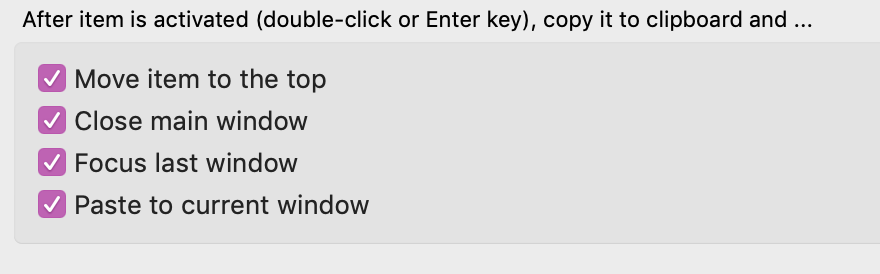
However I am not able to paste with the Enter key, which worked before the update, see my settings:
I did a bit of checking, and I think this StackOverflow answer may be relevant: https://stackoverflow.com/questions/23649622/applescript-application-cant-get-rights-in-accessibility
Could it be that the App is seen as having changed by macOS, and thus denied Accessibility? I have other apps that update through Homebrew that haven't lost their access, so hopefully it's a solvable problem.
gibfahn
on 2 Jan 2019
I haven't applied the workaround, so my machine is still in a broken state. Please let me know what debugging information I can collect.
gibfahn
on 2 Jan 2019
Strange that it only happens with pasting (this as other commands are implemented in similar way - using scripting).
Unfortunately, I have no idea how to fix it.
Do you know how macOS identifies CopyQ? Maybe I can do something about it using Qt framework.
hluk
on 2 Jan 2019
FYI: Just came here looking for a solution after seeing the same broken behavior:
After some time not using CopyQ, I just updated it via brew. When run, I got the "unidentified developer" dialog. And after all, CopyQ would copy but not paste.
I quit CopyQ, removed it from the Privacy/Accessibility list, ran again CopyQ and got a dialog asking for it to be re-added to the Accessibility list. I did so, and now it's working.
 hmijail
on 6 Jan 2019
hmijail
on 6 Jan 2019
Do you know how macOS identifies CopyQ? Maybe I can do something about it using Qt framework.
I'm afraid I know almost nothing about how macOS apps work. I had a look online for docs but didn't find anything. I haven't rerun the workaround, so I still have a non-working version to test with.
I'm afraid I don't enough about Qt to be able to debug.
Strange that it only happens with pasting (this as other commands are implemented in similar way - using scripting).
What other commands would you expect not to work? Copying still populates the CopyQ list, and I can still edit snippets. Maybe something else is broken that I haven't tried.
gibfahn
on 6 Jan 2019
Strange that it only happens with pasting (this as other commands are implemented in similar way - using scripting).
What other commands would you expect not to work? Copying still populates the CopyQ list, and I can still edit snippets. Maybe something else is broken that I haven't tried.
I was wrong, when you press Enter to paste current item, CopyQ won't use scripting by default.
It uses some platform-dependent code to raise target window and send key press event to it. The app also needs to store last active foreign window to know where to paste later.
Maybe system revokes some permission for some of this functionality after app is updated.
hluk
on 7 Jan 2019
I found this, which suggests the information is stored in a mysql database. Unfortunately you have to turn SIP off to access it in the latest macOS.
gibfahn
on 17 Jan 2019
I recently migrated my macOS to another computer (by using the Migration Assistant). I had to uninstall and reinstall Homebrew, which then reinstalled CopyQ.
The final result is that CopyQ again does not paste (it alters the clipboard so I can paste manually, but it won't paste by itself). I never got a dialog asking to give Accessibility permissions to CopyQ. Showing CopyQ's window+choosing an item+pressing enter also doesn't trigger the dialog.
I have tried manually adding CopyQ to the Privacy list of apps, but it still does not work.
macOS 10.14.5, CopyQ 3.8.0-osx
hmijail
on 27 May 2019
FWIW on the latest CopyQ update I lost access again, and I still had the "unidentified developer" popup, but once I resolved that macOS prompted me to go to the Accessibility settings to add CopyQ.
gibfahn
on 27 May 2019
Have been hitting this every time I upgrade, so did a bit more checking, and have raised a PR to document this in the brew Cask: https://github.com/Homebrew/homebrew-cask/pull/83157
From that PR:
As the CopyQ app is not signed, you will have to re-grant Accessibility access every time the app is updated:
- Run:
shell open /System/Library/PreferencePanes/Security.prefPane - or go to:
System Preferences -> Security & Privacy -> Accessibility - then:
Untick and retick CopyQ.app
You can verify this with e.g.
# Install older CopyQ
brew cask reinstall https://raw.githubusercontent.com/Homebrew/homebrew-cask/854fdbbd4b73abf940fde14b536c7de3e21f189d/Casks/copyq.rb

# Try using it and note issues, try workaround to resolve

# Upgrade to latest CopyQ:
brew cask upgrade https://raw.githubusercontent.com/Homebrew/homebrew-cask/7bb3c4952f1b6e00ceddfa2c5b33fe9c7370e1d2/Casks/copyq.rb

# Rerun workaround.
Related issues
 davidawad
·
9Comments
hluk
·
9Comments
davidawad
·
9Comments
hluk
·
9Comments
 ujay68
·
9Comments
ujay68
·
9Comments
 gatopeich
·
3Comments
gatopeich
·
3Comments
 gflex
·
5Comments
gflex
·
5Comments
Most helpful comment
Have been hitting this every time I upgrade, so did a bit more checking, and have raised a PR to document this in the brew Cask: https://github.com/Homebrew/homebrew-cask/pull/83157
From that PR:
As the CopyQ app is not signed, you will have to re-grant Accessibility access every time the app is updated:
shell open /System/Library/PreferencePanes/Security.prefPaneSystem Preferences -> Security & Privacy -> Accessibility
Untick and retick CopyQ.app
You can verify this with e.g.