Copyq: Paste entry from history to current window on MacOS 10.15 Catallina not working
Describe the bug
Pasting selected record from history in current application window is not working.
To Reproduce
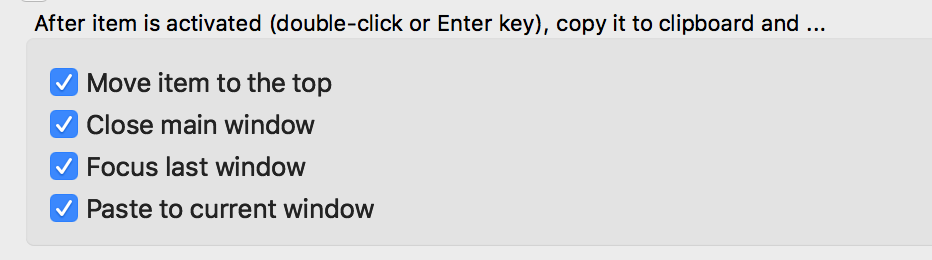
CopyQ is with enabled cipboard sharing. copy text to clipboard. Try to retrieve object and paste to another program window (whichever it is). Select from history and either press enter or double click. Nothing happens. Text is not pasted.
Though, selected Item is added to clipboard. So consecutive "Command-V" pastes the selected entry.
Expected behavior
A clear and concise description of what you expected to happen.
Screenshots
Selected options in History tab:
Version, OS and Environment
CopyQ version is 3.9.2 installed through brew cask
OS: MacOS Catalina 10.15.1
 gflex
gflex
All 5 comments
Please check if FAQ or #1030 help.
 hluk
on 2 Nov 2019
hluk
on 2 Nov 2019
Thanks for the reference! Actually that helped me to work the issue around.
- brew cask remove copyq
- reboot machine
- brew cask install copyq
- start copyq.
- Accept to run the app from "unknown source"
- when asked , do allow CopyQ access to Accessibility in "security and privacy"
My case was similar to https://github.com/hluk/CopyQ/issues/1030#issuecomment-496096481
Migrated from old computer to the current. So I suppose something happened during migration and the proper rights were not assigned.
Obviously not CopyQ but mac issue (whoorray!)
Thanks a lot and sorry for bothering :)
gflex
on 2 Nov 2019
For me, with the same issue, I had to remove and add CopyQ again in Accessibility and the auto-paste functionality was restored.
(I began having this issue after upgrading to Catalina)
 ajorpheus
on 7 Jan 2020
ajorpheus
on 7 Jan 2020
I believe that all you need to do to fix the issue is to untick and retick CopyQ in the Accessibility preferences, see https://github.com/hluk/CopyQ/issues/1030#issuecomment-633205588.
 gibfahn
on 24 May 2020
gibfahn
on 24 May 2020
For me, with the same issue, I had to remove and add CopyQ again in Accessibility and the auto-paste functionality was restored.
(I began having this issue after upgrading to Catalina)
Resolve for me. Thanks!
PS:
❯ copyq --version
CopyQ Clipboard Manager v3.12.0
Qt: 5.13.2
Compiler: GCC
Arch: x86_64-little_endian-lp64
OS: macOS 10.15
 marcosdemelo
on 23 Jul 2020
marcosdemelo
on 23 Jul 2020
Related issues
 gatopeich
·
3Comments
gatopeich
·
3Comments
 SmileyStiles
·
3Comments
SmileyStiles
·
3Comments
 happysurf
·
9Comments
happysurf
·
9Comments
 m4r71n
·
5Comments
m4r71n
·
5Comments
 maricn
·
3Comments
maricn
·
3Comments
Most helpful comment
Thanks for the reference! Actually that helped me to work the issue around.
My case was similar to https://github.com/hluk/CopyQ/issues/1030#issuecomment-496096481
Migrated from old computer to the current. So I suppose something happened during migration and the proper rights were not assigned.
Obviously not CopyQ but mac issue (whoorray!)
Thanks a lot and sorry for bothering :)