Hi,
I have a 4K screen with high DPI but the text in the app is very small.
I didn't find a way to increase the font size, is it possible?
 HarelM
All 19 comments
I cannot properly test this (missing the hardware). Though text changes size if I change DPI in system or use scaling on Windows.
The application should work fine on hidpi displays -- I try not to use pixel metric anywhere in the code. This can be quite possibly problem with Qt 4. Can you test Qt 5 version of the app from here?
There are also some environment variables which can help fix the scaling in Qt apps.
Another possible solution is to edit style sheet by enabling "Set colors for tabs, tool bar and menus" in "Appearance" config tab, clicking on "Edit Theme" and add following.
css="* { font-size: 12pt; }"
 hluk
on 9 Apr 2016
hluk
on 9 Apr 2016
It might not be a problem of DPI after all.
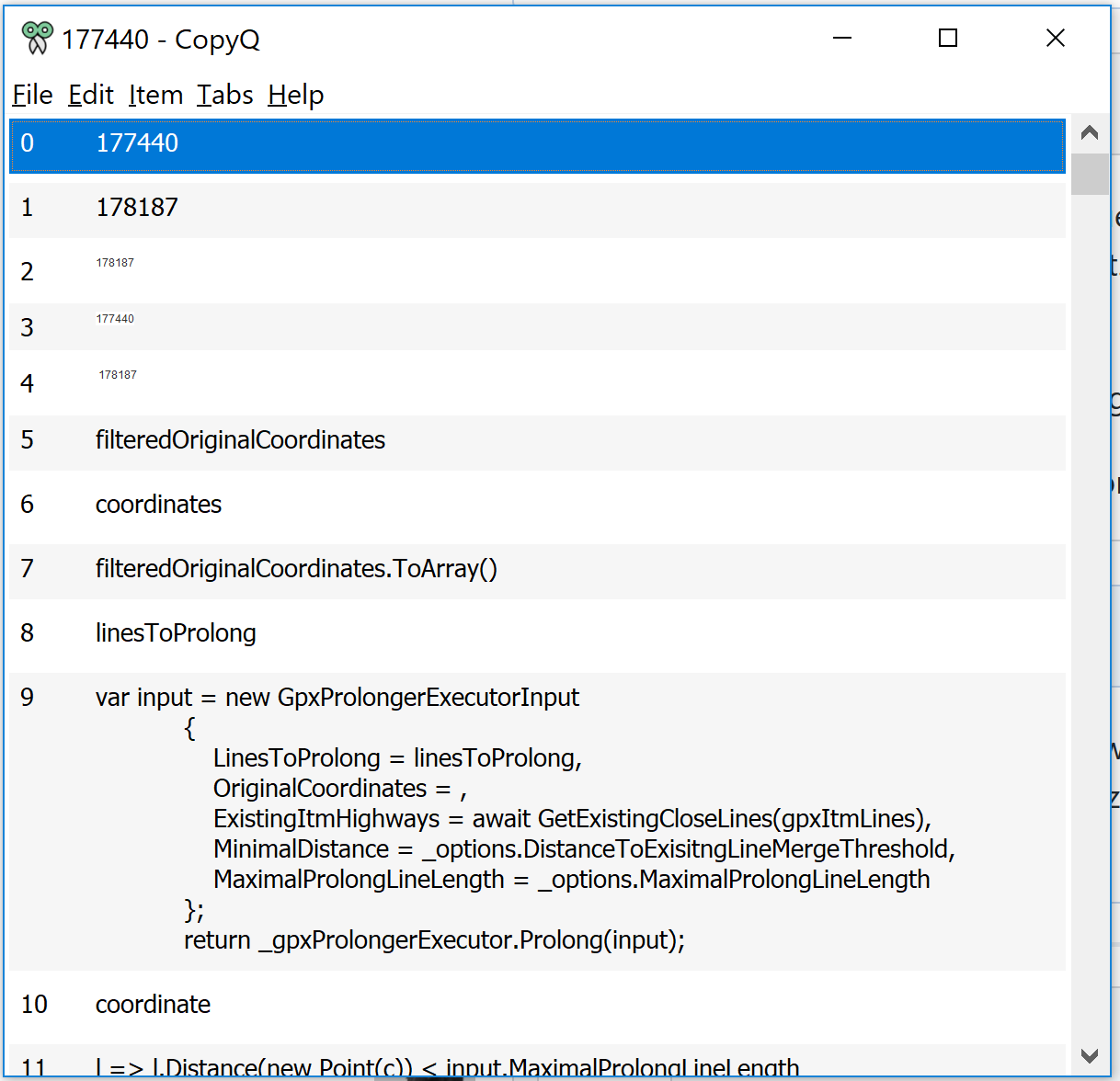
See the image below, only some entries are very small, the other are fine.

HarelM
on 9 Apr 2016
Those small items are HTML -- and bad HTML since it probably defines font size in pixels (or Qt fails to parse it properly). You can check item content with F4 to see how the HTML is written.
There is task to fix background and foreground color of HTML items when displayed in CopyQ, but I'm not sure if it's possible to handle this properly.
If you find some small or too large GUI elements, let me know.
hluk
on 11 Apr 2016
Was there any code changes to fix this? I switched to another program due to this issue but would like to switch back if this was truly solved...
HarelM
on 19 Dec 2017
I closed this because it looks like an issue with copied HTML. I suspect that it contains font size in pixels so the small font in items is actually correct. But I never noticed this happen with Firefox or Chromium web browsers.
One solution would be to disable storing and rendering HTML in preferences.
I started using 4K monitor so support for high DPI displays improved a lot.
hluk
on 19 Dec 2017
Ok then, I'll try it out and let you know what I find.
In any case - probably a minimal font size should be used to avoid such issues.
Most of the web stuff I've seen still uses pixels so I don't think you can fairly blame the site writers :-)
HarelM
on 19 Dec 2017
Please reopen as this is still an issue:
Bad HTML or not, I can't see what I copied (although it looked fine in the browser)...
One solution would be to disable storing and rendering HTML in preferences.
This fixes it, but feels like a workaround rather than a solution.
HarelM
on 29 Dec 2017
Can you share the HTML? (You can select the item, press F4, select text/html from the list and copy the HTML.)
hluk
on 29 Dec 2017
<html>
<body>
<!--StartFragment--><span style="color: rgb(51, 51, 51); font-family: "Helvetica Neue", Arial, Helvetica, sans-serif; font-size: 12px; font-style: normal; font-variant-ligatures: normal; font-variant-caps: normal; font-weight: 400; letter-spacing: normal; orphans: 2; text-align: right; text-indent: 0px; text-transform: none; white-space: normal; widows: 2; word-spacing: 0px; -webkit-text-stroke-width: 0px; background-color: rgb(255, 255, 255); text-decoration-style: initial; text-decoration-color: initial; display: inline !important; float: none;">223081<span> </span></span><!--EndFragment-->
</body>
</html>
On Linux the HTML is rendered with bigger font because I have to use QT_SCALE_FACTOR=2 environment variable. By default, this is not the case on Windows.
Looks like the issue is in the application which copies the text - it shouldn't set font size to 12px if the text is larger.
I don't think I can implement a simple workaround for this.
hluk
on 29 Dec 2017
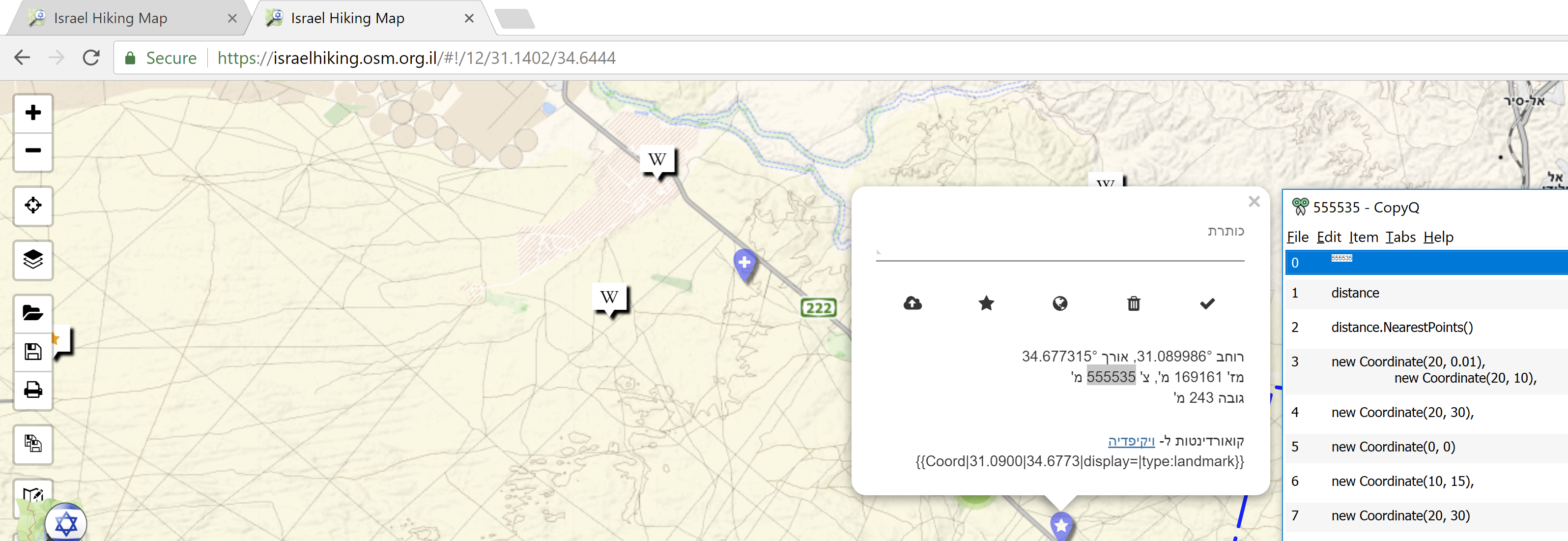
The text was copied from Google Chrome.
This is how it looks when comparing - left side is the highlighted text in the browser - right side is CopyQ.
I'm guessing more windows users may suffer from this issue so I think it's worth thinking how to solve it...
HarelM
on 30 Dec 2017
Got it fixed by settings environment variable QT_AUTO_SCREEN_SCALE_FACTOR=1 when starting application.
For now you can define the env. variable manually in system.
Let me know whether it works if you can test it.
hluk
on 2 Jan 2018
Is there a new release with this or should I try and change the env variable?
HarelM
on 2 Jan 2018
It's safer to change the variable for now. The development version (here) contains a lot more changes but could be still unstable (though there is also portable version).
hluk
on 2 Jan 2018
Setting the env variable seem to solve this issue.
Thanks!
HarelM
on 4 Jan 2018
Glad to hear that. If you notice anything else, let me know.
The last bug to fix for high DPI screens I know about is ugly image while moving items with mouse.
hluk
on 5 Jan 2018
Some of the text I copy to my clipboard is so tiny that it is difficult for me to read in CopyQ. In other words, my problem is essentially the same as this one described above in this issue...

I'm running Lubuntu based on Ubuntu 20.04.1 LTS.
I do not know how to set the environment variable to QT_AUTO_SCREEN_SCALE_FACTOR=1.
I tried adding QT_AUTO_SCREEN_SCALE_FACTOR=1 to...
/etc/environment
and
I tried adding QT_AUTO_SCREEN_SCALE_FACTOR=1 to...
/home/y/.config/copyq/copyq.conf
I checked the CopyQ FAQ - Frequently Asked Questions although environment variable is mentioned, it does not seem to indicate how to set the environment variable.
 Yekutiel
on 15 Oct 2020
Yekutiel
on 15 Oct 2020
Some of the text I copy to my clipboard is so tiny that it is difficult for me to read in CopyQ. In other words, my problem is essentially the same as this one described above in this issue...
@Yekutiel Maybe it's just a badly formatted HTML (you can check the HTML by selecting the item in CopyQ and pressing F4). I don't think that can be easily fixed except disabling HTML format.
Another solution could be to mask font style defined in HTML:
[Command]
Command="
    copyq:
    var formats = dataFormats()
    if ( formats.indexOf(mimeHidden) != -1
      || formats.indexOf(mimeHtml) == -1 ) {
        abort()
    }

    var html = str(data(mimeHtml))
    var html2 = html.replace(/font-size:|font-family:/g, 'masked:')
    setData(mimeHtml, html2)"
Display=true
Icon=\xf121
Name=Fix HTML Fonts
(Here is how to add the command above to CopyQ.)
I checked the CopyQ FAQ - Frequently Asked Questions although environment variable is mentioned, it does not seem to indicate how to set the environment variable.
You can set the environment variable by launching copyq from terminal (exit the running instance of CopyQ first):
env QT_AUTO_SCREEN_SCALE_FACTOR=1 copyq
@hluk
Thanks for replying quickly to me. Also, thanks for your help.
Another solution could be to mask font style defined in HTML:
Thanks, that eliminated the tiny text. Thank you! Here's an snippet of what I see now...
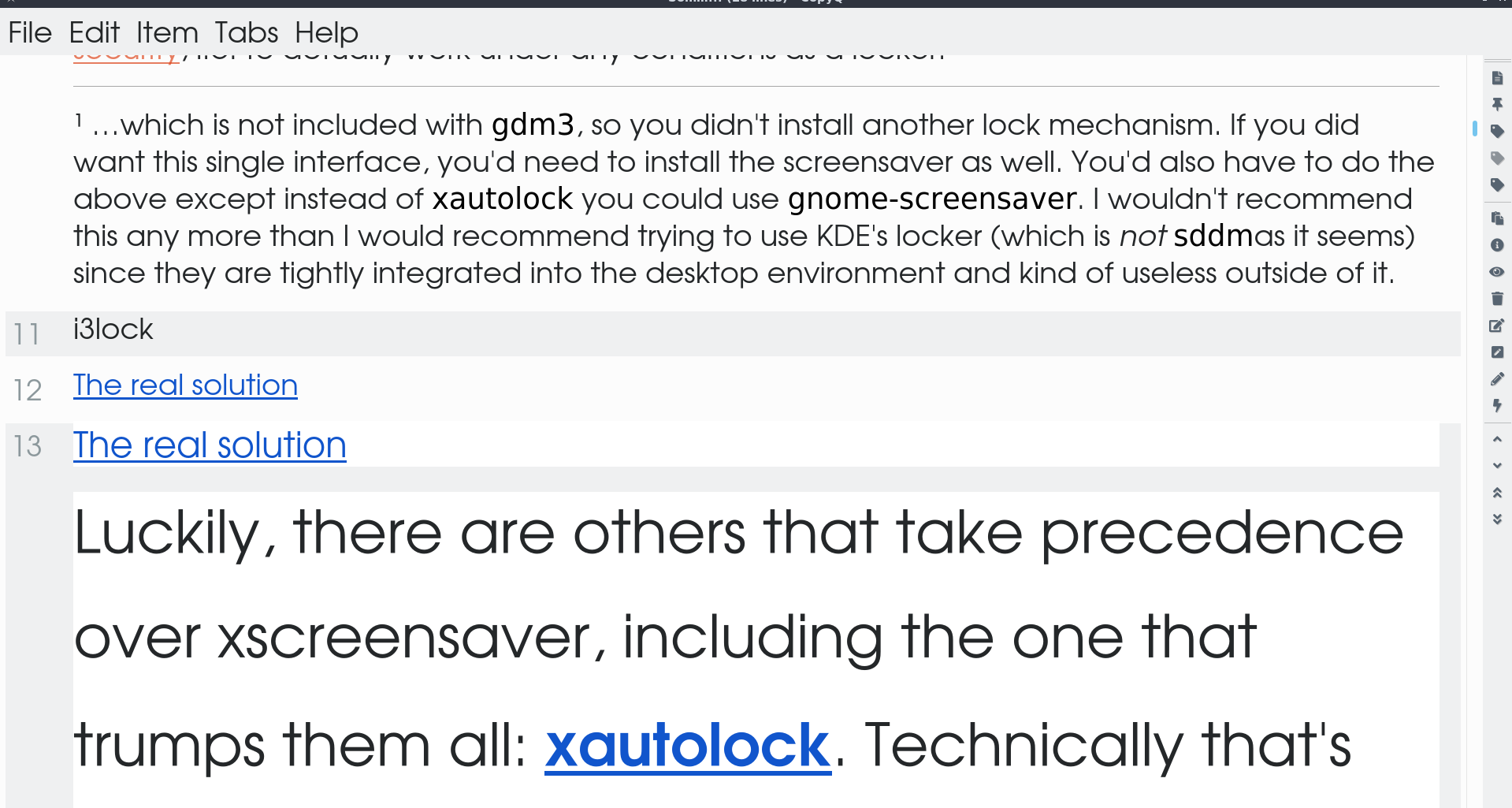
As you can see, none of the text is tiny!
You can set the environment variable by launching copyq from terminal (exit the running instance of CopyQ first):
env QT_AUTO_SCREEN_SCALE_FACTOR=1 copyq
I tried that but that didn't eliminate the tiny text for me. However, that is irrelevant because, as I indiacted, your solution to mask font style defined in HTML did eliminate the tiny text for me.
Perhaps it would be a good idea to add your solution to...
FAQ - Frequently Asked Questions
I'm guessing it's a fairly common problem.
Also, perhaps, say, the first three times a user opens CopyQ a message might put up saying something like,
If you are having any problems please see the CopyQ FAQ - Frequently Asked Questions at https://copyq.readthedocs.io/en/latest/faq.html. This message will only appear the first three times you open CopyQ.
Yekutiel
on 15 Oct 2020
Related issues
 orschiro
·
7Comments
orschiro
·
7Comments
 gflex
·
5Comments
gflex
·
5Comments
 ujay68
·
9Comments
ujay68
·
9Comments
 nmat
·
6Comments
nmat
·
6Comments
 pacid
·
3Comments
pacid
·
3Comments
Most helpful comment
Got it fixed by settings environment variable
QT_AUTO_SCREEN_SCALE_FACTOR=1when starting application.For now you can define the env. variable manually in system.
Let me know whether it works if you can test it.