Copyq: Command dialog in CopyQ F6 shortcut does not work
Describe the bug
Command dialog in CopyQ (F6 shortcut) - this doesn't work for me. I see it in all docs, but whether CopyQ is focused or not it won't work.
To Reproduce
Steps to reproduce the behavior:
- Just press F6 - does not work - when Chrome is in focus it does sth there
Open CopyQ (Ubuntu 18.04)
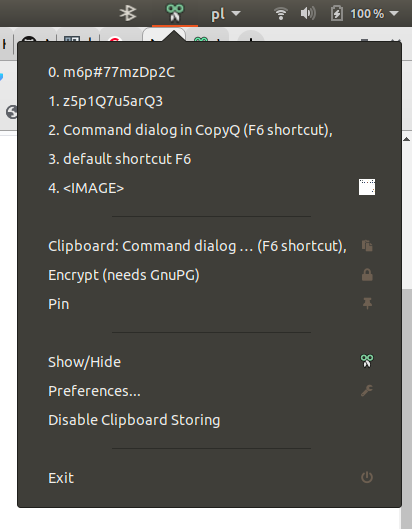
Press F6 - nothing
Version, OS and Environment
- OS: Ubuntu 18.04
- Version: CopyQ Clipboard Manager v3.2.0 ([email protected])
Built with: Qt 5.9.3, LibQxt 0.7.0 - Desktop
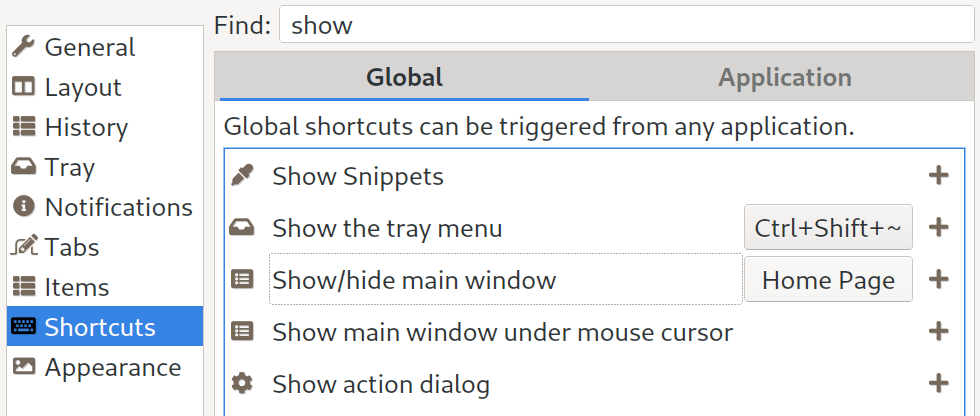
I must be missing something basic here as "show main window under mouse coursor" works and I have added a shortcut for it CTRL+SHIFT+V
 pacid
pacid
All 3 comments
Oh, ok, stand corrected.
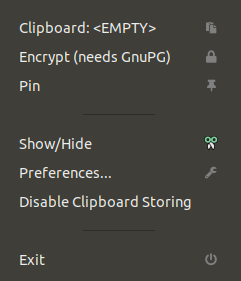
You just need to click "Show/Hide" from the tray menu. That's the only way for me to see the main menu as it does not load in the side panel (maybe I turned it off?).
Anyways, when I open the main window with the "File" menu and then do F6 it works.
pacid
on 25 Jan 2020
You just need to click "Show/Hide" from the tray menu.
Yeah, I can see it can be confusing. I was just replying with the same.
The menu behavior is handled by desktop environment, the app doesn't have complete control over it.
That's the only way for me to see the main menu as it does not load in the side panel (maybe I turned it off?).
Preferred way to show the main window is to assign global shortcut.
 hluk
on 25 Jan 2020
hluk
on 25 Jan 2020
Thanks!! I wouldn't even think of first assigning a shortcut in order to open the main menu. I would just go to see the docs or give up (I wouldn't click on random "Show/Hide" - don't know what it means in this context). In this case, since I know what Github is :) I was able to get your help this way.
Maybe then "Show/Hide" in the tray menu could be "Show/Hide Main Menu" ?
pacid
on 25 Jan 2020
Related issues
 nmat
·
6Comments
nmat
·
6Comments
 orschiro
·
9Comments
orschiro
·
9Comments
 eera5607
·
7Comments
eera5607
·
7Comments
 happysurf
·
9Comments
happysurf
·
9Comments
 sebflipper
·
8Comments
sebflipper
·
8Comments
Most helpful comment
Oh, ok, stand corrected.

You just need to click "Show/Hide" from the tray menu. That's the only way for me to see the main menu as it does not load in the side panel (maybe I turned it off?).
Anyways, when I open the main window with the "File" menu and then do F6 it works.