Cookie-autodelete: Automatic cleaning does not work
Describe the Bug/Feature
Apparently, automatic cleaning does not seem to work. I am not sure what caused the plugin to stop working, but it must be a recent firefox update.
Screenshot in which the bug can be seen
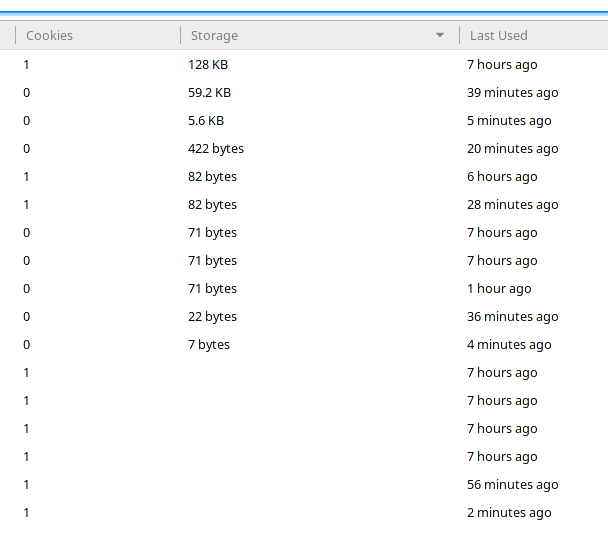
Manage data page:
Steps for anyone to reproduce the bug
No idea. I just visit various pages and I expect their data to clear after 15 seconds (as set in the plugin settings). But that is not the case, I can see cookies and LocalStorage data even after I've closed the tab and several hours have passed.
Your settings
- OS/version: Fedora 30
- Browser/version: Firefox 70
- Cookie AutoDelete version: 3.0.2
- Other plugins: uBlock Origin
My settings:

 ghost
ghost
All 42 comments
It doesn't help if the URL's aren't there. We can't start debugging if it's a specific site problem (like certain websites that don't craft cookies properly), or something else. It could be because you have some of those site/domain and its subdomains greylisted or whitelisted.
Localstorage is clearable per domain. However, we cannot clear indexDB per host/site at this time. Unfortunately those storage counts includes both localstorage and indexDB.
To really help us further, enable cleanup logs and counter. That will tell us what cookies are deleted and why some of them aren't.
 kennethtran93
on 13 Nov 2019
kennethtran93
on 13 Nov 2019
Its not a specific site problem because as you can see from the screenshot, pretty much all the sites I visit are not cleaned. I have no domains greylisted or whitelisted.
I think the cookies are deleted if there is no localstorage and/or indexdb. When there is something in localstorage and/or indedb, then the cookies are not cleaned. At least that is what I can see in my browser after I enabled logging.
ghost
on 13 Nov 2019
I would assume #590 is related to this issue.
@kennethtran93, I am afraid I believe I can somewhat confirm the issue. I cant provide full details at this point as I only noticed today that cookies fail to get deleted, but they do, site-independent.
In my case I am running Firefox Nightly (72), so I would have assumed Mozilla might have made some changes these days, however the two issue reporters seem to run the release version.
 neroux
on 15 Nov 2019
neroux
on 15 Nov 2019
@neroux your issue is already mentioned through the FAQ issue at the end relating to CCleaners. I'm not sure what the current issue is with this one.
kennethtran93
on 15 Nov 2019
@kennethtran93, the thing is, I am not using CCleaner.
neroux
on 15 Nov 2019
I stand corrected. Cookies do seem to get deleted.
My obervation was based on a combination of not being aware that CAD does not handle IndexedDB, coupled with the fact that Firefox now seems to require a page reload of about:preferences#privacy in order for "Manage Data" to show the actual list of cookies.
neroux
on 15 Nov 2019
Well, I removed Cookie-AutoDelete and I installed Forget Me Not so I can compare.
What is interesting, is that Forget Me Not seems more aggressive and the above situation (see screenshot at the top) now is very different, only 4 domains are left. Maybe there are ways to clear the indexeddb?
ghost
on 25 Nov 2019
While clearing indexedDB is available for removal, it removes ALL of it and cannot be used per hostname (i.e. removal by hostname). That's part of the reason why we're not implementing that at this time.
kennethtran93
on 27 Nov 2019
Is that not the same with Localstorage? Yet you did implement that. Why not IndexedDB?
Does clearing IndexedDB also require clearing browsing history, or can you clear them separately?
 SpaceClicker
on 27 Nov 2019
SpaceClicker
on 27 Nov 2019
@SpaceClicker:
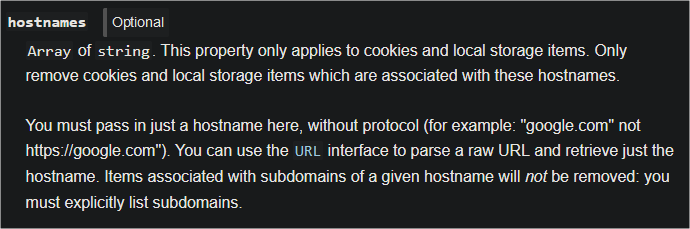
Firefox webextension API allowed removing local storage per hostname/domain. Not with IndexedDB. That's a WebExtension API/Chrome API question.
At this point the removal by hostnames are limited to cookies and local storage per below:
If we were to attempt to implement removal of indexedDB by hostname it would be a hacky code as one would most likely need to programmatically open a tab of that site, then inject javascript code to remove data with the Firefox Window API area, then close it again. Would you like a webextension to programmatically open tabs to visit sites, then inject some code, then close it again?
As for your last question, there's separate functions for clearing indexedDB and history, so we could say that we can clear them separately.
kennethtran93
on 27 Nov 2019
For some reason I thought FireFox did not support per-domain clearing of Localstorage. I think I read it wrong. Thanks.
SpaceClicker
on 27 Nov 2019
I recall there was special handling for localStorage (special cookie was set by CAD?).
AFAIK, with IndexedDB is one more problem - database can have any name and you cannot delete database without knowing it name.
 gwarser
on 27 Nov 2019
gwarser
on 27 Nov 2019
From what I read it appears there is no way to enumerate the localstorage database (to see what is currently set), so you would have to know each domain that is already set in order to clear them on a per-domain basis (without manually giving CAD a list of domains you want deleted). This is why when you first enable this option in CAD, it has to delete ALL the entries instead of just the ones that are not whitelisted/graylisted.
After this initial delete of all localstorage, it can then blindly delete any localstorage associated with each domain you visit in your browser by checking the whitelist/graylist and attempting a delete of localstorage for any specific site you visited that as not in those lists (for the graylist, I would assume it has to maintain a list of all graylist domains you visited in a session and then use that list to delete the localstorage for each of those domains when you exit the browser (or next time you start the browser)). It will do this delete attempt even if there is no localstorage set for that particular domain (since I assume it doesn't know if there is any). So essentially you are giving CAD a list of domains to delete by visiting each domain manually in any particular session.
SpaceClicker
on 27 Nov 2019
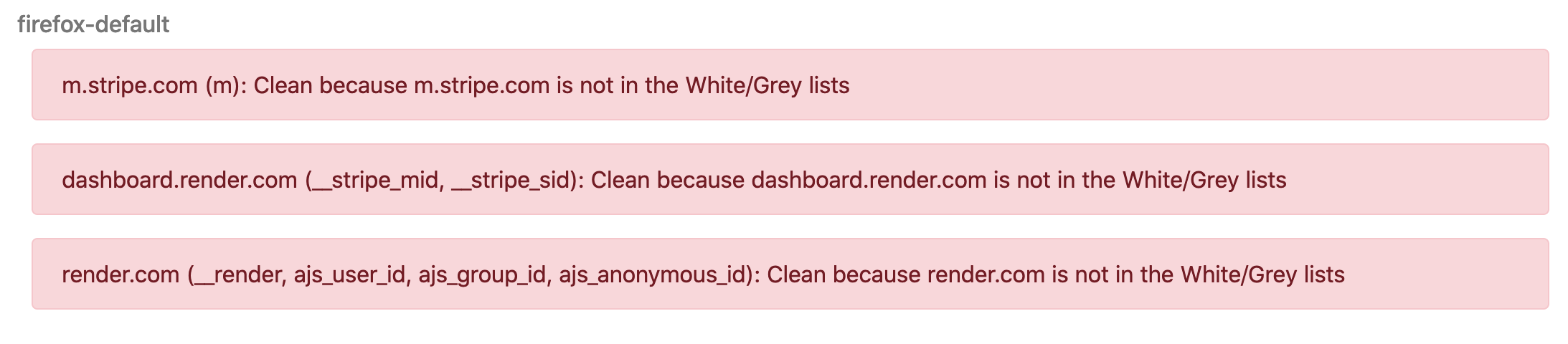
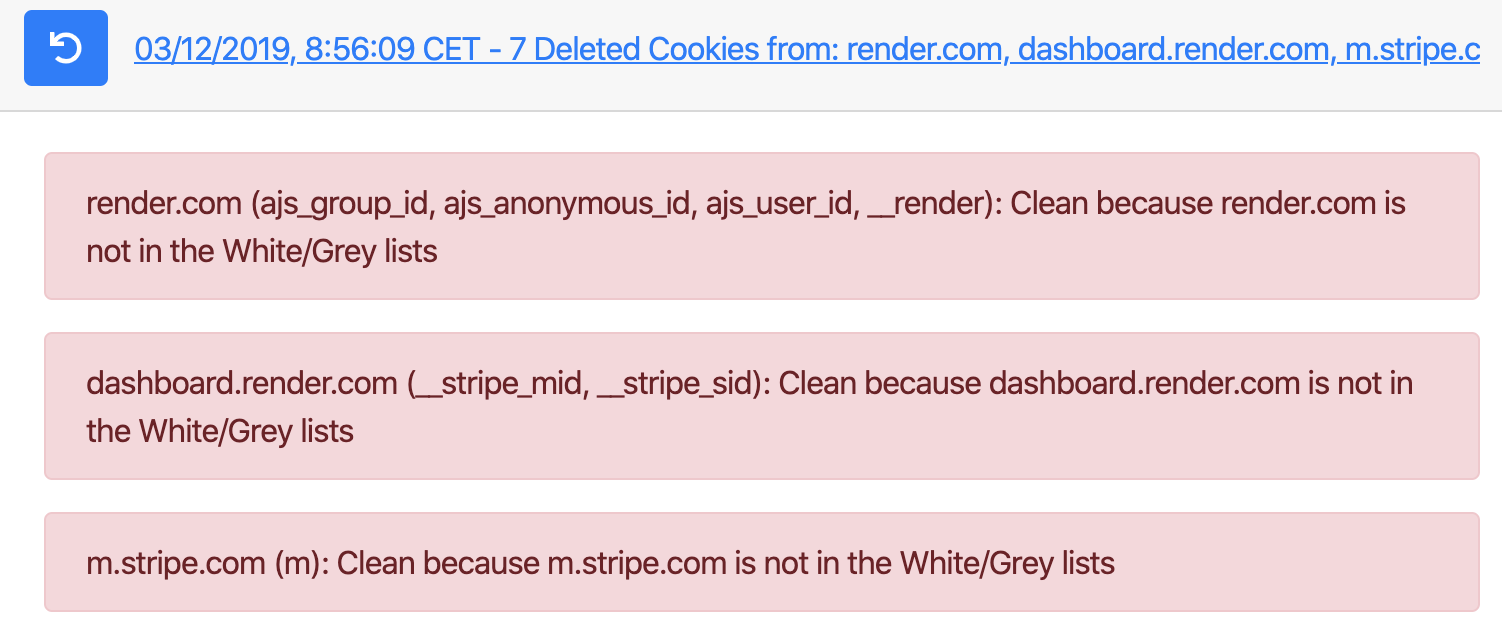
I'm having problems too that some cookies are not deleted, although the logs say they were deleted.
I've noticed it with the website render.com on firefox 70.0.1, brave 1.0.1. and chrome 78 (without any other extensions).
When I login I get redirected to dashboard.render.com.
The logs say that all render and dashboard.render cookies have been deleted. But I can still see the cookies and I can still login without the password. So CAD does not delete the cookies.
Firefox:
Chrome:
In Brave CAD doesnt even seem to recognize the dashboard.render.com domain:
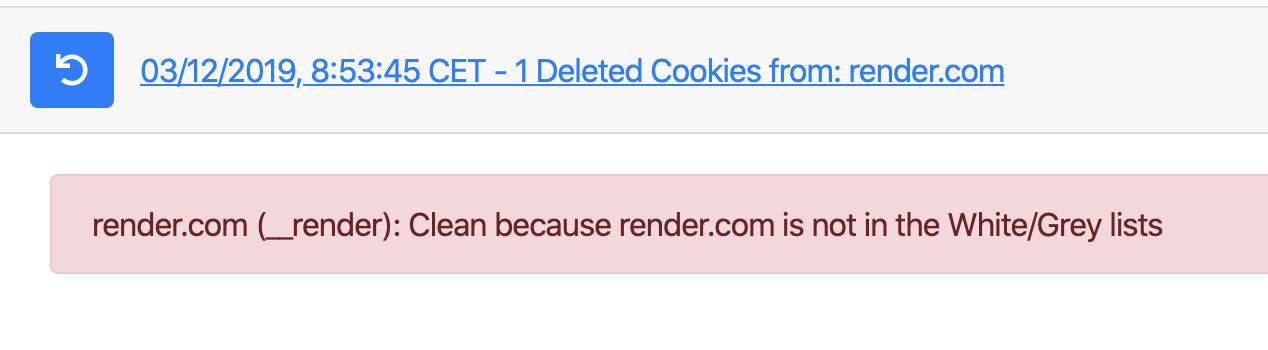
But it is clearly there:
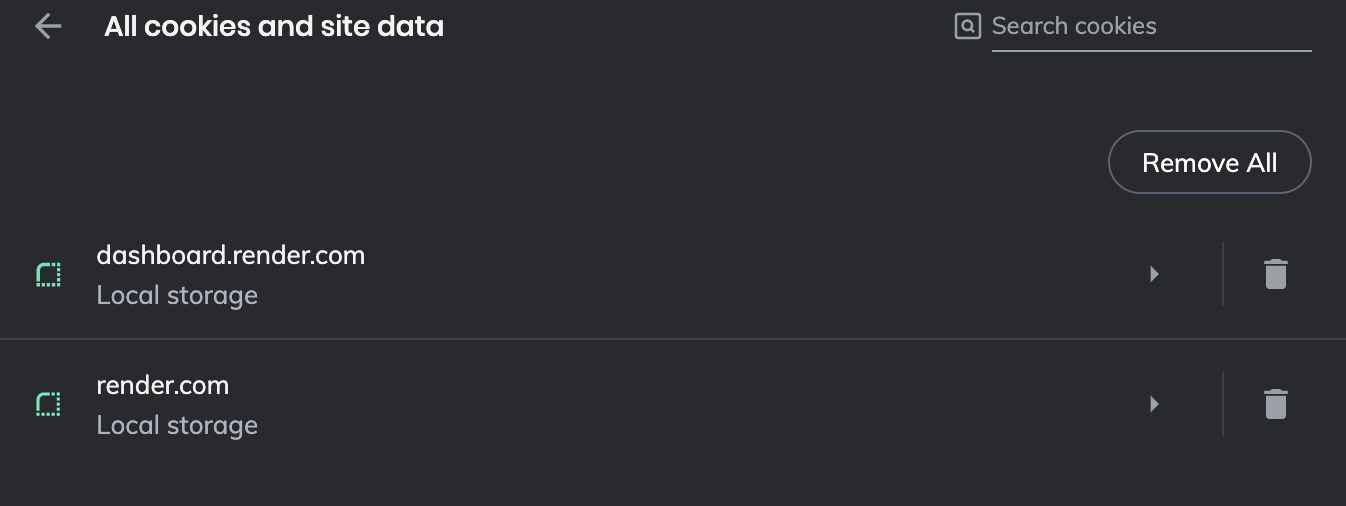
 wAuner
on 3 Dec 2019
wAuner
on 3 Dec 2019
I have Firefox 70.0.1 and visited render.com and dashboard.render.com and I saw it set those cookies (although no m.stripe.com cookie was set, but this may be related to other addons I have that block certain things.)
I used Quick Cookie Manager to see that the cookies were set after visiting the sites, then after I closed the tab for the site. They were there before and gone after CAD indicated they were deleted.
Even going to the native storage viewer in Firefox, I saw no cookies, localstorage, or indexdDB for render.com (it did not list anything being stored for this domain after CAD deleted the cookies).
So I am not sure why you would be having this problem, as for me there is no problem.
SpaceClicker
on 3 Dec 2019
@SpaceClicker did you create an account and logged in with it?
I just tested it on my other linux machine with firefox 70.0.1 and the result is the same.
wAuner
on 3 Dec 2019
What account? You mean a Firefox account (https://www.mozilla.org/en-US/firefox/accounts/)?
No, I don't use a Firefox account.
SpaceClicker
on 3 Dec 2019
I'm talking about a render account. Otherwise you couldn't have tested the problem.
wAuner
on 3 Dec 2019
Oh, no I didn't have an account, but when I went to the login page, all the cookies you show in your logs were set (without attempting to log in).
I just created an account and logged in and there was no difference, the cookies were set and then deleted shortly after I closed the tab to the render.com site.
SpaceClicker
on 3 Dec 2019
could you please try to login into the dashboard, then close the window until the cookies should be deleted and then open the page again and login again?
On all my machines I am able to login again without being asked for a password.
To me it says it deleted the cookies, but it doesn't do it.
wAuner
on 3 Dec 2019
Already tried that, it asks for both login and password.
EDIT: It asks for Email and password, nothing is prefilled and it doesn't act like you are already logged in.
SpaceClicker
on 3 Dec 2019
If I go to render.com, log in, and then close the tab, then quickly open a new tab and go to render.com again, it will act like I am logged in, it doesn't even prompt for a password.
If I go to render.com, log in, and then close the tab, wait 20 seconds, open a new tab and go to render.com again, it will act like I am not logged in, and I need to click on the "Sign In" button to get to the login screen and enter my email and password in order to log in.
SpaceClicker
on 3 Dec 2019
that's how it should behave, depending on the time you've set.
but on my machines/browsers it always keeps me logged in, even if the cookies are supposedly deleted.
wAuner
on 3 Dec 2019
Do you have other addons on all those browsers that might be interfering?
EDIT: Are you able to manually delete the cookies using the Options-> Privacy & Security->Manage Data?
SpaceClicker
on 3 Dec 2019
tried it already even with a clean chrome browser without any extensions.
So far I've tested this behavior with:
Firefox 70.0.1 mac/linux
Chrome 78 mac (clean without any extensions other than cad)
brave mac/linux (also clean on linux).
All browser and OS combinations show the same behavior. CAD says cookies are deleted but I can still login and cookies are still there.
It also doesnt make a difference if I click the clean button manually.
wAuner
on 3 Dec 2019
Well, it is very strange that you have a similar problem with all your browsers while I don't see any problems.
I'm just a user of the addon and haven't seen many of the problems reported here (yours or others issues), so I'm not sure why some people have issues and others (me) don't. Hopefully someone with more knowledge than me can help you here.
SpaceClicker
on 3 Dec 2019
One other thing is that I am using Windows 10, and you are using Linux/Mac, although I don't know why that should make any difference.
SpaceClicker
on 3 Dec 2019
@wAuner try the firefox extension "Forget Me Not" and see if that makes a difference.
I found that it cleans all the extra cookies that CAD could not delete.
IndexDB is another issue, but I'd prefer to have that deleted (for all domains).
ghost
on 3 Dec 2019
@robo2bobo does it support firefox containers? Could‘t find any info about that.
wAuner
on 3 Dec 2019
Sorry I have no idea. I only use uBlock Origin and ForgetMeNot, but neither seems to mention containers.
ghost
on 3 Dec 2019
Thanks I‘ll try Cookie Quick Manager
wAuner
on 3 Dec 2019
@wAuner What are your extension settings?
It looks like from your screenshots that only localstorage remains.
kennethtran93
on 4 Dec 2019
@kennethtran93 I‘ve tested it with default settings in most cases. I’ve just set the time from 15 to 3 seconds.
wAuner
on 4 Dec 2019
If I'm not mistaken, the default settings may not have the clean localstorage settings enabled. That's most likely what is causing those to not be deleted. I'm unsure about the current side effects of having both containers and localstorage settings checked at the same time.
Correction: Localstorage Cleanup was only recently implemented on Google Chrome and this extension has yet to include it. Only firefox handles localstorage for now.
kennethtran93
on 4 Dec 2019
but I've tested it with Google Chrome with the same behavior!?
wAuner
on 4 Dec 2019
only Firefox's localstorage cleanup is handled by this extension at this time.
My priority right now is to get publishing access to official channels then push the dependency updates first.
kennethtran93
on 4 Dec 2019
thanks for the good support.
maybe that's a stupid question, but shouldn't it work on firefox then? what I've noticed in Firefox on both mac and linux is, the website data doesn't show up in the "manage cookies and site data" settings after it is deleted. but I still can login. Is that because it doesn't show localstorage, only cookies?
wAuner
on 4 Dec 2019
Local storage and persistent storage (indexedDB) are lumped together as one under storage count, not cookie count, under Firefox.
kennethtran93
on 4 Dec 2019
Is there any work (opened bug) going on in Mozilla to allow an extensions like this to delete IndexedDB per domain in Firefox?
 mikken
on 9 Feb 2020
mikken
on 9 Feb 2020
Problem solved by moving to the plugin ForgetMeNot, closing this issue.
ghost
on 12 Feb 2020
Why don't you leave it open? It's still a problem for others.
mikken
on 12 Feb 2020
Others can create a new issue then. With newer issues there may be newer detailed logs and procedures that may help.
At this point I believe we're sticking with what we can cleanup per domain at this time. Unsure if indexDB will be cleanable by hostname but from the documentation it still hasn't changed yet.
As for your earlier question about work with indexedDB, then you'll have to search Mozilla's bug reports.
kennethtran93
on 12 Feb 2020
Related issues
gwarser
·
3Comments
 nkestrel
·
6Comments
nkestrel
·
6Comments
 mooms06
·
7Comments
mooms06
·
7Comments
 05nelsonm
·
5Comments
gwarser
·
7Comments
05nelsonm
·
5Comments
gwarser
·
7Comments