Cookie-autodelete: "An unexpected error occured" keeps popping up
Describe the Bug
Since this weekend, the error "An unexpected error" keeps popping up.

I couldn't identify any pattern in the occurrence. It pops up frequently and in any page, including browser tabs like the add-on list. I could identify a possibly related error in the browser console. This error disappeared when downgrading to 2.2.0 and the popup doesn't appear anymore.
[Exception... "Component returned failure code: 0x80070057 (NS_ERROR_ILLEGAL_VALUE) [nsICookieManager.remove]" nsresult: "0x80070057 (NS_ERROR_ILLEGAL_VALUE)" location: "JS frame :: chrome://extensions/content/parent/ext-cookies.js :: remove :: line 402" data: no]
Steps for anyone to reproduce the bug
Install 2.2.0. Use add-on, add some sites to the whitelist, update to 3.0.
Your settings
- OS/version: Linux/Ubuntu
- Browser/version: Firefox 64
- Cookie AutoDelete version: 3.0.0
 lopis
lopis
All 23 comments
It is the clear local storage option. If you disable it, the error will stop.
FF 66.0a1
 wilhepworth
on 14 Jan 2019
wilhepworth
on 14 Jan 2019
I installed 3.0 again and so far the error is not back - the local storage setting is disabled by default. Will reopen if the issue occurs again. Thanks.
lopis
on 14 Jan 2019
I have the same issue:
Describe the Bug/Feature
Since CAD was updated to v3.0., Fennec F-Droid is showing an annoying notification popup (with sound !) as soon as I open some web pages.
The notification popup is showing again after a few seconds, it's very annoying !
If I disable CAD , the popup won't show up.
Screenshot in which the bug can be seen
https://reho.st/self/6a012c6028aa43b583f1726f02a7d1ae9412a884.jpg
Steps for anyone to reproduce the bug
Open & close some webpages.
Your settings
- Android 8.0 on Galaxy S7
- Fennec F-Droid (Firefox) Android 64.0.1
- Cookie AutoDelete 3.0.0
 mooms06
on 14 Jan 2019
mooms06
on 14 Jan 2019
Same problem, since I installed Cookie AutoDelete on y firefox mobile I have this notification, when I close a tab.
Firefox Mobile 64.0.2, on Android 7.1.1. Cookie AutoDelete 3.0.0
I have the module too: ublock, umatrix and google search link fix for mobile installed.
I removed the local storage but it's not better.
 gab12
on 15 Jan 2019
gab12
on 15 Jan 2019
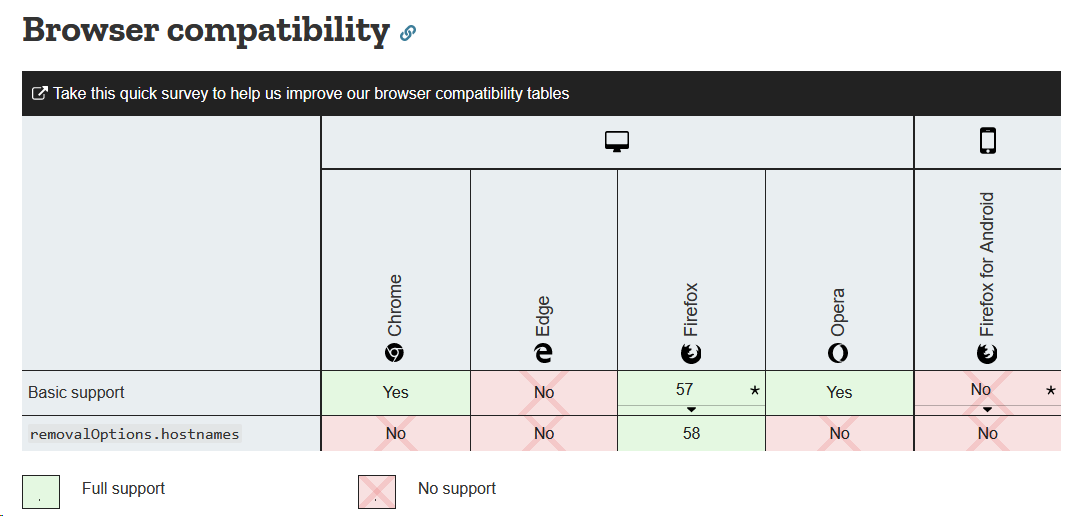
PSA: I'm going to remove the localstorage option on Android since it never worked.
Please turn off the setting for localstorage.

 ke-d
on 15 Jan 2019
ke-d
on 15 Jan 2019
I do have the same issue (60.4.0esr, freshly reinstalled CAD 3.0.0)
However I still get the "unexpected error" popup, even with "localstorage cleanup" unchecked.
What am I doing wrong ?
 guillaumesalagnac
on 15 Jan 2019
guillaumesalagnac
on 15 Jan 2019
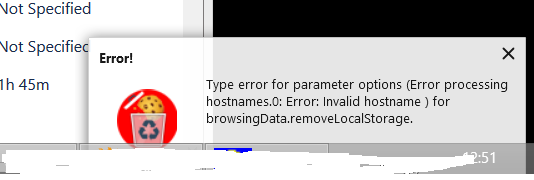
I can replicate this on desktop, too. FF 65.0b10 (64-bit Windows).
wilhepworth
on 15 Jan 2019
mine just says "an unexpected error occurred". BTW this seems to happen after the 15s timeout (for automatic cleanup) but I can also trigger it just by clicking the yellow "clean up now" button in the CAD popup menu.
Le 15 janv. 2019 à 14:08, wilhepworth notifications@github.com a écrit :
I can replicate this on desktop, too. FF 65.0b10 (64-bit Windows).
—
You are receiving this because you commented.
Reply to this email directly, view it on GitHub, or mute the thread.
guillaumesalagnac
on 15 Jan 2019
@guillaumesalagnac Indeed, I can confirm clicking the yellow "clean up" does trigger the error.
lopis
on 15 Jan 2019
Same problem here. I don't have the localstorage storage enabled and i'm getting the error.
Error: "An unexpected error occurred" common-background-popup-setting.bundle.js:formatted:1311
I'm using Firefox container.
Version: 3.0.1
Windows 10
Firefox 64.0.2 (64 bits)
 sansnom
on 17 Jan 2019
sansnom
on 17 Jan 2019
Same here: Firefox 64.0.2 (64 bits) under Debian 9, CAD 3.0.1, Localstorage Cleanup disabled.
When I go to the extensions's Cleanup Log ("Journal de nettoyage" here in french, I'm not sure of the original wording), I get this error:
can't convert undefined to object
t.default</</n<@moz-extension://9b6e96d4-7e04-4c52-8f1a-2812cff186cd/bundles/common-popup-setting.bundle.js:20:5269
t.default</<@moz-extension://9b6e96d4-7e04-4c52-8f1a-2812cff186cd/bundles/common-popup-setting.bundle.js:20:5241
t.default<@moz-extension://9b6e96d4-7e04-4c52-8f1a-2812cff186cd/bundles/common-popup-setting.bundle.js:20:5219
po@moz-extension://9b6e96d4-7e04-4c52-8f1a-2812cff186cd/bundles/common-popup-setting.bundle.js:36:61969
Ko@moz-extension://9b6e96d4-7e04-4c52-8f1a-2812cff186cd/bundles/common-popup-setting.bundle.js:36:78334
Yo@moz-extension://9b6e96d4-7e04-4c52-8f1a-2812cff186cd/bundles/common-popup-setting.bundle.js:36:78711
Ai@moz-extension://9b6e96d4-7e04-4c52-8f1a-2812cff186cd/bundles/common-popup-setting.bundle.js:36:85134
Oi@moz-extension://9b6e96d4-7e04-4c52-8f1a-2812cff186cd/bundles/common-popup-setting.bundle.js:36:84514
Ii@moz-extension://9b6e96d4-7e04-4c52-8f1a-2812cff186cd/bundles/common-popup-setting.bundle.js:36:90725
Sn@moz-extension://9b6e96d4-7e04-4c52-8f1a-2812cff186cd/bundles/common-popup-setting.bundle.js:36:30438
at line 20
 pcdavid
on 17 Jan 2019
pcdavid
on 17 Jan 2019
When checking the debugger, there is an array with the error. For me, it was an array with 2 cookies. I decided to clean-up all my cookies and data. After that, the error is not present again. I should have tried cleaning only the two in question.
sansnom
on 18 Jan 2019
@sansnom thanks for this suggestion ; i just removed all cookies once (via the firefox settings page) and now it seems the "unexpected errors" are gone !
guillaumesalagnac
on 18 Jan 2019
@sansnom Any idea what the hostnames of the cookies were?
ke-d
on 18 Jan 2019
Had the same problem. Thanks @sansnom for your suggestion!
I have exported, deleted and then imported all my cookies and now popup is gone.
For export/import I use Cookie Quick Manager.
 enricoreich
on 18 Jan 2019
enricoreich
on 18 Jan 2019
@pcdavid I think this is a separate error. I'm going to log it.
Same here: Firefox 64.0.2 (64 bits) under Debian 9, CAD 3.0.1, Localstorage Cleanup disabled.
When I go to the extensions's Cleanup Log ("Journal de nettoyage" here in french, I'm not sure of the original wording), I get this error:
can't convert undefined to object
t.default</</n<@moz-extension://9b6e96d4-7e04-4c52-8f1a-2812cff186cd/bundles/common-popup-setting.bundle.js:20:5269
t.default</<@moz-extension://9b6e96d4-7e04-4c52-8f1a-2812cff186cd/bundles/common-popup-setting.bundle.js:20:5241
 hurtstotouchfire
on 22 Jan 2019
hurtstotouchfire
on 22 Jan 2019
Hi, unfortunately it took me days to find out who triggered this desktop notification.
Maybe you could add the name of the programm to any notifications. Otherwise your only hint is the icon. But unfortunately I did not recognize is, neither did google image search.
 pbengert
on 26 Jan 2019
pbengert
on 26 Jan 2019
This is happening for me (only) in Firefox Nightly (v67):
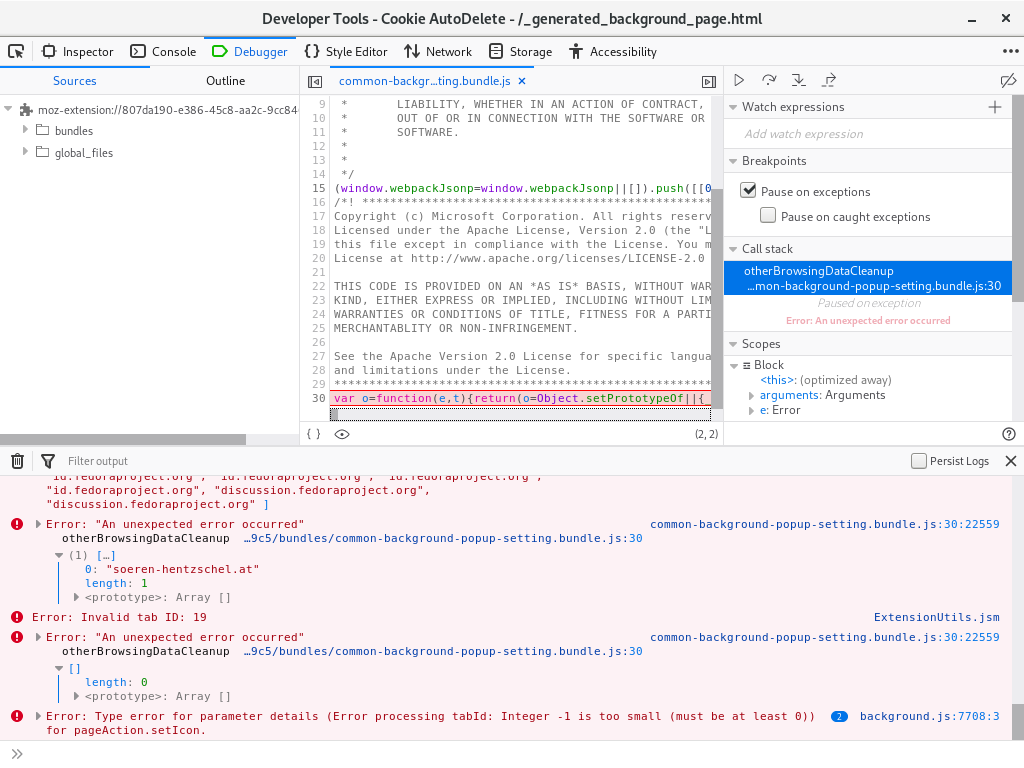
Console (errors) itself say:
Error: "An unexpected error occurred"
otherBrowsingDataCleanup moz-extension://807da190-e386-45c8-aa2c-9cc8466029c5/bundles/common-background-popup-setting.bundle.js:30
(1) […]
0: "soeren-hentzschel.at"
length: 1
<prototype>: Array []
common-background-popup-setting.bundle.js:30:22559
Error: Invalid tab ID: 19 ExtensionUtils.jsm
Error: "An unexpected error occurred"
otherBrowsingDataCleanup moz-extension://807da190-e386-45c8-aa2c-9cc8466029c5/bundles/common-background-popup-setting.bundle.js:30
[]
length: 0
<prototype>: Array []
common-background-popup-setting.bundle.js:30:22559
Error: Type error for parameter details (Error processing tabId: Integer -1 is too small (must be at least 0)) for pageAction.setIcon.
background.js:7708:3
makeError resource://gre/modules/Schemas.jsm:459
throwError resource://gre/modules/Schemas.jsm:2190
fixedArgs resource://gre/modules/Schemas.jsm:2258
map self-hosted:286
checkParameters resource://gre/modules/Schemas.jsm:2251
stub resource://gre/modules/Schemas.jsm:2334
updateBrowserAction moz-extension://d5479f7d-6b50-484d-9754-8869e3240b99/dist/background.js:7708
processPage moz-extension://d5479f7d-6b50-484d-9754-8869e3240b99/dist/background.js:7758
ondata moz-extension://d5479f7d-6b50-484d-9754-8869e3240b99/dist/background.js:7778
BTW, that you minify your source code really does not help debugging/in any way.
 rugk
on 3 Feb 2019
rugk
on 3 Feb 2019
@rugk From your logs, I'm not sure what's wrong with either CAD or Firefox. I do know that the An unexpected error error is because that's what the browser says. CAD just passes those errors up to the user. So Mozilla would probably know more than me about what's going on.
ke-d
on 16 Feb 2019
I'm seeing the same problem, also bugs out in ext-cookies.js with the same message, though in line 416. I'm using Firefox 66.0.2. The line is Services.cookies.remove(cookie.host, cookie.name, cookie.path, false, cookie.originAttributes);
Sounds like a problem in Firefox indeed.
Maybe until it gets fixed, do a try-catch around the offending API call and on catch, alert the user like "cookie {name} from {domain} could not be removed due to a bug in Firefox"? Or write it to the cleanup logs after alerting the first time? Given how lax mozilla has been (and is being) with reimplementing their add-on system in web extension APIs, I don't expect this will get fixed any time soon. Might be good to alert users about a website being able to set this kind of supercookie.
 bleetsheep
on 8 Apr 2019
bleetsheep
on 8 Apr 2019
Well… first of all, you would need a bug report for Mozilla. And identify what exactly is causing this error…
Before that, they cannot fix it nor can you even blame them.
After all, it's not yet sure whether this add-on just uses the API incorrectly, it is a bug in this add-on or what is wrong here.
I am now using a different add-on and did not have any of these issues, it works much more stable, so I have no idea what was causing this issue here.
rugk
on 8 Apr 2019
I just tried to remove site data one by one, guided by cookies.sqlite to see which domains have cookies with odd characters. Nothing worked. Eventually I had cleared all the entries individually, but the error still occurred. Then I used the 'clear all data' button, tried it again, and now the alert is gone.
I have a tar from ~/.mozilla/firefox/$profile/storage/ and a copy of cookies.sqlite, both from before and after the final clean that seems to have fixed it. I'm not sure what data can be recovered from it and this is my work laptop (I did not have the issue on my private laptop), so I can't share the files, but if there is anything I should look at, I could inspect the file(s) and report back.
bleetsheep
on 8 Apr 2019
Closing this due to the following reason(s):
- Created a while ago
- Was for an old/stale version of CAD, Firefox and/or Chrome
- Comments diverting from original issue/feature.
If this issue is still happening on the latest version, create a new one with updated bug details and screenshots.
 kennethtran93
on 18 Jun 2019
kennethtran93
on 18 Jun 2019
Related issues
 xenopeek
·
4Comments
mooms06
·
7Comments
xenopeek
·
4Comments
mooms06
·
7Comments
 haarp
·
3Comments
haarp
·
3Comments
 GSF1200S
·
4Comments
GSF1200S
·
4Comments
 MarkRH
·
5Comments
MarkRH
·
5Comments
Most helpful comment
I do have the same issue (60.4.0esr, freshly reinstalled CAD 3.0.0)
However I still get the "unexpected error" popup, even with "localstorage cleanup" unchecked.
What am I doing wrong ?