Cookie-autodelete: (Localstorage) "Type error for parameter options" error
Describe the Bug/Feature
I get the following error notification when I visit/close certain sites:
Type error for parameter options (Error processing hostnames.0: Error: Invalid hostname) for browsingData.remove.LocalStorage.
Screenshot in which the bug can be seen
Steps for anyone to reproduce the bug
Your settings
- OS/version: Windows 10 1809
- Browser/version: Firefox 64.0.2
- Cookie AutoDelete version: 3.0.0
 Whocaresman
All 29 comments
As expected, turning off the Local Storage option fixes this, but it comes right back when I enable it.
Whocaresman
on 13 Jan 2019
Is this on Android?
Also which sites does this happen on?
 ke-d
on 13 Jan 2019
ke-d
on 13 Jan 2019
Windows 10.
It seems to happen on any site utilizing local storage.
Whocaresman
on 13 Jan 2019

Do you get anything after Error: invalid hostname like in this example dfdsfsdfds@ is not a valid hostname. Check the debugging window in about:debugging.
Edit: Or maybe it's an empty space like this one

ke-d
on 13 Jan 2019
Yes, there's an empty space after "hostname."
Whocaresman
on 13 Jan 2019
Ok so I think the problem is the removeLocalStorage call doesn't like empty hostnames or hostnames with a space.
Cookie-AutoDelete_Firefox_Dev_190112_2327.zip
Can you try this patched version to see if it fixes your issue. If not the console in the patched version should show all the hostnames that's being passed into the function. There might be some odd hostname in there. Thanks!
ke-d
on 13 Jan 2019
Hi there, I am getting the same error. Where can I look at the error output?
I am looking in the debug window (F12) but I do not know where exactly where to search for it.
Thanks.
 Charliopoulos
on 13 Jan 2019
Charliopoulos
on 13 Jan 2019
I used your zip file and I still get a similar error:
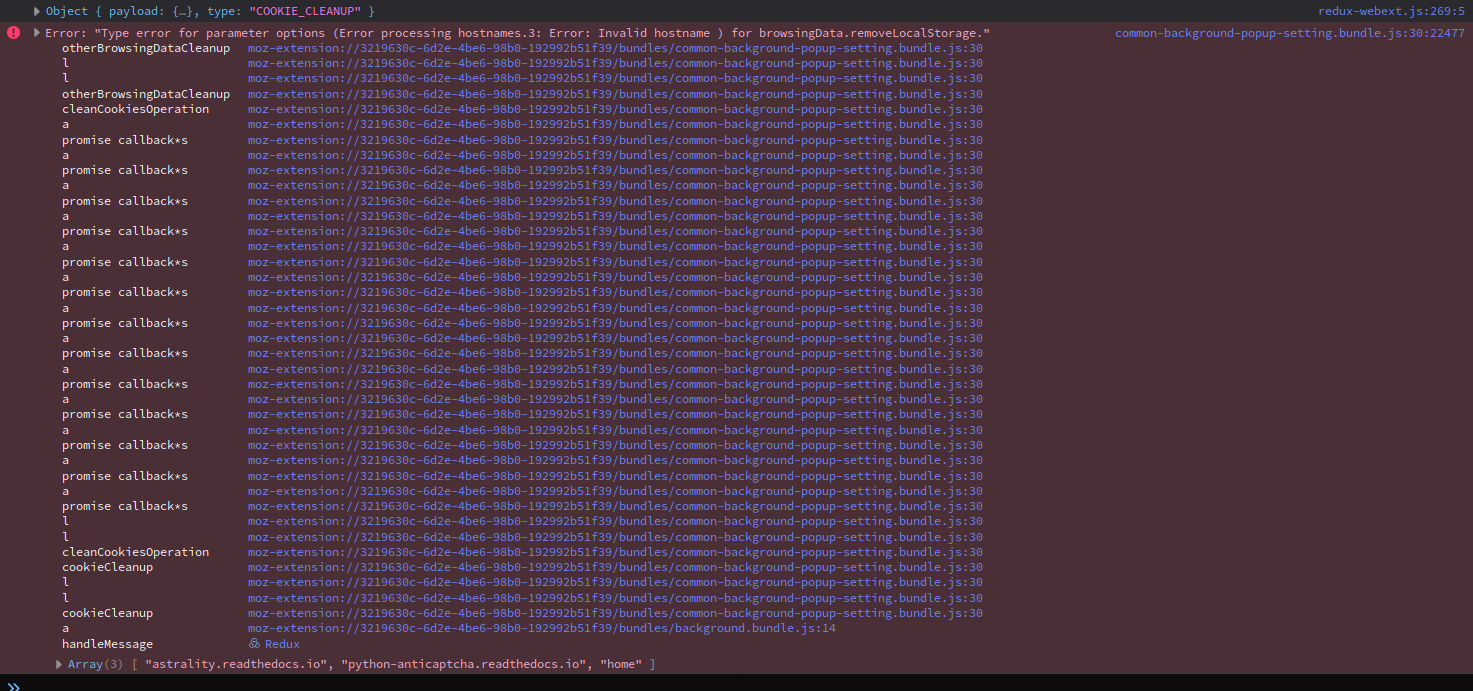
Edit: You can debug the extension when you put about:debugging in your address bar. There you can load the zip file (I disabled the real extension before) and click on debug. May only work in Nightly
 SpineEyE
on 13 Jan 2019
SpineEyE
on 13 Jan 2019
Experiencing the same bug on Debian Linux stable. Appears to be happening with every site.
 ChthonVII
on 13 Jan 2019
ChthonVII
on 13 Jan 2019
Same here. Linux (Xubuntu) and Firefox.
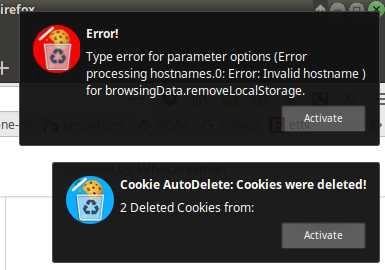
p.s. It's also kicking up "an unexpected error occurred" in FF Android.
 mvario
on 13 Jan 2019
mvario
on 13 Jan 2019
I've been getting this error also.
Type error for parameter options (Error
processing hostnames.0: Error: Invalid
hostname ) for
browsingData.removeLocalStorage.
The numeral, 0, in hostnames.0: changes with each occurrence.
The error occurs when any tab is closed. I'm pretty sure it started after updating to FF 64.0.2. I am using v3 of Cookie AutoDelete.
I'm on Win7 SP1 with all updates except January.
 grinlap
on 13 Jan 2019
grinlap
on 13 Jan 2019
The error occurs when any tab is closed. I'm pretty sure it started after updating to FF 64.0.2. I am using v3 of Cookie AutoDelete.
In my case it began the 12.01. which is the same day the update to v3.0.0 happened. And in my case it also occurs if I leave the tabs open. I had changed the trigger.
Charliopoulos
on 13 Jan 2019
@SpineEyE (other people are welcome to try this as well) In the same console debugging window, try running these commands and see if you get the same output.
You can also run these commands if you open up the console in CAD settings.
await browser.browsingData.removeLocalStorage({hostnames: ['home']})
await browser.browsingData.removeLocalStorage({hostnames: ['astrality.readthedocs.io', 'python-anticaptch.readthedocs.io', 'home']})
await browser.browsingData.removeLocalStorage({hostnames: [' ']})
await browser.browsingData.removeLocalStorage({hostnames: ['']})

Also perhaps try it in a new profile with just CAD as it might be some browser setting.
ke-d
on 13 Jan 2019
Re Charliopoulos
I'm sure mine occurred later than 12/1 but it's possible that it occurred when Auto CookieDelete was updated. I have auto updates set so I never see a notification of the extension updates.
grinlap
on 13 Jan 2019
ke-d
on 13 Jan 2019
Works for me, I have not checked if everything else still works tho.
*edit: I noticed that the popup which notifies about deleted cookies still does not show a hostname.
It say something like "5 cookies deleted from: "
(Linux, Firefox 65.0b10 (64-bit) Developer Edition)
Cheers
 sxe
on 13 Jan 2019
sxe
on 13 Jan 2019
I can confirm that this happens on Android too. Firefox gives "An unexpected error happened" notification in the notification bar. Doesn't show anymore if I disable local storage support.
 SeriousHoax
on 13 Jan 2019
SeriousHoax
on 13 Jan 2019
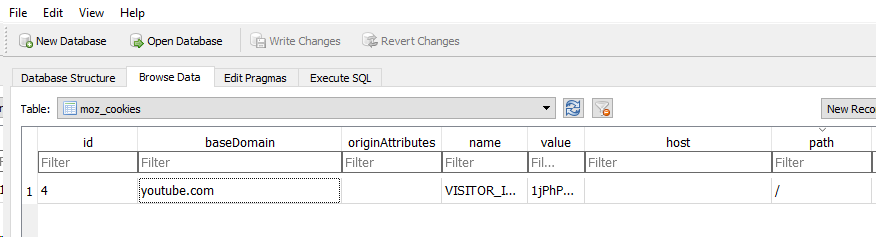
I was able to reproduce this by opening cookies.sqlite in DB browser for SQLLite and replacing one of the cookie's host to one space.
I'm not sure how this happens in the real world where a cookie ends up orphaned without a domain tied to it. It also seems like the cookie API can't remove these either, so what I'm going to end up doing is ignoring those cookies.
Patch 3 (@sxe Should contain the fix to ignore those cookies so no more of the "5 cookies deleted from: "):
Cookie-AutoDelete_Firefox_Dev_190113_1719.zip
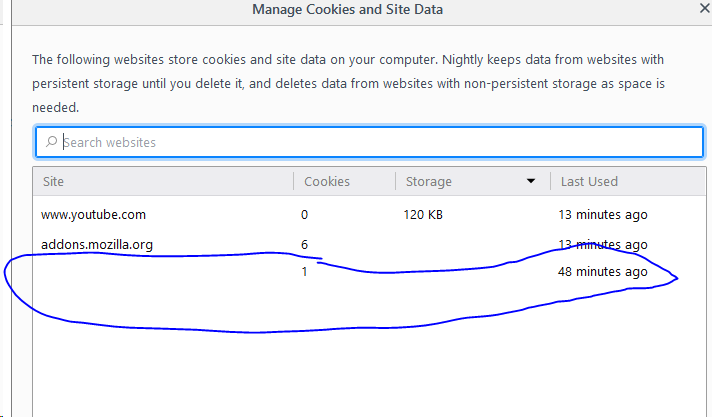
Maybe removing those one space hostname cookies in the cookies manager could be a way to resolve this.
In any case, I'll release the patched version in a couple of days after more testing.
@SeriousHoax
That's a different issue. The implementation for removing localstorage was actually never in Android despite it being in Desktop Firefox. See this. So I'm going to remove that Localstorage setting on Firefox Android.
To everyone else:
The reason why this appears only in 3.0.0 is because of #437. So before 3.X.X, all these errors were silently failing (and probably not cleaning correctly) until I pushed those errors up into a notification. So all this error information will help me improve CAD. Thanks again!
ke-d
on 14 Jan 2019
Same here on Linux Mint 19.1, but not - unless it is because I've visited different sites on the two computers - Windows 8.1. I look forward to trying the new version that incorporates the fix. EDIT: one of my cookies had no name, I find. I've deleted it. I'll see whether the notification persists.
 ghost
on 14 Jan 2019
ghost
on 14 Jan 2019
@mrdokenny the latest zip file works without errors. I also had a look at my sqlite database and found 3 entries with baseDomain=''. I removed then and now also 3.0.0 of your addon works without the error.
What I found unsettling about these database entries is that they all seem to be set by google...
"608642"    "608642"    ""  ""  "google_experiment_mod" "169"   ""  "/" "2147483647"    "1543838372596362"  "1543838372596362"  "0" "0" "0" "0"
"646474"    "646474"    ""  ""  "_ga"   "GA1.1.1552693682.1546872319"   ""  "/" "1609944318"    "1546872318954892"  "1546872318954892"  "0" "0" "0" "0"
"646475"    "646475"    ""  ""  "_gid"  "GA1.1.1787974708.1546872319"   ""  "/" "1546958718"    "1546872318956063"  "1546872318956063"  "0" "0" "0" "0"
@mrdokenny thanks for the quick fix.
With Cookie-AutoDelete_Firefox_Dev_190113_1719.zip both works for me now.
Cheers
sxe
on 14 Jan 2019
Please don't make it "ignore those cookies". I prefer that the error message inform me there's something suspicious looking that needs my attention.
I came here due to the same error message and manaully removing the data from the mysterious source cleared it up for me as well.
 Madeupname722
on 14 Jan 2019
Madeupname722
on 14 Jan 2019
Maybe removing those one space hostname cookies in the cookies manager could be a way to resolve this.
Erasing the "whitespace" domain manually from the mozilla options solved the problem. So no need for sql queries :)
Charliopoulos
on 14 Jan 2019
The reason why this appears only in 3.0.0 is because of #437. So before 3.X.X, all these errors were silently failing (and probably not cleaning correctly) until I pushed those errors up into a notification.
Yep, I've seen a one space hostname cookie a couple of times since using CAD and was wondering where it came from and why it wasn't deleted by CAD. Never looked into it though until the error message started to appear. Could it have something to do with CAD that it's appearing in the first place?
 0x7969
on 14 Jan 2019
0x7969
on 14 Jan 2019
@ypsy How long have you had your profile without doing a full profile reset (not including Refresh Firefox since I think that carries your cookies over).
If you had your profile before FF Quantum (57) it's possible a mixture of old settings and pre-quantum extensions did some stuff to cause this since they had access to the actual sqllite database.
IMO, it's might be beneficial to start your profile over from new (not using refresh) every couple of months/years to get rid of old crud.
ke-d
on 14 Jan 2019
@ypsy How long have you had your profile without doing a full profile reset
More than a couple of years I think haha. Might be a good occasion to start a new one :smile:
Thanks for helping!
0x7969
on 14 Jan 2019
Marking to be resolved... since no one has commented for a while.
ke-d
on 16 Feb 2019
Started experiencing this error since yesterday. 3.2.0 on FF 75 (macos)
 Blizzke
on 24 Apr 2020
Blizzke
on 24 Apr 2020
An updated issue #699 was made and is in progress of trying to get it fixed again. It has to do with either empty/invalid hostname values and urls that uses file:// protocols.
 kennethtran93
on 25 Apr 2020
kennethtran93
on 25 Apr 2020
Related issues
 gwarser
·
7Comments
gwarser
·
7Comments
 erotavlasme
·
3Comments
erotavlasme
·
3Comments
 mooms06
·
7Comments
mooms06
·
7Comments
 xenopeek
·
4Comments
xenopeek
·
4Comments
 nkestrel
·
6Comments
nkestrel
·
6Comments
Most helpful comment
I was able to reproduce this by opening
cookies.sqlitein DB browser for SQLLite and replacing one of the cookie'shostto one space.I'm not sure how this happens in the real world where a cookie ends up orphaned without a domain tied to it. It also seems like the cookie API can't remove these either, so what I'm going to end up doing is ignoring those cookies.
Patch 3 (@sxe Should contain the fix to ignore those cookies so no more of the
"5 cookies deleted from: "):Cookie-AutoDelete_Firefox_Dev_190113_1719.zip
Maybe removing those one space hostname cookies in the cookies manager could be a way to resolve this.

In any case, I'll release the patched version in a couple of days after more testing.
@SeriousHoax
That's a different issue. The implementation for removing localstorage was actually never in Android despite it being in Desktop Firefox. See this. So I'm going to remove that Localstorage setting on Firefox Android.
To everyone else:
The reason why this appears only in 3.0.0 is because of #437. So before 3.X.X, all these errors were silently failing (and probably not cleaning correctly) until I pushed those errors up into a notification. So all this error information will help me improve CAD. Thanks again!