Cookie-autodelete: Feature Request: Display Cookies Cleanup Log
Feature Request: Display Cookies Cleanup Log
Sometimes it's needed to track history of cleaned cookies.
This could be useful when some site doesn't work as expected because its cookie(all or some) had been deleted.
In this case user could track that deleted cookie and try to whitelist it fix site behavior.
Currently this information is shown in popup but in most cases (because the time gap is short) this isn't enough to memorize that cookie path.
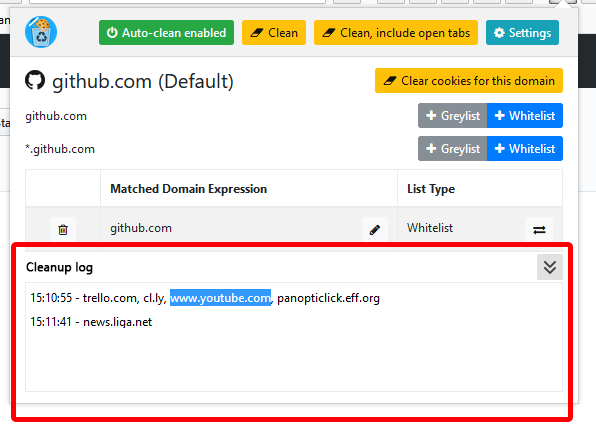
The better approach to achieve this is to add additional section with cookie deletion log.
An ability to copy some of its parts(domain URLs) to clipboard could improve it even better.
Few addons from pre WebExtention era had this feature
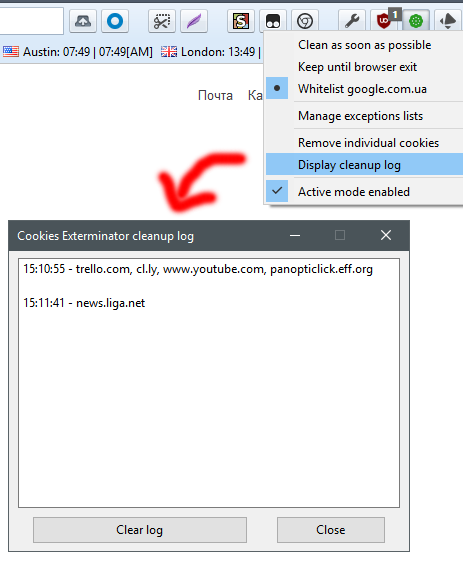
Maybe you consider adding something similar.
I've made some basic mock-up how this could look like without going out of current styling
Screenshot mock-up
Your settings
- OS/version: Win10 x64
- Browser/version: Nightly 58.0a1 (2017-10-26) (64-bit)
- Cookie AutoDelete version: 2.0.1
 Acid-Crash
All 20 comments
Still a WIP but here's a sample screen shot. Hopefully this will result in less issues reported on specific sites :)

 ke-d
on 14 Apr 2018
ke-d
on 14 Apr 2018
@Acid-Crash @somini @zero77 @gwarser @mooms06 @drcheap and also anyone else who would like to chime in.
Since you guys expressed interest in this feature, feel free to test out 2.2.0b1 and give some feedback on any wording that might be unclear or confusing before I submit these strings for translation on crowdin. Note that the old setting Log Total Number Of Cookies Deleted is now replaced with Enable Cleanup Log and Counter
For the list of strings used for the Cleanup log:
https://github.com/Cookie-AutoDelete/Cookie-AutoDelete/blob/Development/extension/_locales/en/messages.json#L128-L195
ke-d
on 20 Apr 2018
Hi, Just tested the feature. Looks OK to me.
A bit sad that it's located in a separate settings section page (instead of the pop-up window) but it works and that is good.
Stull will be super happy if it will appear in pop-up someday...
Acid-Crash
on 20 Apr 2018
I will prefer more tabular representation and some filtering (overwhelmed by whitelisted entries now).
I'm not sure reasonTabsWereIgnored and reasonTabsWereNotIgnored will work for all languages if concatenated (for Polish is ok).
 gwarser
on 20 Apr 2018
gwarser
on 20 Apr 2018
@mrdokenny
Thanks for notifying us, I think this new edition looks good, and improves things and I think its implemented well.
Although, after a while it gets a bit cluttered, I appreciate you were being thorough but, the extra explanations make it a bit distracting when there’s lots of entries.
It may be simpler to just have the domain / sub domain in red or green without the extra explanation.
Also, having an option to clear the logs all or individually or just logs with 0 cleaned as they seem to build up quickly.
Additionally, having it in the pop-up window as well as settings would be nice, unless it is already and I have missed it so far.
Thanks
 zero77
on 20 Apr 2018
zero77
on 20 Apr 2018
I would agree with @gwarser and choose a tabular representation, but it looks good to me as the first version.
I don't feel adding it to the popup is necessary because it doesn't seem like a feature that it's used so often. Putting a direct link seems a better option.
 somini
on 21 Apr 2018
somini
on 21 Apr 2018
Like other people, I find that I'm overwhelmed by whitelisted entries in the log; usually I have any number of retained cookies and only a few cookies that were deleted. I think it would be better to summarize all of the retained cookies in one line somehow, even if it's just 'N cookies retained for various reasons'. As far as the log report of deleted cookies goes, I think it'd be nice if each site's entry said how many cookies was deleted; as it stands, the log will tell you how many cookies in total were deleted, but you don't know how many came from which site.
Count me as one of the people who'd love a link to either the log page as a whole or the most recent log in the popup. As it stands, checking at the log is awkward; you have to go to settings and then the right pane of it and so on. I think it'd also be great if the popup showed a summary of the most recent cleanup; perhaps 'N cookies cleaned' (perhaps with 'X retained' as well). Some summary of where the deleted cookies came from would be nice too, but it might be too verbose.
 siebenmann
on 23 Apr 2018
siebenmann
on 23 Apr 2018
A bit sad that it's located in a separate settings section page (instead of the pop-up window) but it works and that is good.
I'll do that in the next beta.
I will prefer more tabular representation and some filtering
Yeah that's a good suggestion.
Although, after a while it gets a bit cluttered, I appreciate you were being thorough but, the extra explanations make it a bit distracting when there’s lots of entries.
It may be simpler to just have the domain / sub domain in red or green without the extra explanation.
The whole idea is that some people get confused on why certain site cookies get deleted/don't get deleted like #302 #333 #285 #268 #351 #360 #363 #372 #379 #388 #389 (and possibly more, so it's worth addressing). Something like this would help people debug if it's actually something on their side and not an actual extension issue.
ke-d
on 26 Apr 2018
The whole idea is that some people get confused on why certain site cookies get deleted/don't get deleted like #302 #333 #285 #268 #351 #360 #363 #372 #379 #388 #389 (and possibly more, so it's worth addressing). Something like this would help people debug if it's actually something on their side and not an actual extension issue.
Yes that makes sense although, perhaps it may be better to make the lay out a lot simpler by default, but give filtering options like others have said hear, for the users who wanted to use it for debugging and not just as info.
zero77
on 1 May 2018
My impression is that part of the issues are that the current log is trying to address two audiences at once. One audience is interested in what cookies have recently been deleted, for various reasons; for them a log of discarded cookies (only) is most useful. A second audience is trying to diagnose why cookies have been retained or deleted; these people need some sort of breakdown or even a search by site name (perhaps with the default being 'this site').
Life might be simpler if these two functions were split apart somehow, either with an explicit 'diagnose cookie discarding' state or just focusing the log on one or the other in its initial state (I'd like 'log of deleted cookies' as the default, but I'm not objective here).
siebenmann
on 2 May 2018
2.2.0b2 has filtering options and the cleanup log in the popup.
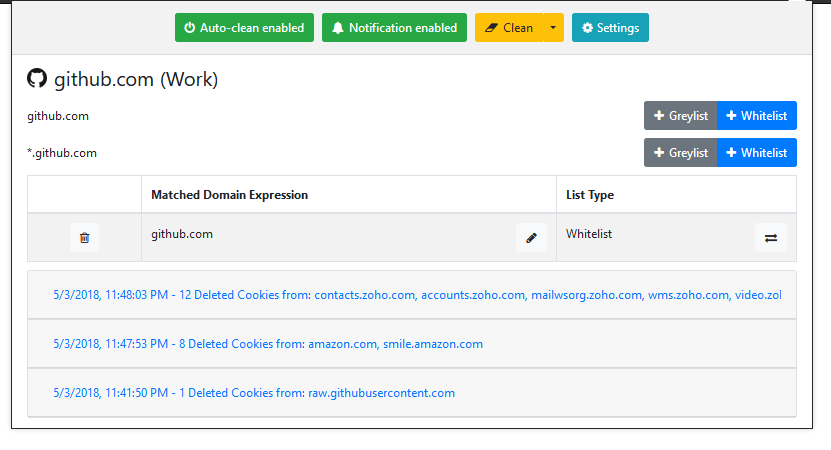

Let me know what you guys think :)
ke-d
on 4 May 2018
Is filtering implemented? I see only "deleted" entries.
gwarser
on 4 May 2018
@gwarser Yeah you can filter by Clean or Keep in the Cleanup log in the settings.
ke-d
on 4 May 2018
I'm talking about log in settings. Nothing changes when clicking on radio buttons.
gwarser
on 4 May 2018

I'm not sure what you are talking about. When you expand the card, the sites get filtered.
ke-d
on 4 May 2018
Expandable... :man_facepalming: Thats why they look so short
gwarser
on 4 May 2018
Is "Clean" reused? From button in popup? If yes, please add another string.
https://user-images.githubusercontent.com/17077613/39634771-8057a34e-4f70-11e8-97d3-e43e9b6c4c8c.png
gwarser
on 8 May 2018
@gwarser Is there a difference?
ke-d
on 8 May 2018
I can leave it as is (good enough), however will be better to change it.
Difference is like "Clean these cookies!" vs "Show cleaned cookies" (including capitalization).
"Wyczyść" vs "Filtr: -brak -wyczyszczone -zachowane"
gwarser
on 8 May 2018
I've got the current beta version installed and I want to say that I quite like the new (current) interface. It's great at giving me a quick peek at recently deleted cookies and assuring me that cookies are getting deleted, and the log section of the settings works fine for deeper diagnostics.
siebenmann
on 10 May 2018
Related issues
 AtomicRobotMan0101
·
3Comments
AtomicRobotMan0101
·
3Comments
 nkestrel
·
6Comments
gwarser
·
5Comments
nkestrel
·
6Comments
gwarser
·
5Comments
 odiasodias
·
6Comments
gwarser
·
3Comments
odiasodias
·
6Comments
gwarser
·
3Comments
Most helpful comment
Still a WIP but here's a sample screen shot. Hopefully this will result in less issues reported on specific sites :)