Cookie-autodelete: How to turn off notification window
Describe the Bug/Feature
There is no way to turn off that annoying notifications window!
Screenshot in which the bug can be seen
Steps for anyone to reproduce the bug
Your settings
- OS/version:
- Browser/version:
- Cookie AutoDelete version:
 odiasodias
All 6 comments
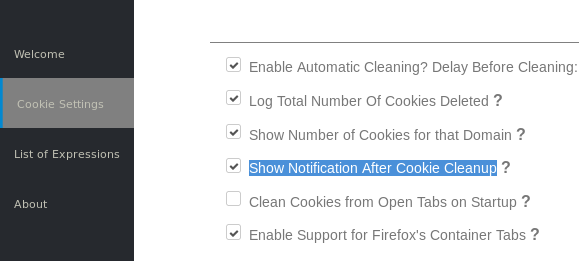
 gwarser
on 7 Nov 2017
gwarser
on 7 Nov 2017
Thank You very much
Get Outlook for Android
On Tue, Nov 7, 2017 at 12:33 PM +0000, "gwarser" notifications@github.com wrote:
—
You are receiving this because you authored the thread.
Reply to this email directly, view it on GitHub, or mute the thread.
odiasodias
on 7 Nov 2017
THese should really, really be off by default.
 tkoham
on 9 Nov 2017
tkoham
on 9 Nov 2017
I agree...
Get Outlook for Android
On Thu, Nov 9, 2017 at 4:30 AM +0000, "tkoham" notifications@github.com wrote:
THese should really, really be off by default.
—
You are receiving this because you authored the thread.
Reply to this email directly, view it on GitHub, or mute the thread.
odiasodias
on 9 Nov 2017
Nah - notifications are helpful when you're trying to debug, which is most of us when we first start using this addon.
 chiraag-nataraj
on 9 Nov 2017
chiraag-nataraj
on 9 Nov 2017
Nah - notifications are helpful when you're trying to debug, which is most of us when we first start using this addon.
Yes, otherwise how else would you know that it's working properly other than looking in the native cookie manager.
 ke-d
on 14 Nov 2017
ke-d
on 14 Nov 2017
Related issues
 haarp
·
3Comments
haarp
·
3Comments
 05nelsonm
·
5Comments
gwarser
·
7Comments
gwarser
·
5Comments
05nelsonm
·
5Comments
gwarser
·
7Comments
gwarser
·
5Comments
 xenopeek
·
4Comments
xenopeek
·
4Comments
Most helpful comment