Cookie-autodelete: Localstorage Support
Follow up issues for IndexDB and other types of storage when we get there.
Future Solutions
Proper API for deleting Localstorage by hostname (both of these bugs seem to want to extend the browsingData API)
Pros
- Clear localstorage by site rather than all or nothing
- Should be easily added to the extension code since it seems like the extended API uses a list of hostnames which Cookie Cleanup conveniently returns
Cons
- No support yet
Unless there's a way to enumerate all localstorage, there's a way for this extension to miss some localstorage
- Ex. A site that uses no cookies and only localstorage (as cookie cleanup outputs site names for cookies that have been deleted to be sent into the localstorage cleanup)
- I find this very unlikely since almost all sites have cookies
- Ex. A current Cookie AutoDelete user who upgrades to a version that supports deleting localstorage will have their existing localstorage still there
- The user would have to clear all their localstorage after upgrade to get a "clean slate"
Firefox Blockers
[x] [Extend browsingData to support removing localStorage by host](https://bugzilla.mozilla.org/show_bug.cgi?id=1388428)
Chrome Blockers
- [ ] [78093](https://bugs.chromium.org/p/chromium/issues/detail?id=78093)
Current solutions
browsingData API
Pros
- Actual API for removing localstorage
Cons
- Not viable without the above bugs
- Current removalOptions only include the timeframe
Firefox Blockers
- [x] [Implement clearing of LocalStorage in browsingData API (Firefox 57+)](https://bugzilla.mozilla.org/show_bug.cgi?id=1355576)
Inject a content script that clears localstorage on page load (courtesy of reddit)
Code:
window.localStorage.clear();
window.sessionStorage.clear();
Pros
- Works in all browsers
- Better than the current browsingData API
- Will work with the whitelists
Cons
- Seems very hackish and its only a workaround
- Localstorage stays until the user visits the website again
- Probably have to come up with an algorithm to find the diff of the current tabs (between page loads) and only inject if there is a change (otherwise the injection would happen every time on site navigation)
- Because of this, this workaround will be on the backburner until I have some strategies about the best way to only inject the content script when it is needed
I'm thinking of doing the content script route as an experimental feature until the browsingData gets extended. Anyone else is free to give their input on how best to implement this.
 ke-d
ke-d
All 98 comments
The workaround you found seems quite OK, at least until Mozilla does not sort out the API.
Do you have any ETA for the workaround to be implemented?
 crssi
on 16 Jun 2017
crssi
on 16 Jun 2017
@crssi Probably once #20 is done and stable so hopefully by the end of summer. Things are subject to change like the workaround might not work as well as I thought but we'll see.
ke-d
on 17 Jun 2017
The tricky part here will be figuring out when to clear local storage. The content script will have to ask the backend if/when it should clear localStorage before it lets the rest of the page load. Unfortunately, you can't use a port as ports are asynchronous.
The best method I can think of is to inject a "clear-localStorage" cookie with onHeadersReceived and then read/delete it from the content script.
 Stebalien
on 19 Jun 2017
Stebalien
on 19 Jun 2017
@Stebalien I was planning on doing tabs.executeScript() at document_start and see how well that does.
Edit: There also the problem of injecting the same content script multiple times on a new page load on the same website.
ke-d
on 19 Jun 2017
Where will you call that function? Unless I'm mistaken, the only place one can synchronously "catch" a page load (pause it while you do something) is from onHeadersReceived and I'm not sure if you can programatically inject scripts at that point.
Stebalien
on 19 Jun 2017
There's the tabs.onUpdated event which I use to update the icon and calculate the number of cookies for that site.
ke-d
on 19 Jun 2017
I'm pretty sure that event is asynchronous so there's no way to guarantee that the content script will get injected before the page loads.
Stebalien
on 19 Jun 2017
Ex. A site that uses no cookies and only localstorage (as cookie cleanup outputs site names for cookies that have been deleted to be sent into the localstorage cleanup)
I find this very unlikely since almost all sites have cookies
Not frequent indeed yet sites using only localStorage do exist.
I have two in mind because bookmarked, the first is modest, the second is far more important since it is a search engine: ClockTab and Qwant
Cleaning the localStorage is indeed as imperious as cleaning cookies, for non white-listed sites of course.
 ghost
on 28 Jun 2017
ghost
on 28 Jun 2017
@zymase The only way I see this happening for those sites without an API to enumerate localstorage is to store the store the current domains in memory and find the diff between sites on page load. Another option that could work is to artificially set a temporary cookie, so that the cleanup would still get the hostname of the site. Personally 2nd one might be better for performance,
ke-d
on 28 Jun 2017
@mrdokenny I know the idea is to be constructive, always. I'm not at all into coding but from what I read concerning the possibility to read/analyze/edit localStorage with a Webextension it seems to be Mission:Impossible if the proper API is not made available. From there on, considering Mozilla's commitment to privacy, considering the highly privacy concern related to localStorage, I remain reasonably optimistic that Mozilla will work on that API. Should I be wrong, should Firefox 57 appear to consider localStorage as an exotic quest not worth being taken care of that I'd remain deaf to the company's credo of users' privacy and consider definitely an alternative to Firefox. Period.
If programmers in the light of Webextensions are required to support extensions as Atlas the weight of the planet on his shoulders then where are we leading to? Counter-progress? For the sake of what, "universal" extensions valid on all platforms on the basis of a leverage on the cheapest possibilities granted to extensions?
Good luck to all, and to extension programmers in particular, they'll need it.
ghost
on 28 Jun 2017
Is it possible to clear all local storage on startup?
SDC is able to do it even with e10s enabled.
ghost
on 28 Jun 2017
@zeepob , the Firefox SDC (Self-Destructing Cookies) add-on's developer faces the same problems:
Q: Will this add-on ever be multi-process (e10s) compatible?
A: Add-ons can't monitor sites' LocalStorage usage in e10s mode. This functionality will probably never be restored for legacy add-ons such as SDC. This means that the answer is "very likely never". You can still force-enable e10s and SDC should clean your cookies just fine, but it can only clean your LocalStorage when the browser starts.Q: Will this add-on make the jump to the WebExtension world?
A: I don't have the time for a full rewrite as a WebExtension. Enjoy it while it lasts.
As explained on the add-on's AOM page
The _Cookie AutoDelete_ add-on handles e10 I think, _SDC_ doesn't, at least not completely.
_Cookie Autodelete_ handles localStorage, _SDC_ doesn't
_Cookie Autodelete_ is a WebExtension, _SDC_ is not and will likely never be.
I'm still running SDC (on Firefox ESR 52.2.0) but one day or another (at latest at the EOL of FF52ESR) SDC will be obsolete, so the target is _Cookie Autodelete_ and the wish is to have it handle localStorage.
ghost
on 28 Jun 2017
@zymase I don't understand your answer.
SDC can't clear individual site local storage when e10s is enabled but it can clear local storage globally on startup. My question is if it's technically possible for Cookie Autodelete to do.
That ability is clear advantage of SDC running on latest firefox versions.
ghost
on 28 Jun 2017
@zeepob ,
SDC can't clear individual site local storage when e10s is enabled but it can clear local storage globally on startup.
That is correct. That is why I added _"at least not completely_.". I block e10 altogether here and now so I don't have to face the e10 restrictions when it comes to e10 incompatibility.
My question is if it's technically possible for Cookie Autodelete to do
SDC's developer says it's not possible. I have no idea, not being a coder myself.
In fact it appears that _Cookie Autodelete_ is facing two walls when it comes to handling localStorage: the WebExtension format and the e10 implications. Need I say both bother me and many of us?
ghost
on 28 Jun 2017
@zymase
SDC's developer says it's not possible
Well, you just quote him saying that's possible with e10s:
You can still force-enable e10s and SDC should clean your cookies just fine, but it can only clean your LocalStorage when the browser starts.
I wonder if it's possible for webextension too.
ghost
on 28 Jun 2017
@zeepob , I quoted above SDC' developer:
Add-ons can't monitor sites' LocalStorage usage in e10s mode. This functionality will probably never be restored for legacy add-ons such as SDC. This means that the answer is "very likely never". You can still force-enable e10s and SDC should clean your cookies just fine, but it can only clean your LocalStorage when the browser starts.
Seems explicit to me.
_This functionality will probably never be restored for legacy add-ons such as SDC_.
The point is to know if this functionality will or will not be made available on Webextensions by means of a dedicated API. Clear enough?
ghost
on 28 Jun 2017
It's very explicit and contradicts you saying that's not possible. I understand you have no knowledge to answer my question so please refrain from posting unrelated answers to me. Thanks.
ghost
on 28 Jun 2017
I tried to bring my contribution to your question by referring to what is known. I linger to find a contradiction when emphasizing on what the developer of an add-on similar to Cookie Auto delete wrote, explicitly. _To force enable e10 which will clean cookies but will clean localStorage only when browser starts_ is not what I call monitoring localStorage, neither is it SDC's developer opinion when he states "_Add-ons can't monitor sites' LocalStorage usage in e10s mode._ "
Is it a language problem of that of basic logic and understanding? Good luck.
ghost
on 28 Jun 2017
Maybe it's language. In my every post I was crystal clear that I talk about:
clearing all local storage on startup
Monitoring local storage and clearing it per domain is out of my question. Thank you.
ghost
on 28 Jun 2017
OK; @zeepob I have to agree that indeed your quest concerned _clearing all local storage on startup_
I will have missed that probably because, if it is for you a point of interest it is for me so far from what I expect from localStorage monitoring that unconsciously I misunderstood. From there on arguments mismatched. Neither a language nor a logic problem, obviously a wrong dialog triggered by an initial psychological bias.
I think we got it clear now :)
ghost
on 28 Jun 2017
@zymase
"Add-ons can't monitor sites' LocalStorage usage in e10s mode. "
That's only for legacy extensions because Mozilla broke the XUL API for monitoring localstorage when they were implementing e10s and don't want to fix it because they were moving on to WebExtensions.
See 1130859 and 1043081. It's not that with e10s extensions can't clear localstorage ever again, because there is an API to do so, but it's too general of an approach.
@zeepob
Is it possible to clear all local storage on startup?
Yes this should be possible with the general API (browsingData).
How the browsingData works currently is you pass in which type of storage you want to clean and the removal options. The only problem is that it only has the since property which means that I could pass 0 in it and it would clear all localstorage (as well as any other data that I specify).
What I want is another property hostname that I can pass in to delete data by site rather than only by time. The proper API is nice but this is probably the best for right now.
ke-d
on 28 Jun 2017
Just so everyone is on the same page now: what you need is a hostname option to be added to browsingData's removal options, and that's it?
 spinda
on 28 Jun 2017
spinda
on 28 Jun 2017
@mrdokenny thanks for the reply.
So what do you think about adding localstorage clearing at startup as opt-in feature? I think it would be better than nothing as currently we have.
ghost
on 28 Jun 2017
Just so everyone is on the same page now: what you need is a hostname option to be added to browsingData's removal options, and that's it?
@spinda Yes
Also one interesting to note that that Chrome bug is 6 years old by now, but hopefully Mozilla won't take that long.
So what do you think about adding localstorage clearing at startup as opt-in feature? I think it would be better than nothing as currently we have.
@zeepob They haven't added localstorage cleanup to browsingData yet. The related bug is under Current Solutions ->browsingData API -> Firefox Blockers and it's getting some activity from what I see. :)
ke-d
on 29 Jun 2017
Just following up on @zeepob's request -- I want to transition from SDC to a WebExtension (so thank you for working on this!). What practice would you recommend in the mean time to preserve privacy at a level similar to SDC? If I clear "Offline website data" in the "Clear history" option in Preferences->Privacy, will that clear localStorage and indexDB? I could do that by hand periodically (not quite as good as SDC doing it when a tab closes but close).
Or maybe I should just keep using SDC for now and wait for 1355576 so you can implement @zeepob's suggestion.
 wshanks
on 29 Jun 2017
wshanks
on 29 Jun 2017
Firefox's LocalStorage is all in the user's profile webappsstore.sqlite file. Once Firefox closed of course, deleting this webappsstore.sqlite file is radical; a new file will be initiated on next Firefox run. Beware nevertheless that LocalStorage may include data from sites the user has whitelisted (which then, as this is the case with SDC, is not removed in the same way cookies from whitelisted sites are not removed). Even though I (still) use SDC at this time, I have the CCleaner application include my webappsstore.sqlite file for deletion, just in case SDC would have missed a hit ...
ghost
on 29 Jun 2017
Some addons are using webappsstore.sqlite to store preferences so deleting the file can break them.
@willsALMANJ you can stick to SDC for now or use this sript with greasemonkey (or both)
ghost
on 29 Jun 2017
Some addons are using webappsstore.sqlite to store preferences so deleting the file can break them.
Indeed, and that's why deleting our webappstore.sqlite file is to be put on the account of a radical approach when no other way is available.
This is why add-ons such as SDC or Cookie AutoDelete consider that the same logic should apply to LocalStorage than to cookies : if the user whitelists a site then that site is authorized to keep cookies and LocalStorage data -- If not then cookies and LocalStorage data get wiped once the site is closed.
Generally speaking storage is a plea. Browsers, Firefox included, have tried numerous ways to legitimate sites' right and pertinence to keep an associated user's data in his profile. That is NOT necessary, cookies are far enough to keep a minimum when required and when required means when the user has decided to. Hence, LocalStorage is baloney and sites using it to keep the user's data rather than plain cookies are crooks.
Cookies, LocalStorage, Dom IndexedDB .... insane : INSANE. Cookies and that's all, cookies which are already by themselves totally misused compared to their initial function & meaning. All sites now (almost all) set a cookie, for nothing, just as another tracker item. CRAPS. Same with LocalStorage. CRAPS. Which is why add-ons such as SDC and now Cookie Autodelete are so worthy and an essential component in the light (or shade?!) of privacy.
And I have not mentioned the browser's cache, recommended by the developer of SDC (and an option in that add-on) to be cleaned regularly considering sites have the ability to add sniffing in one's caches as they have in one's history. Do we realize what has become of the Web? A universal spying entity. If you don't give a damn, fine, otherwise half-privacy as half-pregnancy doesn't exist : it's yes or no.
Keep on the good work, guys.
ghost
on 29 Jun 2017
Thanks for the suggestion of using Greasemonkey (I see those commands were suggested in the opening post here as well). I can try that out with Cooke Autodelete as a replacement for SDC until the WebExtension API's are added (since it's not clear that Greasemonkey will become a WebExtension).
What about IndexedDB? Is that cleared by clearing localStorage and sessionStorage? Also, is IndexedDB covered by this ticket, or only localStorage?
wshanks
on 30 Jun 2017
@willsALMANJ
(since it's not clear that Greasemonkey will become a WebExtension).
https://addons.mozilla.org/en-US/firefox/addon/violentmonkey/
What about IndexedDB? Is that cleared by clearing localStorage and sessionStorage? Also, is IndexedDB covered by this ticket, or only localStorage?
Assuming Mozilla adds the hostname property, it "should" work for all the DataTypeSets including IndexDB, which could get a little interesting cause SDC doesn't clear most of these (like cache) by hostname. So basically it would be like a "Forget this site" once you close all the tabs of the site.
Even if they can't add the parameter for all of them (like cache), it would be fine to have just the localstorage and indexedDB.
ke-d
on 30 Jun 2017
SDC handles cooikies, localStorage and caches, not the IndexedDB data
IndexedDB is all in the user's profile 'storage' folder and managed by storage.sqlite. As far as I know nothing cleans the user's indexedDB, except deleting the storage folder together with the storage.sqlite file (once Firefox closed of course).
If many sites require
dom.indexedDB.enabled
to be set to _true_, which is the default Boolean value, most won't deposit any data, they just need it, why? No idea; some sites will deposit data, like the Webmail site posteo.de, but most don't yet their pages won't display correctly if dom.IndexedDB is set to false (i.e. laposte.fr).
Funny thing:
Replace Firefox's default home page (about:home) by another page (i.e. about:blank)
Close Firefox then in the current Firefox profile, delete the storage folder and the storage.sqlite file
Restart Firefox : in the current profile the storage folder and the storage.sqlite file have not been rebuilt.
Open a site requiring dom.indexedDB = true without actually using it, such as above mentioned laposte.net and the site will display correctly.
Now, if you reset Firefox's default home page to about:home and restart Firefox, both the storage folder and the storage.sqlite file are rebuilt on Firefox start.
One thing is sure, Firefox's home page not only triggers the storage folder/file but uses it as well, and my speculation is that this storage comes in very handy to Firefox's about:home and about:newtab pages when it come to performing what these pages allow, including a quick look on the user's visited sites.
I avoid about:home and about:newtab. Start Page is whatever except about:home and the new tab calls the page set as the start page.
Slightly off-topic with this extent over our concern, storage, IndexedDB and mainly LocalStorage.
Moreover you will have noticed that English is not my mother-tongue and be thanked for your tolerance.
ghost
on 30 Jun 2017
most won't deposit any data, they just need it, why? No idea;
When I checked long time ago, jQuery or one of its plugins checks for indexedDb, and crashes if is not avliable. Bug was closed as wontfix.
 gwarser
on 30 Jun 2017
gwarser
on 30 Jun 2017
When I checked long time ago, jQuery or one of its plugins checks for indexedDb, and crashes if is not avliable. Bug was closed as wontfix.
Thanks for recalling that. That's why I keep it enabled.
I could/should have emphasized on what is mentioned in Pants' Ghacks User.js:
If set as false (disabled) [_dom.indexedDB.enabled_], this WILL break some [old] add-ons and DOES break a lot of sites' functionality. Applies to websites, add-ons and session data
That's the facts but doesn't explain why this fantasy (as all storage) is required by some add-ons, some sites, some sites which don't even use it. I'm not a programmer so I'll put this mystery on the account of my ignorance (and rename _fantasy_ to _oddity_)
ghost
on 30 Jun 2017
SDC handles cooikies, localStorage and caches, not the IndexedDB data
IndexedDB is all in the user's profile 'storage' folder and managed by storage.sqlite. As far as I know nothing cleans the user's indexedDB, except deleting the storage folder together with the storage.sqlite file (once Firefox closed of course).
If many sites require
dom.indexedDB.enabled
to be set to true, which is the default Boolean value, most won't deposit any data, they just need it,
FWIW, there is also the Disable IndexedDB add-on which disables IndexedDB reliably. Unfortunately it doesn't work on a per-site basis, hence it's not possible to whitelist specific sites so you have to _manually_ disable the add-on for them. Its github site is rather dormant - it seems that the add-on is no longer actively maintained.
 curiosity-seeker
on 30 Jun 2017
curiosity-seeker
on 30 Jun 2017
The _Disable IndexedDB_ Firefox add-on does the job indeed. I had it installed at one time after which I replaced it with another approach, that of the _Custom Buttons_ add-on.
If you happen to be in need of several toolbar buttons performing various tasks you can install the add-on then add various buttons.
_Custom Buttons_ add-on is available on AMO and on a dedicated forum. At one time the version on AMO was outdated so personally I had installed the custom_buttons-0.0.5.8.9-fixed2-signed from the link provided on that forum.
From there on, one of the interesting buttons made available for the add-on is the Preference Switcher (Basic) button. The button, as most others, may be duplicated with different settings, for instance,
Button 1 toggles dom.indexedDB.enabled (true/false)
Button 2 toggles security.mixed_content.block_display_content (true/false)
etc...(these 2 and others used here)
The advantage is that you have one add-only with a quasi infinity of settings possibilities.
Anyway, be it the _Disable IndexedDB_ add-on or the _Custom Button_ approach, both indeed require the user's input as there is no per-site global setting.
If Firefox, if whatever browser wants to handle storage on a user's computer, ok but then at least be the handling (on/off/per-site) correctly provided as it is with cookies. At this time storage is NOT accompanied by quick switches and this is not correct.
EDIT : I forgot to mention essential points because I'm still in the legacy add-ons and non e10 Firefox ESR 52 state of facts and mind : The Custom Buttons add-on is a legacy add-on and I don't believe it will be brought to its Webextension equivalency (because not technically feasible), moreover it is not e10 compliant. OK, long live WebExtensions and Electrolysis but for anyone handling 68 add-ons with hardly a third bound to survive when Webextensions (2017-11) and e10 (later on) become mandatory, when that someone prefers their incredible contribution to a user-tailored browser rather than the Eldorado of universal Webextensions and so called security provided by e10 ... it is understandable I guess that a clash is in perspective. This is why I'm struggling to find add-ons such as the _Cookie Autodelete_ worked on here to keep hope that Firefox will remain an adventure for me.
ghost
on 30 Jun 2017
IMO best way to deal with indexedDB is to set to read-only two folders inside your-firefox-profile/storage directory. Those folders are default and temporary. Leave the permanent untouched as it can store extensions data.
Now you can leave dom.indexedDB.enabled and all sites will think that indexedDB is enabled while they can't write anything inside it.
ghost
on 30 Jun 2017
@zymase : Thanks for this hint. But since Custom Buttons doesn't offer no per-site setting, either, I don't see any advantage over Disable IndexedDB. And unfortunately bot add-ons are not WE's.
@zeepob : Interesting approach! I'm gonna try it immediately!
curiosity-seeker
on 30 Jun 2017
@zeepob : I've tried your suggestion for several sites which require IndexedDB and haven't run into any problems. Thanks again - neat trick, indeed!
To be on the safe side I made these two folders immutable with _sudo chattr +i_ (I'm on Linux).
curiosity-seeker
on 30 Jun 2017
Getting slightly off topic here 😉
Anyways, I going to take a break on developing this extension for about a month, and then come back to see the state of all these issues/Mozilla Bug reports/etc.. I'll still respond or fix any major breaking issues (for the most part) that anyone has. Feel free to send in a PR (as per contributing code) for any issues.
ke-d
on 30 Jun 2017
@zeepob the concept of setting to read-only a file or folder is valuable and most often accepted (there are exceptions where Firefox will write/rename an important file which would have been set to read-only but this is seldom). To be noted: a folder may be made totally inaccessible by deleting it and creating a file (file, not foder) with the exact same name then set to read-only...
Anyway, if your tip works and I have no doubt it does (confirmed by @curiosity-seeker ) the problem remains when a site needs not only the setting dom.indexedDB.enabled to be true, but really needs to fill the user's storage folder : in such a case the trick may lead to problems. I'll have to try with posteo.de which uses my storage folder truly by filling it! At this time I run posteo.de in Private Mode so the local storage is only in RAM ... I still prefer a per-site approach.
ghost
on 30 Jun 2017
@mrdokenny ,
Getting slightly off topic here
I agree and plead guilty. Digging may indeed carry off the path.
I'll stay on the track, sorry for getting off the main topic.
ghost
on 30 Jun 2017
I plead guilty, too :-) I just want to confirm that posteo.de doesn't cause any probelms so far!
curiosity-seeker
on 30 Jun 2017
I just want to confirm that posteo.de doesn't cause any probelms so far!
Thanks, @curiosity-seeker ! Good to know!
Back to the topic: _Localstorage Support_
Free coffee and bagels :)
ghost
on 30 Jun 2017
Alright just got an update for a new bug with a patch already!
Bug 1388428 - Extend browsingData to support removing localStorage by host
ke-d
on 8 Aug 2017
Sorry for blunt question but, did you implemented some localstorage cleanup solution?
Thank you in advance
Cheers
crssi
on 16 Aug 2017
@crssi Not yet as the above bug "Extend browsingData to support removing localStorage by host" hasn't been resolved yet.
ke-d
on 16 Aug 2017
Thank you
crssi
on 16 Aug 2017
@curiosity-seeker There's also the Privacy Settings add-on, which has options for enabling/disabling Local Storage and Indexeddb.
 Pentarctagon
on 21 Aug 2017
Pentarctagon
on 21 Aug 2017
@Pentarctagon : I know. But that add-on is not a webextension and, hence, won't work with FF57+.
curiosity-seeker
on 22 Aug 2017
If you like to play with deeper setting, you can get a lot of info at https://github.com/ghacksuserjs/ghacks-user.js
Cheers
crssi
on 22 Aug 2017
Note: For future testing when local storage by host lands: test it fails with FPI
OT: the same will happen with indexedDB by host if/when that lands, and I hope this WE adds that functionality - stick it on the wish list - 1333050 FYI
Would it also be prudent to add that privacy.firstparty.isolate disables access to cookies (and local storage after testing) on the AMO page?
 Thorin-Oakenpants
on 25 Aug 2017
Thorin-Oakenpants
on 25 Aug 2017
I might be naive, but have you looked at how uMatrix implements web storage clearing?
 zer0def
on 4 Sep 2017
zer0def
on 4 Sep 2017
Note that Firefox may have a problem with IndexedDB, so this add-on can help here, when it is implemented.
 rugk
on 19 Sep 2017
rugk
on 19 Sep 2017
@rugk One thing I did notice about that question is that they mention they are using Firefox 52, which they say has: "cache, cookies, website settings, download history, search history, browser history and active logins".
However, now in Firefox 55, I see another checkbox: Offline Website Data. I also use Tutamail, which stores ~8 MBs total in two entries under Advanced > Network > Offline Web Content and User Data. When this new checkbox is checked and after I close/reopen Firefox, both of Tutamail's entries now show as 0 bytes rather than the ~ 4 MBs each before I closed and reopened Firefox.
Pentarctagon
on 19 Sep 2017
@Pentarctagon I'm not sure what exactly Mozilla means by "Offline Website Data," but I don't think it's IndexedDB. For ages now I've had my preferences set to clear OWD when Firefox closes – the checkbox has been there since FF 50 at least – but the storage folder in my FF profile is still full of website data whenever I check it.
 practik
on 24 Sep 2017
practik
on 24 Sep 2017
@practik OWD does indeed refer to indexedDB, it's just been broken for 3+ years -now fixed
There are a dozen or more similar tickets, most closed as duplicate, to do with clearing "IDB/OWD" when closing and/or when using "clear recent history" with time range everything, and some with time range not everything.
That last one if 5 years old but sums up WTF? huh? UI is being overhauled anyway with a new permissions interface - see 1275599 which was resolved fixed 2 days ago. The new Storage API, new about:permissions, Photon and UI changes = expect a bit of a complete overhaul in wording
Thorin-Oakenpants
on 24 Sep 2017
@Thorin-Oakenpants That was enlightening, thanks for the links!
practik
on 25 Sep 2017
Looks like extending browsingData to support removing localStorage by host just landed for Firefox.
 kah0922
on 28 Sep 2017
kah0922
on 28 Sep 2017
^^They are not serious. Not until FF58. :(
crssi
on 28 Sep 2017
It's only about 6 weeks and we've come so far, so let's count them down.. 😉
 Eagle3386
on 28 Sep 2017
Eagle3386
on 28 Sep 2017
FF58 is scheduled for January 2018, which is quite more than 6 weeks.
But we might get lucky since a few resolved bugs planning to land on FF58 were after rescheduled for FF57.
crssi
on 28 Sep 2017
Sorry, I'm on Beta, so I'll receive it way earlier. 😉
Eagle3386
on 28 Sep 2017
Bug reports aren't social clubs.
 pwd-github
on 28 Sep 2017
pwd-github
on 28 Sep 2017
@pwd-github As the question, so the answer.
From that onwards, I wasn't after a chit chat, but after hinting at using the Beta for sooner usage of Cookie AutoDelete in Firefox.
Thanks for your understanding and proper manners next time.
Eagle3386
on 28 Sep 2017
Looks like extending browsingData to support removing localStorage by host just landed for Firefox.
It seems that this doesn't include IndexedDB, does it?
curiosity-seeker
on 28 Sep 2017
@curiosity-seeker No, localstorage is already covered by removeLocalStorage()
IDB is covered under 1333050 which just recently landed for 57
- not entirely sure if this currently allows by host and by time
- not entirely sure if it also covers cache API + SW (service workers) cache and asm.js as discussed in the ticket
Thorin-Oakenpants
on 28 Sep 2017
@Thorin-Oakenpants
IDB is covered under 1333050 which just recently landed for 57
not entirely sure if this currently allows by host and by time
Yes, that's what I meant. In the patch for 1388428 is no reference to IDB.
curiosity-seeker
on 28 Sep 2017
Will the Firefox version be able to clear local storage or do we need to wait for the Chrome API to land?
kah0922
on 1 Oct 2017
@kah0922 I usually enable/disable certain features (like Containers) based on the browser anyways. Right now I'm just waiting for actual documentation on the API to land as it could change from Nightly to Beta.
ke-d
on 1 Oct 2017
@mrdokenny According to 1388428
It should be available at Firefox 58
 Riajyuu
on 13 Oct 2017
Riajyuu
on 13 Oct 2017
Hello, @mrdokenny.
You can wait a long time for the desired API. But you can implement some useful functionality already.
The window.localStorage, window.sessionStorage, and window.cache objects control the entities for a particular domain, not for all domains. You do not have to wait for a special API for the domain to appear. It already exists.
After closing the last tab for a specific domain, you can create a background tab for that domain and call the JavaScript code
window.localStorage.clear();
window.sessionStorage.clear();
window.caches.keys().then(function(cacheNames) {
  return Promise.all( cacheNames.map(function(cacheName) { return caches.delete(cacheName); }) );
});
Next, you should close this background tab. This will clean the localStorage, sessionStorage, cache for this domain.
You can also watch how the "Clear Cache" extension works
https://chrome.google.com/webstore/detail/clear-cache/cppjkneekbjaeellbfkmgnhonkkjfpdn?utm_source=chrome-app-launcher-info-dialog
Also you can watch here how to work with the cache
Https://davidwalsh.name/cache
Please make a full cleanup for the closed tab for us.
Thank you a lot for your extension.
Sorry for my English. It is not my native language.
 ntevlcnbda
on 29 Oct 2017
kah0922
on 1 Nov 2017
ntevlcnbda
on 29 Oct 2017
kah0922
on 1 Nov 2017
What's the status of this issue? Firefox Quantum is out, will extension clear localstorage when installd?
Thanks.
 little-arhat
on 14 Nov 2017
little-arhat
on 14 Nov 2017
The APIs for Firefox have landed, but Cookie AutoDelete has not been updated to implement support for Local Storage clearing yet.
kah0922
on 14 Nov 2017
Citing it here for convenience.
Excerpt from https://blog.mozilla.org/addons/2017/11/20/extensions-in-firefox-58/:
The browsingData API now supports clearing the indexedDB storage area
The browsingData API supports clearing localStorage by hostname, similar to cookies
 Solomon1732
on 23 Nov 2017
Solomon1732
on 23 Nov 2017
I implemented a basic implementation of localstorage cleaning.
Here are some things I noticed:
- C-AD will have to set a cookie for sites that don't set cookies so that the cleanup "knows" that site's cookies and localstorage should be cleaned when the tab closes
- Might not be compatible with containers enabled (needs more testing)
- It will not clear localstorage that was previously there (Maybe a deep clean option that uses your history to clear cookies and localstorage?)
ke-d
on 6 Dec 2017
C-AD will have to set a cookie for sites that don't set cookies so that the cleanup "knows" that site's cookies and localstorage should be cleaned when the tab closes
It might be good to open a bug report to mozilla/chrome. I don't think that it should work that way. Just seems counter-intuitive.
 publicarray
on 6 Dec 2017
publicarray
on 6 Dec 2017
@mrdokenny
C-AD will have to set a cookie for sites that don't set cookies so that the cleanup "knows" that site's cookies and localstorage should be cleaned when the tab closes
I'm not quite sure that I understand. AFAIK, cookies and localstorage are linked together in Firefox (unless this has recently changed): no cookie -> no localstorage. So why would C-AD need/want to clear localstorage on sites where cookies and, hence, localstorage are blocked?
curiosity-seeker
on 6 Dec 2017
@mrdokenny
It will not clear localstorage that was previously there (Maybe a deep clean option that uses your history to clear cookies and localstorage?)
For the localstorage cookies that were previously there why not just check them against the white/grey lists.
That way if there are not in the lists they will be cleaned.
Also, can you please consider having a beta so we can test it before its made official.
Thanks
 zero77
on 7 Dec 2017
zero77
on 7 Dec 2017
For the localstorage cookies that were previously there why not just check them against the white/grey lists.
That way if there are not in the lists they will be cleaned.
Unlike cookies, there's no way to enumerate localstorage. The API requires you to pass in a list of hostnames. So what I am doing is getting that infomation from the cleanup part of cookies and passing that into the API for localstorage cleaning.
So if a site does not set cookies, then that hostname wouldn't get passed into the API for localstorage cleaning.
https://developer.mozilla.org/en-US/Add-ons/WebExtensions/API/browsingData/RemovalOptions
Also, can you please consider having a beta so we can test it before its made official.
Time is limited for me right now but I hope to get something out before Firefox 58 releases (since the API required for localstorage is in that version).
ke-d
on 7 Dec 2017
there's no way to enumerate localstorage. The API requires you to pass in a list of hostnames
Maybe it's worth to request better API in bugtracker as @publicarray suggested?
 Kagami
on 7 Dec 2017
ke-d
on 7 Dec 2017
Kagami
on 7 Dec 2017
ke-d
on 7 Dec 2017
Unlike cookies, there's no way to enumerate localstorage.
Can we do a full cleanup from inside Firefox (or maybe from the profile folder)? A delete all is probably an easy way out for most people.
 EchoDev
on 7 Dec 2017
EchoDev
on 7 Dec 2017
The current title of Bug 1329745 is "WE API to add/change localStorage items on a per-site basis" and the last comment is "Renaming, because removing is possible." So is this a wrong link to describe possibility of enumerating?
 ihateregs
on 10 Dec 2017
ihateregs
on 10 Dec 2017
Can we do a full cleanup from inside Firefox (or maybe from the profile folder)? A delete all is probably an easy way out for most people.
I agree. The StoragErazor add-on claims that it "automatically removes data stored in DOM Storage (local storage) and IndexedDB when the browser restarts". This might be a way to go.
curiosity-seeker
on 16 Dec 2017
automatically removes data stored in DOM Storage (local storage) and IndexedDB when the browser restarts
I think this contradicts with the purpose of the extension - delete cookies/data that you don't need. Obviously I don't want to remove data of the sites which I reguarly use.
Kagami
on 16 Dec 2017
I think this contradicts with the purpose of the extension - delete cookies/data that you don't need. Obviously I don't want to remove data of the sites which I reguarly use.
Ofcourse but it is a response to "It will not clear localstorage that was previously there". CAD won't be able to delete old data with one click, a complete delete should give us the option to start with a fresh/clean localstorage and start whitelisting/blacklisting from there.
EchoDev
on 16 Dec 2017
I uploaded 2.1.0b1 to the AMO beta channel which has localstorage support.
Some notes:
- The API for localstorage cleaning doesn't appear to support Containers. So if cookies from one container are cleared, then all of the site's localstorage from all containers are deleted regardless of whitelisting rules.
- You are still able to enable both Containers and Localstorage cleaning but a warning will appear.
- TBH, I haven't noticed anything major with both of them on, but still better to put a warning there.
- Due to the way this extension works, I am placing a temporary cookie on sites that have no cookies if you have the localstorage setting on.
- The cookie's name and content are very obvious to what the purpose is.
- Fortunately, not many sites only use localstorage, so this shouldn't be a major issue.
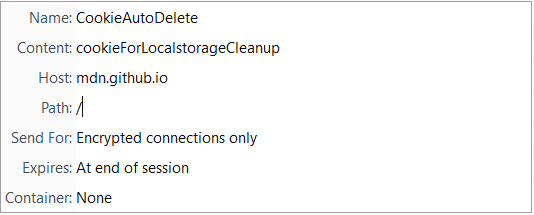
- This can't clear localstorage that was there previously
- I'll eventually add a popup action that clears all of them manually or you can use something like StorageErazor
Some Test sites
A test site that uses only localstorage and no cookies:
https://mdn.github.io/dom-examples/web-storage/
Soundcloud uses localstorage for the volume control.
https://soundcloud.com/
ke-d
on 24 Dec 2017
BYW, why don't set Path to some special value to avoid sending this CookieAutoDelete cookie on each request to the given host?
For example
Path: /cookie-for-localstorage-cleanup
 ruv
on 24 Dec 2017
ruv
on 24 Dec 2017
Due to the way this extension works, I am placing a temporary cookie on sites that have no cookies if you have the localstorage setting on.
How does this affect users who would like to use something like #95?
 grenzor
on 24 Dec 2017
grenzor
on 24 Dec 2017
@grenzor
How does this affect users who would like to use something like #95?
My other option is to store which websites you visited and pass that along to the localstorage API, which might not be ideal privacy-wise.
ke-d
on 28 Dec 2017
Using a fixed path name makes it easy to fingerprint Cookie AutoDelete users.
Can you set it to a different random string every time a new dummy cookie is created?
 anewuser
on 5 Feb 2018
anewuser
on 5 Feb 2018
Since localstorage "support" is there, FF version 58 is out, and this thread is getting long, I'm going to close this issue. Any future issues with localstorage should be new issue. Thanks for the support.
ke-d
on 6 Feb 2018
@mrdokenny
Was this thread just for FF and not Chrome.
zero77
on 6 Feb 2018
@zero77 Technically there is "Clear localstorage for this domain" in the "Clean" dropdown menu of the popup. This does not require an API since CAD injects a content script, so it works in Chrome.
I also doubt that this bug will be resolved anytime soon.
ke-d
on 7 Feb 2018
I see, ok thanks.
zero77
on 7 Feb 2018
@mrdokenny
Technically there is "Clear localstorage for this domain" in the "Clean" dropdown menu of the popup. This does not require an API since CAD injects a content script, so it works in Chrome.
Dose this happen automatically when the tab is closed, if not is it possible.
zero77
on 12 Feb 2018
Dose this happen automatically when the tab is closed, if not is it possible.
He has said:
I'm going to close this issue. Any future issues with localstorage should be new issue.
And he has also already pointed you to the bug that needs to be solved by Chromium developers for it to be possible automatically: https://bugs.chromium.org/p/chromium/issues/detail?id=78093
Please don't post comments here anymore. Many people had subscribed to this issue and are still receiving notifications about your posts.
@mrdokenny Consider to restrict comments for this issue to contributors-only.
anewuser
on 12 Feb 2018
Related issues
gwarser
·
3Comments
 nkestrel
·
6Comments
nkestrel
·
6Comments
 RandomGOTI
·
3Comments
gwarser
·
5Comments
RandomGOTI
·
3Comments
gwarser
·
5Comments
 tedomedo
·
3Comments
tedomedo
·
3Comments
Most helpful comment
I implemented a basic implementation of localstorage cleaning.
Here are some things I noticed: