Cookie-autodelete: Allow cookie until the browser is closed (Grey List Support)
Hi,
Thanks for working on this WebExtension!
Could you also add a feature to only allow cookies of a domain for the current session. As soon as the browser is closed the cookies are deleted.
 Primokorn
All 21 comments
I was considering adding a setting that basically does a "Cookie Cleanup (Ignore Open Tabs)" on startup (no APIs for performing actions on shutdown yet), which should cover your use case unless you have another use case for that feature.
 ke-d
on 17 May 2017
ke-d
on 17 May 2017
It doesn't cover my feature request.
Here is what I mean:
- I have 3 opened tabs : site A, B and C.
- I close site B
- Several minutes later I open site B again and I'd like to have my cookies until I close the browser.
Actually I visit several websites during a session but they aren't always open. I close and open them several times a day.
Thanks.
Primokorn
on 18 May 2017
To make it easier on myself and for whitelist backwards compatibility, I am probably going to implement this as a grey list similar to how Cookies Exterminator does it.
ke-d
on 5 Jun 2017
Do you mean the '_keep until browser exit_' option? (I have never installed this addon).
FWIW Self-Destruction Cookies has this feature.
Primokorn
on 6 Jun 2017
Grey list is similar to whitelist except grey list is the sites that you want to keep cookies until the browser is closed (or in this case on start b/c of lack of APIs).
Whitelist will be the sites that you want to keep cookies permanently.
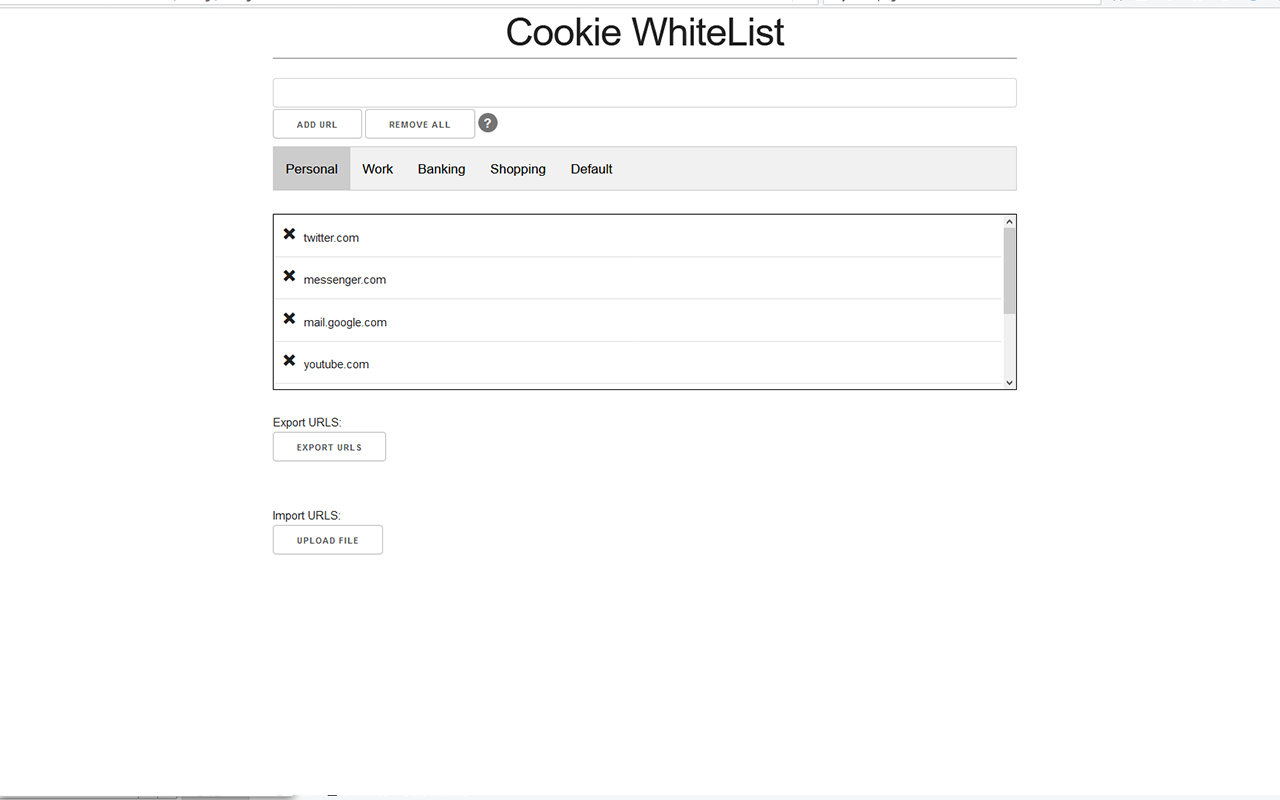
I have the necessary architecture in place because of Containers (which have a separate whitelist for each Container)
ke-d
on 6 Jun 2017
Just wanted to +1 this request. What I like about Self Destructing Cookies is the three options it gives (Allow, clear on browser exit, clear on tab close).
It sounds like the combination of whitelist and graylist + active mode will allow this same functionality?
 dylanhanning
on 15 Jun 2017
dylanhanning
on 15 Jun 2017
What I like about Self Destructing Cookies is the three options it gives (Allow, clear on browser exit, clear on tab close).
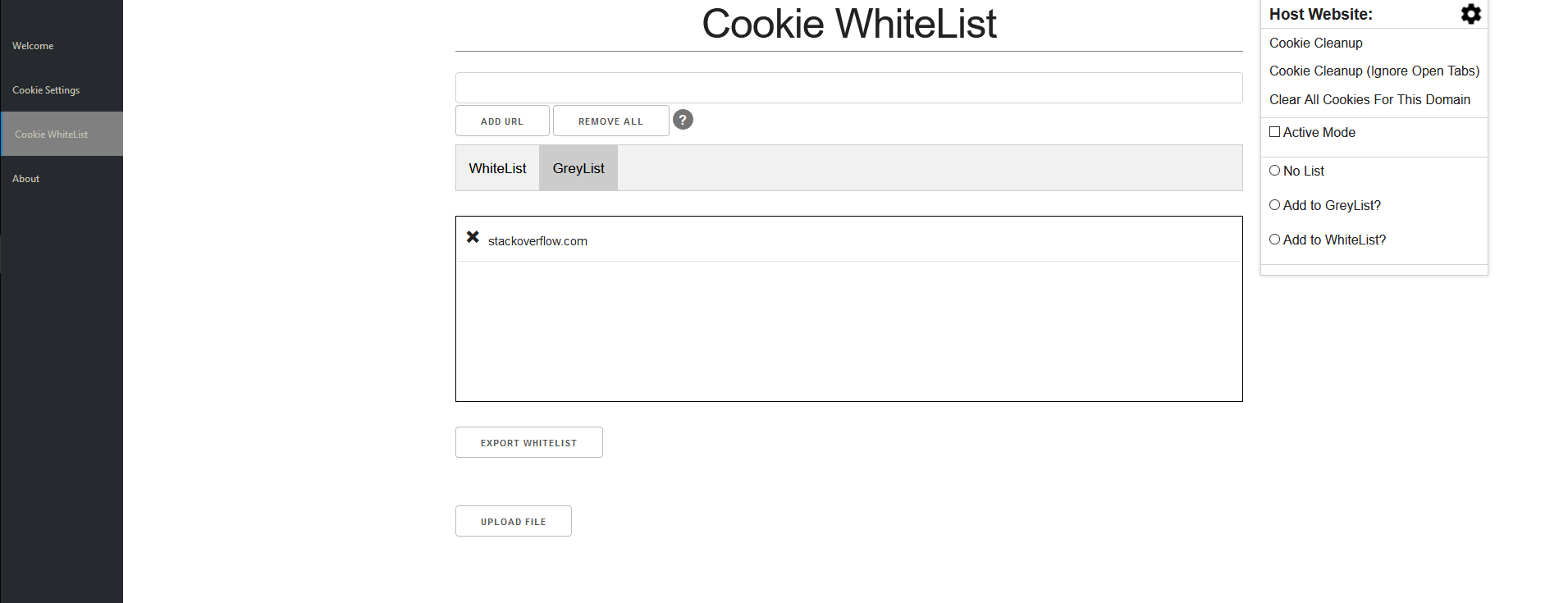
I'll have something similar like:
- No list
- Add to GreyList?
- Add to WhiteList?
as radio buttons in the popup. This means that a site can only be in one of these three states.
ke-d
on 15 Jun 2017
Cool, thanks! I like the icon suggestion in https://github.com/mrdokenny/Cookie-AutoDelete/issues/47 as well, that's pretty much what I had in mind with my comment above.
dylanhanning
on 15 Jun 2017
Got some UI work done today. Still not functional yet but it's a good start. :)
ke-d
on 16 Jun 2017
Anyone can think of a better wording or phrase for "No list"? I feel like it might not make sense for most people or it might not translate well to other languages. The other 2 ("Add to GreyList?" and "Add to WhiteList") are ok in my opinion.
ke-d
on 17 Jun 2017
In my opinion it's not obvious what "GreyList" means, I'd suggest something like:
- Clean on tab close
- Clean on exit
- Never clean
If I recall correctly, this is similar language to Self-Destructing Cookies, which I suspect many new users will be familiar with.
As for the UI, it doesn't make sense for a host to be able to exist on both whitelist and greylist, so I'd suggest combining those 2 views and just having some sort of indicator as to the mode of operation for each host (perhaps even radioboxes/dropdown to switch between on tab close and on exit).
 welwood08
on 17 Jun 2017
welwood08
on 17 Jun 2017
@welwood08
In my opinion it's not obvious what "GreyList" means, I'd suggest something like:
Clean on tab close
Clean on exit
Never clean
Good start. I would go one step further and do this:
- Clean on tab close
- Clean on restart (GreyList)
- Never clean (WhiteList)
Just to make a clear connection. Either way I'll have explanation somewhere in the options UI.
As for the UI, it doesn't make sense for a host to be able to exist on both whitelist and greylist, so I'd suggest combining those 2 views and just having some sort of indicator as to the mode of operation for each host (perhaps even radioboxes/dropdown to switch between on tab close and on exit).
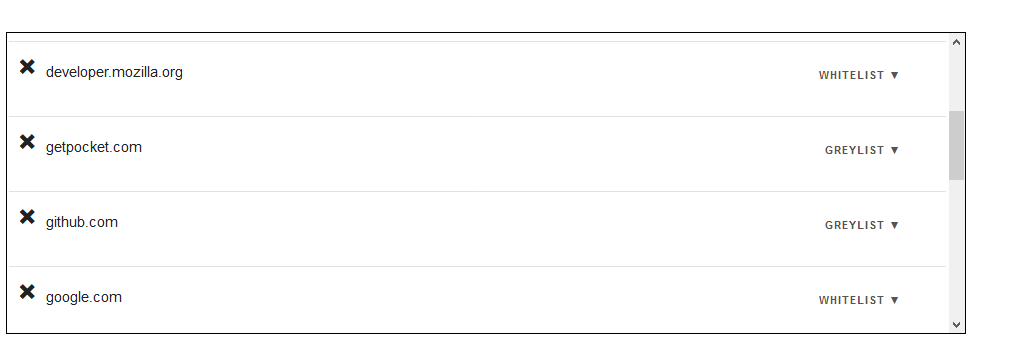
I like that idea but I think for the MVP and to make it easier for me to code I'll leave the WhiteList and GreyList there for now.
Edit: So the above suggestion wasn't as complicated as I expected so here's some new UI.
ke-d
on 17 Jun 2017
Testing is available in 1.4.0b1. Please test it and give your feedback and report bugs as well. 😄
GreyList goes pretty well with the setting "Clean Cookies from Open Tabs on StartUp" (used to be named "Enable Cookie Cleanup on Startup")
With that setting enabled, the cleanup on start will clean cookies on the greylist of a site regardless if that site is open.
Ex. Google.com is in the greylist and currently open. With "Clean Cookies from Open Tabs on StartUp" enabled, the cleanup on start will clear google.com even though it is in a open tab.
Since extension restarts count as browser restarts, a good way to test the greylist is to restart the extension. In Firefox, you can load the xpi temporary and reload it in about:debugging. In Chrome, you have to enable developer tools to enable extension restarts.
ke-d
on 20 Jun 2017
New interface looks good! - would you prefer bug reports in this issue or new issues?
I noticed that after adding a site to the greylist or whitelist in the popup (1.4.0b1, FF 55.0b2), it's not possible to add it to 'no list' in the popup, you have to go into the addon settings page and remove it there. Clicking 'Clean After Tab Close' doesn't do anything, and after closing and reopening the popup dialogue the radio is set to white/greylist again. Seems the radio toggle isn't removing the site from the whitelist properly?
dylanhanning
on 20 Jun 2017
Same issue here (FF 54.0)
Primokorn
on 20 Jun 2017
@IllegalCactus @Primokorn
New interface looks good! - would you prefer bug reports in this issue or new issues?
Bug reports relating to the feature should probably go into their respective feature issue.
I haven't added code that updates the setting page whitelist/greylist when you make changes in the popup. Have you guys tried refreshing the settings page after making changes in the popup?
It works fine on my end.
ke-d
on 20 Jun 2017
Here are all the steps that I did on this website:
- Cookies set to Clean on browser restart
- Log in to my account
- Refresh the webpage ==> no changes
- Refresh the addon from about:debugging
- Refresh the webpage => cookies are cleared
On the same webpage:
- Open the Cookie AutoDelete pop-up
- Select Clean after close tab
- Click outside of the pop-up
- Open the Cookie AutoDelete pop-up ==> Clean on browser restart is checked
Primokorn
on 20 Jun 2017
Ah thanks @Primokorn for the STR 👍
I think it might be a problem with restarting the extension from about:debugging.
It might work fine if you are restarting normally, but I'll do some more testing.
According to console,
TypeError: this.cookieWhiteList.get(...) is undefined[Learn More]
the WhiteList object in memory didn't get reset from storage on a restart in about:debugging. So I'll have to see what's that about.
ke-d
on 20 Jun 2017
I fixed that issue and added the updated fr locale in 1.4.0b2.
So Containers have their separate default white/grey lists from the non-Containers Mode, and that "Clean after close tab" button was trying to remove it from the Container Mode default lists rather than the Non-Container Mode default lists.
ke-d
on 20 Jun 2017
Ah, makes sense, I had a feeling it might be that cookieStoreId was wrong, but couldn't figure out why 😃 Thanks for the quick response.
dylanhanning
on 20 Jun 2017
Yeah with all the settings and new features interacting with each other, there's bound to be some bugs (which is why I unit test the important modules), but it should be good for daily use (I typically use the beta versions in my main profile to see if its good for daily use).
If you find any more bugs, please report them and have a clear STR.
ke-d
on 20 Jun 2017
Related issues
 AtomicRobotMan0101
·
3Comments
AtomicRobotMan0101
·
3Comments
 odiasodias
·
6Comments
odiasodias
·
6Comments
 nkestrel
·
6Comments
nkestrel
·
6Comments
 RandomGOTI
·
3Comments
RandomGOTI
·
3Comments
 frankclaassens
·
4Comments
frankclaassens
·
4Comments
Most helpful comment
@welwood08
Good start. I would go one step further and do this:
Just to make a clear connection. Either way I'll have explanation somewhere in the options UI.
I like that idea but I think for the MVP and to make it easier for me to code I'll leave the WhiteList and GreyList there for now.
Edit: So the above suggestion wasn't as complicated as I expected so here's some new UI.
