Cookie-autodelete: (Tracking) Firefox on Android Support (Works as of 9/3/17 Nightly)
Missing APIs needed for full support on Firefox Android.
- [x] [BrowserAction](https://bugzilla.mozilla.org/show_bug.cgi?id=1330159) (Firefox 55+ for no popup support)
- [X] [Blocking Installation on Firefox Android](https://bugzilla.mozilla.org/show_bug.cgi?id=1367494) (Firefox 56 uplift to 55)
- [x] [Popups on Firefox Android (Firefox 57+)](https://bugzilla.mozilla.org/show_bug.cgi?id=1370333)
- [X] Tabs (Firefox 54+)
- [X] [Options UI Support (Firefox 57+)](https://bugzilla.mozilla.org/show_bug.cgi?id=1302504)
FYI the UI is already mobile ready (can see this by scaling the window in the options page).
 ke-d
ke-d
All 14 comments
Options UI support landed today!
 pwd-github
on 9 Jul 2017
pwd-github
on 9 Jul 2017
@sabret00the Still not ideal since it only works with in pane options, not C-AD where the options page is in a whole new tab.
I filed a bug that somewhat related to this.
Still, I did what uBlock did with their WebExtension and just programmatically open the options page in a new tab via the settings pane in e4ff01c509b34098db012b263a70a2db7ebd1ab6
This is just temporary and can be used for testing on FF Android Nightly, which works quite well since you can enable Active Mode and access the white/gray lists in the options menu. One thing I noticed is the sidebar animation is kinda janky on my device and notifications are actual phone notifications (which I find interesting).
(Since GitHub doesn't allow me to upload .xpi files, I used Dropbox)
(Removed since as of 8/25/17 Nightly, there is now a options button)
ke-d
on 13 Jul 2017
I'm embarrassed to admit that I've been trying to install the beta xpi on my Android device for a couple weeks to no avail.
Though on a plus note, that bug you filed was fixed a few days ago.
pwd-github
on 5 Aug 2017
@sabret00the
I'm embarrassed to admit that I've been trying to install the beta xpi on my Android device for a couple weeks to no avail.
- Download the xpi onto your device
- Disable xpi signing on Nightly
- Go to
file://in the address bar - Navigate to the xpi and install it
Though on a plus note, that bug you filed was fixed a few days ago.
There's suppose to be a options button but I don't see it.
https://discourse.mozilla.org/t/options-ui-on-android/17551/10
ke-d
on 5 Aug 2017
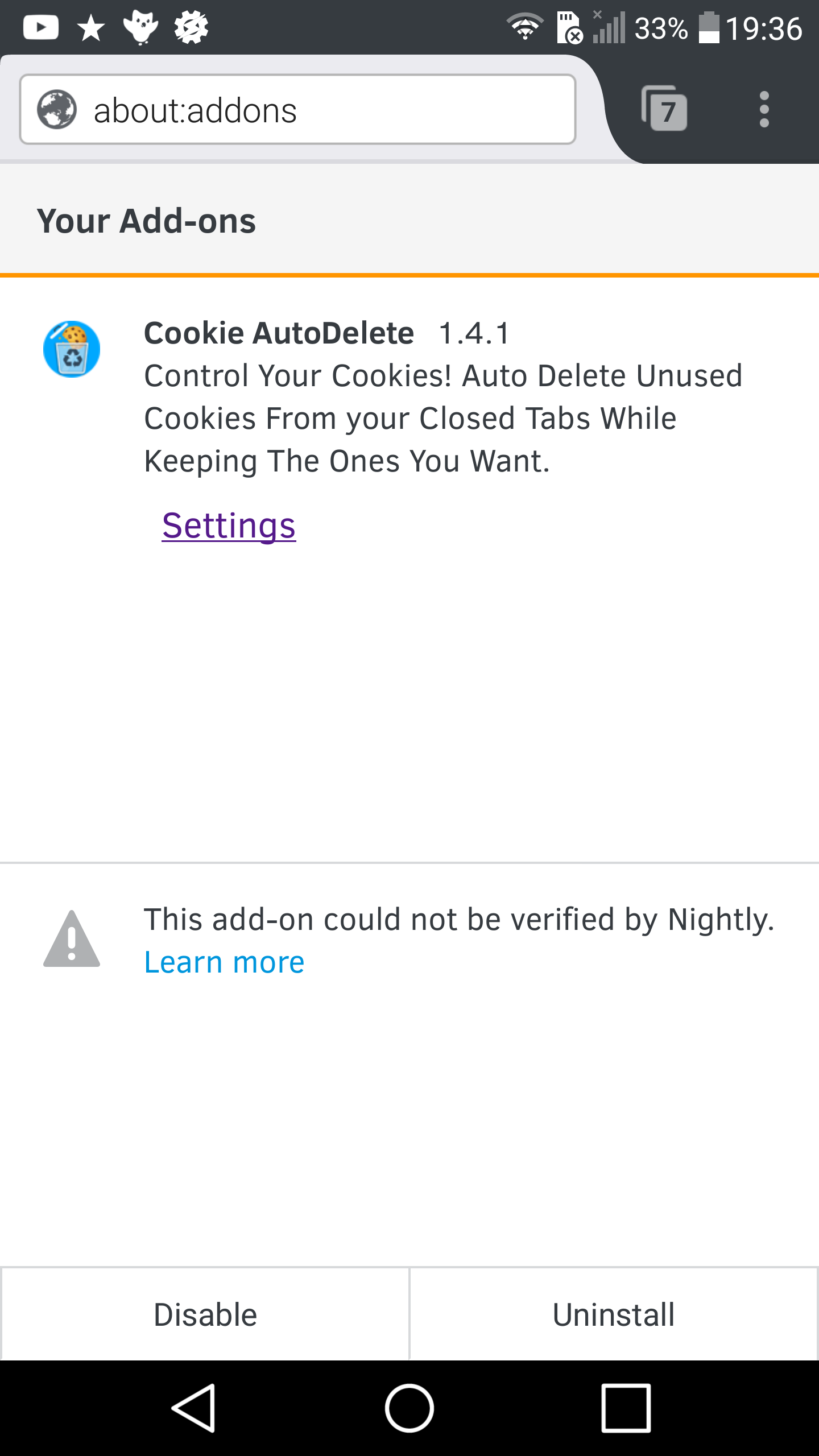
@mrdokenny Within the addons list, if I select C-AD, not only does it automatically open the C-AD settings it also displays a link that says "Settings" just below the C-AD description. The glaring problem that I do see though is that nowhere within either the addon detail page, or within C-AD's moz-extension:// page is there a clean now link/button.
pwd-github
on 5 Aug 2017
@sabret00the The one that you downloaded has a workaround (same workaround that ublock origin did) for the issue that I said in discourse. The one on AMO does not have this workaround and that's what I've been trying to get work on Nightly.
The glaring problem that I do see though is that nowhere within either the addon detail page, or within C-AD's moz-extension:// page is there a clean now link/button.
Well the popup doesn't work, from what I can see. Right now the menu has a slot with "Cookie AutoDelete" that does nothing when you click on it.
ke-d
on 5 Aug 2017
Well the popup doesn't work, from what I can see. Right now the menu has a slot with "Cookie AutoDelete" that does nothing when you click on it.
You will need to listen to browserAction.onClicked event and open the popup yourself in a separate tab. Conveniently, that event is not fired if you are not on Firefox for Android. That's what I had to do for uBO.
 gorhill
on 7 Aug 2017
gorhill
on 7 Aug 2017
@gorhill Thanks for the info. I assume browser.tabs.query({
currentWindow: true,
active: true
}) wouldn't work right since the active tab is now the newly opened popup tab?
ke-d
on 7 Aug 2017
Not sure I didn't try but yes, it seems safe to assume this won't work.
gorhill
on 7 Aug 2017
https://bugzilla.mozilla.org/show_bug.cgi?id=1364945
This bug adds an options button for the open_in_tab: true option, which means the workaround isn't needed anymore as of 8/25/17 Nightly.
ke-d
on 26 Aug 2017
Latest nightly on android (as of 8/31) I can get from the add on manager get to the options page for the addon. However, when i tap the 3 menu dots from the browser main screen I see an entry for the add on but tapping that doesn't get me to the options page. Also be useful to add another menu entry to the list that is "white list" the site.
 pcause
on 31 Aug 2017
pcause
on 31 Aug 2017
Finally BrowserAction has landed on trunk.
pwd-github
on 3 Sep 2017
@pwd-github I tested it and it works very well actually. I'm kinda surprised that browser.tabs.query({ currentWindow: true, active: true }) still works even though the popup is in a new tab.
There are some weird scaling issues but not a huge blocker.
ke-d
on 3 Sep 2017
Just got to test this out. It's a shame that the panels aren't as aesthetically pleasing/native feeling as they are on desktop. But it works fine. Just over 1700 cookies cleaned from my tablet and just under 500 cleaned on my phone. Thank you for your hard work @mrdokenny, it's much appreciated.
pwd-github
on 5 Sep 2017
Related issues
 haarp
·
3Comments
haarp
·
3Comments
 claudiopolis
·
5Comments
claudiopolis
·
5Comments
 MarkRH
·
5Comments
MarkRH
·
5Comments
 dacav
·
7Comments
dacav
·
7Comments
 mooms06
·
7Comments
mooms06
·
7Comments
Most helpful comment
https://bugzilla.mozilla.org/show_bug.cgi?id=1364945
This bug adds an options button for the
open_in_tab: trueoption, which means the workaround isn't needed anymore as of 8/25/17 Nightly.