Conemu: Maximum real console size was reached.
Hi,
I got this notification with the latest conemu under windows 10 x64.
It appears every 10-20 mins.
I have far managers (3.0 build 4400) and putty terminals open.
screenshot:

Br,
 kolomparrudi
All 54 comments
There is already one similar issue here.
Anyway, that seems like a bug of Windows 10 conhost, but I need LogFiles from you (when warning appears) to be sure.
 Maximus5
on 31 Jul 2015
Maximus5
on 31 Jul 2015
I can send you log files on monday.
Br
kolomparrudi
on 31 Jul 2015
What kind of log files do you need?
"Log console output" contains nothing of value.
It can easily be reproducted by opening a console and going to the login screen by pressing Win+L by the way.
PS: Msys2 zsh console in my case.
 phryneas
on 2 Aug 2015
phryneas
on 2 Aug 2015
http://conemu.github.io/en/LogFiles.html
If it reproduced, I wouldn't ask for logs.
Maximus5
on 2 Aug 2015
Sorry, didn't see that.
http://pastebin.com/tMK3YYpH
http://pastebin.com/xzxa1dBD
http://pastebin.com/YtsvAC4u
phryneas
on 2 Aug 2015
_I wonder, why some users think log files must contain anything interesting for them? What, landscapes? Nevermind. If user wants to help it's easy to crop "proprietary data"._
Maximus5
on 3 Aug 2015
Maximus already said he couldn't reproduce. Maybe he isn't on Win10 or is driving a different resolution or something (mine is at 3840x2160 by the way and window scaling is up to 150%). So we gotta do that work for him.
@Maximus5 can I provide anything else?
phryneas
on 3 Aug 2015
Oh, I got something: turning my window scaling to 100% DOES solve the problem. Unfortunately I can't read anything any more, so that's not really a solution :/
Disabling DPI scaling in Program Compatibility Options does not work as well.
phryneas
on 3 Aug 2015
I'm still researching ;-) May be later I'll ask for new logs in new build.
Maximus5
on 4 Aug 2015
I believe I may have a lead on this:
Windows 10 introduced scaling of conhost depending on the font used.
Pressing Win+Ctrl+Alt+Space to get the Real Console, then right-clicking the Title Bar, going to Preferences and then playing around with the font type & size solves the problem.
Rasterized font 8x12 seems to be a good idea here as going to the login screen seems to trigger the scaling, and raszerized fonts are not scaled.
Unfortunately, while the real console's options seem to save font size, they always reset the font to consolas.
phryneas
on 4 Aug 2015
Do not select raster fonts. Never. Otherwise you'll lose unicode support.
http://conemu.github.io/en/UnicodeSupport.html
Maximus5
on 4 Aug 2015
Uh, okay, thanks for the hint :)
Looks like I've got some reading to do, I didn't notice that there is so much documentation on this, cool :+1:
phryneas
on 4 Aug 2015
I started conemu with logging, but the problem haven't appeared yet.
kolomparrudi
on 4 Aug 2015
Hello. I too have had this error occur a few times since updating to W10. I have a dual panel setup, vertical split. The crash occurs while resizing the split, and only after the console was left running/was used for a while. Log below:
 ptrwllrd
on 4 Aug 2015
ptrwllrd
on 4 Aug 2015
I had this issue again, it occoured at 12:51
http://pastebin.com/K6Zi8MTV
The issue occoured when I got an email notification from Mozilla Thunderbird (I don't know wheather it's only a coincidence).
kolomparrudi
on 4 Aug 2015
More log (notification occoured on 14:58):
http://pastebin.com/psP6TGKL
kolomparrudi
on 4 Aug 2015
I have an other strange issue: Far manager layout messes up, maybe it has connection with the original issue. If I press CTRL-O twice it'll fix.
Far manager version: 3.0 build 4400 x64

kolomparrudi
on 14 Aug 2015
@kolomparrudi Without reproduction steps I can't say anything.
Maximus5
on 14 Aug 2015
Unfortunately I don't know when did it happen. When I click back to a far manager tab sometimes I saw this. I'm running conemu with logs, but I don't know when did it happen. Mayben I can share my logs (10 days long)
kolomparrudi
on 14 Aug 2015
That is too long period of course.
Maximus5
on 14 Aug 2015
Check new build 150813. If the problem persists, I need new LogFiles. Note I need all three files, not only selected one.
Maximus5
on 14 Aug 2015
Problem still exists in the latest version + 1 new bug:
The far manager window is being smaller, you can see black area around it (alt-f9 won't resize it).

kolomparrudi
on 24 Sep 2015
I've asked LogFiles for new version.
Maximus5
on 24 Sep 2015
Here are the logs from today and yesterday: https://mik.bme.hu/~lmadarassy/conemu/conemu-logs.zip
The error appearing usually all the time.
kolomparrudi
on 24 Sep 2015
Hi,
The issue still exists in the latest version. Now I discovered it occours when I lock my computer and log in again. I have created a small video from it:
https://mik.bme.hu/~lmadarassy/conemu/VID_20151013_144747054.mp4
btw. I have dual monitor, I don't know wheather it causes any problem.
kolomparrudi
on 13 Oct 2015
Please, don't ignore my requests!
https://conemu.github.io/en/LogFiles.html
Video is nice, may be, but is does not show required internal information.
Maximus5
on 13 Oct 2015
Here are the latest logs:
https://mik.bme.hu/~lmadarassy/conemu/conemu-logs-2015-10-13.zip
(already sent logs 19 days ago, when you asked)
kolomparrudi
on 13 Oct 2015
Sorry, have missed them
Maximus5
on 13 Oct 2015
The conemu-logs.zip contains longer run,
The conemu-logs-2015-10-13.zip contains only a short run when the problem occoured.
kolomparrudi
on 13 Oct 2015
i can kind of reproduce this behaivor - i am running a Surfacebook with its built in monitor at a native 3000x2000 px with 200% scaling and 2 1080p monitors running at 100% scaling.
Conemu behaves fairly poorly compared to other apps when moving between monitors. The title bar doesn't resize, so its twice as big as it should be on the 1080p screen. The size of the window doesn't change either but something is triggering the underlying window to rescale so thats when you get that message the original poster was seeing. Conemu will start cutting off the text at the right and bottom as if it was on a much smaller screen but the real estate itself will be much bigger. Resizing fixes this as long as your font size on the real console is small enough.
 jjmartin
on 5 Feb 2016
jjmartin
on 5 Feb 2016
@jjmartin please create another issue, it's not related to the subject. Attach your config and LogFiles+ Screenshots demonstrating the problem.
Nonrelevant posts will be cleared here.
Maximus5
on 5 Feb 2016
I started getting the error recently around the time I upgraded to the latest version of ConEmu. But then I realized at the same time I had disabled the "legacy console" in the settings of the Windows console.
After re-enabling the legacy console, the errors seem to have gone away. Not a fix but definitely work around.
 Ventajou
on 5 Feb 2016
Ventajou
on 5 Feb 2016
I need LogFiles from updated ConEmu recorded when error appears. Even better, if anyone can provide exact steps to reproduce.
Maximus5
on 5 Feb 2016
Hi,
The problem appeared again for me at 2016 Feb 16 13:57
Logs: https://mik.bme.hu/~lmadarassy/conemu/conemu-logs-20160216.zip
Br,
kolomparrudi
on 17 Feb 2016
@kolomparrudi your zip contains incomplete sets of logs from different sessions and different days. Useless.
I see the date/time in your comment, but there is only one log from that date.
Maximus5
on 17 Feb 2016
Hi,
Updated the zip with all the log files created by conemu.
I'll take screenshot next time I saw the error.
When:
I locked my computer and logged in again and the error appeared. I had 2 far manager tabs (one is with run as administrator, the other is with normal user rights + 6 putty tabs).
Br,
kolomparrudi
on 17 Feb 2016
Hi,
I was able to reproduce this issue by locking and loggin in again, screenshot:
https://mik.bme.hu/~lmadarassy/conemu/conemu-screenshot.jpg
Br,
kolomparrudi
on 17 Feb 2016
Can you reproduce that with one tab opened and upload new logs?
Maximus5
on 17 Feb 2016
Hi,
I tried to reproduce the bug with 1 tab. If it was a normal user far manager, the problem not appeared.
When I started far manager with admin rights (*far.exe /w) with problem appears. Took screenshot and uploaded new logs.
new logs: https://mik.bme.hu/~lmadarassy/conemu/conemu-logs-20160216-2.zip
screenshot: https://mik.bme.hu/~lmadarassy/conemu/conemu-screenshot2.jpg
Br,
kolomparrudi
on 17 Feb 2016
What if you run *cmd.exe instead of Far? Does it reproduce on unlock?
Maximus5
on 17 Feb 2016
Hi,
The problem is not exist with *cmd.exe.
I tried to start *cmd.exe, locked, unlocked, no problem. than I started far.exe from this cmd tab and after lock, unlock the problem started again.
Br,
kolomparrudi
on 17 Feb 2016
Hi,
The 160217 build seems to solve the problem.
kolomparrudi
on 18 Feb 2016
I keep getting this error on Windows 10 x64. Cmder build 160710
 patrick-wc
on 14 Jul 2016
patrick-wc
on 14 Jul 2016
Same, still getting it on Windows 10 x64. 4k monitor, maybe that has something to do with it?
 blented
on 10 Aug 2016
blented
on 10 Aug 2016
Without LogFiles reproducing the problem I can't tell you anything.
Maximus5
on 10 Aug 2016
I can reliably reproduce the bug on win10 by opening conemu on a high-dpi monitor, dragging the window to a standard resolution monitor and then maximizing it.
here's the log files produced by what i just described (captured with -log2).
con http://pastebin.com/7e7XcdTC
gui http://pastebin.com/Mp3G13Db
srv http://pastebin.com/RLiMW0cQ
 jhofm
on 15 Aug 2016
jhofm
on 15 Aug 2016
I have the same setup as jhofm (4k+2k screen) and the same effects.
I would guess that the underlying real console does not handle the dpi switch (or screen dimension switch - the 2k screen is vertically oriented) if moving frome screen to screen.
 thecere
on 30 Sep 2016
thecere
on 30 Sep 2016
Same here. I agree with @thecere 's idea. I am using 4k + 1080P display.
 yxliang01
on 14 May 2017
yxliang01
on 14 May 2017
Same. Anyways to fix it temporarily?
 thj-dk
on 30 Jan 2018
thj-dk
on 30 Jan 2018
- Use latest alpha build?
- LogFiles of repro?
Maximus5
on 1 Feb 2018
Upgrading to 180206 [64] {Alpha} resolves the issue for me on Windows 10. We used to receive the notification when we moved among multiple monitors. 👏 👏 👏
 shaunluttin
on 28 Feb 2018
shaunluttin
on 28 Feb 2018
I'm on 180626 [64] and this error still occurs when moving between monitors.
 proteus-aholt
on 17 May 2019
proteus-aholt
on 17 May 2019
There is newer version now
Maximus5
on 22 May 2019
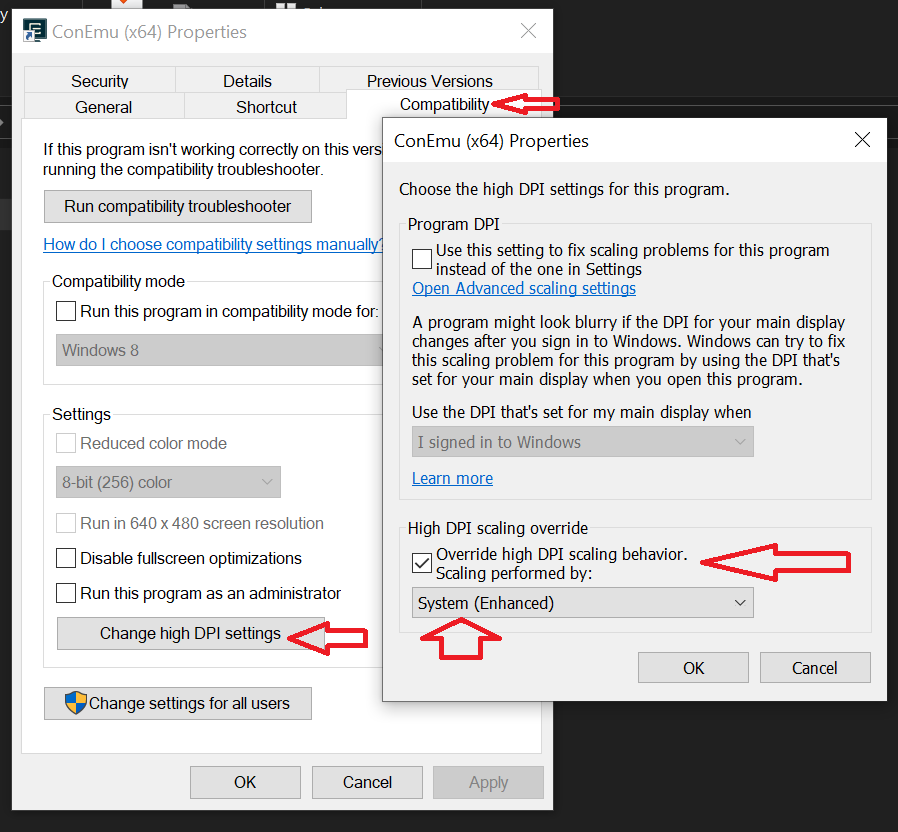
The following property settings for Conemu x64 (191012 preview) on Win 10 solved the issue for me.
 tyronhun
on 5 Dec 2019
tyronhun
on 5 Dec 2019
Related issues
 lllama
·
5Comments
lllama
·
5Comments
 pyhedgehog
·
3Comments
pyhedgehog
·
3Comments
 vampiricwulf
·
5Comments
vampiricwulf
·
5Comments
 jrcharney
·
5Comments
jrcharney
·
5Comments
 marfillaster
·
6Comments
marfillaster
·
6Comments
Most helpful comment
I can reliably reproduce the bug on win10 by opening conemu on a high-dpi monitor, dragging the window to a standard resolution monitor and then maximizing it.
here's the log files produced by what i just described (captured with -log2).
con http://pastebin.com/7e7XcdTC
gui http://pastebin.com/Mp3G13Db
srv http://pastebin.com/RLiMW0cQ