Conemu: Disable scrolling past lowest line
When scrolling down it would be nice if it stopped at the lowest line (rather than allowing scrolling past this into blank space) as is the behavior in putty and Cygwin. I couldn't find an option for this.
 bquistorff
All 10 comments
There is no "lowest line" term defined in Windows. Even if the cursor was left on some line, console applications may write below it using standard WinApi.
More cons than pros.
Will not implement that.
 Maximus5
on 3 Jun 2015
Maximus5
on 3 Jun 2015
Maybe writing N empty lines on shell startup (in something like .bashrc) will help you?
Unfortunately there are no correct way to get "DefaultBufferHeight" option (GetOption macro is awful).
 pyhedgehog
on 10 Jun 2015
pyhedgehog
on 10 Jun 2015
There is an example for cmd:
http://conemu.github.io/en/PromptAtTheBottom.html
Maximus5
on 10 Jun 2015
this is a very annoying feature...
resizing a window will lose focus on current output
really hope you could consider stop it somewhere, and when scrolling large output, it's easy to get lost.
 Ehekatl
on 8 Aug 2016
Ehekatl
on 8 Aug 2016
I'm adding a +1 even if this is "closed" ; any sort of scroll up referral to terminal history makes the terminal useless:
Either you overshoot the cursor, start typing, and lose everything above it
Or you waste an inordinate amount of time repositioning your window.
Please reconsider - even typing "conemu sto" into google autocompletes to "conemu stop scrolling" at this point.
 erikjasiak
on 17 Aug 2017
erikjasiak
on 17 Aug 2017
Another :+1: as well. Conemu is the best Windows console I can find, and it's still very hard to have a pleasant developer experience.
 tcoulter
on 7 Sep 2017
tcoulter
on 7 Sep 2017
Scrolling into empty space after the last line is really annoying. Any fix?
 GeneriGithub
on 20 Sep 2017
GeneriGithub
on 20 Sep 2017
Is there a fix for this? Always overshooting the last line and having to scroll back to the exact position of the cursor is really annoying and slows me down.
 CodeBrotha
on 11 Dec 2017
CodeBrotha
on 11 Dec 2017
Update and read whats new (Dynamic scrollbar range).
There is even the hotkey to position your buffer at the line with the cursor.
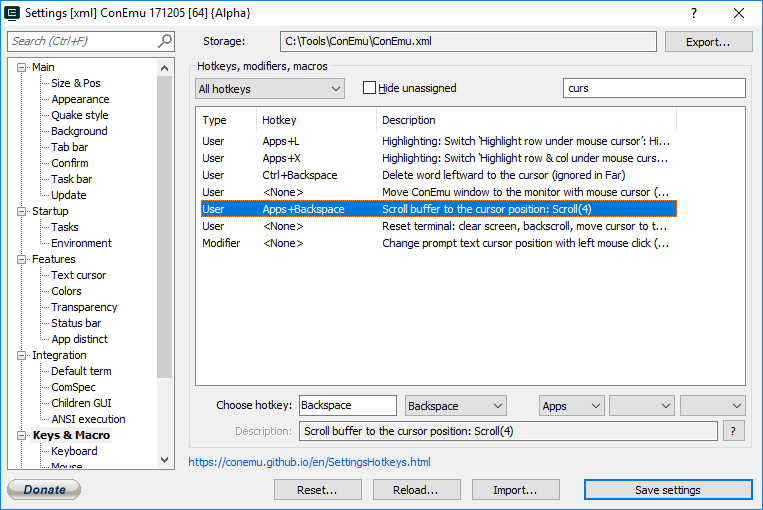
Maximus5
on 11 Dec 2017
Wait, there's something I still don't understand.
ConEmu is clearly able to detect the range of buffer that has actually been filled, otherwise Dynamic scrollbar range wouldn't work. So why can't it lock the regular touchpad or mouse wheel scrolling to that range? What's the purpose of allowing the screen to fly below the range that has any actual text in it?
To put it another way: if I grab the scrollback handle, I'm limited to the correct range. If I want to scroll past that, for whatever obscure reason, I can always click on the arrow button at the end of the scrollbar.
Would it be possible to restrict the WheelDown and WheelUp events to the same "dynamic" range? Can we do it using a macro?
By the way, I'm already using the macros Scroll(0,1) and Scroll(0,-1) on WheelDown and WheelUp, because the default scrolling speed is way too high for a touchpad. If I could, I would reduce it even more, but Scroll() doesn't accept a float argument.
 tobia
on 26 Mar 2018
tobia
on 26 Mar 2018
Related issues
 wildeyes
·
4Comments
wildeyes
·
4Comments
 altbdoor
·
4Comments
altbdoor
·
4Comments
 Chirishman
·
3Comments
Chirishman
·
3Comments
 phazei
·
6Comments
pyhedgehog
·
3Comments
phazei
·
6Comments
pyhedgehog
·
3Comments
Most helpful comment
this is a very annoying feature...
resizing a window will lose focus on current output
really hope you could consider stop it somewhere, and when scrolling large output, it's easy to get lost.