Hi there,
loving hackmd so far - thank for all you hard work!
Three question:
- What are the best options to display a note on another page e.g. on a WordPress blog - if I want to show my visitor the following note - fully rendered of course https://hackmd.io/s/features?
How can I embed one note into another? That would really make composable notes a lot easier e.g. if you have the same "footer" which you want to use in different notes
Is there a "js"-snippet that I could add e.g. in my angular or react project that will render a md file that I might have created with hackmd?
Thanks for your advice.
 VinzentE
All 13 comments
Hi @VinzentE
- See https://hackmd.io/s/features#embed-a-note
<iframe width="100%" height="500" src="https://hackmd.io/features" frameborder="0"></iframe>
- Same as above, iframe is supported in hackmd
- Not yet making our parser engine into a separate repo, will do it later.
Thanks for loving us.
 jackycute
on 13 Mar 2017
jackycute
on 13 Mar 2017
Amazing! Thanks.
Works like a charm - Parser would be fantastic in the future!
Any chance to remove the "header" when embedding? So that the user does not "see" that it actually is a hackmd-note - as it might confuse some non-tech visitor.
Also: I tried scrolling="no" but did't get it to work. Would like to just show the full note, without any second vertical scrollbar (if it is longer then the page, there is already the main scrollbar).
VinzentE
on 13 Mar 2017
You could add css style tag directly inside note.
Below are example code to prevent scrolling and hide infobar & toc menus in publish note.
<style>
body {
    overflow: hidden;
}
body > .ui-infobar, body > .ui-toc, body > .ui-affix-toc {
    display: none !important;
}
</style>
Fantastic.
Thanks - I got it to work & works great!
One last thing I just came across - Can somehow programmatically access the pure markdown behind e.g. https://hackmd.io/s/features? E.g. REST Endpoint?
I looked through the variables in the chrome dev tools, but couldn't find the object / array where it is being stored.
VinzentE
on 13 Mar 2017
We don't have any open API for now.
But you could access the markdown source if you add /download after your note link.
For example: https://hackmd.io/features/download.
jackycute
on 13 Mar 2017
Hey @VinzentE, did you read us?
jackycute
on 15 Mar 2017
Yes ... sorry.
Thanks for it. This helps me as an intermediate solution. A simple endpoint would be fantastic though ...
Thanks again for all your fantastic and quick support.
VinzentE
on 15 Mar 2017
For real API, please refer to #11
😉
jackycute
on 15 Mar 2017
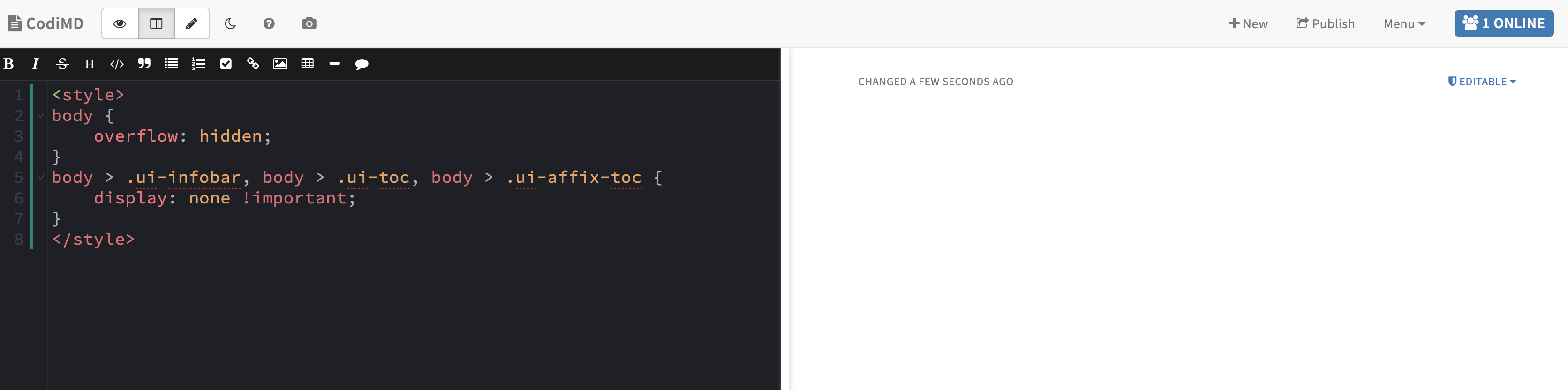
You could add css style tag directly inside note.
Below are example code to prevent scrolling and hide infobar & toc menus in publish note.<style> body { overflow: hidden; } body > .ui-infobar, body > .ui-toc, body > .ui-affix-toc { display: none !important; } </style>
Hi @jackycute I am confused with your solution. Could you explain more details about where to put those CSS codes to?
 lephix
on 18 May 2019
lephix
on 18 May 2019
@lephix Hi, you could just put those code in your note and that will take effect.
jackycute
on 18 May 2019
I am sorry, you mean doing that like the screenshot following?
lephix
on 20 May 2019
@lephix yes!
jackycute
on 20 May 2019
I tried to embed a note as iframe today. But it doesn't seem to work with a console error:
Refused to display 'https://hackmd.io/some-page' in a frame because it set 'X-Frame-Options' to 'sameorigin'
Is there any workaround or settings for the iframe to work?
 yookoala
on 19 May 2020
yookoala
on 19 May 2020
Related issues
 mxmilkiib
·
3Comments
mxmilkiib
·
3Comments
 Nebukadneza
·
3Comments
Nebukadneza
·
3Comments
 farleylai
·
5Comments
farleylai
·
5Comments
 yaxu
·
4Comments
yaxu
·
4Comments
 ccoenen
·
4Comments
ccoenen
·
4Comments
Most helpful comment
Hi @VinzentE
Thanks for loving us.