Code-server: Any client for code-server?
Description
When you run in on Chrome(or any browsers), some of key shortcuts do not work, because they are taken by the web browser. Such as Ctrl-tab.
Is there any client to browse Web, but it supports only one tab, and does not reserve any shortcut?
I feel like it won't be difficult to make it using Electron.
Related Issues
 jin-chong
All 14 comments
Supporting the PWA for Desktop Mode could be a relative easy alternative to an electron app (which almost would be an inception - because vscode originally is an electron app :) ).
https://developers.google.com/web/progressive-web-apps/desktop
 adrianliechti
on 11 Apr 2019
adrianliechti
on 11 Apr 2019
@jin-chong install chrome extension open-as-popup which converts current tab into stand-alone pop-up window w/o all the browser toolbars etc and all keyboard shortcuts will work.
 Muruloki
on 11 Apr 2019
Muruloki
on 11 Apr 2019
This can be done in chrome by adding it as an app:
- More Tools > Create Shortcut
- Check "open as window"
- Launch from the chrome://apps page
It picks up all the keyboard shortcuts this way.
 nrlulz
on 11 Apr 2019
nrlulz
on 11 Apr 2019
chromium --app=[URL of your code server] should work.
If you're not using Chromium, replace chromium with google-chrome or whatever chromium fork you use (vivaldi, brave, etc).
 aveao
on 12 Apr 2019
aveao
on 12 Apr 2019
Here are the requirements for running code-server as a PWA:
- Run code-server built from source after commit 22b485acd9a2accaec601ae6233a9b70ffd6eaf7
- Running code-server with valid --cert and --cert-key files
- Using https
- Using a browser with PWA support (chrome 72+)
If all requirements are met you should be able to install the PWA.
 lucacasonato
on 16 Apr 2019
lucacasonato
on 16 Apr 2019
HI @lucacasonato,
I just want to ask how do you generate valid certifications? I followed the coder instructions to create self-signed certification and use it when launching code-server but chrome73 doesn't accept it. Launching code server on port 443, Chrome flag the link as unsecured.
 philipAdvesa
on 18 Apr 2019
philipAdvesa
on 18 Apr 2019
I think the self-signed certs still show a warning in chrome because they are not verified by a third party. I think you would have better luck with something like letsencrypt
 nol166
on 18 Apr 2019
nol166
on 18 Apr 2019
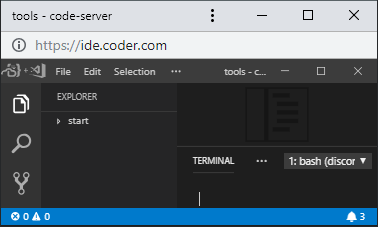
Can i hide omnibox and title bar in pwa window?
 kondr1
on 24 Apr 2019
kondr1
on 24 Apr 2019
There shouldnt be an omnibox afaik. What version of chrome are you using?
lucacasonato
on 24 Apr 2019
Lasted version 74.0.3729.108
kondr1
on 24 Apr 2019
I try add coder.com like a pwa and shortcut redirect me on page https://coder.com/projects?source=pwa with 404 error
kondr1
on 24 Apr 2019
@kondr1 We removed our projects page a long time ago.
 MichaelDesantis
on 24 Apr 2019
MichaelDesantis
on 24 Apr 2019
Hi,
I have simple client which opens code-server URL in app mode.
repo: https://github.com/mengjuleu/code-server-proxy
See CSP-CLI section.
You can open a code-server project by
csp-cli open <URL of project>
 mengjuleu
on 24 Apr 2019
mengjuleu
on 24 Apr 2019
I don't think we'll provide any client for code-server, but you can use Chrome's NaCl or iPadOS's feature to pin apps. Closing for now.
 sr229
on 12 Sep 2019
sr229
on 12 Sep 2019
Related issues
 RealSlimMahdi
·
3Comments
RealSlimMahdi
·
3Comments
 avelino
·
3Comments
avelino
·
3Comments
 Arsaev
·
3Comments
Arsaev
·
3Comments
 infogulch
·
3Comments
infogulch
·
3Comments
 tecosaur
·
3Comments
tecosaur
·
3Comments
Most helpful comment
This can be done in chrome by adding it as an app:
It picks up all the keyboard shortcuts this way.