Cockpit: Allow browser to remember login
Please wrap the 'username' and 'password' input fields in login page to form tag to allow browser to remember credentials.
 jniederm
All 16 comments
Cockpit is a Linux session. I guess some other Linux sessions have auto-login too, but it's usually something that's explicitly enabled per user session. This needs some thought.
@andreasn @petervo What do you think about auto-login to Cockpit using browser password caching?
 stefwalter
on 28 Apr 2017
stefwalter
on 28 Apr 2017
From a linux session point of view, i don't really like it. But I'm not really able to articulate a clear reason why we shouldn't do it other than it makes me a bit uncomfortable. Unless someone else is I think it's sort of a default expectation people have in browsers these days and we should probably allow it to happen.
 petervo
on 1 May 2017
petervo
on 1 May 2017
TBH I don't see why we wouldn't do it - the browser keyring already has all sorts of credentials and is meant for that. It's usually protected by the user's password (in most cases) already anyway, so one has to enter it at least once.
 martinpitt
on 1 May 2017
martinpitt
on 1 May 2017
FWIW, on my MacBook, running macOS High Sierra, all browsers except Firefox already offer to remember the login of cockpit running in a vagrant image (that's Google Chrome, Opera, and Safari that make the offer). Not sure if Firefox is not offering to save credentials only because the connection is not encrypted.
 rhwood
on 11 Apr 2018
rhwood
on 11 Apr 2018
NIST 800-63B specifically encourages supporting the use of password managers (10th paragraph).
rhwood
on 28 Apr 2018
This would be very useful. Those not interested in saving the login can just choose "no" when prompted by their browser.
 Limero
on 28 Apr 2018
Limero
on 28 Apr 2018
+1
 sergiomb2
on 22 Oct 2018
sergiomb2
on 22 Oct 2018
+1
sergiomb2
on 22 Oct 2018
+9001
 AndreasKieling
on 16 Jun 2019
AndreasKieling
on 16 Jun 2019
I tried this again, and I can't make Firefox remember the password for the life of me. The current web page already has the required input types (text and password) for user and password lines.
I tried converting into a proper <form> and even tried to change the login button into a "submit" input (which is wrong from a UI POV, but I wanted to check if it helps). Nothing.
--- src/ws/login.html
+++ src/ws/login.html
@@ -23,7 +23,7 @@
         </div><!--/.col-*-->

         <div id="login" class="col-sm-7 col-md-6 col-lg-5 login-area" style="visibility: hidden;">
-          <div role="form">
+          <form>

             <div id="error-group" class="alert alert-danger" hidden>
               <span id="login-error-message"></span>
@@ -80,13 +80,12 @@

             <div class="form-group">
               <div class="col-md-3 col-sm-3 login-button-container">
-                <button class="btn btn-primary col-xs-12" id="login-button">
+                <input type="submit" class="btn btn-primary col-xs-12" id="login-button" translate="value" value="Log In">
                   <span class="spinner"></span>
-                  <span id="login-button-text" translate>Log In</span>
                 </button>
               </div>
             </div>
-          </div>
+          </form>
         </div><!--/.col-*-->

         <div class="col-sm-5 col-md-6 col-lg-7 details" id="login-details">
It is an important missing feature.
 Neustradamus
on 20 Nov 2019
Neustradamus
on 20 Nov 2019
Any update on this issue?
 agneevX
on 28 May 2020
agneevX
on 28 May 2020
It seems to work just fine as is.
On firefox (firefox-79.0-5) I don't get the popup, but if I click on the key icon I can save the name and passowrd:
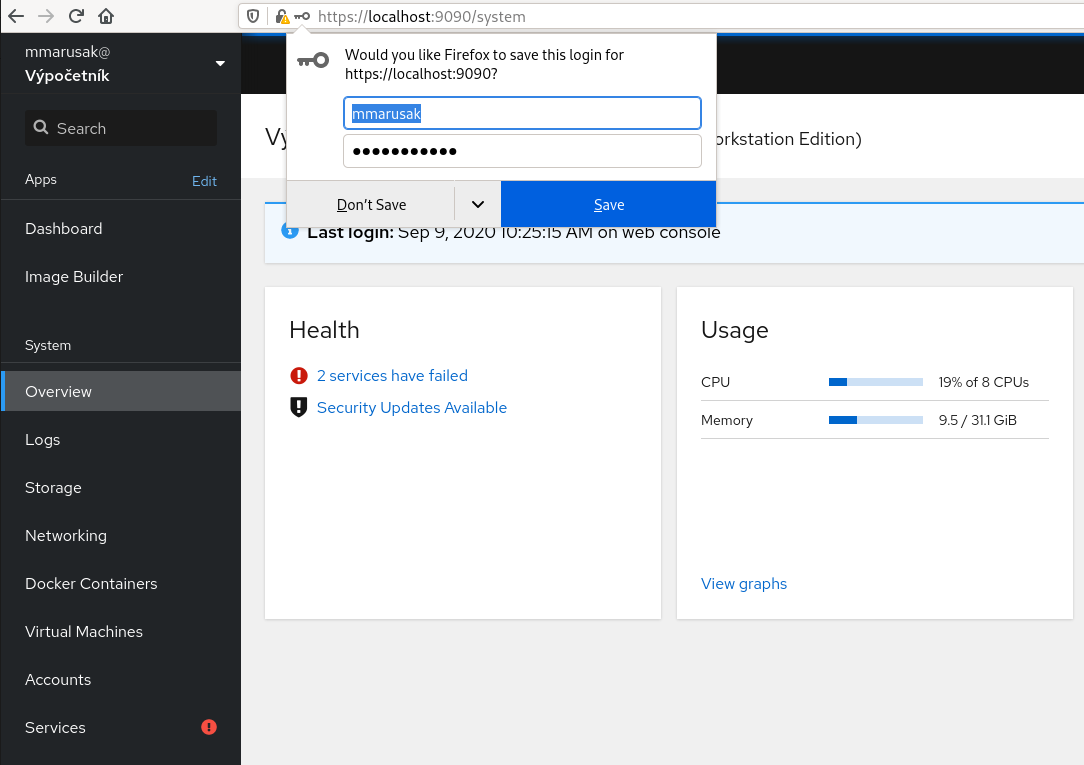
And then on login page I can use it as expected:

Same behaviour in chromium:
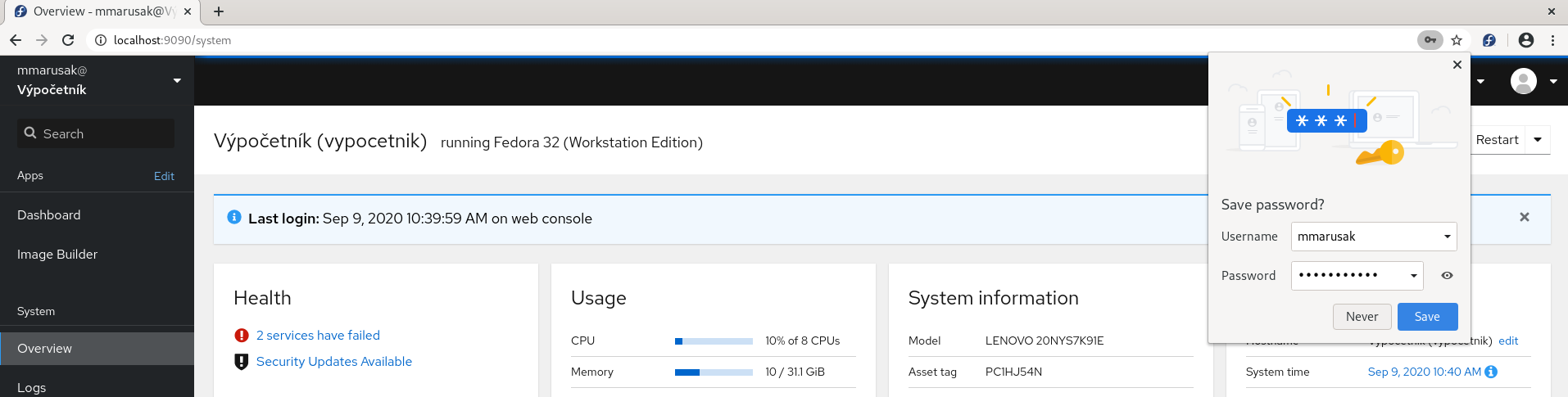
I like this behaviour that the popup is not opened by default but user can find it and save the passoword. (Not sure if this was by design or not, if it was than hats off)
I would be happy if someone from this thread could also give it a shot, thanks! Closing in the meantime.
 marusak
on 9 Sep 2020
marusak
on 9 Sep 2020
@marusak: What is the cockpit version?
Neustradamus
on 9 Sep 2020
@marusak: What is the cockpit version?
Version 226 of Fedora 31 is working
sergiomb2
on 9 Sep 2020
What is the cockpit version?
I have 227 here.
Version 226 of Fedora 31 is working
Awesome, thanks for verifying it!
marusak
on 9 Sep 2020
Related issues
 MauriceNorden
·
3Comments
MauriceNorden
·
3Comments
 cedroid09
·
5Comments
cedroid09
·
5Comments
 garrett
·
4Comments
garrett
·
4Comments
 jacksnodgrass
·
6Comments
jacksnodgrass
·
6Comments
 851d229
·
6Comments
851d229
·
6Comments
Most helpful comment
TBH I don't see why we wouldn't do it - the browser keyring already has all sorts of credentials and is meant for that. It's usually protected by the user's password (in most cases) already anyway, so one has to enter it at least once.