Cockpit: software: Redesign software updates page
The Software Updates has been around for a while and has grown organically over time. Now, we're hitting some growing pains as we try to shoehorn in more features, but they're just not fitting cleanly.
Meanwhile, other parts of Cockpit have evolved their design language.
It's time for the Software Updates page to be redesigned.
enhancement
 garrett
All 4 comments
Goals
- Align with the more recently redesigned parts of Cockpit
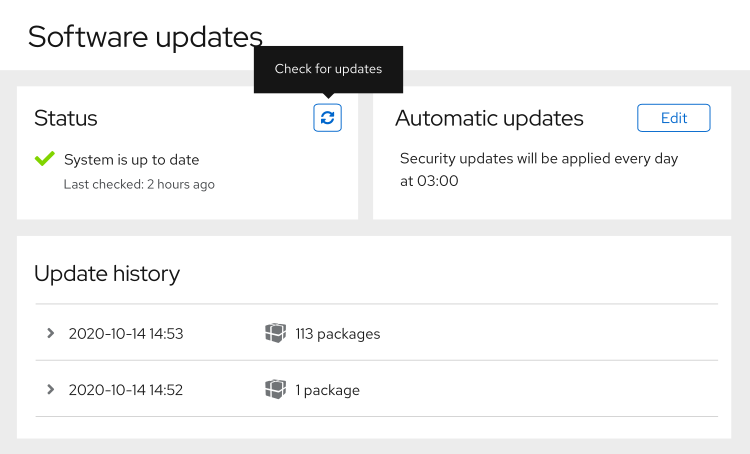
- Make the current status clear
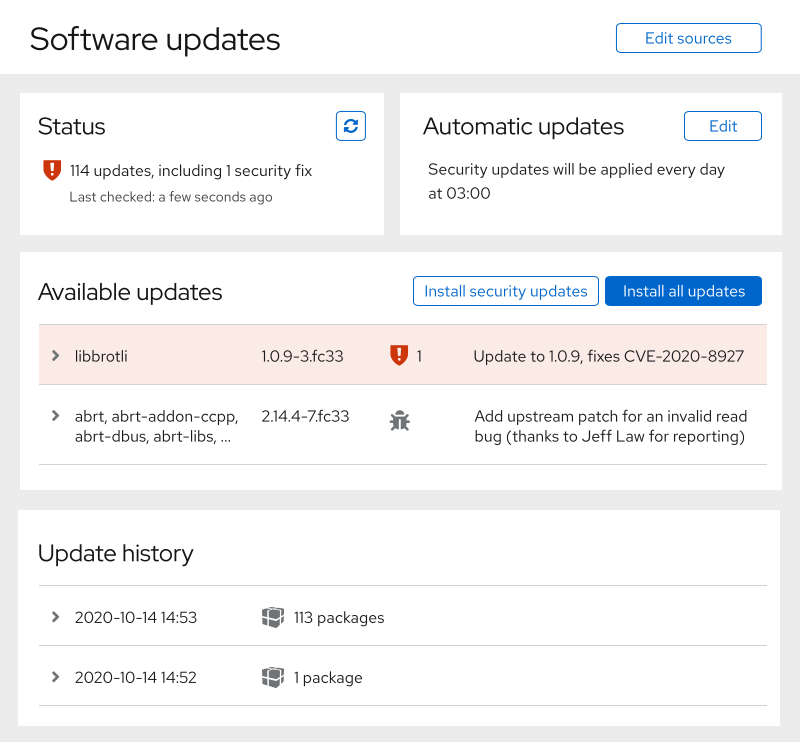
- Provide a place for actions that need taking
- Show a summary of automatic updates and make it clear how to update it
- Separate the sections
garrett
on 14 Oct 2020
Up to date
Updates are available
garrett
on 14 Oct 2020
👍2
Where does the "tracer" messaging go on this page? In the status section? Somewhere else?
 andreasn
on 20 Oct 2020
andreasn
on 20 Oct 2020
I didn't get around to adding it yet. I ran out of time and got sick. Sorry.
Tracer's messaging is _by default_ in the complete area of the screen in a normal update flow.
It only shows up in the status card when:
- it's deferred from the update flow (with an action like "ignore for now" or "skip")
- run outside of an update process
garrett
on 26 Oct 2020
👍1
Was this page helpful?
0 / 5 - 0 ratings
Related issues
 mehdiMj-ir
·
5Comments
mehdiMj-ir
·
5Comments
 akinomeroglu
·
8Comments
akinomeroglu
·
8Comments
 bachradsusi
·
4Comments
bachradsusi
·
4Comments
 Viktova
·
4Comments
Viktova
·
4Comments
 851d229
·
6Comments
851d229
·
6Comments
Most helpful comment
Up to date
Updates are available