Cockatrice: Error opening Qt5Core.dll for writing during installation

Windows 7 Pro. Never had Trice on this laptop in the past. Won't get passed here. Any help?
 pdm619
All 24 comments
Does the "Cockatrice" folder in program files exist? If so, try deleting it and running the installer again.
If that doesn't help, try running the Qt4 version instead - it's listed on the download page as the option for windows XP/Vista.
cc @ctrlaltca
 Daenyth
on 24 Sep 2015
Daenyth
on 24 Sep 2015
This isn't the first time I've seen this. At least 5 people have come to me privately to ask, yet none ever did open a ticket. I believe it was fixed by reinstalling the QT library
 ZeldaZach
on 24 Sep 2015
ZeldaZach
on 24 Sep 2015

This is what I get with that file
pdm619
on 24 Sep 2015
How do I reinstall the QT library?
pdm619
on 24 Sep 2015
@ZeldaZach do you mean the vc redist? I thought our installer bundled the qt dll
Daenyth
on 24 Sep 2015
This error would be caused by 1 of 2 scenario's. The first is the file is in use. To resolve the in use issue close the app before trying to uninstall it and if you still have the issue reboot your PC as there is something retaining a file lock to the file. The 2nd issue would be permissions based. Verify you have permissions to install to that folder, you may need to run the installer as administrator depending on your windows settings.
 woogerboy21
on 24 Sep 2015
woogerboy21
on 24 Sep 2015
@woogerboy21 OP said the he has _not_ had trice on this machine before
Daenyth
on 24 Sep 2015
Chances are he has his DEP settings or something set to a level that requires higher permission to be installed. In windows you shift+right click on the program installer file and choose "Run as administrator".
woogerboy21
on 24 Sep 2015
And for the clients that have Windows 7 but the Qt5 version doesnt run on, it throws some error about can't inject something something DLL file (its very cryptic) and those are the ones that would need to run the Qt4 version of the client. It happens on certain older processors that are missing some microcode and I believe are only AMD based processors if I recall.
woogerboy21
on 24 Sep 2015
Tried everything above and it wont install. Ran as admin and everything. Same error
pdm619
on 24 Sep 2015
Lenovo thinkpad with an ADM A6 processor.
pdm619
on 24 Sep 2015
Your not out of disk space are you?
woogerboy21
on 24 Sep 2015
Possibilities, from the most to the least probable:
- missing permissions: ensure you have administrator rights, right click => run as administrator;
- trying to overwrite a locked file: ensure no cockatrice is running, if needed reboot the pc;
- some problem on the filesystem: scan the disk for errors (chkdsk, needs a reboot);
- corrupt installer: redownload the setup;
As a test, you could try to manually create a file named after the filename you receive on the error and see if it works.
 ctrlaltca
on 24 Sep 2015
ctrlaltca
on 24 Sep 2015
412gb available. I run as admin no problem.
pdm619
on 24 Sep 2015
Still the same error. Bummer.
pdm619
on 24 Sep 2015
did you try explicitly to install with this file yet?
http://www.woogerworks.com/files/cockatrice.weeklybuilds/Cockatrice-WindowsClientQT4.exe
just making sure...
 tooomm
on 25 Sep 2015
tooomm
on 25 Sep 2015
Antivirus maybe?
ctrlaltca
on 25 Sep 2015
@pdm619 did you manage to get your problem solved? We have a similar report from another user, it would be nice to know your solution if any.
ctrlaltca
on 1 Jul 2016
Have the same problem, fresh windows 10. Run setup as Administrator after reboot and get this issue.
 dekmabot
on 4 Apr 2019
dekmabot
on 4 Apr 2019
Which version do you try to install? Where did you download it from? @dekmabot
Do you use any antivir software? Can you try disabling it during install?
tooomm
on 4 Apr 2019
Which version do you try to install? Where did you download it from? @dekmabot
Do you use any antivir software? Can you try disabling it during install?
Version 1.14.50.37, downloaded from jetbrains.com todays morning.
I have no antivirus software, so nothing to disable, its a new official windows install.
By the way, I tried to setup it several times (with reboots, as administrator), and it fails each time with the same error. But some time later, after cold reboot it just starts automatically and now works perfect. Don`t know, maybe it fails with error AFTER it installs properly?
dekmabot
on 4 Apr 2019
You are in the Cockatrice repository, I think you are talking about a different software?
tooomm
on 4 Apr 2019
You are in the Cockatrice repository, I think you are talking about a different software?
Oh, please forgive me, fluent googling have fooled me!
Thank you for your responces anyway =))))
dekmabot
on 4 Apr 2019
I ended up with this problem while trying to install a JetBrains product. Here's how I solved the problem:
- The installer gave me the path to the QT5Core.dll that it was having issues with, which was deep within my AppData/Local folder
- I tried to delete the entire JetBrains folder that contained this file, which turned out to be non-trivial because it said a file in it was open

- I opened ResourceMonitor and found that the jetbrains installer executable was still running (2 .exe's actually)
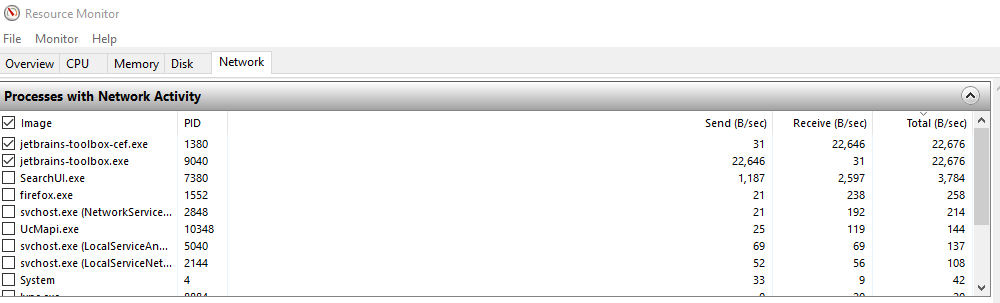
- I killed these two processes
- I then deleted every JetBrains folder within AppData, which was successful after the processes had been killed
- I rebooted, redownloaded the installer, and everything went smoothly the second time
Hope this helps
 lstuemke
on 17 May 2019
lstuemke
on 17 May 2019
Related issues
 jonschoning
·
3Comments
jonschoning
·
3Comments
 Gibidinp
·
7Comments
Gibidinp
·
7Comments
 mosew
·
3Comments
tooomm
·
5Comments
mosew
·
3Comments
tooomm
·
5Comments
 Assassinsquid
·
4Comments
Assassinsquid
·
4Comments
Most helpful comment
I ended up with this problem while trying to install a JetBrains product. Here's how I solved the problem:
Hope this helps