The date fields are not rendered in the collection table correctly.
'date_format' => 'd.n.Y',
"Beginn" is the default date field from the filename. "Ende" is an added field.
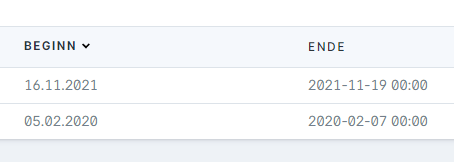
I know, there is a format setting inside the date field. But if I change this, I'm getting an error.
So I don't know, if this field is for backend or frontend.
 wm-simon
All 9 comments
Good point on this one. The _intention_ of the date_format setting was just the "publish date", or default system date field. Need to look at how we resolve that with a format setting on the field, and check that error too. Thanks for the heads up!
 jackmcdade
on 6 Feb 2020
jackmcdade
on 6 Feb 2020
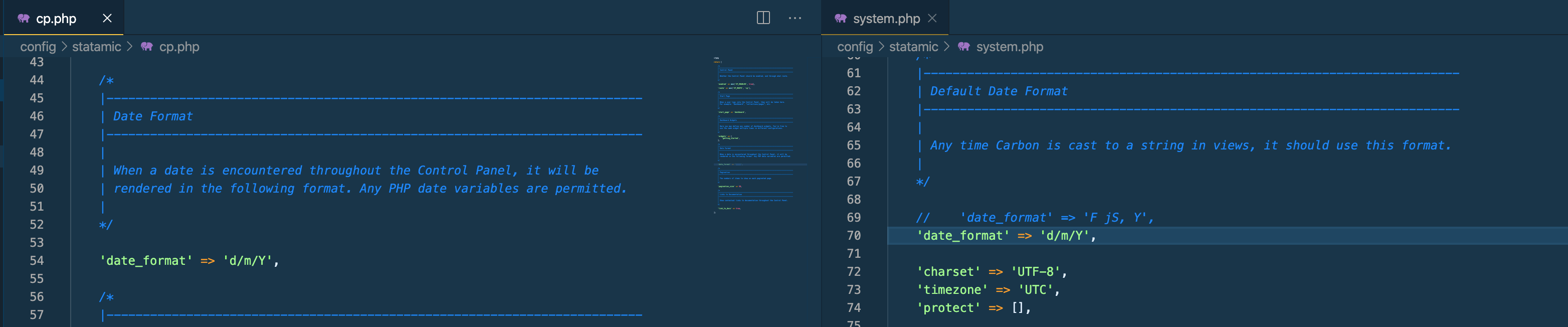
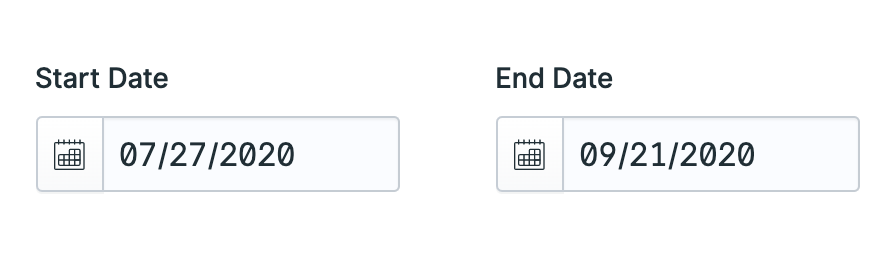
Another non-American here having similar problems - I'm not sure if this is related to the above or a separate issue, I've changed the date format in config/statamic/cp.php to 'd/m/Y' but datepicker dates are still showing America style:
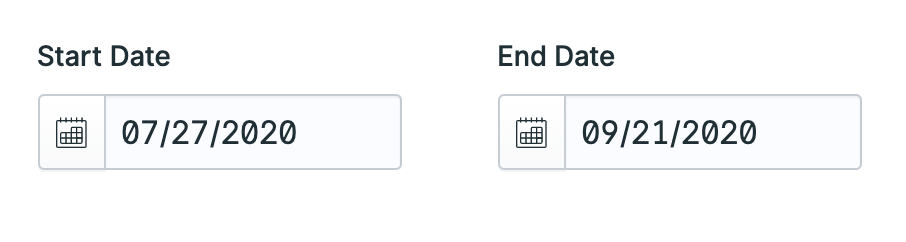
Also noticed that error when trying to set the date format on the field itself
 timack
on 25 Jun 2020
timack
on 25 Jun 2020
@timack Did you change the time_format in config/statamic/system.php too?
Normally this should work.
wm-simon
on 25 Jun 2020
@Pfeifakopf thanks for the tip but it didn't make a difference for me
timack
on 26 Jun 2020
Related to #2053
 ebeauchamps
on 16 Sep 2020
ebeauchamps
on 16 Sep 2020
This issue has not had recent activity and has been marked as stale — by me, a robot. Simply reply to keep it open and send me away. If you do nothing, I will close it in a week. I have no feelings, so whatever you do is fine by me.
![github-actions[bot] picture](https://avatars.githubusercontent.com/in/15368?v=4&s=40) github-actions[bot]
on 7 Jan 2021
github-actions[bot]
on 7 Jan 2021
Please keep this issue alive. For true localisation this is critical. So confusing to UK clients to read dates in US (or even ISO) format.
 wesort
on 7 Jan 2021
wesort
on 7 Jan 2021
I've added a PR for the CP listings, #3264.
Another non-American here having similar problems - I'm not sure if this is related to the above or a separate issue, I've changed the date format in
config/statamic/cp.phpto 'd/m/Y' but datepicker dates are still showing America style:
Also noticed that error when trying to set the date format on the field itself
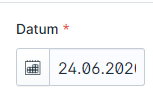
Regarding the date fieldtype mentioned above, I think the date fieldtype actually has it's own date format setting you can use for that, see screenshot.
If that's not working as expected, please create another issue as I don't really think it's related to this one.

 duncanmcclean
on 17 Feb 2021
duncanmcclean
on 17 Feb 2021
Since this issue is about the format within listings, and Duncan has fixed it in #3264, I've opened another issue for the fieldtype display issue in the form itself here: #3265
 jasonvarga
on 17 Feb 2021
jasonvarga
on 17 Feb 2021
Related issues
 philippgrimm
·
3Comments
philippgrimm
·
3Comments
 jelleroorda
·
3Comments
jelleroorda
·
3Comments
 skoontastic
·
4Comments
skoontastic
·
4Comments
 sauerbraten
·
3Comments
sauerbraten
·
3Comments
 dakisan
·
4Comments
dakisan
·
4Comments
Most helpful comment
Please keep this issue alive. For true localisation this is critical. So confusing to UK clients to read dates in US (or even ISO) format.