Cli-microsoft365: [Question] Is there an issue with npm run test?
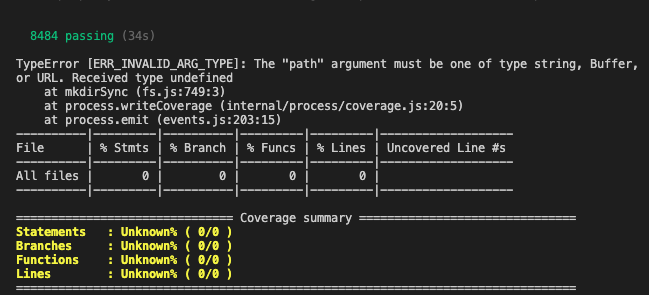
I followed the minimum path to awesome: Clone, npm i -> npm run build then npm test but it seems like there's an issue with the test runs. Is that just me?
 BassemNKhalil
All 5 comments
Which version of Node are you using?
 waldekmastykarz
on 3 Oct 2020
waldekmastykarz
on 3 Oct 2020
v10.20.1
BassemNKhalil
on 4 Oct 2020
Hey @BassemNKhalil - As per the documentation Minimal Path to Awesome, we may need Node.js ?12.0.0 if we want to start running the build and test.
If you want to have multiple versions in the same machine, you can use Node Version manager through which you can juggle between multiple node versions. This would definitely be handy if you want to develop SPFx and M365 CLI in parallel.
You can watch THIS VIDEO where it has explained how to do that.
Let me know if you need any other help or have questions. Will be more than happy to help you on the same.
 arjunumenon
on 5 Oct 2020
arjunumenon
on 5 Oct 2020
🤦 Yup - v12 sorted things out. Thanks @arjunumenon
BassemNKhalil
on 5 Oct 2020
🤦 Yup - v12 sorted things out. Thanks @arjunumenon
Awesome.... You are welcome... ✌
arjunumenon
on 5 Oct 2020
Related issues
arjunumenon
·
3Comments
 rabwill
·
3Comments
rabwill
·
3Comments
 joshua-probst
·
3Comments
joshua-probst
·
3Comments
 VelinGeorgiev
·
3Comments
VelinGeorgiev
·
3Comments
 garrytrinder
·
3Comments
garrytrinder
·
3Comments
Most helpful comment
🤦 Yup - v12 sorted things out. Thanks @arjunumenon