Cli-microsoft365: spfx project ugprade suggesting wrong version of rush stack
Repro
- scaffold a 1.8.2 project
- swap to rush stack 3.3 for example
Shell npm i @microsoft/rush-stack-compiler-3.3 -DE npm un @microsoft/rush-stack-compiler-2.9 -D - run the upgrade
o365 spfx project upgrade -o md -f upgrade.md
Current behavior
The report will suggest you to update rush stack 2.9, and if you follow blindly the instructions, you'll end up with two versions of rush stack installed.
Desired behavior
The report to suggest me to update the current rush stack I have or to suggest me to upgrade to the latest rush stack available.
 baywet
All 11 comments
I will have a look tomorrow why this is happening.
 VelinGeorgiev
on 28 Nov 2019
VelinGeorgiev
on 28 Nov 2019
Thank you for reporting this Vincent @baywet! This is a bug. I created a fix so it should not demand on adding the module anymore.
VelinGeorgiev
on 29 Nov 2019
Good catch @baywet, although a proper solution to it is tricky.
The report to suggest me to update the current rush stack I have or to suggest me to upgrade to the latest rush stack available.
I don't think that this is correct. We're not recommending to use the latest version of available packages. Instead, we bring you to the packages used by the specific version of SPFx. So, suggesting the latest could break you if it wasn't designed for use with the particular version of SPFx. Also, suggesting upgrading to a newer version of the stack is not right, because it means using a newer version of TypeScript which could mean having to refactor the codebase unnecessarily.
What I think would be the right thing to do, is to check if there is another version of the rush stack used, and if so, ignore the recommendation altogether under the assumption that the developer has everything under control. At that point, we shouldn't make any assumptions regarding what versions of rush stack can be used with what versions of SPFx.
Curious to hear what you think.
 waldekmastykarz
on 29 Nov 2019
waldekmastykarz
on 29 Nov 2019
haha I'm a big advocate of pushing to the latest when possible/not too time consuming even if it means you might break and have to fix a few things (regarding the refactoring comment). But I understand not everyone is like that.
I think I can happily live with something that recommends the corresponding rush stack and package version for the version of spfx I'm upgrading to if no other rush stack is installed.
And it doesn't recommend anything if I'm on a newer rush stack and/or a new package version for the same rush stack. At this point npm outdated + a quick check against the npm registry tell me what's missing after the o365 spfx project upgrade and I think we can assume more experienced developer also do the same thing.
baywet
on 29 Nov 2019
I am in Waldek's camp on this. I upgrade modules only when I am sure the system will continue to work without interruption. Imagine we or the CLI suggested a new version, but this breaks a customer solution. That could cause downtime and business losses, no matter how small that change looks for a developer.
I have another issue with the versions of the rush modules. We do not know which one to pick up.
Let's have a look at this image:
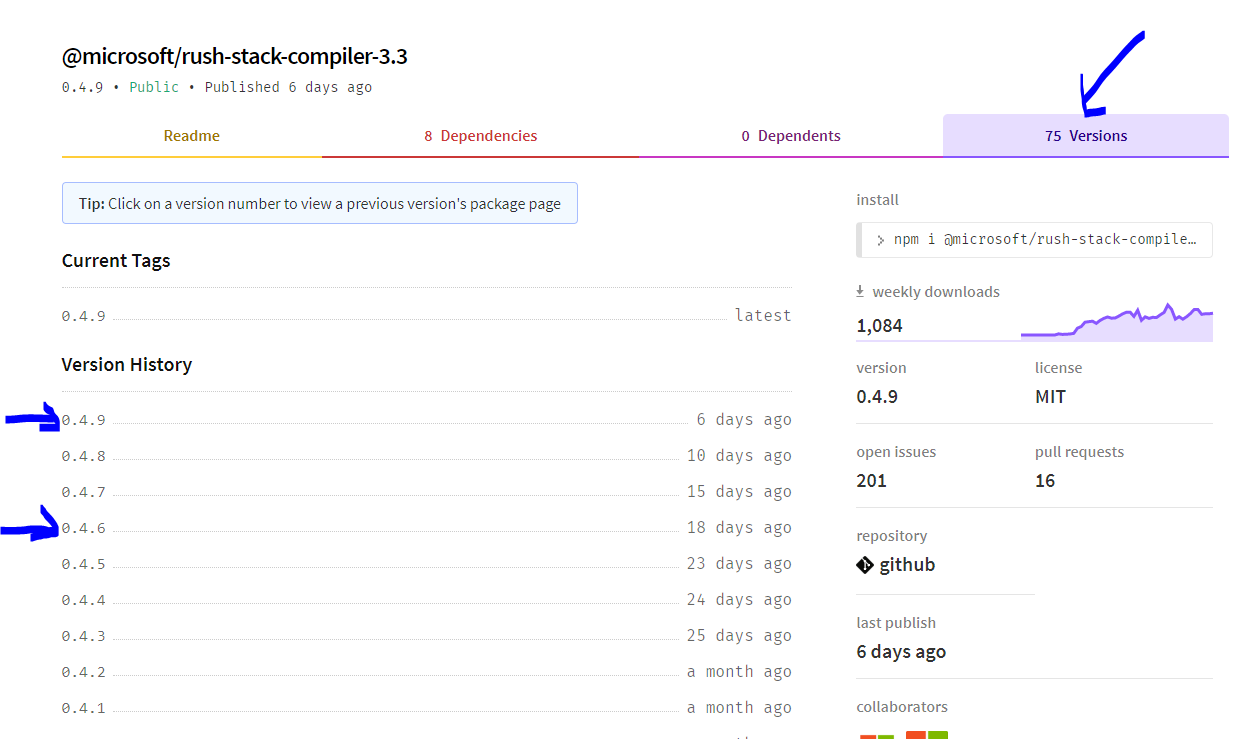
There are 75 versions in npm, which one is guaranteed to work with the SharePoint Framework? If we make that suggestion, we will have to make sure the version we select will not break business systems. Implementing new rules in the CLI might be a challenging exercise, and it might require time to test before adding it to the suggestions, and it would still not be guaranteed to work.
I understand your point, Vincent, because I also want to be on edge, but when it comes to other users using my service, I am a bit more reserved. I want to make sure it is operating without interruption. From my experience, the latest modules were never friends with without interruption. :smiley:
VelinGeorgiev
on 29 Nov 2019
yeah I think our last to comments are aligned:
If the target spfx version comes with rush stack 2.9 0.7.7 (making up numbers here) let's suggest that unless there's a higher rush stack already in the project (eg 3.3) or a higher package version (0.8.8) in which case we don't suggest anything
baywet
on 29 Nov 2019
@VelinGeorgiev will you adjust your PR to reflect our discussion? 🙂
waldekmastykarz
on 30 Nov 2019
The fix is already making the change as follows:
- When you have different than the suggested module in the SPFx yeoman scaffolded project (2.9 currently) then the report will not include suggestion to add 2.9.
- If you use 2.9 it will suggest update rush 2.9, but the miduoe version is driven by what ver is specified in the newer ver of the SPFx scaffolded project.
Am I missing something?
VelinGeorgiev
on 30 Nov 2019
Looking at the PR, it seems like we've introduced the isOptional option, but which is always set to false which already is the default behavior of the DependencyRule, so what's exactly the benefit of this change that seems to be having the same behavior as previously?
waldekmastykarz
on 30 Nov 2019
It is not optional only when you upgrade to 1.8.x then the package should be added as something new if does not exist.
For the 1.9.x or up, it should be an optional since we do not know if the user is not using rush 3.3 or else. Then we should not add it in the report as must. This is Vincent case.
If you have a look at the rule in PR again, you can see that I am reverting IsOptional to be true by default for that specific rule.
VelinGeorgiev
on 30 Nov 2019
You're right. I missed the other reference to the rule and thought that we reference it just in one place. Good call 👍
waldekmastykarz
on 30 Nov 2019
Related issues
VelinGeorgiev
·
3Comments
 arjunumenon
·
3Comments
arjunumenon
·
3Comments
 StfBauer
·
3Comments
waldekmastykarz
·
3Comments
StfBauer
·
3Comments
waldekmastykarz
·
3Comments
 plamber
·
3Comments
plamber
·
3Comments
Most helpful comment
I am in Waldek's camp on this. I upgrade modules only when I am sure the system will continue to work without interruption. Imagine we or the CLI suggested a new version, but this breaks a customer solution. That could cause downtime and business losses, no matter how small that change looks for a developer.
I have another issue with the versions of the rush modules. We do not know which one to pick up.

Let's have a look at this image:
There are 75 versions in npm, which one is guaranteed to work with the SharePoint Framework? If we make that suggestion, we will have to make sure the version we select will not break business systems. Implementing new rules in the CLI might be a challenging exercise, and it might require time to test before adding it to the suggestions, and it would still not be guaranteed to work.
I understand your point, Vincent, because I also want to be on edge, but when it comes to other users using my service, I am a bit more reserved. I want to make sure it is operating without interruption. From my experience, the
latest moduleswere never friends withwithout interruption. :smiley: