Cli-microsoft365: Authentication error
Hi,
I went through other related issues for this repo but none seems to solve my problem.
I am unable to authenticate and get access token.
These are the steps I followed in command-line:
from O365 import Account
credentials = (XXXX, YYYY)
scopes=['basic', 'message_all']
account = Account(credentials)
account.authenticate(scopes=scopes)
Visit the following url to give consent:
https://login.microsoftonline.com/common/oauth2/v2.0/authorize?response_type=code&client_id=XXXX&redirect_uri=https%3A%2F%2Flogin.microsoftonline.com%2Fcommon%2Foauth2%2Fnativeclient&scope=https%3A%2F%2Fgraph.microsoft.com%2FMail.ReadWrite+https%3A%2F%2Fgraph.microsoft.com%2FUser.Read+https%3A%2F%2Fgraph.microsoft.com%2FMail.Send&state=8uYYgVKgZVdyAAB9wJYo4dCcPte2N6&access_type=offline
Paste the authenticated url here:
https://login.microsoftonline.com/common/oauth2/nativeclient?code=OAQABAAIAAAAP0wLlqdLVToOpA4kwzSnxc2V5yW7WGqV0QgL_QhC6P8_AQxTPZqMH6Y1_o3vA9S6mR6oOBPvQIYFh_s7DGsp7ytKxGrJ4DJPdcHLao5S4LO2kCX1MWPuhRvoY6XboWPPpjfQ-CLFBpy_2ZXY_F9_KL6aN4isT52gjwWfto-h8_KX4BhR_eAHggyIELOH_PRg3smfOe9KTf9Ml8GWgc2wpQjmOlNrcTp8IztO4-MbJ81VNsLg0fFukS1_exL8d13ktQ5nmmreZ6FrtoQ07yF8OyFwfXIZaiFeEE8622w7uC7RsoUlSJq9GhgkQuTqf4mwOc4oHSxW790aarq2j6C6nNVBjLy4M_yBiDvR047rzrVitmhzkT0Bxw_gF_cOxNBVDgDHeebO30eQ8JZcgu2ttecYsM8vygsoQpdlatJ-aUFq8S1br3vw8xtN7EfDN3ZTA-heDyU-V-O8rBL2ZQ0F0L5umYyzpXElWCYD8hOey9ySEesYO1yQNb-skTR9Tz5IVuYTVGolauDrggsgGiY6iBvdYRyOIWCOsRC4dQRAHQClzfdMbsYrsr-3U3Agv_mce_H6Tr9yWyW1ZbASKD8aI1oS0KdgQVgoBhBLmIhYNQbf_ezs5ag7TUfa6j5WJGk98dV2EnbzJ0i4eZ22Rhh5IK4oesg5btHCF5Oi3d7LB98a7PObBYk9192qEL8Jj6eY_PtP3BTLyIYvzAWJ9FqVIFxxk1olS0khpZKqVQRORZ9x-5lEdIiWWhJcUrFVKh7XXXX&state=YqSQyBKZpw769L91S2VFgcal5tiu4J&session_state=54f91bd3-4b36-4168-8fca-03c4ad65f861
The pasted URL was received after logging into the account. But I receive the following error:
ERROR:O365.connection:Unable to fetch auth token. Error: (invalid_client) AADSTS700025: Client is public so neither 'client_assertion' nor 'client_secret' should be presented.
Trace ID: a3c24393-576f-4884-980a-32ef582d1a00
Correlation ID: 2ef0ceaf-6968-4884-9d75-5ac4151be4eb
Timestamp: 2019-09-19 10:51:30Z
Something go wrong. Please try again.
The following are some screenshots of my Azure App Registration portal:
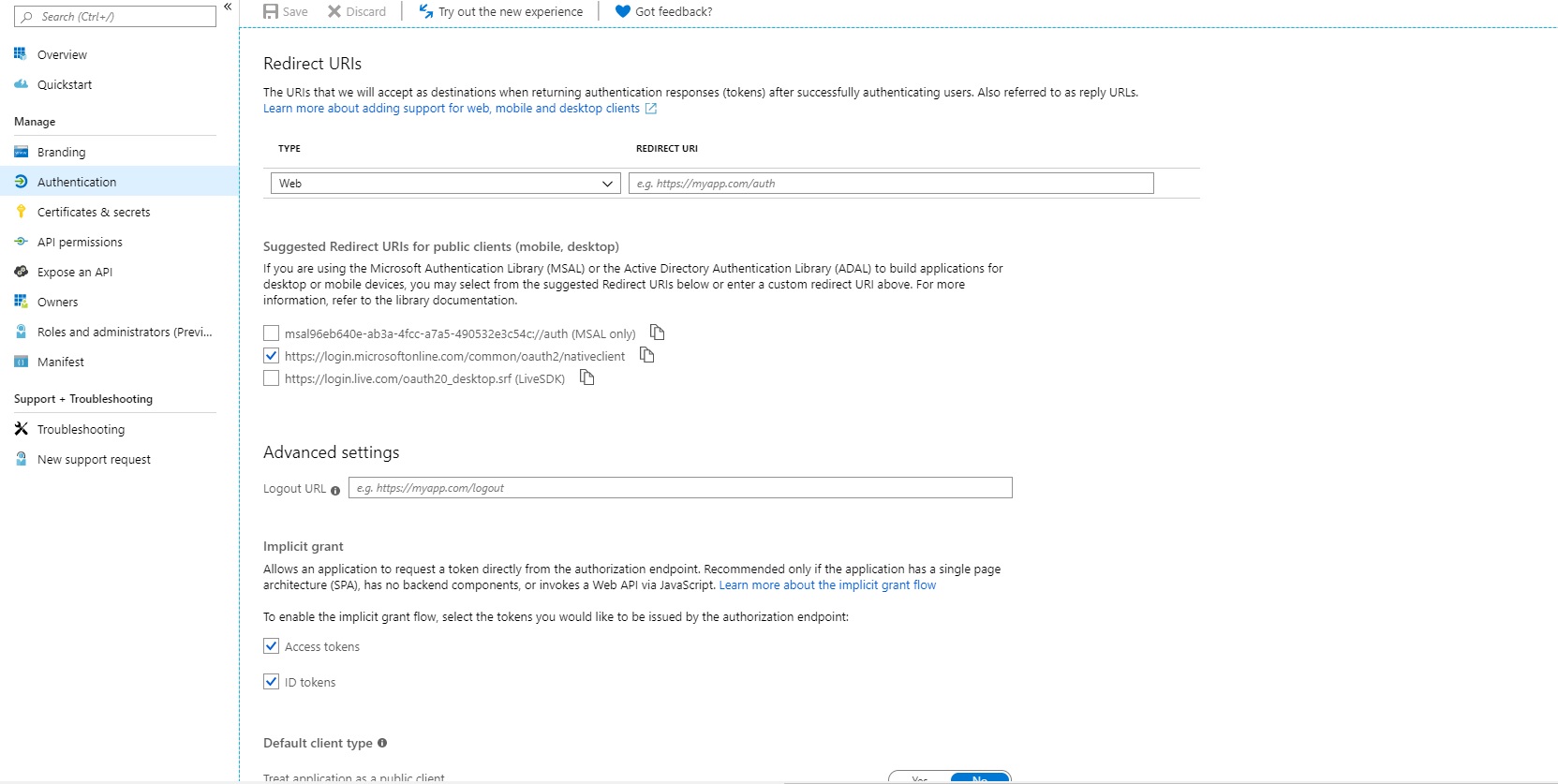


Please help.
Thanks.
 basilgeorge
All 13 comments
Hi,
Have you tried to change the "Default Client Type" to "yes" already?
br,
Patrick
 plamber
on 20 Sep 2019
plamber
on 20 Sep 2019
Hi,
Have you tried to change the "Default Client Type" to "yes" already?br,
Patrick
Yes, same error persists.
basilgeorge
on 20 Sep 2019
Oh wait, what is the reason of having Implicit Grant enabled? Not required in this case from my point of view.
plamber
on 20 Sep 2019
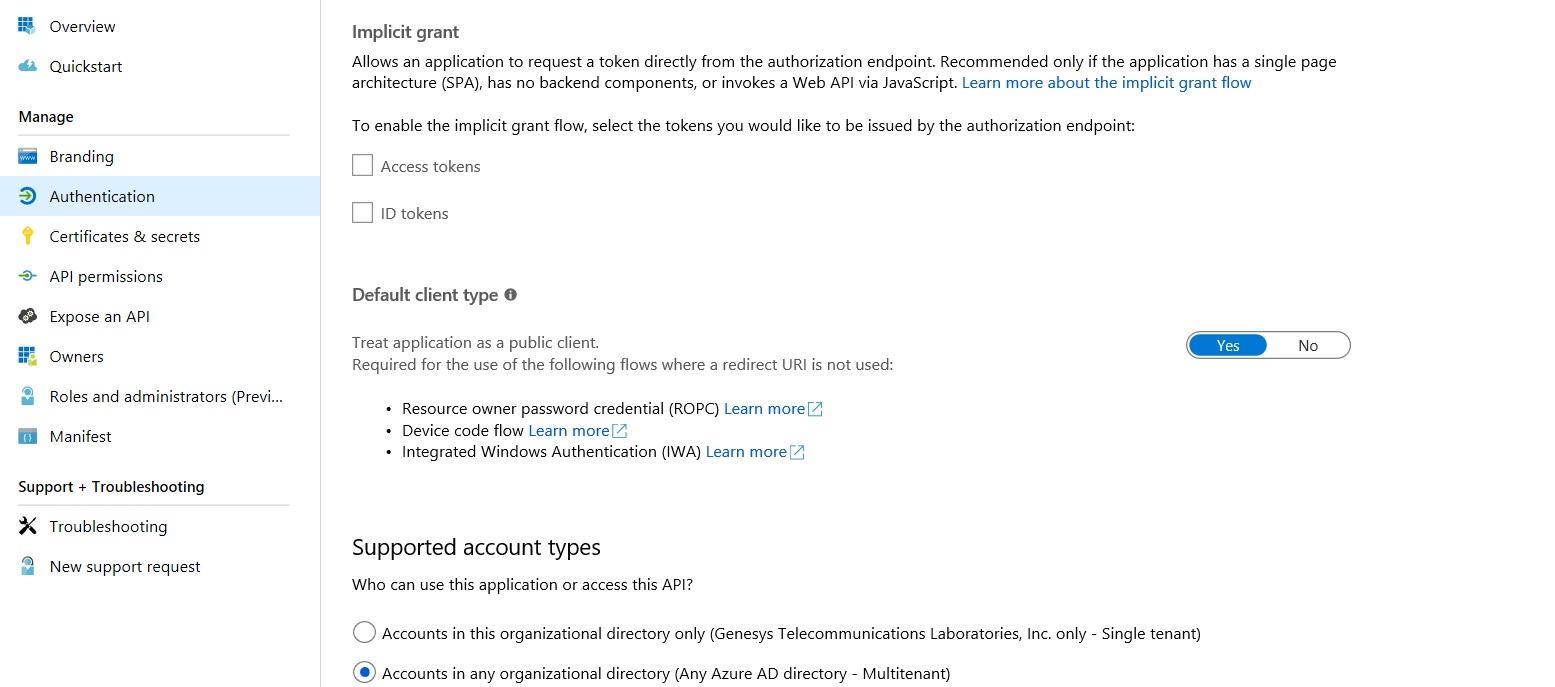
Still no luck. The same error comes.
basilgeorge
on 20 Sep 2019
Edit: Update the steps for a better follow-up.
- Create the Azure AD app
- Assigned the desired API permissions (similarly as you did)
- Ensured that under authentication I have following settings enabled/disabled
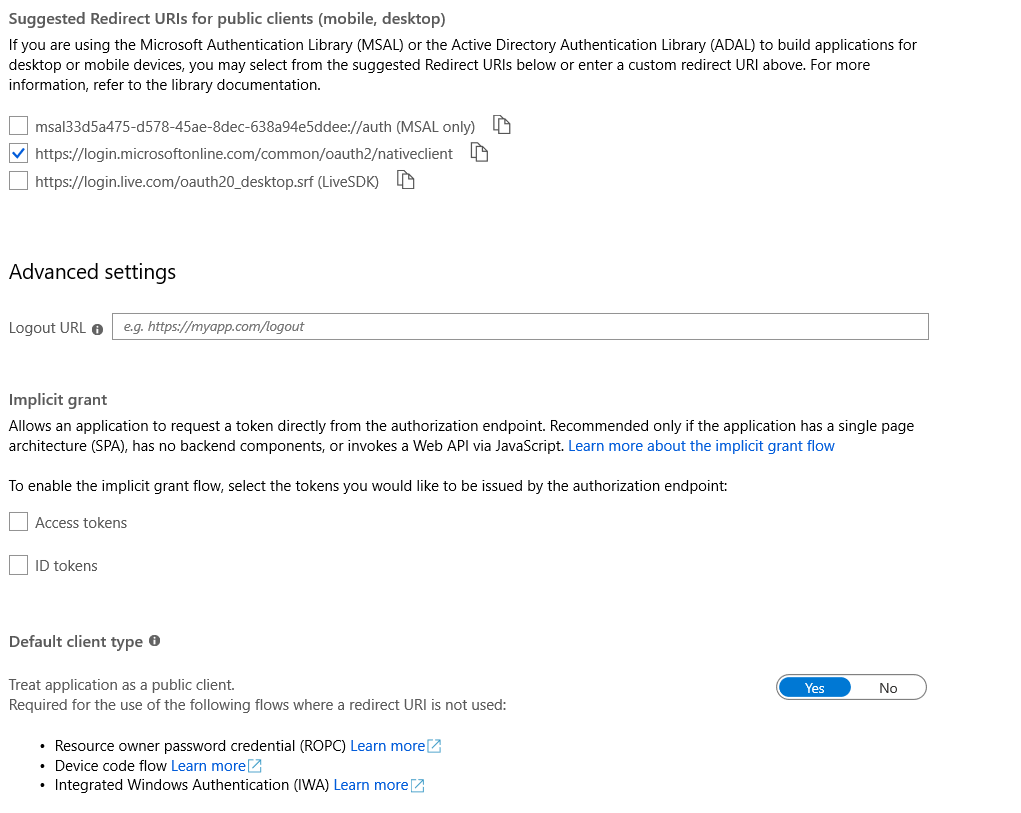
- Before running the CLI specify the environment variables OFFICE365CLI_AADAPPID [Application (client) ID] and OFFICE365CLI_TENANT [Directory (tenant) ID]. You should pick the values that you see under "Overview" of your previously created Azure AD application
- Run the CLI once and execute the login command. Follow the steps and perform a successful authentication through the browser. It will also ask you to grant consent to your app to perform operations on your behalf.
Afterward, you do not have to authenticate against any CLI calls until you are not explicitly executing a logoff operation.
It would be interesting to understand what exactly you want to achieve. In theory, the steps above should be sufficient for command-line automation scenarios.
br,
Patrick
plamber
on 20 Sep 2019
Hi @plamber,
- Specified before running the command line interface the environment variables: OFFICE365CLI_AADAPPID and assigned the app id of the Azure AD application I created
- Run the office365 CLI once and executed a the login command inside it (it will ask you to open a browser and log in with your credentials and grant the app permissions to perform operations on your behalf
Once that happened, you can just run the office365 cli without additional login prompts until you are not explicitly logging off.
I don't exactly follow this. I am not trying to run office365 cli. What I want to achieve is the ability to send out emails from my python application. For this, my understanding is that I need to first download the access token file by authenticating through the following steps:
from O365 import Account
credentials = (XXXX, YYYY)
scopes=['basic', 'message_all']
account = Account(credentials)
account.authenticate(scopes=scopes)
Is this not the way of generating the access token file?
Thanks,
Basil
basilgeorge
on 20 Sep 2019
I haven't tried it with Phyton. I am working in PowerShell. Nevertheless, the concept should be similar.
I installed the CLI on my host.
Now you have two options:
- Option 1: Create your dedicated Azure AD application and specify the desired permissions (as you did)
- Option 2: Use the Azure AD multi-tenant application the PNP group is providing to you (no actions needed)
Before running the CLI
Option 1:
if you follow this option, you need to tell the CLI to use the correct Azure AD application performs the necessary operations. I am specifying this specifying the environment variable "OFFICE365CLI_AADAPPID" with the appropriate application ID (the one that you created) and the environment variable "OFFICE365CLI_TENANT" with the appropriate tenant id.
Option 2:
if you just want to use the "standard" permissions, you do not have to specify the application ID
Authentication
With the CLI you can follow the device code flow for authentication. In a nutshell, you open the CLI once in your command prompt and you are then using the command login. The CLI will guide you in how to authorize the CLI to perform the operations on behalf of the user that is finalizing the login operation. This is an interactive operation.
Performing commands
After a successful login, you do not have to pass credentials after you are not explicitly logging out from the CLI. The necessary tokens to perform the operations on your behalf are stored in the device and are automatically refreshed by the cli. This is what I am usually doing when creating unattended scripts.
You can find an example on how to integrate the CLI in scripts here: https://blog.mastykarz.nl/building-scripts-office-365-cli/
At first glance, I do not see the requirement for you to try to get the token differently. Maybe, I misunderstood your requirements.
plamber
on 20 Sep 2019
In addition to what @plamber mentioned:
For option 1, I think you also need to provide 'OFFICE365CLI_TENANT'
(See Login Documentation)
 stijnbrouwers
on 20 Sep 2019
stijnbrouwers
on 20 Sep 2019
Ok, from what I understood from your comments, I did the following:
In Windows cmd:
set OFFICE365CLI_AADAPPID=XXXX <application id>
set OFFICE365CLI_TENANT=ZZZZ <tenant id>Installed office365:
npm i -g @pnp/office365-cliLogin to office365
office365
o365$ login
To sign in, use a web browser to open the page https://microsoft.com/devicelogin and enter the code H65QY72ED to authenticate.
I went to https://microsoft.com/devicelogin and entered the code which then asked username and password. But when I provided the credentials, I was given this message:

Am I making any mistake?
Thanks,
Basil
basilgeorge
on 20 Sep 2019
Edit: with correct screenshots
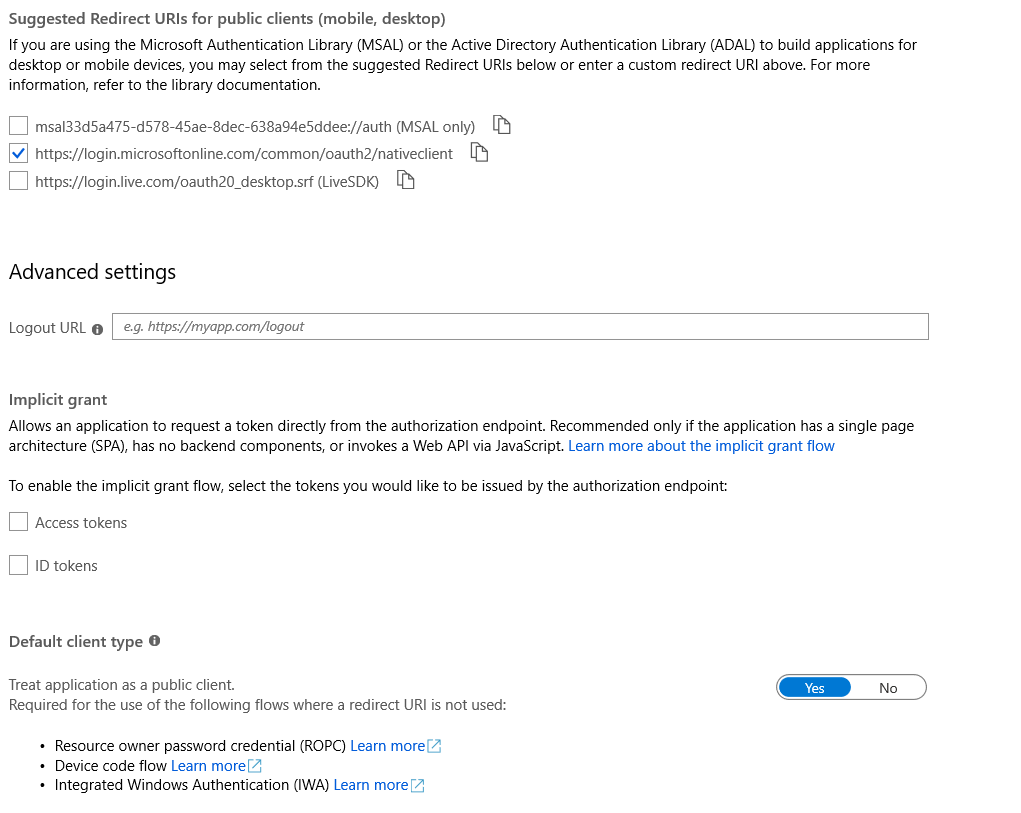
If you do not have the "Suggested redirect URLs" enabled for public clients enabled, then a fake redirect URL und "Redirect URIs" solves your current issue. This is how I configured it in my application. On the other hand, if you change the settings as done in the screen below, this might be more appropriate for the CLI setup.
plamber
on 20 Sep 2019
Hi,
Thanks @plamber. I was able to login successfully into office365 by giving credentials in https://microsoft.com/devicelogin.
But how do I send out emails from the authenticated account after this (using a Python script)? I am following the instructions given here: https://github.com/O365/python-o365#usage
from O365 import Account
credentials = (XXXX, YYYY)
scopes=['basic', 'message_all']
account = Account(credentials)
m = account.new_message()
m.to.add(<recepeint_email>)
m.subject = "Subject"
m.body = "Body"
m.send()
This produces the error:
HTTPError: 401 Client Error: Unauthorized for url: https://graph.microsoft.com/v1.0/me/sendMail | Error Message: Access token is empty.
Thanks,
Basil
basilgeorge
on 24 Sep 2019
Hi,
I do not see why you should use the current's project CLI in combination with the project that has been created by the other person. I am almost sure this will not work in combination.
From my point of view, you should either use the other project's methods or with the CLI presented here.
br,
Patrick
plamber
on 24 Sep 2019
Ok got it. Thanks
basilgeorge
on 26 Sep 2019
Related issues
 arjunumenon
·
3Comments
plamber
·
3Comments
arjunumenon
·
3Comments
plamber
·
3Comments
 StfBauer
·
3Comments
StfBauer
·
3Comments
 garrytrinder
·
3Comments
garrytrinder
·
3Comments
 thomyg
·
3Comments
thomyg
·
3Comments
Most helpful comment
Hi,
I do not see why you should use the current's project CLI in combination with the project that has been created by the other person. I am almost sure this will not work in combination.
From my point of view, you should either use the other project's methods or with the CLI presented here.
br,
Patrick