Cli-microsoft365: Cannot log in with custom AAD Application with user credentials
I have a problem to log in with the following scenario:
- custom AAD application with the described permissions (also admin granted already)
- I used PowerShell for setting environment variable and logging in
- I am not behind a proxy
- set the environment variable $env:OFFICE365CLI_AADAPPID and $env:OFFICE365CLI_TENANT
- CLI version 1.15.0
Expected Behaviour
using a custom properly configured AAD application in conjunction with the authType "password" and proper user credentials should let me login.
Actual Behaviour
when I log in I always get an error. I even tried to change the tenant ID or the app id to something, that does not exist and gives me proper error message like
Error: AADSTS90002: Tenant '#WrongTenantId#' not found. This may happen if there are no active subscriptions for the tenant. Check with your subscription administrator.
or if I use the wrong client ID
Error: AADSTS700016: Application with identifier '#MyWrongClientID#' was not found in the directory '#MyCorrectTenantID#'. This can happen if the application has not be
en installed by the administrator of the tenant or consented to by any user in the tenant. You may have sent your authentication request to the wrong tenant.
Problem Description
the following code I used:
$env:OFFICE365CLI_TENANT="#MyTenantId#"
$env:OFFICE365CLI_AADAPPID="#MyClientId#"
$env:OFFICE365CLI_VERBOSE="1"

o365 spo login https://contoso.sharepoint.com --authType password --userName [email protected] --password contosopassword
I get the following logs:
DONE
Logging in to SharePoint Online at https://contoso.sharepoint.com...
Error: AADSTS7000218: The request body must contain the following parameter: 'client_assertion' or 'client_secret'.
Trace ID: 84ef2fb4-07a7-473c-a5f2-346d7595b400
Correlation ID: af49f0c2-5a96-42ad-bb20-e3f2205ca6d1
Timestamp: 2019-03-28 08:31:03Z
I get the same result when I try to use the device login with my application (e.g. office365 spo login https://devglobal.sharepoint.com):
DONE
Logging in to SharePoint Online at https://devglobal.sharepoint.com...
To sign in, use a web browser to open the page https://microsoft.com/devicelogin and enter the code #SomeCodeHere# to authenticate.
Error: undefined
Of course I changed all data related to my environment. I only kept the trace and correlation ID.
I don't find any documentation how to login with a custom AAD application and user credentials, but I asked @waldekmastykarz on twitter and he said it should be possible. So I just guessed it should work like described above.
 SebastianSchuetze
All 10 comments
Thanks for reporting the issue and the detailed description. I will investigate it asap.
 waldekmastykarz
on 28 Mar 2019
waldekmastykarz
on 28 Mar 2019
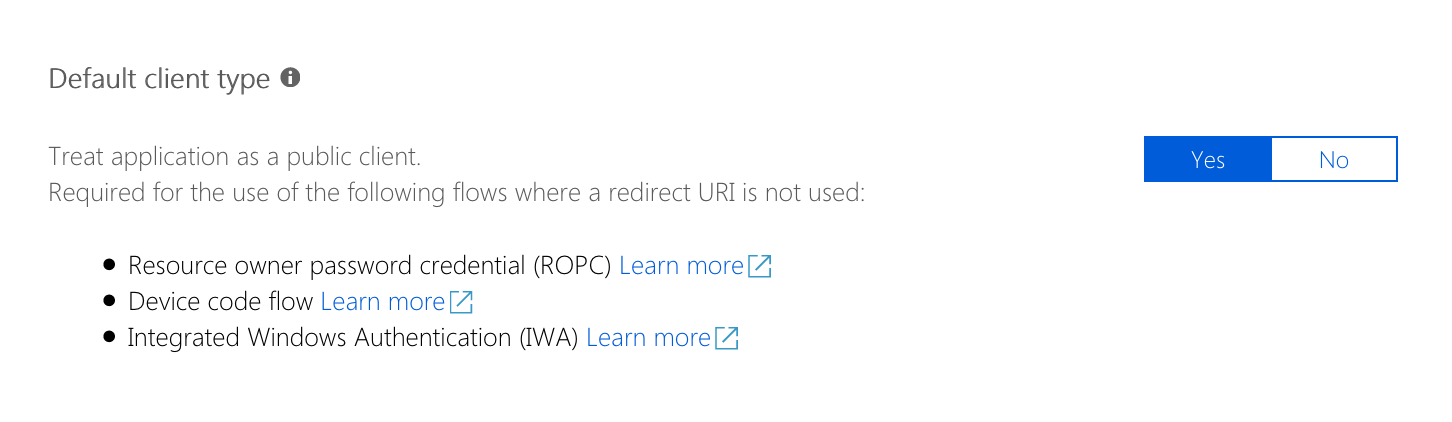
I was able to reproduce your issue. It seems to be fixed, when in the app registration, you change the app to be treated as public client by default:
waldekmastykarz
on 1 Apr 2019
Thank you very much! I will check tomorrow. I think this is not mentioned in the documentation. I would suggest adding a notice box maybe, as this is not a default configuration when I create a new application.
If understand correctly, this setting is needed, because a redirection could / should not be handled with a CLI? Does this also solve MFA issues?
SebastianSchuetze
on 1 Apr 2019
I tried it and it worked!

SebastianSchuetze
on 2 Apr 2019
Yes, it is related to the fact, that the CLI is a client tool that can't handle a redirect to a URL. MFA is a different problem as it requires an interactive login, so unfortunately not something that you can use in the credentials flow.
Good suggestion to extend the docs with this information. Once again, sorry for the trouble and thank you for reporting it 👍
waldekmastykarz
on 2 Apr 2019
@waldekmastykarz do you know what that setting changes in the AD application manifest?
 phillipharding
on 2 Apr 2019
phillipharding
on 2 Apr 2019
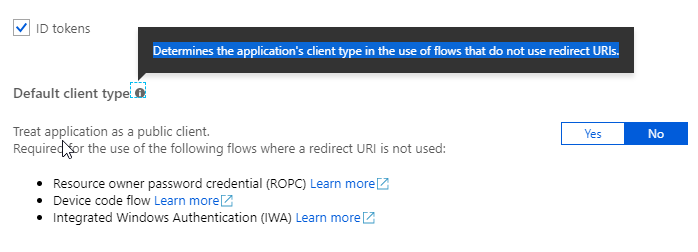
@phillipharding the purpose of this option is to use clients, that cannot handle redirections. E.g. this CLI. When you go to the AAD you can see the following which should give the explanation:
@waldekmastykarz I could make the PR for the doc change if it's ok with you.
SebastianSchuetze
on 3 Apr 2019
Please do @SebastianSchuetze! Appreciate your help 👏
waldekmastykarz
on 3 Apr 2019
@phillipharding I haven't compared the before and after state of the manifest
waldekmastykarz
on 3 Apr 2019
I might be hijacking this thread a bit, but I did some digging and turned up an interesting oddity :smiley:
Firstly, changing the Default Client Type setting in the portal changes the allowPublicClient property in the application manifest, which is described as setting the default client type when a _redirect_uri_ is not used - the documentation goes further by describing the property as setting the fallback application type _when it cannot be determined or inferred_.
According to the Azure AD v2 ROPC reference, a client_assertion or client_secret is not required and that the Default Client Type/allowPublicClient must be set to True.
So, executing such a token request without the client_assertion or client_secret will fail with error code _invalid_client_ if the Default Client Type/allowPublicClient is not set to True.
However, if you execute the ROPC token request with a client_assertion or client_secret, the Default Client Type/allowPublicClient setting is effectively ignored and the token request succeeds.
I'm assuming in this later case, that Azure infers (because of the client_secret) that the client making the request is a Confidential Client and it's OK to issue the token.
phillipharding
on 4 Apr 2019
Related issues
 garrytrinder
·
3Comments
garrytrinder
·
3Comments
 arjunumenon
·
3Comments
arjunumenon
·
3Comments
 OodapowUiPath
·
3Comments
waldekmastykarz
·
3Comments
OodapowUiPath
·
3Comments
waldekmastykarz
·
3Comments
 thomyg
·
3Comments
thomyg
·
3Comments
Most helpful comment
I tried it and it worked!