Cli-microsoft365: how to make 'spo connect' work with proxy
Hi @waldekmastykarz ,
I'm trying to connect
spo connect https://[admin].sharepoint.com
but it errors out : connect ETIMEDOUT [ip address]
Note: node config has proxy setting set.
The same works when i use SharePoint Online Management Shell (Latest version)
Regards
Akhilesh
 akhileshnirapure
All 8 comments
I just had a quick look at the package we're using for issuing web requests and it seems like you need to specify the proxy as a separate option on the request. If this is indeed the case, then it would mean that at this moment using proxies is not supported and we'd have to extend the CLI to support them.
If you'd be willing to help us test it, I could put together a test version so that we can test the change on one or two commands. If it works, we would then consistently update the whole CLI. How does that sound @akhileshnirapure?
 waldekmastykarz
on 17 Jan 2018
waldekmastykarz
on 17 Jan 2018
Reading further through the request docs I've found this: https://github.com/request/request#controlling-proxy-behaviour-using-environment-variables. So theoretically, it should work the way it is. Could you double check if this is how you configured your proxy?
waldekmastykarz
on 17 Jan 2018
@waldekmastykarz , @akhileshnirapure I will also try to run it behind corporate proxy in the next few days to see what would happen on my end.
 VelinGeorgiev
on 17 Jan 2018
VelinGeorgiev
on 17 Jan 2018
Appreciate your help @VelinGeorgiev 👏
waldekmastykarz
on 17 Jan 2018
Seems to be working fine and as per the documents with one restriction, it is strictSSL all the time.
@akhileshnirapure here is how you can try and setup the proxy if you are using Windows OS.
Open the Windows startup menu (windows button) -> Open "Run" prompt -> type "SystemPropertiesAdvanced" -> go to the "Environment Variables"
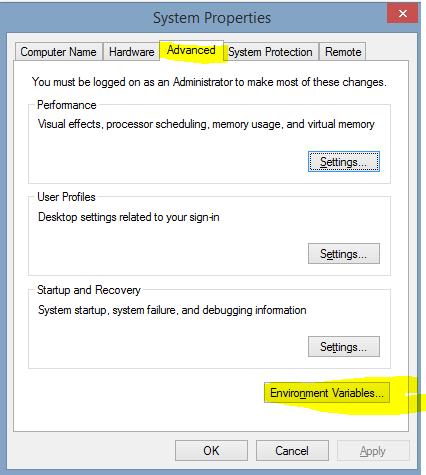
Add HTTP_PROXY and HTTPS_PROXY variables under User variables for XXX with the following values:
HTTP_PROXY=http://username:[email protected]:8080
HTTPS_PROXY=http://username:[email protected]:8080
or just
HTTP_PROXY=http://proxy.example.com:8080
HTTPS_PROXY=http://proxy.example.com:8080
if no authentication is needed.

Note, I couldn't fully test it with our proxies because I encountered different issue that says "Error: Self signed certificate in the chain" (I get that with the pnp powershell as well). I relate that to my organization proxy setup and the request strictSSL option, but would have to further investigate.
In general, the office365-cli picks up the proxy settings and I guess (@waldekmastykarz can say) the setup is similar with Unix based systems where you add the proxy as Env variable
VelinGeorgiev
on 20 Jan 2018
Thank you double checking and the detailed description @VelinGeorgiev 👏
waldekmastykarz
on 21 Jan 2018
@VelinGeorgiev followed steps and o365 cli works :-) @waldekmastykarz great stuff
akhileshnirapure
on 23 Jan 2018
Excellent! Thanks for confirming @akhileshnirapure and once again, thanks @VelinGeorgiev for the detailed walkthrough 👏
waldekmastykarz
on 23 Jan 2018
Related issues
 OodapowUiPath
·
3Comments
OodapowUiPath
·
3Comments
 aakashbhardwaj619
·
3Comments
waldekmastykarz
·
3Comments
waldekmastykarz
·
3Comments
aakashbhardwaj619
·
3Comments
waldekmastykarz
·
3Comments
waldekmastykarz
·
3Comments
 arjunumenon
·
3Comments
arjunumenon
·
3Comments
Most helpful comment
Seems to be working fine and as per the documents with one restriction, it is strictSSL all the time.
@akhileshnirapure here is how you can try and setup the proxy if you are using Windows OS.
Open the Windows startup menu (windows button) -> Open "Run" prompt -> type "SystemPropertiesAdvanced" -> go to the "Environment Variables"

Add
HTTP_PROXYandHTTPS_PROXYvariables underUser variables for XXXwith the following values:or just
if no authentication is needed.

Note, I couldn't fully test it with our proxies because I encountered different issue that says "Error: Self signed certificate in the chain" (I get that with the pnp powershell as well). I relate that to my organization proxy setup and the request strictSSL option, but would have to further investigate.
In general, the office365-cli picks up the proxy settings and I guess (@waldekmastykarz can say) the setup is similar with Unix based systems where you add the proxy as Env variable