Clarity: [1.0] Datagrid custom column width
Describe the bug
The version ^0.13.10 worked well with the approach taken from here.
But on version 1.0 this column width setting does not work.
How to reproduce
https://stackblitz.com/edit/clarity-light-theme-v013-wrxgpk
or from github: https://github.com/gonzobard777/datagrid-custom-column-width
Steps to reproduce the behavior:
- Go to 'stackblitz'
- Click on 'Open in New Window'
- You will see that the columns do not match the contents of the table
Note that I just added the width for the column:
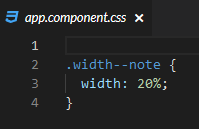
Expected behavior
You can specify an arbitrary width for an arbitrary column. And the columns and content will be the same
Versions
App
- Angular: 7.1
- Node: last in stackblitz
- Clarity: 1.0
Device:
- Type: Descktop
- OS: Win10
- Browser chrome, firefox
 gonzobard777
All 6 comments
The datagrid row uses flexbox for its layout so there might be some issues with trying to use % for column width and I'm not 100% sure we supported that pre v1.0.0. I tested using px for a predefined width and that works as expected.
There are two ways to explicitly set column width.
First, bind the width value you want using the template:
<clr-dg-column [style.width.px]="150" class="width--num"> #</clr-dg-column>
Second, using css classes as your example was doing with percentages:
.width--progress {
  width: 200px;
}
<clr-dg-column class="width--progress"> %</clr-dg-column>
 hippee-lee
on 18 Dec 2018
hippee-lee
on 18 Dec 2018
Hi hippee-lee, thanks for your explanation.
As a result of the struggle with these columns, we eventually came to specify the width of the column in pixels. But I would like to be able to set the width in percentage (as it was possible in v0.13.10)
gonzobard777
on 18 Dec 2018
Hey, @gonzobard777 - I will label this as a regression and look more into it when I have some time. For now I'm going to move it into the backlog. If this is urgent- feel free to take a stab at fixing it. Ask me any questions if you want to know how the renderer calculates cell/column widths.
I believe that the root cause is related to the cells when they are in the calculation table. They are not getting the correct width from the header when a consumer sets width with a % value.
hippee-lee
on 18 Dec 2018
I did some more investigation and know why. With recent datagrid state changes I still need to figure out how to fix this. I'll update when I make progress.
hippee-lee
on 11 Apr 2019
Hi @gonzobard777.
I have the same problem and found the workaround solution.
You still need to set width for datagrid column as it was in Clarity 0.13. You can do it with CSS class or by inline style. Here is an example with inline style.
<clr-dg-column [style.width.%]="20"></clr-dg-column>
And in addition of that in Clarity 1.0 you also need to set width for datagrid cell related to this column. But you should use CSS property flex-basis instead of width. This property overrides inline property width with incorrectly calculated value.
<clr-dg-cell [style.flexBasis.%]="20"></clr-dg-cell>
Here is the working example:
https://stackblitz.com/edit/clarity-light-theme-v013-aepwzg?file=src/app/app.component.html
 belyan
on 4 Feb 2020
belyan
on 4 Feb 2020
There is a workaround available for this issue, and we recommend using it for Clarity Angular. As we build Clarity Core implementations, we expect that this issue won’t be an issue or will be configurable on the application side. To help us clean up our backlog, we are going to close this with a functional workaround available and suggest you follow updates for Clarity Core for enhancements that can support your use case with Clarity Core components.
 gnomeontherun
on 26 Jan 2021
gnomeontherun
on 26 Jan 2021
Related issues
 reddolan
·
3Comments
reddolan
·
3Comments
 Vad1mo
·
3Comments
Vad1mo
·
3Comments
 elesueur
·
3Comments
elesueur
·
3Comments
 gperdomor
·
3Comments
gperdomor
·
3Comments
 beaker1977
·
3Comments
beaker1977
·
3Comments
Most helpful comment
Hi hippee-lee, thanks for your explanation.
As a result of the struggle with these columns, we eventually came to specify the width of the column in pixels. But I would like to be able to set the width in percentage (as it was possible in v0.13.10)