Clarity: Datagrid - long column headers overlap next column header when sorting
Select one ... (check one with "x")
[x ] bug
[ ] feature request
[ ] enhancement
Expected behavior
Next column would move right when the sorted column header expands
Actual behavior
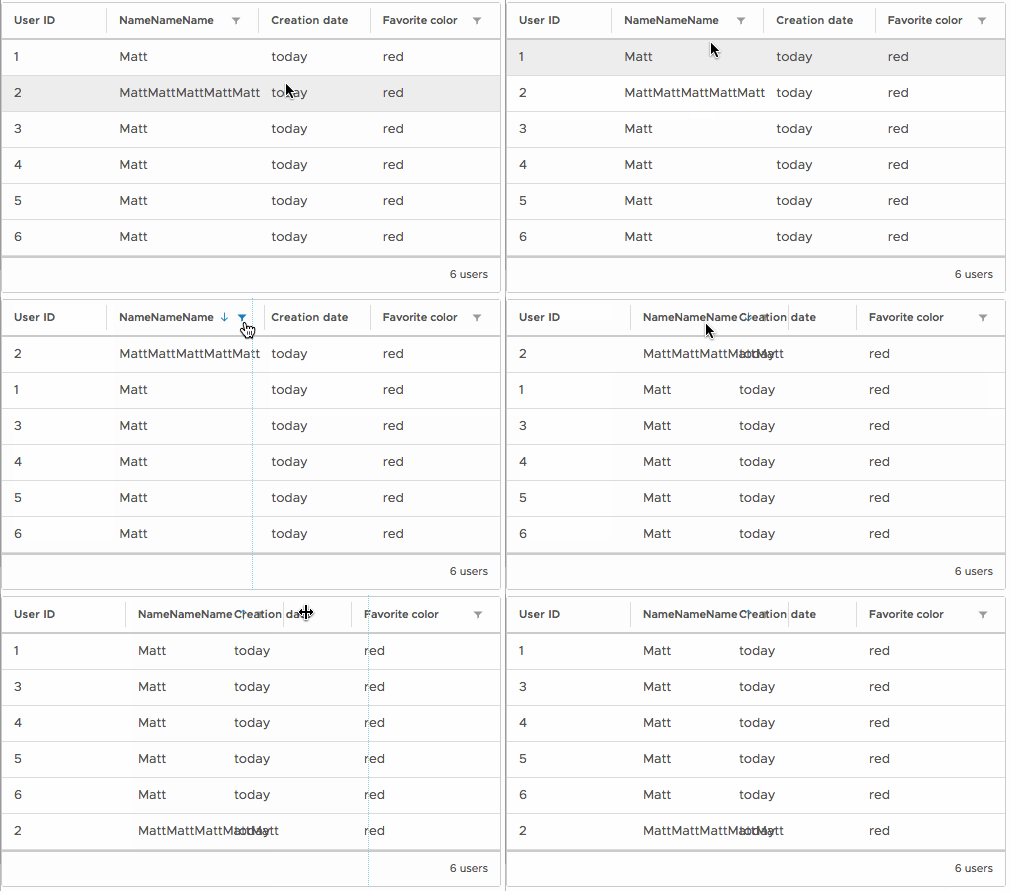
When sorting some column, its header expands to include the sorting icon, but the next column remains where it was. When sorting by column with long name, its header overlaps the next one
Reproduction of behavior
Make a datagrid with enough columns to fill the width, give one of the column some ReallyLongName and try to sort by it
https://plnkr.co/edit/F4ODz2cLELOMB7xncPQp?p=preview - sort by any of VeryLongColumn names
Environment details
Angular version:
5.0.1Clarity version:
0.10.13- OS and version:
Windows 10 - Browser:
Chrome 62.0.3202.94
FF 56.0
 grreeenn
All 12 comments
Overlapping also occur in the row
 marcelocarmona
on 4 Dec 2017
marcelocarmona
on 4 Dec 2017
Hi @marcelocarmona, what you're talking about is defined as an expected behavior - see https://github.com/vmware/clarity/issues/618
grreeenn
on 5 Dec 2017
Hi @grreeenn thanks, I had not seen that issue.
marcelocarmona
on 5 Dec 2017
@grreeenn @marcelocarmona This issue might have a simple workaround if you specify the style of handling word breaks in the datagrid columns and cells:
.datagrid-column, .datagrid-cell {
  overflow-wrap: break-word;
  word-wrap: break-word;
  -ms-word-break: break-all;
  word-break: break-word;
  -ms-hyphens: auto;
  -moz-hyphens: auto;
  -webkit-hyphens: auto;
  hyphens: auto;
}
This is the result: https://plnkr.co/edit/nyo8KOcVMitktCjNwrJ0?p=preview
EDIT: Firefox has issues with this workaround
 Shijir
on 6 Dec 2017
Shijir
on 6 Dec 2017
Hi @Shijir
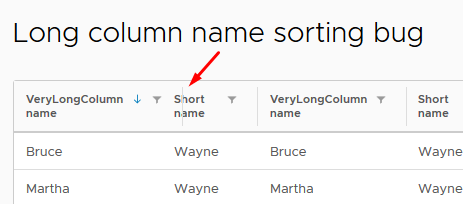
Looked at your plunker - it looks like this
grreeenn
on 6 Dec 2017
@Shijir although this workaround which works in chrome (and only in chrome, btw - it does not in both FF and Edge) it turns the column name to unreadable pile of characters; so I don't know if it may be considered as a workaround after all, sorry.
grreeenn
on 7 Dec 2017
A workaround could be that you add a display: inline-table to the .datagrid .datagrid-column class, however by doing this, it undoes the preset width on each header. I'm not sure how to avoid that happening but at least it fixes the bug.
 spetri
on 1 Feb 2018
spetri
on 1 Feb 2018
Another workaround (if you are okay with ellipsis), is to add:
  .datagrid-column-title {
    white-space: nowrap;
    overflow: hidden;
    text-overflow: ellipsis;
  }

  .datagrid-column-flex {
    width: 100%;
  }
Updated Stackblitz also demonstrating this issue: https://stackblitz.com/edit/clarity-dark-theme-v012-tsdheb (From issue #2605)
 hippee-lee
on 30 Aug 2018
hippee-lee
on 30 Aug 2018
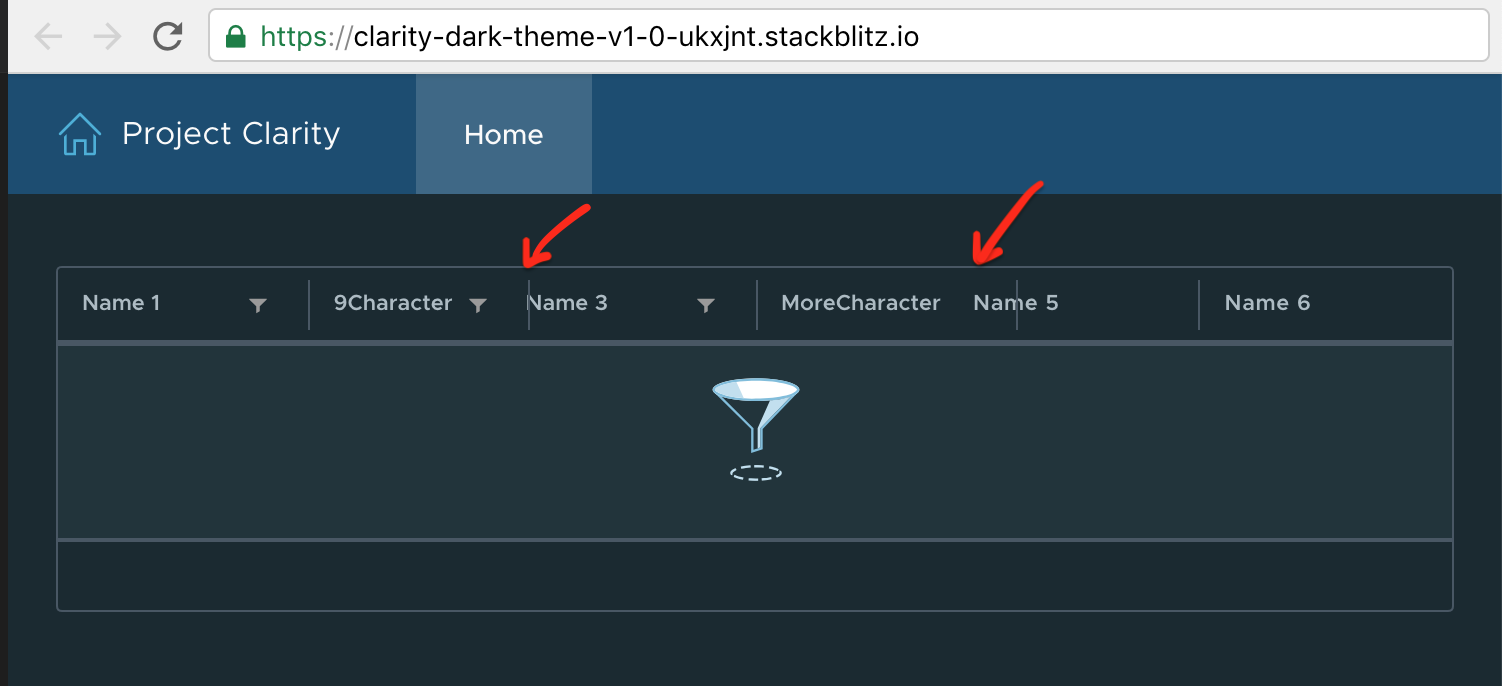
Are we planning to fix this issue? It is still reproducible in 1.0. This the text seem start overlapping once the column title has more than 9 characters (non-wrappable).
 yaooluu
on 14 Feb 2019
yaooluu
on 14 Feb 2019
Hi All,
We just ran into this. It is still an issue as of May, 2019. Any plans on fixing this?
Overlapping headers doesn't seem to be an issue when filtering, but only when sorting. Maybe something is broken there.
Has anyone a good solution to this while waiting for a fix?
Thank you.
 Andreaux
on 22 May 2019
Andreaux
on 22 May 2019
This issue is about a version of Clarity that is out of support. In an effort to better manage our backlog, we are closing this issue. We recognize that some of these issues may remain problematic for you, but to help us to be able to prioritize it we ask for a new GitHub issue with an updated demo with a recent supported version of Clarity.
 gnomeontherun
on 29 Jan 2021
gnomeontherun
on 29 Jan 2021
Related issues
 girijaa
·
29Comments
girijaa
·
29Comments
 reddolan
·
31Comments
reddolan
·
31Comments
 markofranjic
·
22Comments
markofranjic
·
22Comments
 Harsh072
·
23Comments
Harsh072
·
23Comments
 steven-zou
·
24Comments
steven-zou
·
24Comments