Ckan: Auto-update and other GitHub connections not working
Background
CKAN Version:
- 1.24.0-PRE
KSP Version:
1.3.1.1891
Operating System:
Windows 10.1
Have you made any manual changes to your GameData folder (i.e., not via CKAN)?
no, I use CKAN for all of my changes
Problem
What steps did you take in CKAN?
Opened it.
What did you expect to happen?
It to open without error and connect to the repository
What happened instead?
I got the errors below, and no updates.
Screenshots:

CKAN error codes (if applicable):
See the end of this message for details on invoking
just-in-time (JIT) debugging instead of this dialog box.

************** Exception Text **************
CKAN.ModuleNotFoundKraken: Exception of type 'CKAN.ModuleNotFoundKraken' was thrown.
   at CKAN.Registry.AllAvailable(String module)
   at CKAN.MainAllModVersions.set_SelectedModule(GUIMod value)
   at CKAN.Main.ModList_SelectedIndexChanged(Object sender, EventArgs e)
   at System.Windows.Forms.DataGridView.OnSelectionChanged(EventArgs e)
   at System.Windows.Forms.DataGridView.FlushSelectionChanged()
   at System.Windows.Forms.DataGridView.ClearSelection(Int32 columnIndexException, Int32 rowIndexException, Boolean selectExceptionElement)
   at System.Windows.Forms.DataGridView.SetAndSelectCurrentCellAddress(Int32 columnIndex, Int32 rowIndex, Boolean setAnchorCellAddress, Boolean validateCurrentCell, Boolean throughMouseClick, Boolean clearSelection, Boolean forceCurrentCellSelection)
   at System.Windows.Forms.DataGridView.MakeFirstDisplayedCellCurrentCell(Boolean includeNewRow)
   at System.Windows.Forms.DataGridView.OnRowCollectionChanged_PostNotification(Boolean recreateNewRow, Boolean allowSettingCurrentCell, CollectionChangeAction cca, DataGridViewRow dataGridViewRow, Int32 rowIndex)
   at System.Windows.Forms.DataGridViewRowCollection.OnCollectionChanged_PostNotification(CollectionChangeAction cca, Int32 rowIndex, Int32 rowCount, DataGridViewRow dataGridViewRow, Boolean changeIsDeletion, Boolean changeIsInsertion, Boolean recreateNewRow, Point newCurrentCell)
   at System.Windows.Forms.DataGridViewRowCollection.OnCollectionChanged(CollectionChangeEventArgs e, Int32 rowIndex, Int32 rowCount)
   at System.Windows.Forms.DataGridViewRowCollection.AddRange(DataGridViewRow[] dataGridViewRows)
   at CKAN.Main._UpdateFilters()
   at CKAN.Main._UpdateModsList(Boolean repo_updated, List`1 mc)
   at CKAN.Main.CurrentInstanceUpdated()
   at CKAN.Main.OnLoad(EventArgs e)
   at System.Windows.Forms.Form.OnCreateControl()
   at System.Windows.Forms.Control.CreateControl(Boolean fIgnoreVisible)
   at System.Windows.Forms.Control.CreateControl()
   at System.Windows.Forms.Control.WmShowWindow(Message& m)
   at System.Windows.Forms.Control.WndProc(Message& m)
   at System.Windows.Forms.Form.WmShowWindow(Message& m)
   at System.Windows.Forms.NativeWindow.Callback(IntPtr hWnd, Int32 msg, IntPtr wparam, IntPtr lparam)
 adalast
All 84 comments
This is probably because of TLS v1 and v1.1 depreciation here on Github that was put into effect today.
 TruePikachu
on 22 Feb 2018
TruePikachu
on 22 Feb 2018
Odd, it's actually working for me. Maybe my system is able to use later versions of TLS than the ones having issues?
 HebaruSan
on 22 Feb 2018
HebaruSan
on 22 Feb 2018
Either way, @TruePikachu, you sound like you're familiar with this. Is there an official announcement that I could read to catch up?
HebaruSan
on 22 Feb 2018
Honestly I only know about this because of a post over in /r/3dshacks (see https://redd.it/7uem9t and sticky comment)
EDIT: And suspected this because of TLS being in the backtrace for one of the errors
TruePikachu
on 22 Feb 2018
Just checked Wireshark, CKAN attempted use of TLSv1 to api.github.com .
TruePikachu
on 22 Feb 2018
Thanks! Those posts have links to the official announcements. I guess their attempt at outreach was not successful in this case. I bet this was the cause of the recent outage reported on the forum:
The plan is to do a 1hr brownout on February 8th, followed by a permanent deployment on February 22nd. We realize that no matter how much notice (announced roughly a year ago), there are bound to be some systems that are both incompatible and unknowingly running on production systems. So, the hope is that a 1hr brownout will help to unearth such systems and give folks time to get them updated.
In retrospect, I'm not sure how we were supposed to figure out this was the cause of people randomly reporting that stuff doesn't work and then it working again.
HebaruSan
on 22 Feb 2018
@TruePikachu, what platform are you using? I'm on Ubuntu and therefore using Mono, so since it's working for me, I'm wondering whether .NET on Windows doesn't support TLS 1.2?
HebaruSan
on 22 Feb 2018
Windows 7, just did a quick search, .NET 4.5 is when 1.2 support was added, and 4.6 is when it was made the default.
TruePikachu
on 22 Feb 2018
Boom:
https://blogs.perficient.com/microsoft/2016/04/tsl-1-2-and-net-support/
So, why didn’t .NET framework support TLS 1.2 in my case? Well, that was because my application was using .NET 4.0. In .NET 4.0 default transport level security standard is TLS 1.1. The solution for my problem was to upgrade my application to the latest .NET framework: 4.6.1. In this framework version TLS 1.2 is a default cryptographic standard.
... NINJA'd.
Can you try 4.6?
HebaruSan
on 22 Feb 2018
Problem is, I don't have a way to compile right now.
I do have .NET 4.6.1 installed, however.
TruePikachu
on 22 Feb 2018
ckan.exe is compiled against many versions of Mono by default, and the latest one is used for release:
https://travis-ci.org/KSP-CKAN/CKAN/builds/343973360
I think you should be able to use the existing EXE as long as you have the right version of .NET installed.
HebaruSan
on 22 Feb 2018
Except I can't find where to actually get the builds from Travis.
TruePikachu
on 22 Feb 2018
You should be able to use any released version.
HebaruSan
on 22 Feb 2018
I have the same issue and same software versions as described.
Ckan worked a few hours ago and then I opened it and got errors.
 sergivonavi
on 22 Feb 2018
sergivonavi
on 22 Feb 2018
I'm already on 1.22.6
EDIT: 1.24.0-PRE-1 also has the issue
EDIT2: Also still using TLSv1
EDIT3: I can confirm that it is built for 4.5, though, so it just doesn't know to escalate to TLSv1.2 when the TLSv1 fails.
TruePikachu
on 22 Feb 2018
Confirmed here too
Error in autoupdate:
    La demande a été abandonnée : Impossible de créer un canal sécurisé SSL/TLS.
I am also unable to update CKAN repository
Connection to https://github.com/KSP-CKAN/CKAN-meta/archive/master.tar.gz could not be established.
Repository successfully updated
 TTAK
on 22 Feb 2018
TTAK
on 22 Feb 2018
I'm having the issue in Windows 10, using .NET 4.7, and, like TTAK mentioned, 'ckan update' isn't working either, unable to connect.
PS D:ckan> ./ckan update
Downloading updates...
Connection to https://github.com/KSP-CKAN/CKAN-meta/archive/master.tar.gz could not be established.
Updated information on 0 available modules
 fobok1
on 22 Feb 2018
fobok1
on 22 Feb 2018
My best suggestion for now is to force CKAN to use TLSv1.2, since it apparently can't escalate to there automatically. Under 4.5, run the following code before any SSL connections are established:
ServicePointManager.SecurityProtocol = SecurityProtocolType.Tls12;
Under 4.6, it should already be the default.
EDIT: It's entirely possible that Mono under Linux already was smart enough to default to TLSv1.2, which would be why you didn't experience the issue.
TruePikachu
on 22 Feb 2018
@politas, @techman83, @Olympic1, @pjf, anyone, we kind of need an all-hands-on-deck on this. CKAN is no longer able to access GitHub on Windows at all, despite indications that it should be fine on .NET 4.6 and later, and we have no known workarounds.
HebaruSan
on 23 Feb 2018
@TruePikachu, I think you may be right about compilation. The ckan.exe that I was trying was one that I built locally. I'll retry with the actual download version...
HebaruSan
on 23 Feb 2018
Compile it for .NET 4.6 or later, and it should be golden.
TruePikachu
on 23 Feb 2018
... nope, the 1.22.6 download works fine on my system! The difference must be in the runtime environment somewhere.
HebaruSan
on 23 Feb 2018
If you're using Mono, it's entirely possible that it is deviating from .NET by using TLSv1.2 by default. For this issue to be fixed, one of the following needs to be done:
- Compile for .NET 4.6
- Add
ServicePointManager.SecurityProtocol = SecurityProtocolType.Tls12;where it will be executed before any SSL connections are established. This will also require the compile to be for .NET 4.5 or later (which is the case for the prerelease anyway).
Just having a later version of .NET installed doesn't appear to work as a fix for the issue; the application needs to actually be compiled for that version in order to take advantage of changed default behaviors (otherwise, programs would break all the time when .NET gets updated).
TruePikachu
on 23 Feb 2018
This is a workaround, as any regedit use at your own risk.
In Powershell:
Set-ItemProperty -Path 'HKLM:\SOFTWARE\Microsoft\.NetFramework\v4.0.30319' -Name 'SchUseStrongCrypto' -Value '1' -Type DWord
 G-UK
on 23 Feb 2018
G-UK
on 23 Feb 2018
Workaround doesn't work on this system, even with corrected registry paths (there's a typo in there)
TruePikachu
on 23 Feb 2018
Same here
Tried on two Systems
A friend tried to use CKAN today first time, same problem
 Timst10
on 23 Feb 2018
Timst10
on 23 Feb 2018
Where's the typo?
Works for me on Win10 64bit. You have run Powershell in Admin and then restarted CKAN afterwards?
Oh and I'm running CKAN 1.24.0-Pre
G-UK
on 23 Feb 2018
I would really like to mod my KSP today, can you give me a dumb down version of a step by step process on how to get CKAN working again.
 vigoroushydro
on 23 Feb 2018
vigoroushydro
on 23 Feb 2018
@G-UK The path is: Computer\HKEY_LOCAL_MACHINE\SOFTWARE\Microsoft\.NETFramework\v4.0.30319 (check cases)
@vigoroushydro non available yet. Just wait.
 EoD
on 23 Feb 2018
EoD
on 23 Feb 2018
Wait for it to get fixed™
There isn't much that can be done safely without a recompile of CKAN. The registry "workaround" that was suggested can cause issues with other applications, and didn't even appear to have an effect on my system.
TruePikachu
on 23 Feb 2018
@TruePikachu just make sure that you are using the correct path and not the one under WOW6432Node. I added the key manually and it works fine (except for the side effects).
EoD
on 23 Feb 2018
Alright, I'm rebooting into Windows. See you on the other side...
HebaruSan
on 23 Feb 2018
Is there a way to force ckan to work offline?
My mods are in the download folder, but they have to be installed
The workarround from Jan2015 told me to uninstall all mods... :( I cant play atm... :(
Timst10
on 23 Feb 2018
@EoD There is a Windows PowerShell drive named HKLM: that is mapped to the HKEY_LOCAL_MACHINE hive of the registry as default in Windows PowerShell. Hence the path I posted is valid.
Edit also .NET vs .net makes no difference.
G-UK
on 23 Feb 2018
@G-UK's workaround worked for me as well (verbatim original text). I'm now in Windows, and I saw the error on my first test, and CKAN is working after the workaround.
I'm going to see if I can turn this into a .reg file that people can install rather than having to run Powershell.
HebaruSan
on 23 Feb 2018
Right now, I was just thinking about the fix I proposed, and I currently feel it might be safest to use something like ServicePointManager.SecurityProtocol |= SecurityProtocolType.Tls12; instead (note the use of |= instead of =), assuming that's still proper C# syntax. Basically, since we just want to enable support for TLSv1.2 instead of forcing everything to use it (which includes servers that host mods, even though it's probably foolish not to support TLSv1.2).
@HebaruSan Just don't have that be the official fix to the issue, since it could potentially open a can of worms with other applications.
TruePikachu
on 23 Feb 2018
OK, here is the workaround in reg file form:
To install it, right click and Open with Registry Editor:
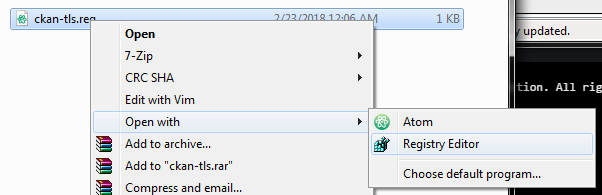
There might be a security popup or something, you know how Windows is. This will set up the registry key that @G-UK suggested (thanks!); you can read the file in notepad first to be sure that I haven't added anything else. I tested this several times and it seemed effective. If you try this, please report back on the outcome.
If this generally looks good for folks, we can put the file someplace reasonable and post it on the forum thread.
@TruePikachu, thanks for the code suggestions, but I would like to find something that does not require releasing a new version of CKAN, if possible. That could take a while, and there are a lot of changes since 1.22.6 and I'm concerned about telling people that they _have to_ upgrade now. (And I don't want to hard-code TLS 1.2 only to have this all happen all over again in 2 years when GitHub sunsets _that_ version in favor of the next big thing.)
HebaruSan
on 23 Feb 2018
I was referring more in terms of the actual bug never getting fixed, and instead using a registry hack forever. A workaround like this is at least somewhat okay for between versions.
TruePikachu
on 23 Feb 2018
That .reg file worked fine here.
As much as it would be annoying to have to force people to update CKAN, it's better practice than forcing people to change a Windows registry setting which could affect any number of other programs.
 Maeyanie
on 23 Feb 2018
Maeyanie
on 23 Feb 2018
@EoD, it didn't work for you?
HebaruSan
on 23 Feb 2018
OK, rereading my earlier comment, it does kind of sound like I'm ruling out code changes.
To be clear: That's not the case.
If there's a good, solid code solution to this that isn't going to break something else (For example, I have not tested whether SpaceDock supports TLS 1.2. Have you? What happens to the user running .NET 4.5 who auto-updates to a CKAN that requires 4.6?) or repeat the same problem further down the line, I'm in favor of doing it. In fact, I'm sure it'll happen.
However, it may be days or weeks before a new CKAN release could come out. At the very least we need one of the other members of the CKAN team to show up, since I'm a new-ish member (October) and haven't done a release by myself before, let alone a release with code changes that no one else on the team has reviewed.
That's why I'm focusing on this workaround for the short term. People who are OK with a workaround can go that route, and those who are OK with waiting for a new release can go that route.
HebaruSan
on 23 Feb 2018
@TruePikachu, thanks for the code suggestions, but I would like to find something that does not require releasing a new version of CKAN, if possible. That could take a while, and there are a lot of changes since 1.22.6 and I'm concerned about telling people that they have to upgrade now. (And I don't want to hard-code TLS 1.2 only to have this all happen all over again in 2 years when GitHub sunsets that version in favor of the next big thing.)
I absolutely disagree about this statement. It should not be a problem to release a bugfix version of an already existing version of CKan.
As you don't seem to have maintenance branches, just check out an old tag, create a maintenance branch of the old tag and add the line of code from TruePickachu.
"Fixing" the issue by using registry edits is really not a good way imho.
EoD
on 23 Feb 2018
@EoD, thanks for elaborating. If I did that, Travis would build a new release of HEAD instead of that maintenance branch. I'm nowhere near expert enough in Travis stuff to address that.
HebaruSan
on 23 Feb 2018
OK, changing the TargetFrameworkVersion to v4.6 seems to be effective. I assume I have plenty of volunteers willing to test now:
- (link removed, see later post)
Next up, setting SecurityProtocol...
HebaruSan
on 23 Feb 2018
@HebaruSan :wave: - I only have ready access to linux I'm afraid. Are we able to get the connection to default to 1.2 and fall back? I'm not super familiar with the libs we're using in C# for http.
IMO a work around is ok while we formulate a better solution going forwards.
 techman83
on 23 Feb 2018
techman83
on 23 Feb 2018
@techman83, the lib we're using is just System.Net.Webclient, and that's the next thing I'm going to check.
HebaruSan
on 23 Feb 2018
@HebaruSan I've fired up IRC if you need to ping me for anything.
techman83
on 23 Feb 2018
The new version you posted there seems to work after deleting the registry key set by the .reg file earlier. Setting it to 0 (instead of 1) it doesn't work... I didn't make a note of what the default was, unfortunately.
Maeyanie
on 23 Feb 2018
I just tested and it worked for me (even if Windows Defender complained about the 'unknown file')
 ve2dmn
on 23 Feb 2018
ve2dmn
on 23 Feb 2018
Worked for me as well. Got a single exception, hit continue and that was it
 linuxgurugamer
on 23 Feb 2018
linuxgurugamer
on 23 Feb 2018
worked for me as well, with Windows SmartScreen flagging it for having an unknown publisher.
 godisnumber7
on 23 Feb 2018
godisnumber7
on 23 Feb 2018
FYI, Window Defender gave me a warning the first time, after that, no more warnings
linuxgurugamer
on 23 Feb 2018
confirmed working on my Windows 10 PC. That seems to have fixed this issue, at least for now.
 Argoroth
on 23 Feb 2018
Argoroth
on 23 Feb 2018
Thanks for the responses, everyone. They confirm that the TargetFrameworkVersion setting does indeed control this behavior (as baffling as that may be).
Here's a new test version that's probably closer to what we'd release, since requiring everyone to upgrade to .NET 4.6 isn't the best plan:
- (Link removed, install the official release at https://github.com/KSP-CKAN/CKAN/releases/tag/1.24.0)
This adds TLS 1.2 to the list of allowed security protocols. It should work the same as the other download except it's .NET 4.5 compatible. Thanks to @TruePikachu for pinpointing the needed code change. Again, if you try this, please reply with your results.
HebaruSan
on 23 Feb 2018
That one worked fine here.
Though I suppose the real question is, does it work for someone with .NET 4.5.
Maeyanie
on 23 Feb 2018
@G-UK your fix seemed to work for me- thnx :)
 welwo
on 23 Feb 2018
welwo
on 23 Feb 2018
Tried using the new exe still no success.
See the end of this message for details on invoking
just-in-time (JIT) debugging instead of this dialog box.

************** Exception Text **************
CKAN.ModuleNotFoundKraken: Exception of type 'CKAN.ModuleNotFoundKraken' was thrown.
   at CKAN.Registry.AllAvailable(String module)
   at CKAN.MainAllModVersions.set_SelectedModule(GUIMod value)
   at CKAN.MainModInfo.set_SelectedModule(GUIMod value)
   at CKAN.Main.ModList_SelectedIndexChanged(Object sender, EventArgs e)
   at System.Windows.Forms.DataGridView.OnSelectionChanged(EventArgs e)
   at System.Windows.Forms.DataGridView.FlushSelectionChanged()
   at System.Windows.Forms.DataGridView.ClearSelection(Int32 columnIndexException, Int32 rowIndexException, Boolean selectExceptionElement)
   at System.Windows.Forms.DataGridView.SetAndSelectCurrentCellAddress(Int32 columnIndex, Int32 rowIndex, Boolean setAnchorCellAddress, Boolean validateCurrentCell, Boolean throughMouseClick, Boolean clearSelection, Boolean forceCurrentCellSelection)
   at System.Windows.Forms.DataGridView.MakeFirstDisplayedCellCurrentCell(Boolean includeNewRow)
   at System.Windows.Forms.DataGridView.OnRowCollectionChanged_PostNotification(Boolean recreateNewRow, Boolean allowSettingCurrentCell, CollectionChangeAction cca, DataGridViewRow dataGridViewRow, Int32 rowIndex)
   at System.Windows.Forms.DataGridViewRowCollection.OnCollectionChanged_PostNotification(CollectionChangeAction cca, Int32 rowIndex, Int32 rowCount, DataGridViewRow dataGridViewRow, Boolean changeIsDeletion, Boolean changeIsInsertion, Boolean recreateNewRow, Point newCurrentCell)
   at System.Windows.Forms.DataGridViewRowCollection.OnCollectionChanged(CollectionChangeEventArgs e, Int32 rowIndex, Int32 rowCount)
   at System.Windows.Forms.DataGridViewRowCollection.AddRange(DataGridViewRow[] dataGridViewRows)
   at CKAN.Main._UpdateFilters()
   at CKAN.Util.Invoke[T](T obj, Action action)
   at CKAN.Main.UpdateFilters(Main control)
   at CKAN.Main._UpdateModsList(Boolean repo_updated, List`1 mc)
   at CKAN.Main.<>c__DisplayClass234_0.<UpdateModsList>b__0()
   at CKAN.Util.Invoke[T](T obj, Action action)
   at CKAN.Main.UpdateModsList(Boolean repo_updated, List`1 mc)
   at CKAN.Main.CurrentInstanceUpdated()
   at CKAN.Main.OnLoad(EventArgs e)
   at System.Windows.Forms.Form.OnCreateControl()
   at System.Windows.Forms.Control.CreateControl(Boolean fIgnoreVisible)
   at System.Windows.Forms.Control.CreateControl()
   at System.Windows.Forms.Control.WmShowWindow(Message& m)
   at System.Windows.Forms.Control.WndProc(Message& m)
   at System.Windows.Forms.Form.WmShowWindow(Message& m)
   at System.Windows.Forms.NativeWindow.Callback(IntPtr hWnd, Int32 msg, IntPtr wparam, IntPtr lparam)


************** Loaded Assemblies **************
mscorlib
    Assembly Version: 4.0.0.0
    Win32 Version: 4.7.2633.0 built by: NET471REL1LAST_C
    CodeBase: file:///C:/Windows/Microsoft.NET/Framework64/v4.0.30319/mscorlib.dll
----------------------------------------
ckan
    Assembly Version: 1.24.0.0
    Win32 Version: 1.24.0
    CodeBase: file:///F:/Program%20Files%20(x86)/Steam/steamapps/common/Kerbal%20Space%20Program/ckan.exe
----------------------------------------
System.Configuration
    Assembly Version: 4.0.0.0
    Win32 Version: 4.7.2556.0 built by: NET471REL1
    CodeBase: file:///C:/WINDOWS/Microsoft.Net/assembly/GAC_MSIL/System.Configuration/v4.0_4.0.0.0__b03f5f7f11d50a3a/System.Configuration.dll
----------------------------------------
System
    Assembly Version: 4.0.0.0
    Win32 Version: 4.7.2556.0 built by: NET471REL1
    CodeBase: file:///C:/WINDOWS/Microsoft.Net/assembly/GAC_MSIL/System/v4.0_4.0.0.0__b77a5c561934e089/System.dll
----------------------------------------
System.Core
    Assembly Version: 4.0.0.0
    Win32 Version: 4.7.2633.0 built by: NET471REL1LAST_C
    CodeBase: file:///C:/WINDOWS/Microsoft.Net/assembly/GAC_MSIL/System.Core/v4.0_4.0.0.0__b77a5c561934e089/System.Core.dll
----------------------------------------
System.Xml
    Assembly Version: 4.0.0.0
    Win32 Version: 4.7.2612.0 built by: NET471REL1LAST_B
    CodeBase: file:///C:/WINDOWS/Microsoft.Net/assembly/GAC_MSIL/System.Xml/v4.0_4.0.0.0__b77a5c561934e089/System.Xml.dll
----------------------------------------
System.Windows.Forms
    Assembly Version: 4.0.0.0
    Win32 Version: 4.7.2556.0 built by: NET471REL1
    CodeBase: file:///C:/WINDOWS/Microsoft.Net/assembly/GAC_MSIL/System.Windows.Forms/v4.0_4.0.0.0__b77a5c561934e089/System.Windows.Forms.dll
----------------------------------------
System.Drawing
    Assembly Version: 4.0.0.0
    Win32 Version: 4.7.2556.0 built by: NET471REL1
    CodeBase: file:///C:/WINDOWS/Microsoft.Net/assembly/GAC_MSIL/System.Drawing/v4.0_4.0.0.0__b03f5f7f11d50a3a/System.Drawing.dll
----------------------------------------
System.Transactions
    Assembly Version: 4.0.0.0
    Win32 Version: 4.7.2556.0 built by: NET471REL1
    CodeBase: file:///C:/WINDOWS/Microsoft.Net/assembly/GAC_64/System.Transactions/v4.0_4.0.0.0__b77a5c561934e089/System.Transactions.dll
----------------------------------------
Microsoft.GeneratedCode
    Assembly Version: 1.0.0.0
    Win32 Version: 4.7.2612.0 built by: NET471REL1LAST_B
    CodeBase: file:///C:/WINDOWS/Microsoft.Net/assembly/GAC_MSIL/System.Xml/v4.0_4.0.0.0__b77a5c561934e089/System.Xml.dll
----------------------------------------
System.Numerics
    Assembly Version: 4.0.0.0
    Win32 Version: 4.7.2556.0 built by: NET471REL1
    CodeBase: file:///C:/WINDOWS/Microsoft.Net/assembly/GAC_MSIL/System.Numerics/v4.0_4.0.0.0__b77a5c561934e089/System.Numerics.dll
----------------------------------------
System.Runtime.Serialization
    Assembly Version: 4.0.0.0
    Win32 Version: 4.7.2612.0 built by: NET471REL1LAST_B
    CodeBase: file:///C:/WINDOWS/Microsoft.Net/assembly/GAC_MSIL/System.Runtime.Serialization/v4.0_4.0.0.0__b77a5c561934e089/System.Runtime.Serialization.dll
----------------------------------------
System.Data
    Assembly Version: 4.0.0.0
    Win32 Version: 4.7.2633.0 built by: NET471REL1LAST_C
    CodeBase: file:///C:/WINDOWS/Microsoft.Net/assembly/GAC_64/System.Data/v4.0_4.0.0.0__b77a5c561934e089/System.Data.dll
----------------------------------------
Anonymously Hosted DynamicMethods Assembly
    Assembly Version: 0.0.0.0
    Win32 Version: 4.7.2633.0 built by: NET471REL1LAST_C
    CodeBase: file:///C:/WINDOWS/Microsoft.Net/assembly/GAC_64/mscorlib/v4.0_4.0.0.0__b77a5c561934e089/mscorlib.dll
----------------------------------------
Microsoft.CSharp
    Assembly Version: 4.0.0.0
    Win32 Version: 4.7.2556.0
    CodeBase: file:///C:/WINDOWS/Microsoft.Net/assembly/GAC_MSIL/Microsoft.CSharp/v4.0_4.0.0.0__b03f5f7f11d50a3a/Microsoft.CSharp.dll
----------------------------------------
System.Dynamic
    Assembly Version: 4.0.0.0
    Win32 Version: 4.7.2556.0
    CodeBase: file:///C:/WINDOWS/Microsoft.Net/assembly/GAC_MSIL/System.Dynamic/v4.0_4.0.0.0__b03f5f7f11d50a3a/System.Dynamic.dll
----------------------------------------

************** JIT Debugging **************
To enable just-in-time (JIT) debugging, the .config file for this
application or computer (machine.config) must have the
jitDebugging value set in the system.windows.forms section.
The application must also be compiled with debugging
enabled.

For example:

<configuration>
    <system.windows.forms jitDebugging="true" />
</configuration>

When JIT debugging is enabled, any unhandled exception
will be sent to the JIT debugger registered on the computer
rather than be handled by this dialog box.
 ruff-dreamer
on 23 Feb 2018
ruff-dreamer
on 23 Feb 2018
@ruff-dreamer, try running "ckan update" from the command prompt. That error is caused by a previous occurrence of the network problem.
HebaruSan
on 23 Feb 2018
@HebaruSan Working perfectly now! Thank you
ruff-dreamer
on 23 Feb 2018
@HebaruSan Thanks a lot for the updated file! After a CKAN update from command line, the GUI seems to be working perfectly.
 kartikay-bagla
on 23 Feb 2018
kartikay-bagla
on 23 Feb 2018
@HebaruSan thank you so much! I struggled with this a lot and the reg helped me 👍 :D
 Praafit
on 23 Feb 2018
Praafit
on 23 Feb 2018
@Praafit Undo the changes to your reg and use the zip with the recompiled CKAN which uses the latest version uploaded by HebaruSan here as the reg change can cause potential problems with other applications.
kartikay-bagla
on 23 Feb 2018
ckan update does not help me
Downloading updates...
Connection to https://github.com/KSP-CKAN/CKAN-meta/archive/master.tar.gz could
not be established.
Updated information on 0 available modules
I reported my issue https://github.com/KSP-CKAN/CKAN/issues/2298 but closed and redirected here.
 alphaprior
on 23 Feb 2018
alphaprior
on 23 Feb 2018
@alphaprior #2297 has been merged to fix this, until a new build is released, https://github.com/KSP-CKAN/CKAN/issues/2293#issuecomment-367868078 should solve the issues
 sundhaug92
on 23 Feb 2018
sundhaug92
on 23 Feb 2018
Fixed in release 1.24
sundhaug92
on 23 Feb 2018
Working so far, thanks
 lordplagus02
on 23 Feb 2018
lordplagus02
on 23 Feb 2018
I'm still getting the "exception of type 'CKAN.ModuleNotFoundKraken' was thrown" error that won't let me download new mods
 headshotninja21
on 23 Feb 2018
headshotninja21
on 23 Feb 2018
@headshotninja21 Did you update to 1.24?
sundhaug92
on 23 Feb 2018
yes I believe so I just installed the new version
headshotninja21
on 23 Feb 2018
You will still get that error the first time you load CKAN because it doesn't have a mod list. Click "continue" and fetch the mods list, and it will be fine from there.
Maeyanie
on 23 Feb 2018
oh ok thank you it works now just needed to refresh
headshotninja21
on 23 Feb 2018
It might be a useful improvement in the future to have CKAN not delete the old list on a refresh until it's got the new one, so if something goes wrong with the fetch it's not stuck in an invalid state.
Maeyanie
on 23 Feb 2018
@Maeyanie, 1.24 does that, see #2238.
HebaruSan
on 23 Feb 2018
Sorry, I misread your comment. Yep, that's fixed.
 politas
on 23 Feb 2018
politas
on 23 Feb 2018
Nice @HebaruSan and @politas, was about to mark it as a new suggestion
sundhaug92
on 23 Feb 2018
I run ckan update and it crashes for me.
adalast
on 24 Feb 2018
@adalast Update manually, then refresh
sundhaug92
on 24 Feb 2018
@sundhaug92 I thought using the command prompt to run the ckan update command was updating manually? Do you mean download a fresh .exe file?
adalast
on 24 Feb 2018
ckan update will only work if you have version 1.24.0.
HebaruSan
on 24 Feb 2018
@adalast ckan update refreshes the package-list. Normally ckan upgrade ckan would upgrade ckan however since the version of ckan you're using no longer works with github you have to download the newest version (as linked by @HebaruSan).
sundhaug92
on 24 Feb 2018
Ok, so I downloaded the 1.24.0 zip file and extracted it... but there is no exe or msi file... how do I run?
what am I missing?
adalast
on 24 Feb 2018
Sorry, @politas messed up the download link, get the EXE from here:
HebaruSan
on 24 Feb 2018
@HebaruSan And we're off to the races... thank you so much for figuring this out. I'm still getting the other error, but it's at least working again.
adalast
on 24 Feb 2018
Still not working for me. I've tried CKAN 1.24 and 1.25. I have .NET 4.5.2. Could it be because (OMG) Vista?
 DistracticusPrime
on 13 May 2018
DistracticusPrime
on 13 May 2018
Related issues
 btbonval
·
6Comments
techman83
·
6Comments
btbonval
·
6Comments
techman83
·
6Comments
 Rohaq
·
5Comments
Rohaq
·
5Comments
 Jacke4913
·
7Comments
Jacke4913
·
7Comments
 Unhunter
·
3Comments
Unhunter
·
3Comments
Most helpful comment
Thanks for the responses, everyone. They confirm that the TargetFrameworkVersion setting does indeed control this behavior (as baffling as that may be).
Here's a new test version that's probably closer to what we'd release, since requiring everyone to upgrade to .NET 4.6 isn't the best plan:
This adds TLS 1.2 to the list of allowed security protocols. It should work the same as the other download except it's .NET 4.5 compatible. Thanks to @TruePikachu for pinpointing the needed code change. Again, if you try this, please reply with your results.