Cherrytree: [Feature Request] Add an option to disable ligatures
This one is mainly about preference of looks and copy&paste convenience. When I copy some rich text from a CT node and paste it to somewhere else, in some cases the ligatures carry over. I then have to go ahead and manually fix characters that were combined into ligatures or changed to fancier versions. (This is especially painful for copy&pasting bash code, but then again I shouldn't be using rich text nodes for that so I can't really complain.)
There's a feature in CT in Preferences -> Text -> "Enable Smart Quotes and Auto Replacement" that you can untick to disable ligatures for quotes. If that feature was extended to all characters that would be amazing. Regardless thanks for working on cherrytree and have an awesome year.
 Thmyris
All 17 comments
Well, I not sure that cherrytree is guilty in such behavior. There is no reason to change the text copied in clipboard, you can make sure by using any clipboard manager, e.g. CopyQ. I think the destination programs change the pasted text.
Can you give an example of text, and there I can copy/paste it to see the issue?
 txe
on 18 Jun 2020
txe
on 18 Jun 2020
A very simple example is this "=>". When I type it out in CT it molds together, but if you copy it from CT and paste it here in the comment box it becomes "=>" again so not much of a problem here. The problem arises when you press 'space' after the mold occurs, it becomes a smaller 1-char-sized-arrow that if I copy/paste here looks like this: "⇒". Same thing happens with "->" which turns into "→", "*" turns into "•", "<>" turns into "◇" and so on.
I should've explained it better in the first post but the problem I face is that these ASCII transformations occur, copy/pasting is only a result of the issue not the cause.
Thmyris
on 19 Jun 2020
I'm sorry, I'm really confused by your comment. What does mold mean in this case? And
if you copy paste it here in the comment box
Here is in github's comment box or CT codebox?
There are some rules in CT which converts symbols into one symbol, it doesn't matter if you type those symbols or paste them.
If you don't want such behavior you either can untick the related options or change the node type from Rich Text to something else.
The one issue I noticed is that text in codebox can be converted too (at least in C++ version), maybe you mean this?. I don't think it's right and it should be possible to turn off. What do you think @giuspen ?
txe
on 19 Jun 2020
@txe you are right such smart auto replacements should not happen in the code, only exception may be the plain text
 giuspen
on 19 Jun 2020
giuspen
on 19 Jun 2020
I'm sorry I made this all confusing for you. I'm bad at explaining stuff. I'll start over and try to explain it better.
I'm only using rich text & plain text nodes. No code boxes, no Automatic Syntax Highlighting nodes are being used. I shouldn't have brought up code in the first place as this isn't about code. Basically I was asking for an option to disable ligatures completely. To stop the transformation of these 2 separate characters(=>):

into this combined look:

This is what I meant by molding together. I guess I should've written "binding together" instead. Also this is only half ligature transformation. The full ligature transformation converts multiple characters into 1 symbol. This is still 2 characters long, as you can see, I can select the right half of it:

The full transformation occurs after typing the => characters and then pressing space. When you do that the 2 characters combine into a 1 character long symbol. That's the symbol on line 2. It also becomes smaller to fit the 1 char space.
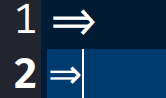
I can also copy that symbol from CT and paste it here on github and it's still 1 character: ⇒ . It doesn't transform back to its original => form.
The point of the post was to request an option to stop getting this combined look. An option that stops both half and full ligature transformations. That makes everything look originally as it is typed, with no binding together.
There are some rules in CT which converts symbols into one symbol, it doesn't matter if you type those symbols or paste them.
Yes! To be able to change those rules is what I am after. I am a newbie programmer so I couldn't find where to look for in the code base. But if you guys could point me in the right direction I'd be happy to have a look.
If you don't want such behavior you either can untick the related options or change the node type from Rich Text to something else.
I couldn't find the related options. The only thing I could find was unticking this option which disables ligatures for only , and " symbols.

It stops them from turning into fancier versions.

Also all this might be caused by the font I'm using "Fira Code Retina" which has plenty of ligature support. If that's the case I'm very sorry I bothered you with this. Feel free to close the issue without further comments if you like.
Again sorry for the misunderstanding, I hope I was able to clear things up with this comment. Regardless have an awesome year you two.
Thmyris
on 19 Jun 2020
@Thmyris Your use of "ligature" confused me :p, had to look it up.
So to be clear, you want to be able to transform auto-replaced characters back into the originals when copying text to the clipboard? There are a few issues with this I can think of
- Currently auto-replaced text is simply replaced by a unicode character, so
=>becomes a unicode arrow,*a unicode bullet, etc. The problem with transforming those back when copying is identifying which ones were auto-replaced and which were inserted "manually" by the user - Why? I don't really see any reason for doing this tbh, if you want to _stop_ the auto-replacement in the first place you can untick "Enable Symbol Auto Replacement" in
preferences -> text - If you want to get plain ASCII symbols/combinations from unicode characters, there probably exists a converter somewhere or write your own with some basic python/scripting, however that is outside of what cherrytree is meant to do
 ForeverRainbow
on 19 Jun 2020
ForeverRainbow
on 19 Jun 2020
@Thmyris , thanks , now I see your point.
When you uncheck "Enable Smart Quotes Auto Replacement", CT stop doing any fancy job with symbols. So, I am sure you can blame Fira Code Retina for it. (check README on https://github.com/tonsky/FiraCode). To turn of such behavior, you can try Fira Mono
txe
on 19 Jun 2020
@txe You are right, switching to Fira Mono or other fonts fixed the problem. But only partially. Take a look:
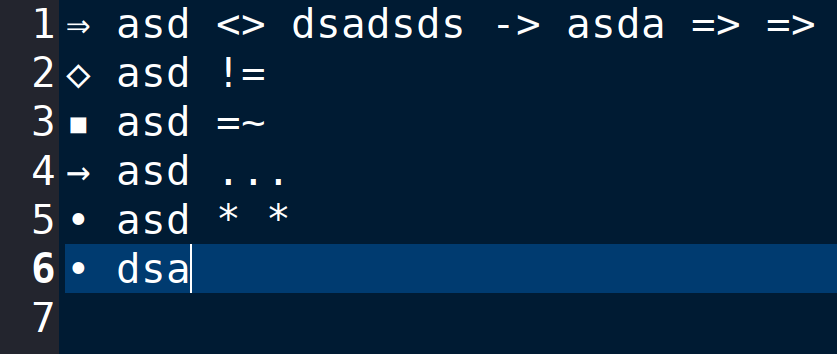
Even though "Enable Smart Quotes Auto Replacement" is unchecked in the settings, CT still converts the characters into symbols if those characters are the first thing to be typed in the line. If you type them later in the line it doesn't convert. I tried about 10 different fonts, all of which had the same behaviour. This is a font named Z003.
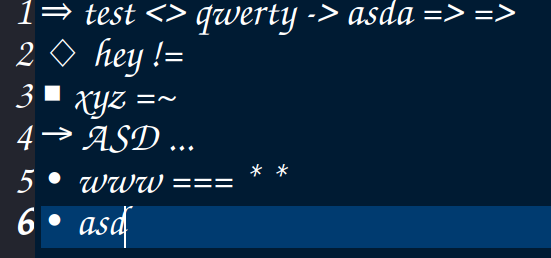
This happens on both rich text and plain text nodes but not on code nodes. I tried restarting CT in between changing any setting.
Thmyris
on 19 Jun 2020
What CT version do you use?
txe
on 19 Jun 2020
0.38.8 I'll try it on latest version real quick.
Thmyris
on 19 Jun 2020
The last version is 0.39.3. Can you update your version? You can find more info on https://www.giuspen.com/cherrytree/#downl
txe
on 19 Jun 2020
Can confirm the issue https://github.com/giuspen/cherrytree/issues/939#issuecomment-646623291 brings up does occur on 0.39.3
Thmyris
on 19 Jun 2020
Thanks, I'll take a look
txe
on 19 Jun 2020
@txe No don't bother, damn it, I forgot to disable the options about auto replacements after reinstalling. When you untick them https://github.com/giuspen/cherrytree/issues/939#issuecomment-646623291 is instantly fixed as well. Thank you so much for the help and sorry about causing all this fuss because of my own blunders. I'll close the issue as there is no issue left here.
Have a nice day everyone!
Thmyris
on 19 Jun 2020
Thanks! :)
txe
on 19 Jun 2020
@giuspen , you wrote
@txe you are right such smart auto replacements should not happen in the code, only exception may be the plain text
I checked, it works as you write
txe
on 1 Jul 2020
@txe ok so we're good with that
giuspen
on 1 Jul 2020
Related issues
 4Syno
·
6Comments
4Syno
·
6Comments
 ForumLiker
·
8Comments
ForumLiker
·
8Comments
 keesse
·
7Comments
keesse
·
7Comments
 valentinbesse
·
8Comments
valentinbesse
·
8Comments
 zauberparacelsus
·
7Comments
zauberparacelsus
·
7Comments
Most helpful comment
Thanks! :)