Cherrytree: Code execution blocks cherrytree
General Information:
Distribution: Ubuntu 20.04
Desktop Environment: Budgie
CherryTree Package Type: deb
CherryTree Version: 0.99.14
Code execution blocks cherrytree; It’s pausing in the background..
Closing the script brings it back to life.
I can't reproduce this with your windows version.

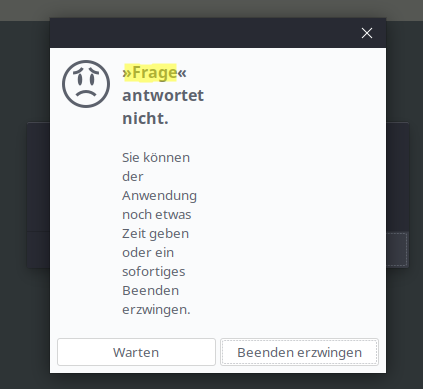
Error Details:
Oct 1 21:54:55 NUC-Desk budgie-panel[5854]: wnck_window_is_skip_pager: assertion 'WNCK_IS_WINDOW (window)' failed
Oct 1 21:54:55 NUC-Desk budgie-panel[5854]: wnck_window_is_skip_tasklist: assertion 'WNCK_IS_WINDOW (window)' failed
Oct 1 21:54:55 NUC-Desk budgie-panel[5854]: wnck_window_get_geometry: assertion 'WNCK_IS_WINDOW (window)' failed
 4Syno
4Syno
All 6 comments
Did you check the terminal preferences settings ?
Is xterm command working ?
xterm -hold -geometry 180x45 -e "ls ~"

 ciranus
on 2 Oct 2020
ciranus
on 2 Oct 2020
Hi ciranus,
thanks for your feedback.
terminal preferences settings are almost default: xterm -hold -geometry 180x45 -e "<command>"
xterm works and sending commands outside of cherrytree have the same behavior.

So I extend the command with ‘&’ on the end and this works for me. If someone else facing this problem here my terminal preferences setting:
xterm -fa 'Monospace' -fs 12 -hold -geometry 140x35 -e "<command>" &
4Syno
on 2 Oct 2020
Maybe I should add the trailing ampersand as default, what's your opinion @txe ?
 giuspen
on 3 Oct 2020
giuspen
on 3 Oct 2020
It can be convenient for users to run several scripts simultaneously, I don't see drawbacks here.
 txe
on 4 Oct 2020
txe
on 4 Oct 2020
No drawback for me either.
Maybe also an opportunity to add -fa 'Monospace' to improve the readability of default xterm font.
ciranus
on 4 Oct 2020
I'll check how the -fa 'Monospace' looks thanks, never used before
giuspen
on 4 Oct 2020
Related issues
 kharaktur
·
9Comments
kharaktur
·
9Comments
 zauberparacelsus
·
7Comments
zauberparacelsus
·
7Comments
 bhutch
·
6Comments
bhutch
·
6Comments
 JC-paavo
·
3Comments
JC-paavo
·
3Comments
 HEDGHOK
·
6Comments
HEDGHOK
·
6Comments
Most helpful comment
No drawback for me either.
Maybe also an opportunity to add
-fa 'Monospace'to improve the readability of default xterm font.