Chamilo-lms: landscape view course - Mobile
When viewing a skin created in the iSpring software, and exporting the scorm to the chamilo, in the landscape view, the course is appearing in half, a gray element is inserted on top of the training, preventing full screen viewing.
Chamilo LMS 1.11.8
Some help?
 480419140
All 27 comments
Hi @480419140
I have no idea of what you are talking about from your description :-)
Could you share a screenshot?
We don't intervene in SCORM content, so unless there is some element of screen resizing that is affecting your course, that might be something coming from iSpring.
 ywarnier
on 13 Dec 2018
ywarnier
on 13 Dec 2018
Hello @ywarnier , in landscape mode, the training stays with this gray bar, which does not let the training occupy the entire screen.
Below the image.
https://drive.google.com/open?id=1ODveImAFRQ2mdUyYOzPJHbahg2-LkIxB
I also forward a test copy of a scorm content for that analysis.
Thank you.
480419140
on 14 Dec 2018
Hi @ywarnier @jmontoyaa ,
I ran new tests, this time accessing Chamilo's official testing platform (https://campus.chamilo.org).
And by performing the training "VETESTISPRING" created in iSpring, the same problem also occurs in the mobile view, as shown below.
https://drive.google.com/open?id=1339cOe3QfSCK3uhKtYg8h8YBGBcsm7ec
I believe there is some element of redirection that is impacting the view correctly.
I'm still waiting for your support.
Sincerely.
480419140
on 14 Dec 2018
Thanks @480419140, that's a good example. It can work by switching from landscape to portrait and back but it's indeed not working that well. We'll try to do something about it but I'm not sure we can make it for 1.11.10.
ywarnier
on 2 Mar 2019
Hi @480419140
I also use ispring version 9.3.2 (elearning authoring tool) for making elearning content in SCORM format
but I didn't experienced any grey bar
I try it for both Chamilo 1.11.4 and 1.11.8

I couldn't download your SCORM file because your link is expired
my email: [email protected]
Hello @ywarnier , in landscape mode, the training stays with this gray bar, which does not let the training occupy the entire screen.
Below the image.
https://drive.google.com/open?id=1ODveImAFRQ2mdUyYOzPJHbahg2-LkIxB
I also forward a test copy of a scorm content for that analysis.
Thank you.
 Haboubi92
on 4 Mar 2019
Haboubi92
on 4 Mar 2019
Apparently after doing internal tests the scorm has loading errors of javascripts. In a few words it is a problem of the file, and as it mentions @Haboubi92 , everything is fine
 aragonc
on 4 Mar 2019
aragonc
on 4 Mar 2019
Apart from the little syntax issue I mentioned in 9d2f24a, this looks fine from the code perspective.
From a style perspective, the buttons now float on top of the SCORM content, which looks really nice.
At a functional perspective, I just tried a monoSCO and a multiSCO and they worked just fine.
The changes have been applied to https://campus.chamilo.org/ and the example given above is now fixed.
This change is approved for me. We just need some feedback from @480419140 now...
ywarnier
on 5 Mar 2019
@ywarnier
I tried the new changes in Chamilo Campus
here is an image of the effect on mobile browser (using chrome on android)
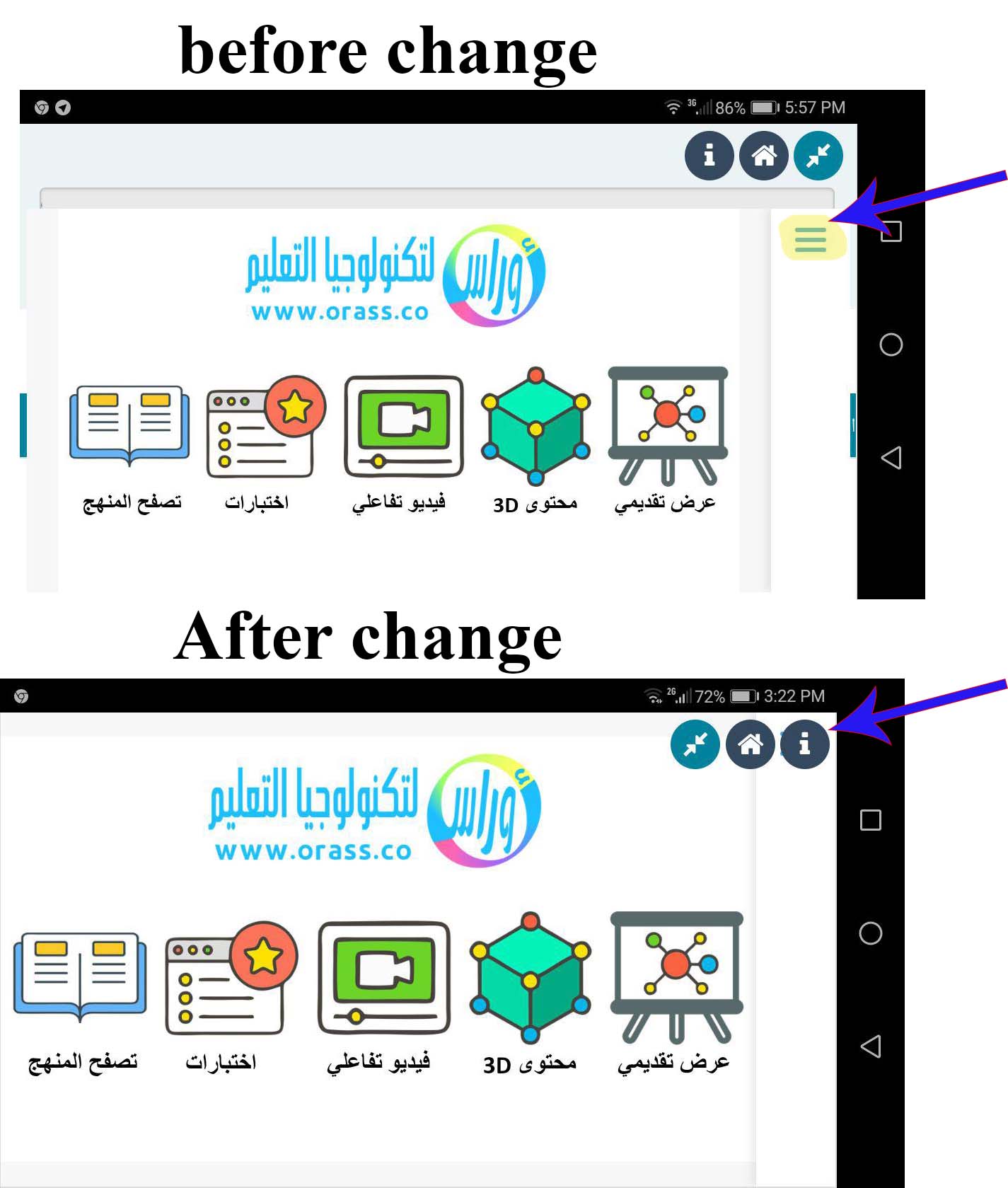
now the SCORM content beautifully take full advantage of the screen
but the expand, home and reporting icons are above the content
unfortunately the slides outline button is underneath these icons, so I have no access for it
this is the SCORM file that I have used (made with third party authoring tool ispring), it has responsive player so try it on mobile device to see the problem
https://drive.google.com/file/d/1LLRqV8ar9doGC_PeW9G7y-lOxO0vRdqK/view
I also have some suggestion to offer SCORM view with no icons on top

Haboubi92
on 5 Mar 2019
I made some changes, now it looks like this.

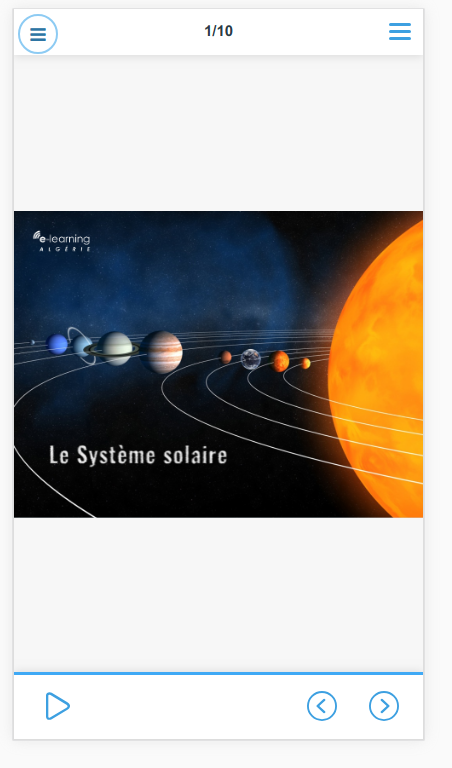
aragonc
on 5 Mar 2019
@aragonc
very Beautiful
Haboubi92
on 5 Mar 2019
The last commit for this was wrongly registered into another issue.
36d39ecd567daee0de50faff62ccf6939b3867e1
ywarnier
on 5 Mar 2019
Approved for me. I have applied the changes to campus.chamilo.org
@480419140 any chance you could check your example course and confirm resolution?
I will close this task in 24h otherwise.
ywarnier
on 5 Mar 2019
@ywarnier @aragonc
Good Morning,
Thank you for the dedication of all those involved.
I made the changes in the files below, but now you are not opening the courses.
Is there any way to update my file database with the official files of chamilo?
I downloaded the git repository, but I noticed that the file structure is different, my version is 1.11.8.
Sincerely,
Leonardo
480419140
on 6 Mar 2019
Hi @480419140
Could you test it on the campus.chamilo.org, first?
We will release 1.11.10 in a few days, so don't worry too much about updating through Git (which is a complicated process if you've never done it).
ywarnier
on 6 Mar 2019
Hi @ywarnier ,
I went to campus.chamilo.org, I tested the VETESTISPRING course and it works perfectly after the adjustments made.
Is it possible to inform you step by step how to upgrade my version 1.11.8, since I am being impacted because all my training is performed in Ispring software?
What is the average time to release the 1.11.10 file?
Thanks.
480419140
on 6 Mar 2019
Hi @480419140
No, it would take too long to explain because there have been several modifications of the files between 1.11.8 and now, so it's probably not just applying the changes in the different commits, and it deviates time we have to work on 1.11.10 to your specific case.
1.11.10 should be released on, or before, the 15th of March.
You can also hire official providers to do the update on your portal for you, but given the short time that remains, it's probably going to take the same time to get into a support contract with a provider anyway, so I suggest you wait and upgrade when we publish 1.11.10.
ywarnier
on 6 Mar 2019
@ywarnier
Thank you.
Will this version be posted on the site along with the upgrade procedure from previous versions?
480419140
on 6 Mar 2019
All of our versions are published on our website.
The installation and upgrade procedures are always available from the download page, through the "Installation guide" button: https://chamilo.org/en/download/
ywarnier
on 6 Mar 2019
The upgrade from one minor version to another (1.11.8 to 1.11.10) are usually very easy: just overwrite the previous installation with the new code, then run the "Clear cache" feature from your admin panel.
ywarnier
on 6 Mar 2019
@ywarnier
I will be waiting for this new installation.
Thank you very much for your support.
480419140
on 6 Mar 2019
Cuando un item de lección tiene un foro asociado, en la vista móvil se ve un margen en la parte superior y desaparecen las pestañas para ver el foro.
Vista escritorio con pestaña para foro:

Vista móvil sin pestaña para foro:
 --
-- 
 AngelFQC
on 6 Mar 2019
AngelFQC
on 6 Mar 2019

Super Fix

aragonc
on 6 Mar 2019
I've asked @aragonc to move the forum/content tab-icons to the right now, given otherwise the mini-menu would hover above those otherwise (and it's better than having the mini-menu jumping up and down depending on whether there is a forum or not).

ywarnier
on 7 Mar 2019
Looks good to me now. Closing again.
ywarnier
on 7 Mar 2019
There is a little issue in mobile view :) Top left.

Replicated here https://11.chamilo.org/main/lp/lp_controller.php?cidReq=NICODU&id_session=0&gidReq=0&gradebook=0&origin=&action=view&lp_id=1&isStudentView=true
AngelFQC
on 7 Mar 2019
Cambio enviado

aragonc
on 8 Mar 2019
Se ve bien
AngelFQC
on 8 Mar 2019
Related issues
 yourKatharsis
·
7Comments
yourKatharsis
·
7Comments
 jderriks
·
8Comments
jderriks
·
8Comments
 AulaBit
·
6Comments
AulaBit
·
6Comments
 alexiye
·
6Comments
alexiye
·
6Comments
 AldoAbdiel
·
3Comments
AldoAbdiel
·
3Comments
Most helpful comment
Super Fix