Caseflow: Copy audit: Caseflow - Surfaced Copy Areas
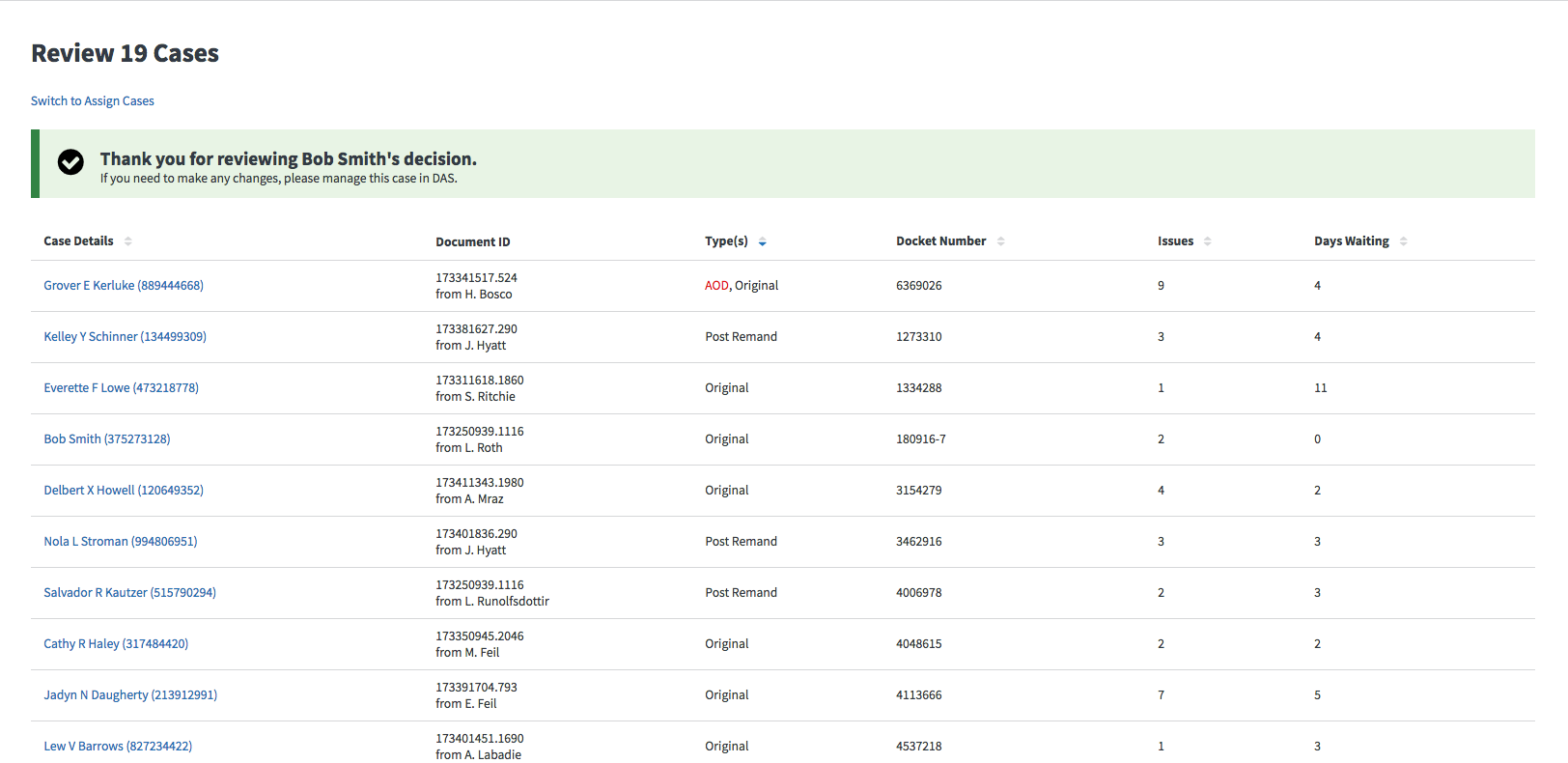
Change 1: ✅ Resolved by @evankroske #7038
Alex: What should this say when reviewing an AMA case? probably shouldn't mention DAS
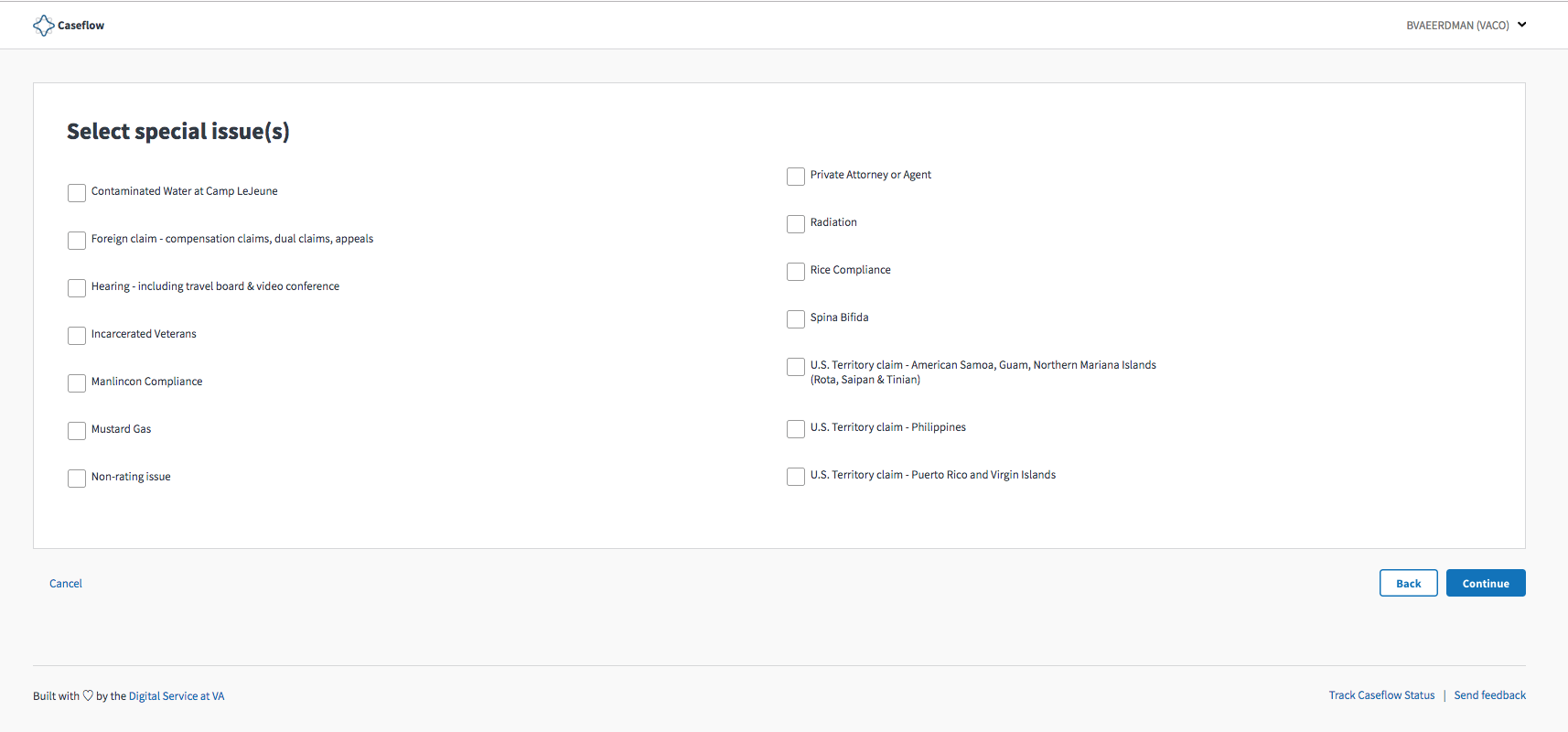
Change 2: @allyceh to work on instruction copy which will sit right below the header. Micro-copy for each type of special issue is out of scope for now (Attorneys are familiar with these various names)
Alex: Since this is a new step for attorneys working AMA cases, do you think it's worthwhile to actually add some instructional text here? or are we thinking users won't be confused and will be familiar with how to do this.
Commentary:
Allyce: Jumping in. I think it would be nice to include a quick blurb next to each special issue about what it is, especially for attorneys who are newer to the board and learning. I am happy to take a stab at it when I can get explanations of what each of these are.
Lauren:
Good q. Holtz reminded me that attorneys used to select “special interests” in their VACOLS checkout flow, so they do have some familiarity with doing this type of extra step. That being said, some explanatory text would definitely be better to have.
Change 3: ✅ Resolved by @sneha-pai https://github.com/department-of-veterans-affairs/caseflow/pull/7078
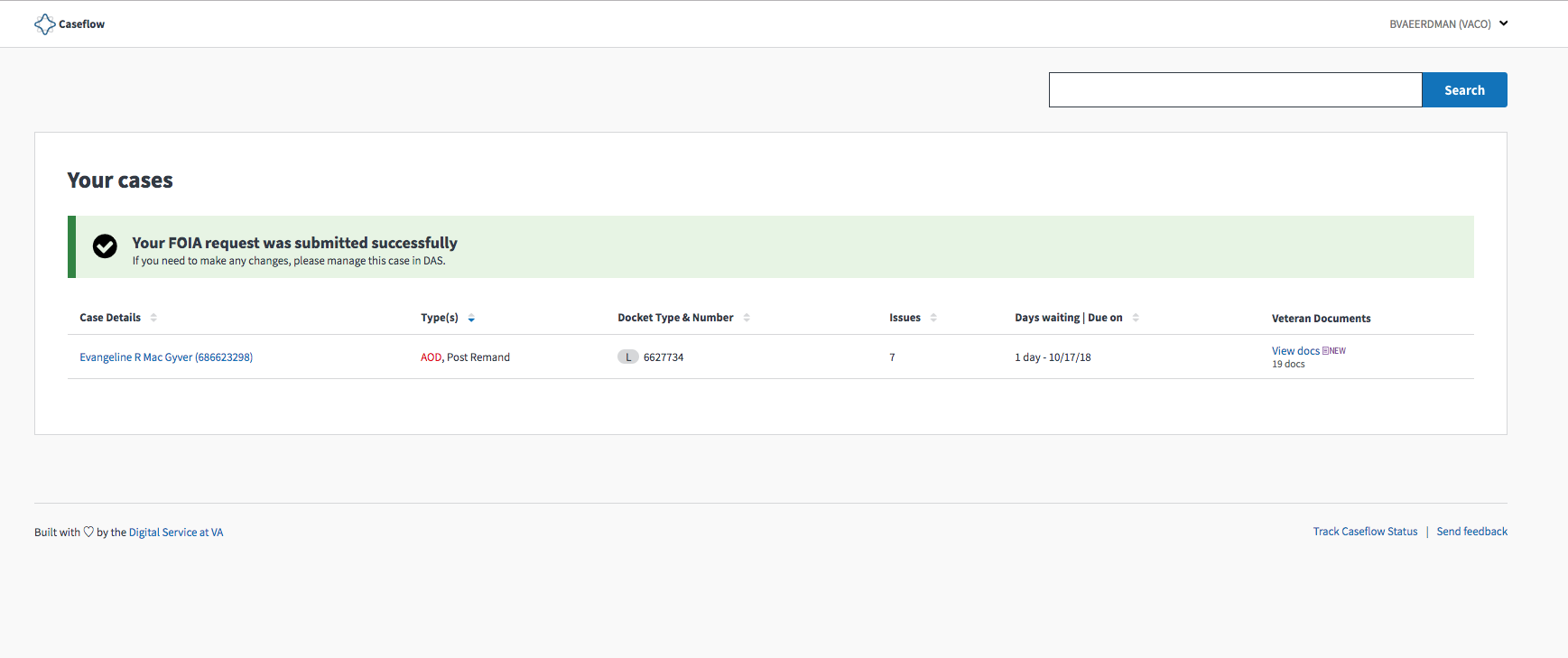
Alex: this copy appears when creating a FOIA colocated task, does it seem like the headline might need a tweak? "FOIA request was submitted successfully" hmm
Commentary
Nicholas: same text appears (or similar, at least) when a judge dispatches an AMA appeal
 sneha-pai
All 10 comments
For Change 3:
1st line: "You have assigned an administrative action (FOIA Request)"
- the content inside parenthesis should be whatever admin action they just assigned.
2nd line: "If you need to make any changes, please email your administration action team"
 mkhandekar
on 19 Sep 2018
mkhandekar
on 19 Sep 2018
@sneha-pai's (first?!) copy PR to address change 3! https://github.com/department-of-veterans-affairs/caseflow/pull/7078
mkhandekar
on 21 Sep 2018
@laurjpeterson , here is some proposed copy for change 2:
Line 1: Select special issues that are relevant to this case
Line 2: If a case has special issues, it will be routed to a specific group for adjudication. OR If a case has special issues, it will be routed to a group of specialists who adjudicate the case.
Rationale: It would be helpful to tell attorneys (especially those who are new to Caseflow) how checking special issues will affect the lifecycle of a case, both showing them how Caseflow works and providing some context into why it's important to check the right issues.
Questions:
- Can more than one special issue be checked? The way I am phrasing it, you can select multiple, so want to double check.
- Who are cases with special issues routed to? Are they like adjudication specialists who have deep knowledge of these cases? We could also say "it will be routed to a group for specialists who adjudicate the case.", which is even more specific.
- Is "adjudication" correct, or are people who handle these cases doing something else?
 allyceh
on 24 Sep 2018
allyceh
on 24 Sep 2018
Thanks @allyceh!
Re: proposed copy
I like your first option, with one small tweak:
- Line 1: Select special issues that are relevant to this case
- Line 2: If a case has special issues, it will be routed to a specific group for adjustment.
Follow-up q:
- Special issues are optional. Should we mention that in Line 1?
Your questions
- Can more than one special issue be checked? The way I am phrasing it, you can select multiple, so want to double check.
- Yes, I think so. I believe this is the behavior in Caseflow Dispatch and we'd want to continue it here. Posed the question in appeals-dispatch.
- Who are cases with special issues routed to? Are they like adjudication specialists who have deep knowledge of these cases? We could also say "it will be routed to a group for specialists who adjudicate the case.", which is even more specific.
- Routed to a variety of VBA offices responsible for different business lines or issue types. The excel in this comment has the routing locations.
- Is "adjudication" correct, or are people who handle these cases doing something else?
- I think VBA/ARC uses the word adjustment instead of adjudication
 laurjpeterson
on 24 Sep 2018
laurjpeterson
on 24 Sep 2018
@laurjpeterson Cool! I'm good with those tweaks and I feel that it's helpful to mention that it's optional.
How about:
Line 1: Select special issues that are relevant to this case (optional)
Line 2: If a case has special issues, it will be routed to a specific group for adjustment.
allyceh
on 24 Sep 2018
From #6854. I wrote:
_"When shadowing an attorney working a RAMP case yesterday, she saw the special issues page for the first time and noticed it was new. She understood it after we explained it to her, but some additional context around 1) what these special issues are, 2) what the attorney needs to do on this page, 3) how we use any special issues they check (routing purposes) could help orient first time users.
Additionally, she missed the POA/agent special issue checkbox (located at the bottom left of the page) and only realized it when we asked her to return to the page. Should we make this more prominent since the majority of cases have POA? Should it be the first special issue if it's the most common? Can we default the POA checkbox if a veteran has a POA in VBMS?"_
Per discussion on #6854 , let's revisit the copy on this page to provide more context around 1) what these special issues are, 2) what the attorney needs to do on this page, 3) how we use any special issues they check (routing purposes) could help orient first time users.
Let's also explore which special issues are most commonly checked, POA aside. Should these issue be included at the beginning of the list for better findability?
allyceh
on 9 Nov 2018
@laurjpeterson @sneha-pai @lowellrex
Below is a draft mock of the special issues page for AMA cases:
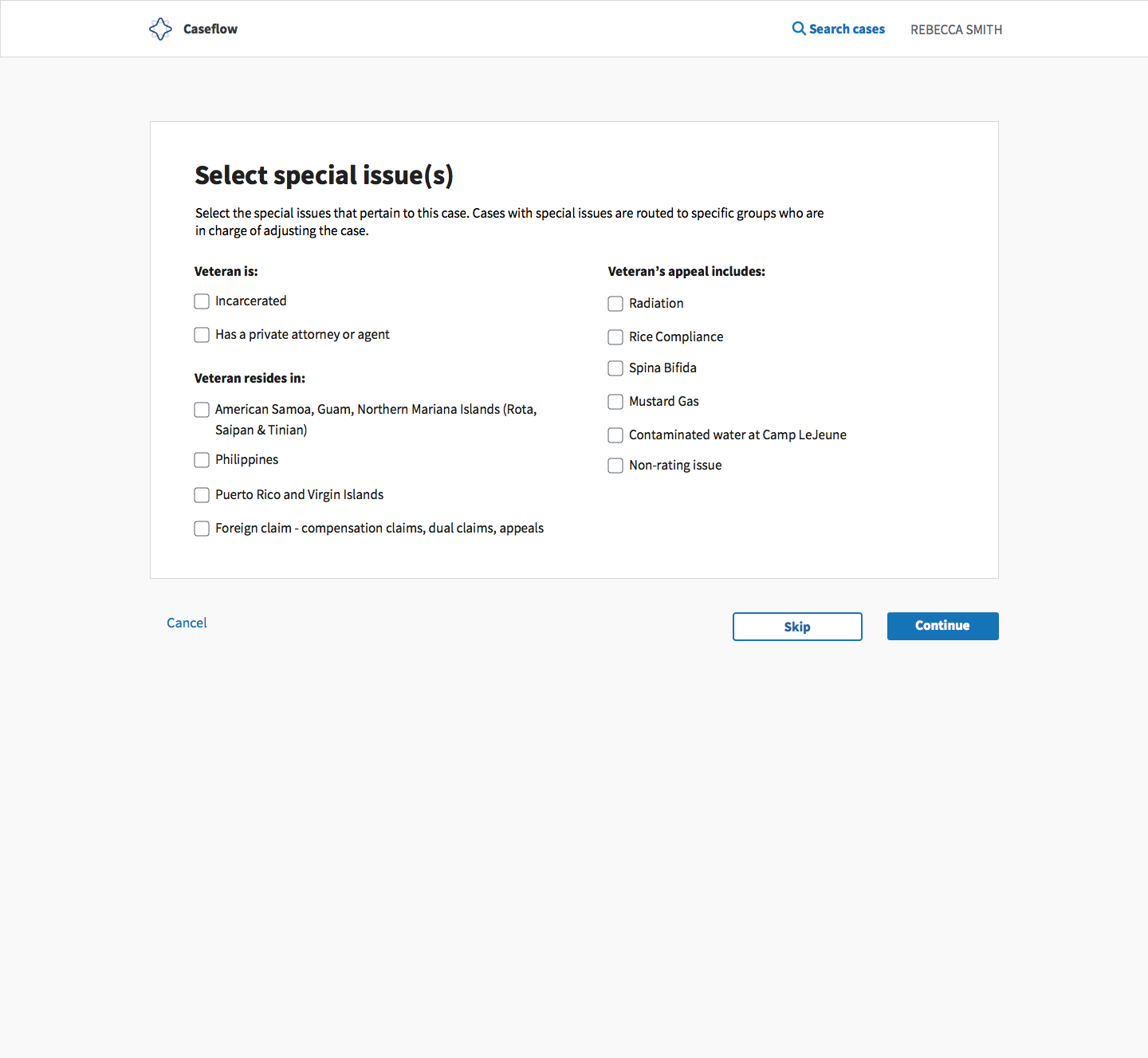
Looking for feedback on:
- UI copy
- Categorization of issues
- Design
Updates include:
- Added instructional copy below the header to tell attorneys what to do and what we use special issues for (i.e., why they should care about checking the right ones)
- Attempted to group these special issues so that the list is scannable and discrete issues are easier to pick out of a list.
- Rephrased some of the special issues so that they flow better in this new format
- Changed the functionality of the "Back" button to a be a "Skip" button. Currently, "Cancel" and "Back" take the user to the same place. Since special issues are optional, we could more clearly indicate that and guide attorneys through this flow by allowing them a "Skip" option. Clicking "Continue" already allows them to "skip" this step if they don't have any issues checked-- this just helps them know what's going on.
Open questions:
- What does "Foreign claim - compensation claims, dual claims, appeals" mean, and is it correctly categorized? How can we better explain this one?
- Need a special issues SME to double check this categorization and that new verbiage accurately represents each special issue. I took a rough stab at it, but we need to validate.
allyceh
on 29 Nov 2018
@allyceh - see this ticket https://github.com/department-of-veterans-affairs/caseflow/issues/7216 special issues for Legacy cases are currently displayed in Caseflow Dispatch, which is where we got this design from to quickly implement it for AMA cases. (This ticket and its comments explain why some were excluded from AMA cases - https://github.com/department-of-veterans-affairs/caseflow/issues/6854)
My feedback:
- Categorization/groupings are great, though I think it's a nice to have. I'd like @nicholasholtz to take a look for his insight on whether attorneys (1) would need these categorizations and if so (2) agree with the categorizations you put forth.
- I think the categorization of "Foreign claim - compensation claims, dual claims, appeals" is correct based on a response that Josh Will (VBA) sent us via email w/r/t routing special issues. He said that these special issues are routed by using country codes from the Veteran’s address, so I think it is safe to say that these Veterans live somewhere else. I'd like @shanear to confirm, though.
- There are two more foreign special issues that we should include: also a "Foreign pension, DIC - Mexico, Central and South America, Caribbean" and "Foreign pension, DIC - all other foreign countries".
- Eventually, we would like to pre-select special issues based on information we know further upstream of this checkout process. I like how you're highlighting that this step is optional, but I wonder if in addition to the Skip button, we could address it in the copy. "Please select any additional special issues that pertain to this case. Cases with special issues are routed to specific groups who are in charge of adjusting the benefit. If there aren't any special issues, click Continue."
To do's:
- Based on information that Shane and I are still waiting for from VBA/AMO about how to create EPs for special issues (tracked here - https://github.com/department-of-veterans-affairs/caseflow/issues/6903) we want to write out all the requirements for how we might recognize special issue before this point
laurjpeterson
on 30 Nov 2018
Here is an updated mock:
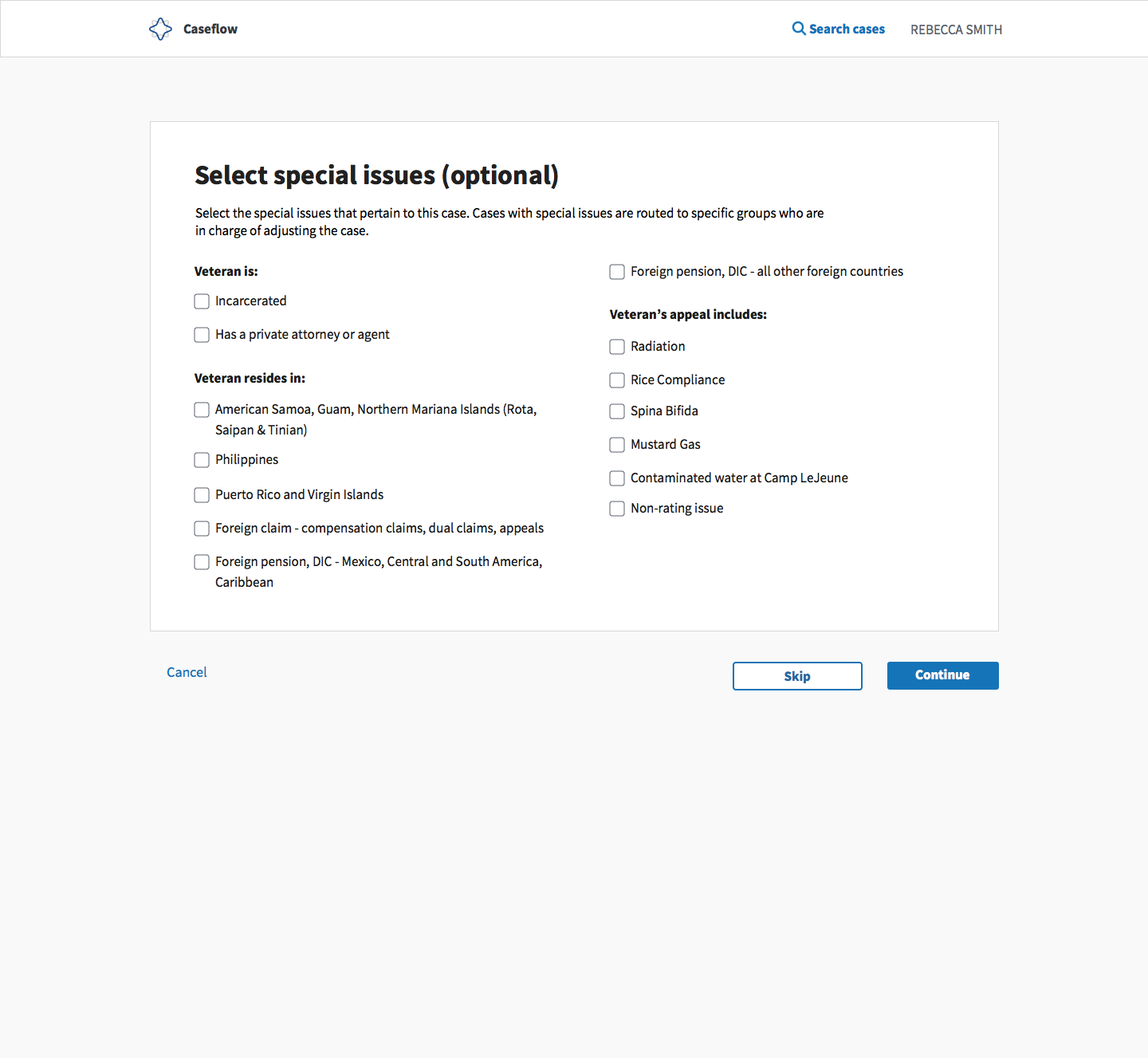
@nicholasholtz Can we have your eyes on this from an attorney perspective? @shanear , can you confirm that "Veteran resides in" is an accurate label for the special issues in this mock?
allyceh
on 5 Dec 2018
2 in 2020 
 hschallhorn
on 10 Jul 2020
hschallhorn
on 10 Jul 2020
Related issues
laurjpeterson
·
5Comments
hschallhorn
·
4Comments
 lowellrex
·
5Comments
lowellrex
·
5Comments
 pkarman
·
5Comments
pkarman
·
5Comments
 gnakm
·
5Comments
gnakm
·
5Comments