Caseflow: SPIKE: Investigate approach for all columns in queue table to be sortable
We've heard feedback that our users would like to sort by various columns in the queue table. We've already prioritized the ability to sort by Days waiting, but think it's worth opening up sorting by other columns to give more flexibility to our users.
AC / Goals for a sortable table
- Default sort for the table is as follows:
- AOD and CAVC, oldest to newest docket date
- AOD, oldest to newest docket date
- CAVC, oldest to newest docket date
- all else, oldest to newest docket date
- Users can "reset" to this default sort
- Utilize sort pattern from Reader for Days waiting. Sortable columns can have the double arrow next to them.
AC / Goals for this spike
- Suggest a few approaches and libraries that could be used for this feature
Notes
- Sorting by 'Type' would be custom in "priority" order - AOD and CAVC, then AOD, then CAVC, then all others
Resources
- Sort by days waiting - https://github.com/department-of-veterans-affairs/caseflow/issues/5781
 laurjpeterson
All 5 comments
Link to a related slack discussion: https://dsva.slack.com/archives/C6E41RE92/p1529418472000776
 lowellrex
on 19 Jun 2018
lowellrex
on 19 Jun 2018
Proposed table library: https://react-table.js.org/
Supports filtering, sorting, resizing columns, components inside rows/cells ("sub components"), etc. Not sure how complicated it will be to bring styling in line with USWDS/Caseflow
 dannysellers
on 20 Jun 2018
dannysellers
on 20 Jun 2018
Thank you all for the collab =D. Here are the requirements from our end per request @laurjpeterson.
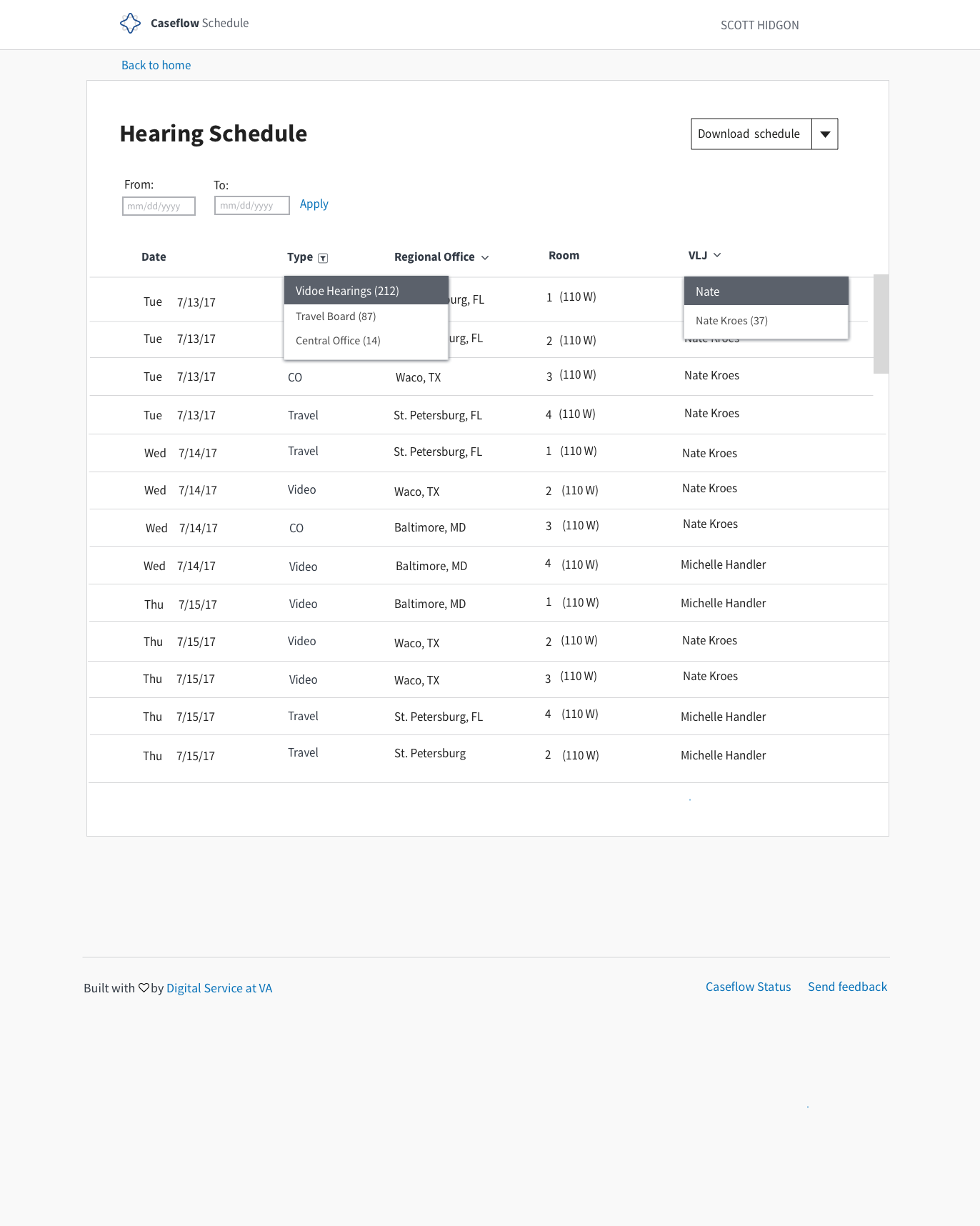
Hearing Schedule Table Filters
We are using a dropdown sort and searchable filters in our table for hearing schedule due to the large number of data entries. We mocked the simplest form (see below) with the most complex showing the number of entries in ( ) in a searchable dropdown.
We have scoped this as something farther down the road as a stretch goal for our UI. It would be awesome though, if it's not too much effort, to add them as a component on our tables. The mocks show two UI options for the filter icon. We can just use an arrow but assuming this is what you guys are using for the sort, so the mock also shows the filter icon used in Reader. Happy to adopt whatever.
Mock
_Mock shows two filter icon options. Dropdown arrow and a filter. Happy to adopt one or the other based on what Queue uses for simple sort_
cc: @MeredithStewart
 Chingujo
on 20 Jun 2018
Chingujo
on 20 Jun 2018
I second using the library @dannysellers suggested. Seems to have all the capabilities we want and looks easy enough to use from a programmer's perspective.
lowellrex
on 26 Jun 2018
So, upon further inspection, it looks like react-table might not be a suitable replacement after all...
For example, within Queue, we occasionally want to alter the colspan attribute for cells, to make them extend beyond one column (we do this for Attorneys when a case has no DAS record). React-table does not support setting colspan/rowspan, meaning we would have to revisit the design of the page/state.
Also, the API is a bit confusing/convoluted for our use case. The recommended way of fetching data per column is to use an accessor, similar to _.get, which retrieves data by name. However, we often want to render components, for which there's a Cell prop, which gets passed a row object containing original, the original object passed to the row (modifying data before rendering is supported), so all references to task must be updated to original or row.original.
The accessor also comes into play when sorting, being used as the default value to sort by. Otherwise, sortMethods are needed for each individual column, or the overall sorting behavior can be modified with a defaultSortMethod prop.
A third issue is the styling. React-table comes with its own CSS file, which can be overridden with class names, or by passing individual style configurations to each individual component. I have this code stashed, and am happy to push it to GH if anybody wants.
MVP screenshot
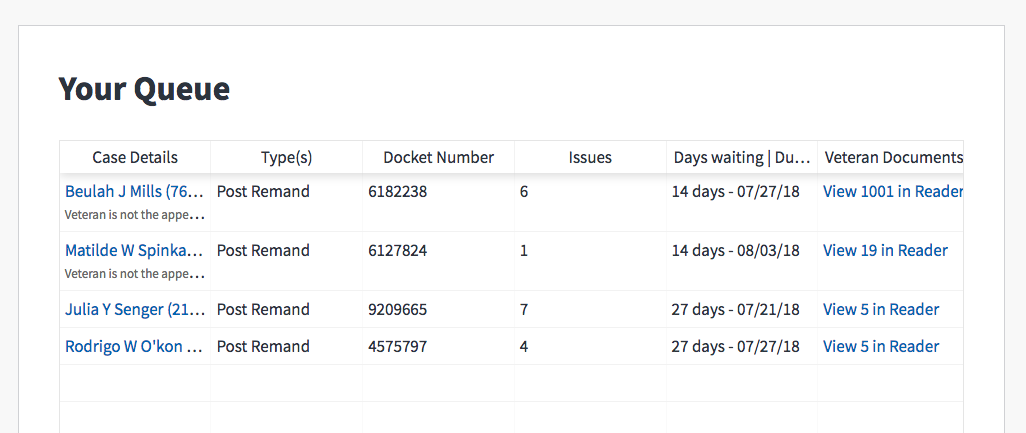
From this and #5954, it looks like there are two main improvements to be made to Table: custom sorting and filtering. I've implemented custom sorting in #6166 (giving columns a sortable attribute and getSortValue method), and am happy to help work on implementing filtering (described in #5954). Filtering data can happen entirely externally to the Table itself, so we shouldn't need to make many substantial changes beyond rendering the filter component/behavior in the header row.
dannysellers
on 10 Jul 2018
Related issues
laurjpeterson
·
4Comments
 hschallhorn
·
5Comments
hschallhorn
·
5Comments
 pkarman
·
5Comments
pkarman
·
5Comments
 leikkisa
·
4Comments
leikkisa
·
4Comments
 araposo-tistatech
·
5Comments
araposo-tistatech
·
5Comments
Most helpful comment
I second using the library @dannysellers suggested. Seems to have all the capabilities we want and looks easy enough to use from a programmer's perspective.