Caseflow: Change appearance of reader link when user does not have access
We attempt to show a count of documents associated with an appeal whenever we display a link from an appeal to reader. We load the page from the initial request, then make an additional request to get the count of documents, and add that number in the text of the link when we get a successful response from that request.
| Before request | After response |
| -------------- | -------------- |
|  |
|  |
|
If that request fails, we continue to show the text as it appears before we make the request. That is, we don't make any indication that the request to get the document count failed (other than not displaying the number in the text of the link). This is a good default behaviour in most cases since the backend could error for any number of legitimate reasons (timeouts... and other weird errors I guess), but when we know why the request resulted in a non-successful response we should indicate that as is appropriate.
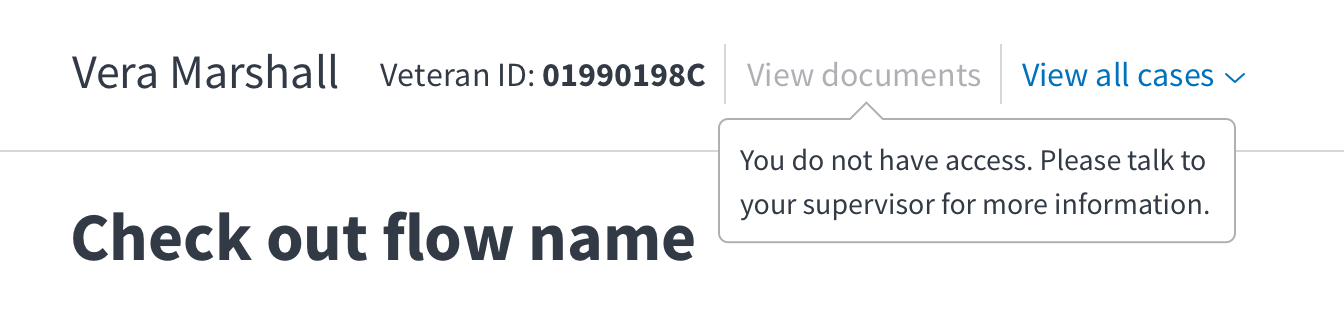
One such case is when somebody is viewing a restricted access case (the Veteran for the case could be a VA employee, a celebrity, high ranking military officials, etc.) that is not assigned to them . In this case the server will respond with a 403 Forbidden and if that person were to click on the link to reader they would be presented with an "Additional access needed" screen. We should instead indicate that they cannot view the documents on the front-end some way. Perhaps we could disable the link and display a message that indicates they do not have the requisite level of access.
Acceptance criteria
- Indicate that additional access is needed to view documents when
AppealDocumentCount's request to/appeals/{vacols_id}/document_countreturns a 403
 lowellrex
All 9 comments
cc @mkhandekar @sneha-pai @amprokop
lowellrex
on 7 Jun 2018
Nice! I like the default fall back. Of the top of anyone's head, what are other examples of data that lands in this category -- _useful to know that X exists, but either do not have access to see or edit it_?
Maybe:
- edit things in case details?
 mkhandekar
on 7 Jun 2018
mkhandekar
on 7 Jun 2018
Quick mock of an option for how this could be displayed:

lowellrex
on 7 Jun 2018
Also, is there something concrete we can tell the user on how to get more access?
mkhandekar
on 7 Jun 2018
Great question that I don't know the answer to! Maybe just go with the default response of... "talk to your ISO"?
lowellrex
on 7 Jun 2018
I think for now it's ok to leave the link as is and let people get errors, but once we know what else also lies in that category, we can implement something like what you mocked up or _something_ like this, depending on complexity:
mkhandekar
on 7 Jun 2018
I think that it make sense to continue to show the link even if the user doesn't have access. I feel like the simplest way to solve this issue would be to hide the document count when the user doesn't have access but keep the active link. When the user clicks on the link, they'll receive our standard permissions error, which I think tells them to ask their ISO for access. I think that we should rely on this existing behavior to save time and effort.
 evankroske
on 8 Jun 2018
evankroske
on 8 Jun 2018
@lowellrex where have we left off on this ticket? are we showing the document count on Case details when the user doesn't have access? i like @evankroske's suggestion to hide the document count and have the user navigate to the standard permissions error.
 laurjpeterson
on 14 Aug 2018
laurjpeterson
on 14 Aug 2018
We currently always show the link, even if the current user will be presented with the standard permissions error when the click through that link and end up in Reader (as Evan notes). I think the value of this change is relatively minimal, but it shouldn't be all that difficult to implement (could probably be contained entirely within the ReaderLink component) so it is probably worth keeping around for when somebody has a half day to kill making quality of life improvements.
lowellrex
on 14 Aug 2018
Related issues
laurjpeterson
·
4Comments
 lomky
·
3Comments
lomky
·
3Comments
 lomaxap
·
3Comments
lomaxap
·
3Comments
 marvokdolor-gov
·
3Comments
laurjpeterson
·
5Comments
marvokdolor-gov
·
3Comments
laurjpeterson
·
5Comments
Most helpful comment
We currently always show the link, even if the current user will be presented with the standard permissions error when the click through that link and end up in Reader (as Evan notes). I think the value of this change is relatively minimal, but it shouldn't be all that difficult to implement (could probably be contained entirely within the
ReaderLinkcomponent) so it is probably worth keeping around for when somebody has a half day to kill making quality of life improvements.