Cascadia-code: Emacs render font as `bitmap` but not vector
Environment
Cascadia Code version number: 1910.04
Application (with version) used to display text: Emacs
OS platform and version: Archlinux(latest,2019.10.08)
Screen resolution (i.e. 220dpi):  Xft.dpi:  96
Actual behavior
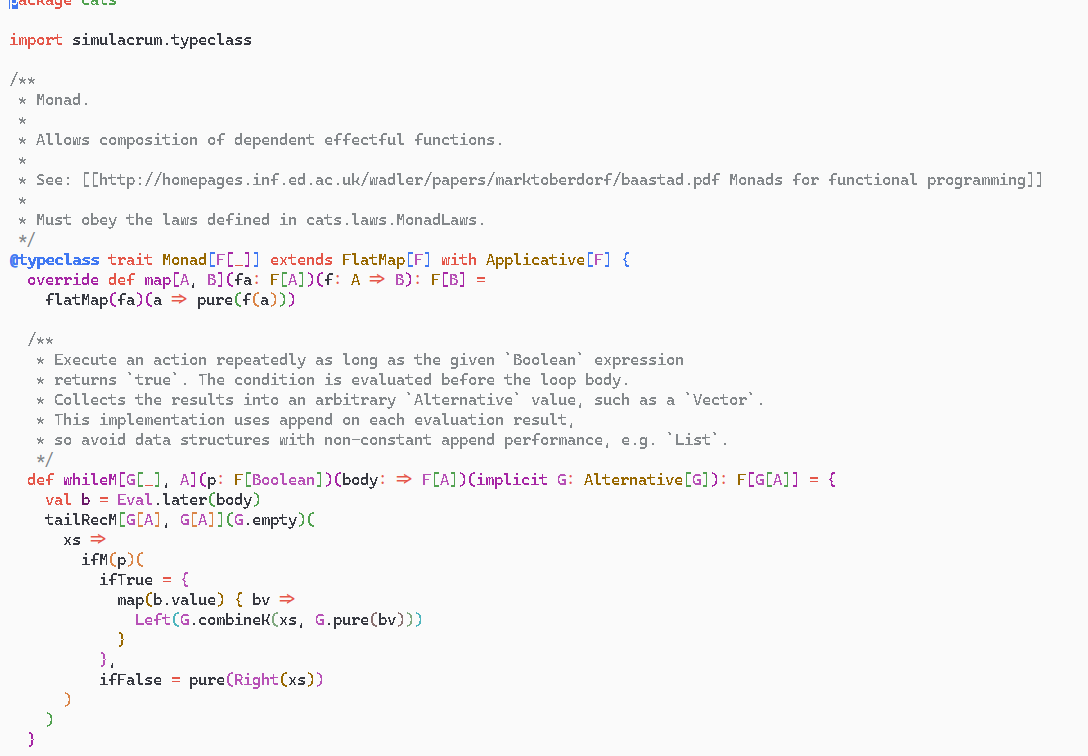
Note
The first release looks just fine.
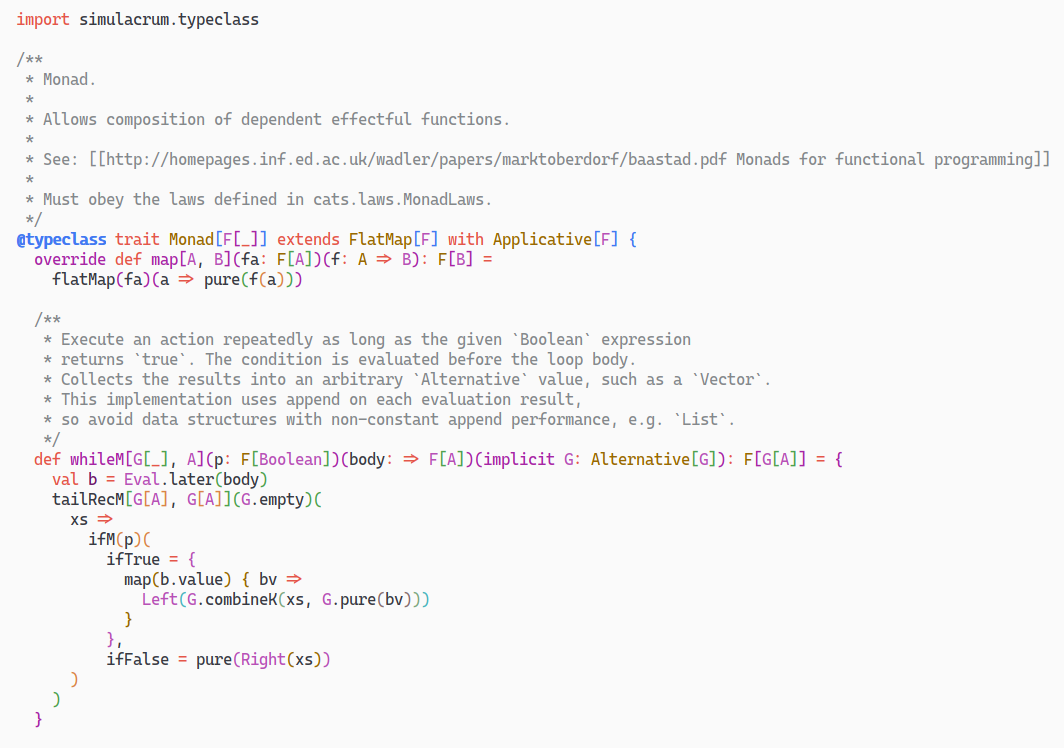
 jilen
jilen
All 9 comments
I am not able to repro this bug on emacs (on Windows).

If one font is working and the other isn't, I'd suggest uninstalling (make sure all instances are removed), and reinstall from the GitHub release. Or otherwise check your settings in emacs to ensure that smoothing / antialiasing is turned on.
 aaronbell
on 9 Oct 2019
aaronbell
on 9 Oct 2019
I have the same issue on my Emacs on Arch Linux. The font works fine in Emacs on Windows 10. Antialiasing and hinting are turned on on Linux and the problem persists as if these settings had no effect at all. If I replace Cascadia Code with another font, say, Iosevka, Emacs displays Iosevka correctly. The only difference is the font in this exercise. btw, It worked fine with the first release of Cascadia Code but not the the recent release.
 peterwu
on 11 Oct 2019
peterwu
on 11 Oct 2019
Hmm. Thanks for the update. I'll see if I can find some differences between the different versions and Iosevka, but it might end up requiring digging into how ArchLinux decides to turn on antialiasing / hinting.
aaronbell
on 11 Oct 2019
OK. I figured out why.
I had the 2 env vars defined for hidpi.
export GDK_SCALE=2
export GDK_DPI_SCALE=0.5
Once I commented them out, the font started to look correct. Hope this helps.
peterwu
on 11 Oct 2019
Thanks @peterwu! I hoped it was something on the ArchLinux side :). Scaling letterforms can definitely have an impact on rendering.
Closing for now.
aaronbell
on 12 Oct 2019
@peterwu I have no such env settings. But the anti-alias not working either. Do you have any idea?
jilen
on 15 Oct 2019
Assuming you installed the font by using the ttf-cascadia-code in the AUR, I have a workaround that works for me. If you copy the Cascadia.ttf file to your ~/.local/share/fonts and uninstall the AUR package, log out and back in, Emacs will render the font correctly. The 2 env vars mentioned in my post don't appear to matter. It seems when the font is installed at the global location, for some reason, Emacs can't render it correctly. It works for me and hopefully it will work for you.
peterwu
on 15 Oct 2019
@peterwu That works! Really weird.
jilen
on 15 Oct 2019
Brilliant! Thanks @peterwu.
aaronbell
on 15 Oct 2019
Related issues
 dkgreer52
·
4Comments
dkgreer52
·
4Comments
 teebeast
·
5Comments
teebeast
·
5Comments
 rivy
·
5Comments
rivy
·
5Comments
 alanbirtles
·
6Comments
alanbirtles
·
6Comments
 schorrm
·
7Comments
schorrm
·
7Comments
Most helpful comment
Assuming you installed the font by using the ttf-cascadia-code in the AUR, I have a workaround that works for me. If you copy the Cascadia.ttf file to your ~/.local/share/fonts and uninstall the AUR package, log out and back in, Emacs will render the font correctly. The 2 env vars mentioned in my post don't appear to matter. It seems when the font is installed at the global location, for some reason, Emacs can't render it correctly. It works for me and hopefully it will work for you.