Carthage builds my framework for x86_64 while i have linked arm64 framework
- carthage install method: homebrew
which carthage: /usr/local/bin/carthagecarthage version: 0.30.1xcodebuild -version: Xcode 9.4.1- Are you using
--no-build?
No - Are you using
--no-use-binaries?
No - Are you using
--use-submodules?
No - Are you using
--cache-builds?
No - Are you using
--new-resolver?
No
Cartfile
No
Carthage Output
victor$ carthage build BanubaCore --no-skip-current
*** xcodebuild output can be found in /var/folders/6s/9_8ytpgd13s0v2d5b8_h69940000gq/T/carthage-xcodebuild.sYIV6A.log
*** Building scheme "BanubaCore" in BanubaCore.xcworkspace
Build Failed
    Task failed with exit code 65:
    /usr/bin/xcrun xcodebuild -workspace /Users/victor/Projects/banubacore/BanubaCore/BanubaCore.xcworkspace -scheme BanubaCore -configuration Release -sdk iphonesimulator -destination platform=iOS\ Simulator,id=1F48929E-E833-472E-8A5E-E27F7CD22D4C -destination-timeout 3 ONLY_ACTIVE_ARCH=NO CODE_SIGNING_REQUIRED=NO CODE_SIGN_IDENTITY= CARTHAGE=YES build (launched in /Users/victor/Projects/banubacore/BanubaCore)

This usually indicates that project itself failed to compile. Please check the xcodebuild log for more details: /var/folders/6s/9_8ytpgd13s0v2d5b8_h69940000gq/T/carthage-xcodebuild.sYIV6A.log
Actual outcome
ld: warning: ignoring file .../effect_player_wrap_ios.framework/effect_player_wrap_ios, file was built for arm64 which is not the architecture being linked (x86_64): .../effect_player_wrap_ios.framework/effect_player_wrap_ios
Expected outcome
A Valid build
Hello!
I'm developing a framework, which is requires some other framework
My valid architecture is arm64 only. Other framework is builded for arm64 as well.
xcodebuild has no issues with building it. But looks like carthage builds for ios simulator?
I have tried cathage build --platform iOS but it doesn't helped.
Any advice?
Thanks!
 don1ck
All 8 comments
Something is probably wrong with your project setup. Is BanubaCore current or a dependency?
If so you should not be specifying BanubaCore
Can you paste the output of carthage build --platform iOS --no-skip-current
 tmspzz
on 24 Jul 2018
tmspzz
on 24 Jul 2018
@blender Sure, here it is:
victor$ carthage build --platform iOS --no-skip-current
*** xcodebuild output can be found in /var/folders/6s/9_8ytpgd13s0v2d5b8_h69940000gq/T/carthage-xcodebuild.mhLEgU.log
*** Building scheme "BanubaCore" in BanubaCore.xcworkspace
Build Failed
    Task failed with exit code 65:
    /usr/bin/xcrun xcodebuild -workspace /Users/victor/Projects/banubacore/BanubaCore/BanubaCore.xcworkspace -scheme BanubaCore -configuration Release -sdk iphonesimulator -destination platform=iOS\ Simulator,id=1F48929E-E833-472E-8A5E-E27F7CD22D4C -destination-timeout 3 ONLY_ACTIVE_ARCH=NO CODE_SIGNING_REQUIRED=NO CODE_SIGN_IDENTITY= CARTHAGE=YES build (launched in /Users/victor/Projects/banubacore/BanubaCore)

This usually indicates that project itself failed to compile. Please check the xcodebuild log for more details: /var/folders/6s/9_8ytpgd13s0v2d5b8_h69940000gq/T/carthage-xcodebuild.mhLEgU.log
My main point is that xcodebuild has no issues to build it, so i trying to figure out how i can ask carthage to build for arm64 only
don1ck
on 24 Jul 2018
So you have a project that is for arm64 only and won't build for x86_64 ?
Have you tried setting in your project build active architecture only? what are the supported architectures you list when building for release?
tmspzz
on 24 Jul 2018
@blender right, arm64 only. I believe it will compile for other architectures, But i have another linked framework which is built for arm64 only.
Active only - tried, no luck
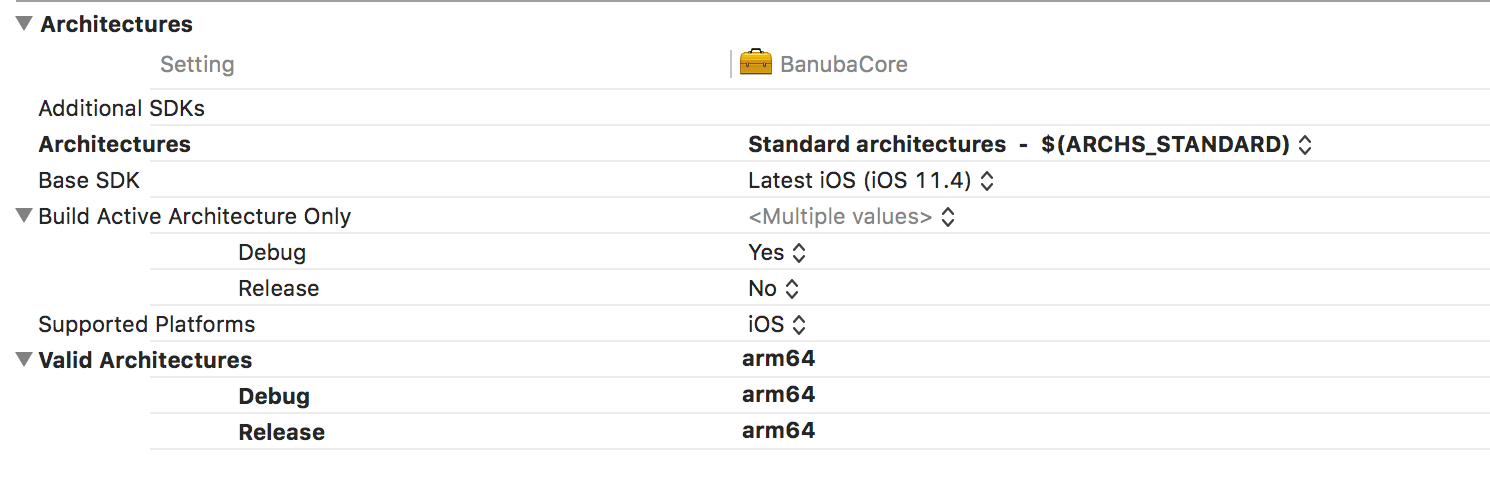
don1ck
on 24 Jul 2018
If you can repro with a sample project I can take a look.
The comment above what my best guess, maybe someone else can give more insight.
tmspzz
on 24 Jul 2018
I found this: https://github.com/Carthage/Carthage/issues/2313#issuecomment-358086211 maybe you can try a similar solution
tmspzz
on 25 Jul 2018
@blender Thanks a Lot! That thread gave me some clue, so i able to resolve my issue.
It was pretty easy, i just need to specify Supported Platforms as iphoneos , instead of iOS
To do that, you have to choose _Other_ option in a dropdown and manually put iphoneos (or what ever you need)
Thanks!
don1ck
on 27 Jul 2018
Have same issue.
@don1ck, could you provide steps to fix?
 denis-hoz
on 2 Oct 2018
denis-hoz
on 2 Oct 2018
Related issues
 yonaskolb
·
3Comments
yonaskolb
·
3Comments
 Ogerets
·
3Comments
Ogerets
·
3Comments
 pmhood
·
3Comments
pmhood
·
3Comments
 billypchan
·
3Comments
billypchan
·
3Comments
 itinance
·
3Comments
itinance
·
3Comments
Most helpful comment
@blender Thanks a Lot! That thread gave me some clue, so i able to resolve my issue.
It was pretty easy, i just need to specify Supported Platforms as iphoneos , instead of iOS
To do that, you have to choose _Other_ option in a dropdown and manually put iphoneos (or what ever you need)
Thanks!