Carla: Lidar sensor ego-pitch&yaw issue
Hi,
I have been using Carla for a few weeks now. I am using a simulated lidar to obtain the pointcloud data at each frame and then I want to integrate all the frames together. I initially had problems with the Lidar-to-Vehicle transformation matrix using the lidar.get_unreal_transform() (solved at issue #392), but I corrected this function in order to have the right transformation.
However there are still some weird issues when I integrate all the frames together into the whole pointcloud, it appears that maybe pitch and/or roll variations on the sensor are not accounted into the transformation matrix. Ideally I should have all points of the ground plane along the same plane but I have variations on the scans as can be sen on the following image. Someone created a similar issue that I think is related (issue #416).
On the first image some pointclouds I integrated together while the car was following a straigth line can be seen. On the second figure, the issue can be observed, it corresponds to the same frames of Figure 1 from another viewpoint.
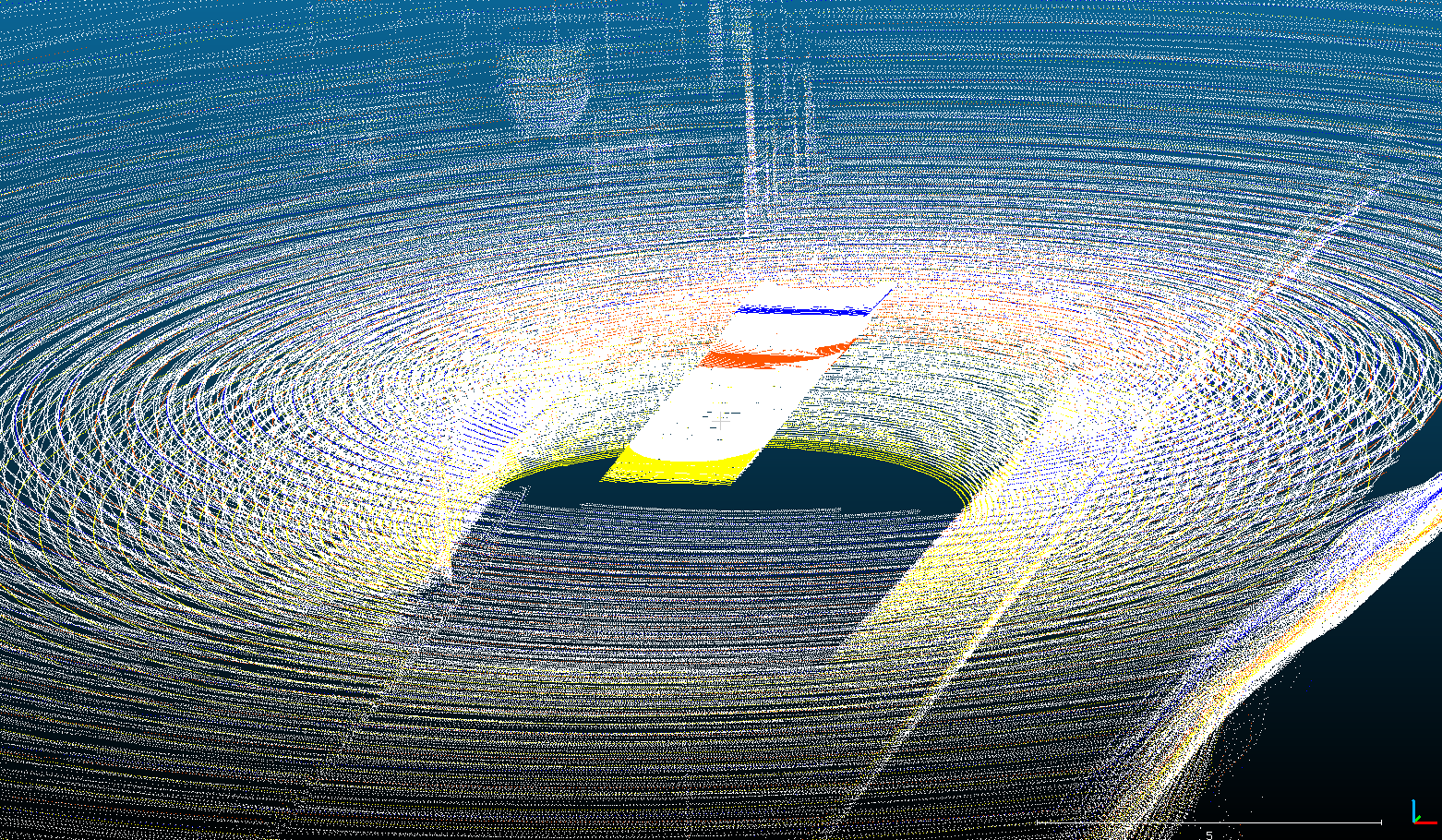
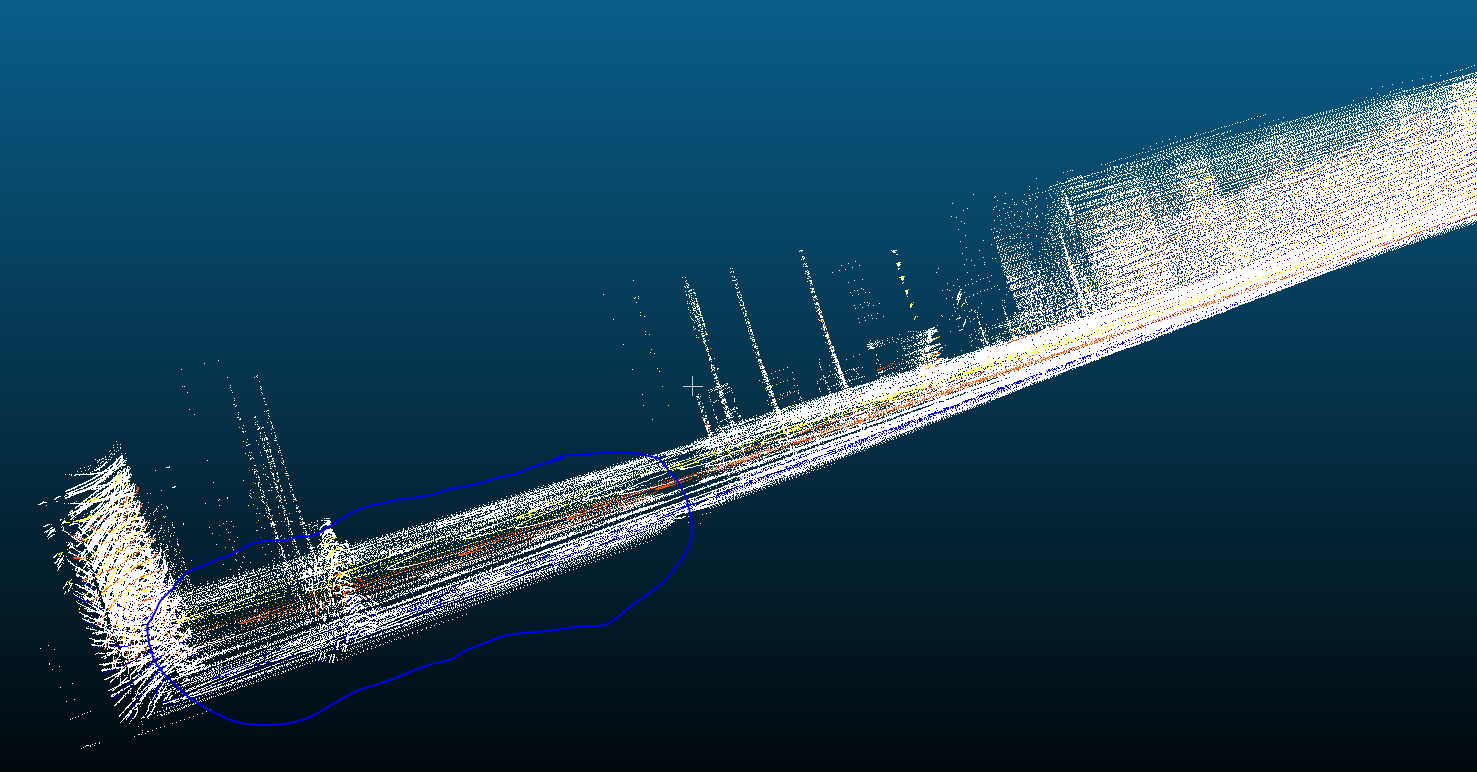
The circled part of the image correspond to scans where there is the ground surface, I should have all points in a same plane.
Is there still a problem with the transformation matrices or am I doing something wrong? Thanks for your help.
 luigui2906
All 13 comments
Hi,
I think I have solved the problem. So I think issue #416 is right.
What I did was basically to ignore the pitch and roll rotation angles when transforming the Lidar pointclouds to the global world reference coordinates, setting them to 0. .
To do so I created another class class TransformLidar(object) at transform.py and then when I am retrieving the transformation matrix I do:
        self.matrix[0, 3] = translation.x
        self.matrix[1, 3] = translation.y
        self.matrix[2, 3] = translation.z
        cy = math.cos(numpy.radians(rotation.yaw))
        sy = math.sin(numpy.radians(rotation.yaw))
        cr = math.cos(numpy.radians(0))
        sr = math.sin(numpy.radians(0))    # alpha = y     # beta = p    # gamma = r
        cp = math.cos(numpy.radians(0))
        sp = math.sin(numpy.radians(0))
        self.matrix[0, 0] = scale.x * (cp * cy)
        self.matrix[0, 1] = scale.x * (cy * sp * sr - sy * cr)
        self.matrix[0, 2] = scale.x * (cy * sp * cr + sy * sr)
        self.matrix[1, 0] = scale.y * (sy * cp)
        self.matrix[1, 1] = scale.y * (sy * sp * sr + cy * cr)
        self.matrix[1, 2] = scale.y * (sy * sp * cr - cy * sr)
        self.matrix[2, 0] = scale.z * (-sp)
        self.matrix[2, 1] = scale.z * (cp * sr)
        self.matrix[2, 2] = scale.z * (cp * cr)
That way I obtain a perfectly aligned pointcloud when I integrate all the frames together in the global reference frame, see images below, the highlighted part is seen from 2 different viewpoints:
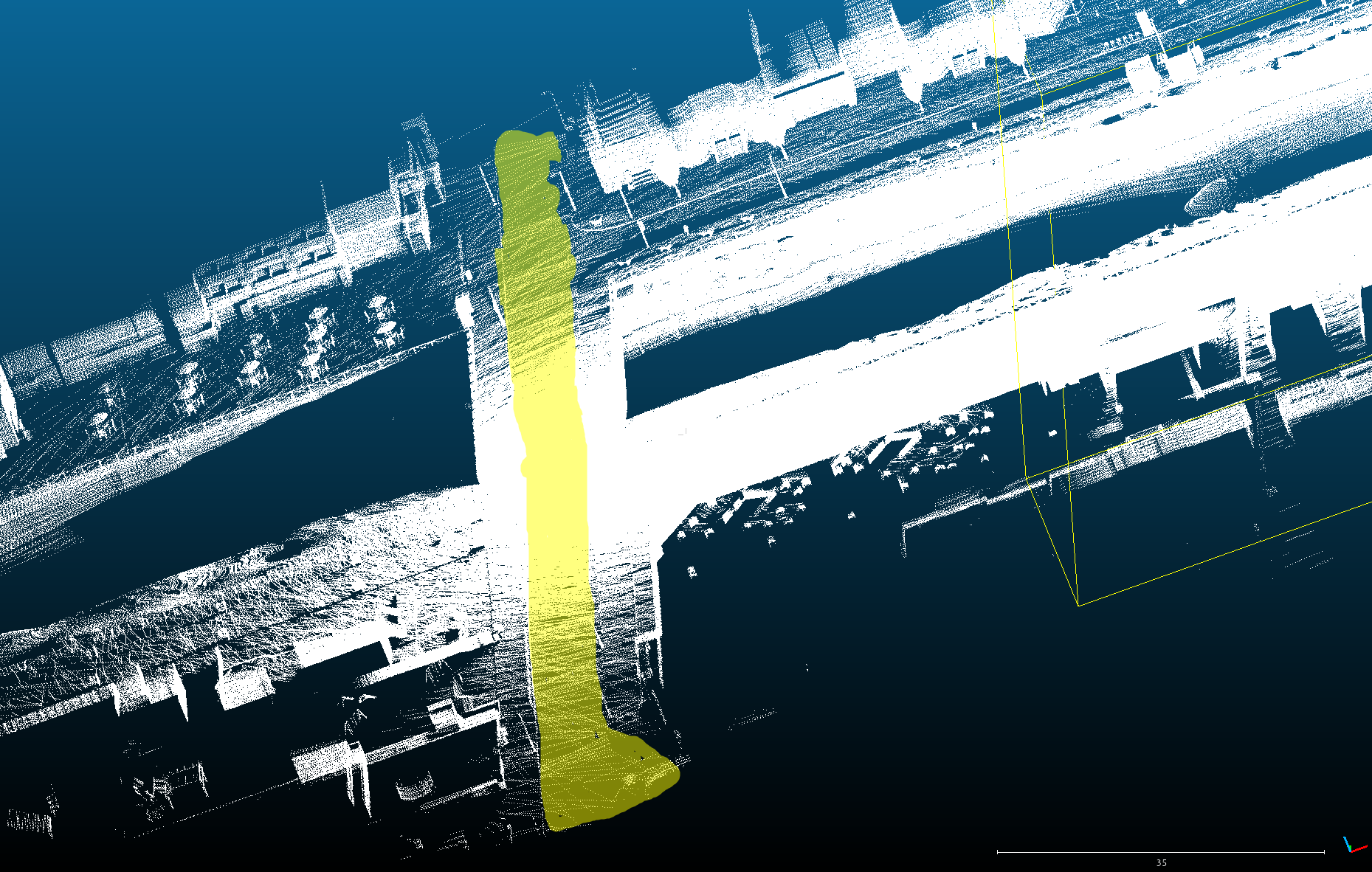
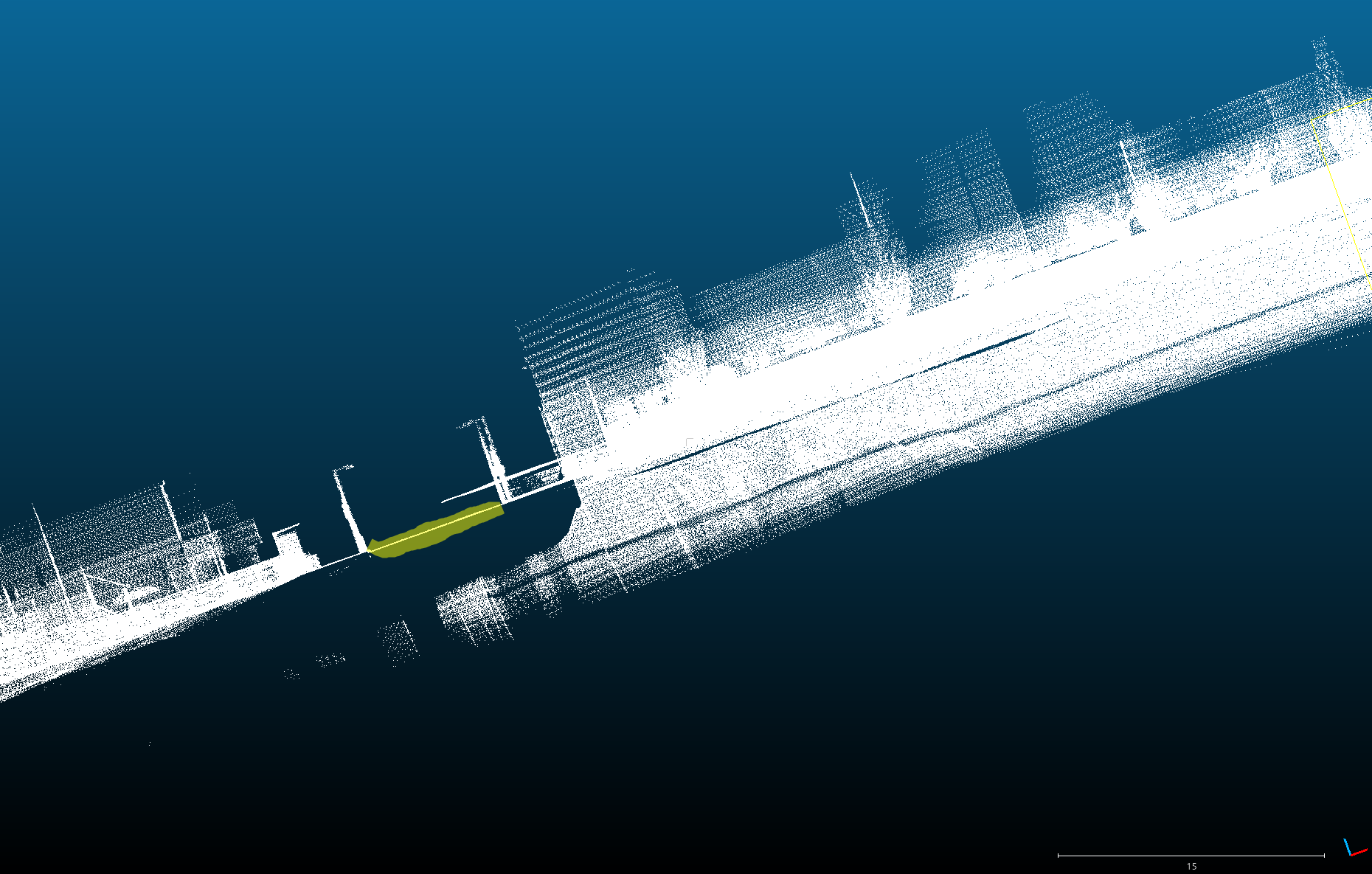
Also, can you explain me how are you getting the transformation matrix on the Transform(object) function? Because you state that you are applying first scale and then rotation and then the traslation matrix. If that's the case, then I think the transform should be:
        self.matrix[0, 3] = translation.x
        self.matrix[1, 3] = translation.y
        self.matrix[2, 3] = translation.z
        self.matrix[0, 0] = scale.x * (cp * cy)
        self.matrix[0, 1] = scale.x * (cy * sp * sr - sy * cr)
        self.matrix[0, 2] = scale.x * (cy * sp * cr + sy * sr)
        self.matrix[1, 0] = scale.y * (sy * cp)
        self.matrix[1, 1] = scale.y * (sy * sp * sr + cy * cr)
        self.matrix[1, 2] = scale.y * (sy * sp * cr - cy * sr)
        self.matrix[2, 0] = scale.z * (-sp)
        self.matrix[2, 1] = scale.z * (cp * sr)
        self.matrix[2, 2] = scale.z * (cp * cr)
instead of:
        self.matrix[0, 3] = translation.x
        self.matrix[1, 3] = translation.y
        self.matrix[2, 3] = translation.z
        self.matrix[0, 0] = scale.x * (cp * cy)
        self.matrix[0, 1] = scale.y * (cy * sp * sr - sy * cr)
        self.matrix[0, 2] = -scale.z * (cy * sp * cr + sy * sr)
        self.matrix[1, 0] = scale.x * (sy * cp)
        self.matrix[1, 1] = scale.y * (sy * sp * sr + cy * cr)
        self.matrix[1, 2] = scale.z * (cy * sr - sy * sp * cr)
        self.matrix[2, 0] = scale.x * (sp)
        self.matrix[2, 1] = -scale.y * (cp * sr)
        self.matrix[2, 2] = scale.z * (cp * cr)
You can checkout the rotation matrix here. And for the scale matrix it should be just a diagonal matrices with Sx, Sy and Sz on the diagonal (from first to third [row|column] respectively). Thanks for the great job you've done with the simulator. Hope this is useful.
luigui2906
on 20 Jul 2018
This issue has been automatically marked as stale because it has not had recent activity. It will be closed if no further activity occurs. Thank you for your contributions.
![stale[bot] picture](https://avatars.githubusercontent.com/in/1724?v=4&s=40) stale[bot]
on 18 Sep 2018
stale[bot]
on 18 Sep 2018
Hi.. Any news on this..? :)
luigui2906
on 18 Sep 2018
Hey @luigui2906, sorry I'm very busy with the 0.9 API and I didn't have to take a look at the lidar issues. But I'm adding this to our backlog so the stale bot does not close it, this is something we definitively want to fix.
 nsubiron
on 19 Sep 2018
nsubiron
on 19 Sep 2018
Is there any update?
This problem still exists in CARLA_0.9.6.
Especially, when the car is rotating on a slope, this issue will be magnified.
 KitKat7
on 30 Jul 2019
KitKat7
on 30 Jul 2019
This issue should be solved now. @bernatx could you confirm, please?
 germanros1987
on 19 Mar 2020
germanros1987
on 19 Mar 2020
It was not solved before, but we just fixed it.
germanros1987
on 26 Jun 2020
@germanros1987 "we just fixed it". Does this mean it is fixed in Carla0.9.9? Where can I find the pull? @DSantosO does https://github.com/carla-simulator/carla/pull/2997 fix this issue?
 TNAV1
on 31 Aug 2020
TNAV1
on 31 Aug 2020
It was not solved before, but we just fixed it.
On which version? Is it fixed on Carla 0.9.6? Help is much appreciated
 yasser-h-khalil
on 15 Oct 2020
yasser-h-khalil
on 15 Oct 2020
Is there any update?
This problem still exists inCARLA_0.9.6.
Especially, when the car is rotating on a slope, this issue will be magnified.
Hi, were you able to find a fix for 0.9.6?
yasser-h-khalil
on 15 Oct 2020
0.9.6? The latest version is 0.9.10.1! Please, could you update your
version?
On Thu, Oct 15, 2020 at 12:56 PM yasser-h-khalil notifications@github.com
wrote:
Is there any update?
This problem still exists in CARLA_0.9.6.
Especially, when the car is rotating on a slope, this issue will be
magnified.Hi, were you able to find a fix for 0.9.6?
—
You are receiving this because you were mentioned.
Reply to this email directly, view it on GitHub
https://github.com/carla-simulator/carla/issues/594#issuecomment-709557202,
or unsubscribe
https://github.com/notifications/unsubscribe-auth/AJF3VTCIGNZ6UQG5WOE7SVTSK5HXTANCNFSM4FKQWWKQ
.
germanros1987
on 15 Oct 2020
The thing is I have been working on 0.9.6 for a good time now and it would take me a lot of time to upgrade my code to match the latest carla version.
I just need to combine several LIDAR frames together! Is there a quick fix for that using 0.9.6?
Thank you.
yasser-h-khalil
on 15 Oct 2020
Look,
It is unreasonable to expect us to go back to every single previous version
and "patch them up" because you got attached to a certain version. Please,
take the effort to update your software to the latest version of CARLA or
accept that you just won't have the fix for 0.9.6
On Thu, Oct 15, 2020 at 2:15 PM yasser-h-khalil notifications@github.com
wrote:
The thing is I have been working on 0.9.6 for a good time now and it would
take me a lot of time to upgrade my code to match the latest carla version.
I just need to combine several LIDAR frames together! Is there a quick fix
for that using 0.9.6?
Thank you.—
You are receiving this because you were mentioned.
Reply to this email directly, view it on GitHub
https://github.com/carla-simulator/carla/issues/594#issuecomment-709594525,
or unsubscribe
https://github.com/notifications/unsubscribe-auth/AJF3VTBFOSEAAVKJYPD73D3SK5Q77ANCNFSM4FKQWWKQ
.
germanros1987
on 16 Oct 2020
Related issues
 metaluga145
·
4Comments
metaluga145
·
4Comments
 mhusseinsh
·
3Comments
mhusseinsh
·
3Comments
 cstamatiadis
·
3Comments
cstamatiadis
·
3Comments
 AftermathK
·
3Comments
AftermathK
·
3Comments
 mallela
·
3Comments
mallela
·
3Comments
Most helpful comment
Hi,
I think I have solved the problem. So I think issue #416 is right.
What I did was basically to ignore the pitch and roll rotation angles when transforming the Lidar pointclouds to the global world reference coordinates, setting them to 0. .
To do so I created another class class TransformLidar(object) at transform.py and then when I am retrieving the transformation matrix I do:
That way I obtain a perfectly aligned pointcloud when I integrate all the frames together in the global reference frame, see images below, the highlighted part is seen from 2 different viewpoints:
Also, can you explain me how are you getting the transformation matrix on the Transform(object) function? Because you state that you are applying first scale and then rotation and then the traslation matrix. If that's the case, then I think the transform should be:
instead of:
You can checkout the rotation matrix here. And for the scale matrix it should be just a diagonal matrices with Sx, Sy and Sz on the diagonal (from first to third [row|column] respectively). Thanks for the great job you've done with the simulator. Hope this is useful.