Carla: Multi lane support and few questions
1)Is there multi lane support in the current release ? else when you guys planning to add the multi lane support ?
2)we have requirement to get vehicles that are on left and right side of the main car along with the distance to main car, is it possible to get that kind of info form the simulator ?
3)How to change the car form Mustang to a different car ? what other cars are supported ?
 imran5144
All 11 comments
Hi @imran5144
1) I managed to use multiple lanes using the splines tool and creating custom roads, like a german highway with 3 lanes. There you can add some RoutePlanners, every vehicle will follow the route when passing the BoxCollider (TriggerVolume) of a planner. It looks like this
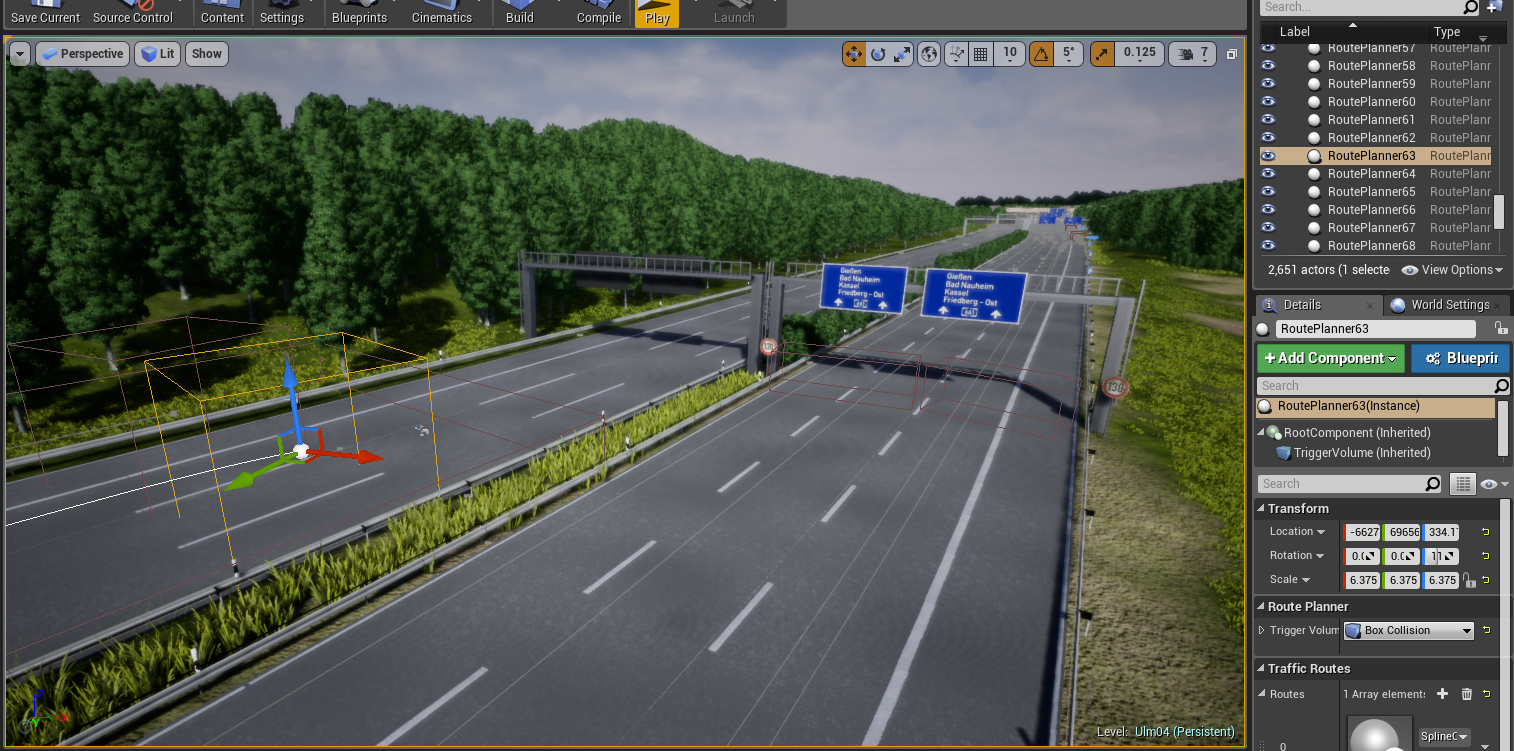
2) Using the RoutePlanner you can add PlayerStarts in front of them. They will drive through the planners and eventually follow the road. This way you might achieve a behaviour of the Ego Car driving in the middle and two Agent Cars left and right from the Ego. Using the measurements from the server you can dump the locations (Transform) of every vehicle in every frame (look at issue #446 for some simple python client code, you can easily add measurements.non_player_agents for the NPC measurements). You can then calculate the distance from the NPC vehicles to the Ego vehicle.
3) In your CarlaSettings.ini you can look at the following lines to change the Ego Car vehicle. I think every vehicle in carla is supported to work as the Ego vehicle. Personally I use the BMW Gran Tourer - this is from my settings file:
[CARLA/LevelSettings]
; Path of the vehicle class to be used for the player. Leave empty for default.
; Paths follow the pattern "/Game/Blueprints/Vehicles/Mustang/Mustang.Mustang_C"
PlayerVehicle=/Game/Blueprints/Vehicles/BmwGrandTourer/BmwGranTourer.BmwGranTourer_C
Maybe this will help you ;)
 p-schulz
on 15 Jun 2018
p-schulz
on 15 Jun 2018
@p-schulz, to create the custom roads like you did, did you use the assets already included with Carla, or did you create your own? I am trying to build a bike lane, but don't see any lane markings other than the double yellow in the Carla assets. Thanks for any help!
 nwsweet
on 25 Jun 2018
nwsweet
on 25 Jun 2018
Hi! @nwsweet
We do not have lanemarkings beyond what is presented in our maps. But you can easily create something similar using simple rectangles combined with our SplineMeshRepeater (Content/Blueprints/SplineMeshRepeater)
 TheNihilisticRobot
on 26 Jun 2018
TheNihilisticRobot
on 26 Jun 2018
@nwsweet
Sorry for answering so late. I created meshes for my roads, e.g. one mesh for a single lane road, one for two lanes etc. and attached a rectangle with a decal material as the road mark. Then I used the SplineMeshRepeater from carla. Remember to put your meshes into the right directories inside the content folder (Static), otherwise you get no or wrong object segmentation labels.
p-schulz
on 5 Jul 2018
Hi @p-schulz , the highway you created seems very good! Did you/Can you share it somewhere? I am having issues modifying the road spline on town01 (v 0.8.4) and it would be nice to see your example.
 sergiocaccamo
on 28 Aug 2018
sergiocaccamo
on 28 Aug 2018
Hello @p-schulz , your work looks great. But after creating RoutePlanners and adding PlayerStarts as you did, I still cannot control Agent Cars. They just don't move and stay there still. How can I move agent cars? Thank you!
 z1223343
on 31 Aug 2018
z1223343
on 31 Aug 2018
Also really interested in this extension. @p-schulz would it be possible to share the custom roads? Thanks!
 hzyjerry
on 5 Oct 2018
hzyjerry
on 5 Oct 2018
Sorry again for answering so late...
@z1223343 are you able to drive around yourself in the ego vehicle? The cars should be placed over the bounding boxes of RoutePlanners, so they drop into them when carla starts... If they have no route at all they should be driving in circles, when they are not moving at all something else is going wrong...
@sergiocaccamo @hzyjerry I cannot completely share the roads, but I will try to export them tomorrow... They are somewhat merged together from the carla roads in /Game/Static/Roads (various RoadTiles from there) and my own models as the railing and the road markings (hint, the road marks are just planes with a masked white texture on them). Anyway, I try to package them up as a example ;-)
p-schulz
on 15 Oct 2018
Hi, @p-schulz @TheNihilisticRobot . I am new for calra and UE4.
I don't know how to duplicate a town01 map correctly. I tried to copy a town01.umap and change a playerspawner location, then save. But it failed. Could you mind tell me how to duplicate a exist map?
 bjane123
on 23 Oct 2018
bjane123
on 23 Oct 2018
Ussualy, when Unreal Doesnt let me Save is because I have two Instances of the same project open. I don't think there is anything wrong with how you duplicated the map.
TheNihilisticRobot
on 26 Oct 2018
This issue has been automatically marked as stale because it has not had recent activity. It will be closed if no further activity occurs. Thank you for your contributions.
![stale[bot] picture](https://avatars.githubusercontent.com/in/1724?v=4&s=40) stale[bot]
on 25 Dec 2018
stale[bot]
on 25 Dec 2018
Related issues
 syinari0123
·
4Comments
syinari0123
·
4Comments
 cstamatiadis
·
3Comments
cstamatiadis
·
3Comments
 AftermathK
·
3Comments
AftermathK
·
3Comments
 qixiaoshuai0120
·
3Comments
qixiaoshuai0120
·
3Comments
 phzeller
·
3Comments
phzeller
·
3Comments
Most helpful comment
Hi @imran5144
1) I managed to use multiple lanes using the splines tool and creating custom roads, like a german highway with 3 lanes. There you can add some RoutePlanners, every vehicle will follow the route when passing the BoxCollider (TriggerVolume) of a planner. It looks like this
2) Using the RoutePlanner you can add PlayerStarts in front of them. They will drive through the planners and eventually follow the road. This way you might achieve a behaviour of the Ego Car driving in the middle and two Agent Cars left and right from the Ego. Using the measurements from the server you can dump the locations (Transform) of every vehicle in every frame (look at issue #446 for some simple python client code, you can easily add measurements.non_player_agents for the NPC measurements). You can then calculate the distance from the NPC vehicles to the Ego vehicle.
3) In your CarlaSettings.ini you can look at the following lines to change the Ego Car vehicle. I think every vehicle in carla is supported to work as the Ego vehicle. Personally I use the BMW Gran Tourer - this is from my settings file:
Maybe this will help you ;)