Potentially related to #761
Expected Behavior
- Code is not line-wrapped, OR
- code is line-wrapped at 80 chars and preserves indentation, OR
- control over line-wrapping (best behavior)
Actual Behavior
Line with <= 80 chars gets wrapped to newline, ignoring indentation
(Compare lines 5 and 6 in the output below to the input snippet)
Details
Output:

Input:
function html (tagName, attributes, ...childNodes) {
  const el = document.createElement(tagName);
  if (attributes) {
    for (const [prop, value] of Object.entries(attributes)) {
      if (prop === 'style' && (Array.isArray(value) || value instanceof Map)) {
        for (const declaration of value) {
          el.style.setProperty(...declaration);
        }
      }
      else {
        el.setAttribute(prop, value);
      }
    }
  }
  if (childNodes) {
    for (let node of childNodes) {
      if (typeof node === 'string') {
        node = document.createTextNode(node);
      }
      el.appendChild(node);
    }
  }
  return el;
}
Carbon config:
(Note: I removed the icon property)
{
  "paddingVertical": "0px",
  "paddingHorizontal": "0px",
  "marginVertical": "45px",
  "marginHorizontal": "45px",
  "backgroundImage": null,
  "backgroundImageSelection": null,
  "backgroundMode": "color",
  "backgroundColor": "rgba(171, 184, 195, 1)",
  "dropShadow": false,
  "dropShadowOffsetY": "20px",
  "dropShadowBlurRadius": "68px",
  "theme": "one-dark",
  "windowTheme": "sharp",
  "language": "javascript",
  "fontFamily": "Hack",
  "fontSize": "14px",
  "lineHeight": "133%",
  "windowControls": false,
  "widthAdjustment": false,
  "lineNumbers": true,
  "exportSize": "2x",
  "watermark": false,
  "squaredImage": false,
  "loading": false,
  "isVisible": true,
  "custom": true
}
Browser:
Win 10, Chrome 75.0.3770.80
 jsejcksn
All 12 comments
Hey @jsejcksn are you still noticing this issue? When I tested on current Carbon, I wasn't seeing the line-wrapping issue you were:
(Source)
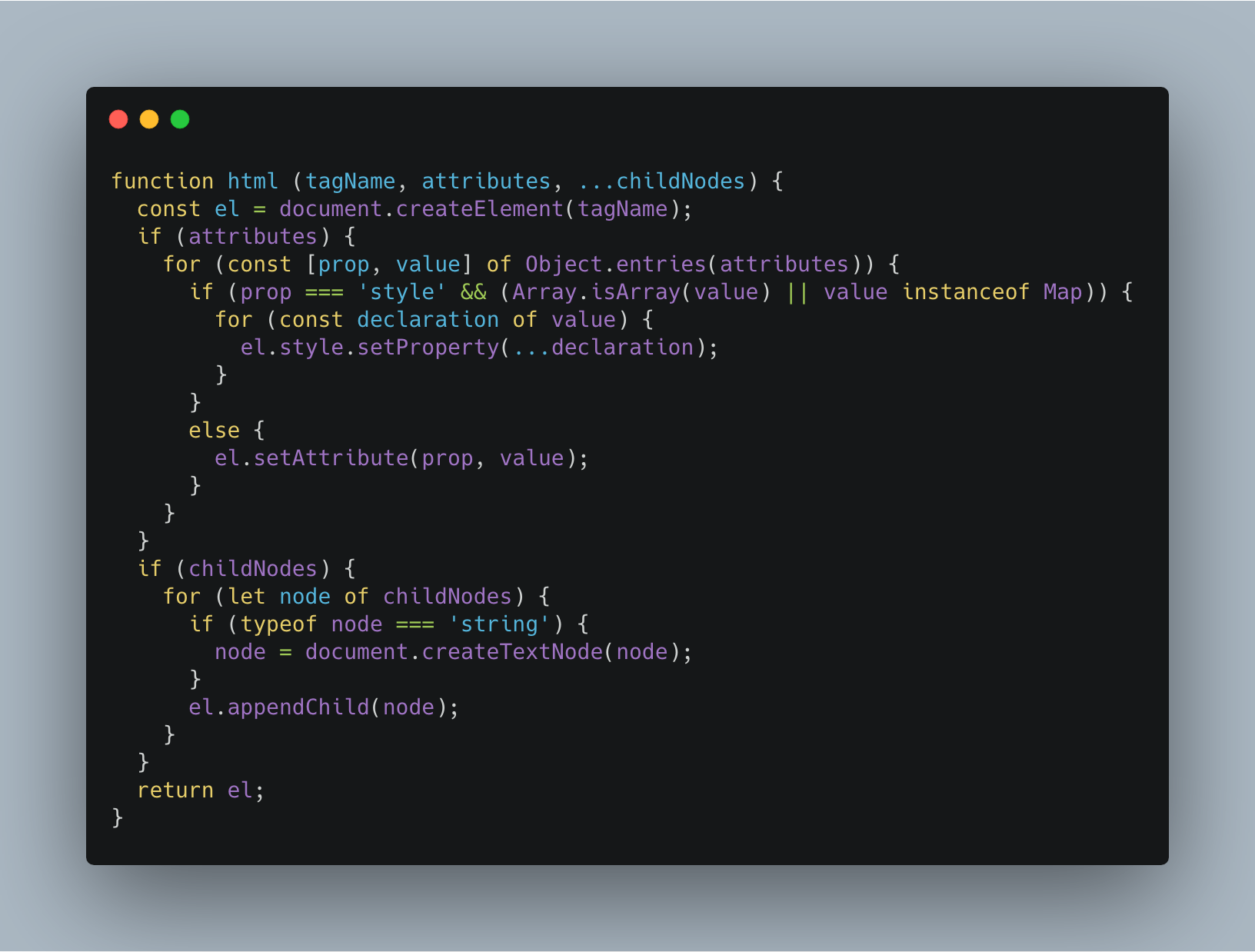
Can you post a new reproduction case?
 mfix22
on 18 Jun 2019
mfix22
on 18 Jun 2019
(Also posting this for future reference for myself: https://codemirror.net/demo/indentwrap.html#)
mfix22
on 18 Jun 2019
LGTM on macOS; will check Windows env in the next day or so
jsejcksn
on 19 Jun 2019
Just checked on Windows: Issue persists.
_Win 10, Chrome 75.0.3770.100_
jsejcksn
on 19 Jun 2019
@mfix22 Are you testing in the same environment? (Win 10, Chrome stable)
jsejcksn
on 19 Jun 2019
Sorry, totally missed these comments. I was testing this on macOS.
mfix22
on 19 Aug 2019
I stumbled into this issue and I can reproduce it in Linux Chromium (well, technically Brave - version shows Version 0.67.125 Chromium: 76.0.3809.100 (Official Build) (64-bit)).
Load this URL for my test case
Using Export/Open gives me this image:

Now change the option "auto-adjust width" (switch it ON). Now Export/Open gives me this:
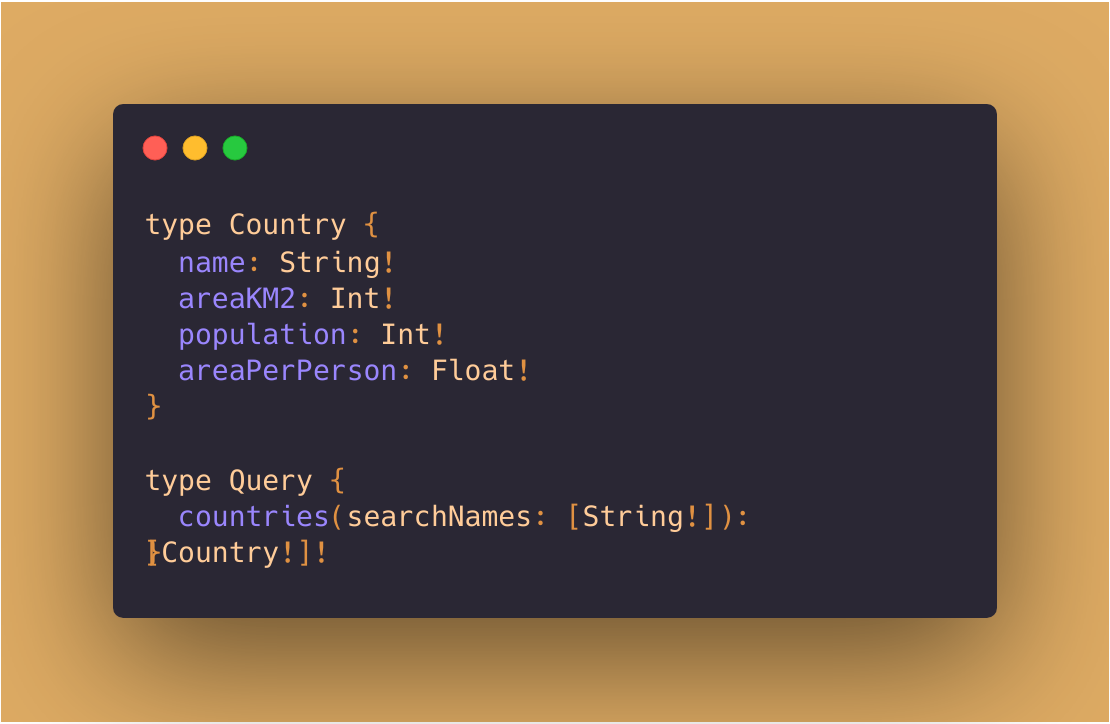
The second from last line has been wrapped and overlaps with the last line.
Now change the font size - for easy access, here's the URL for the changed config. The font size is now set to 12.5px.
Export/Open renders this:
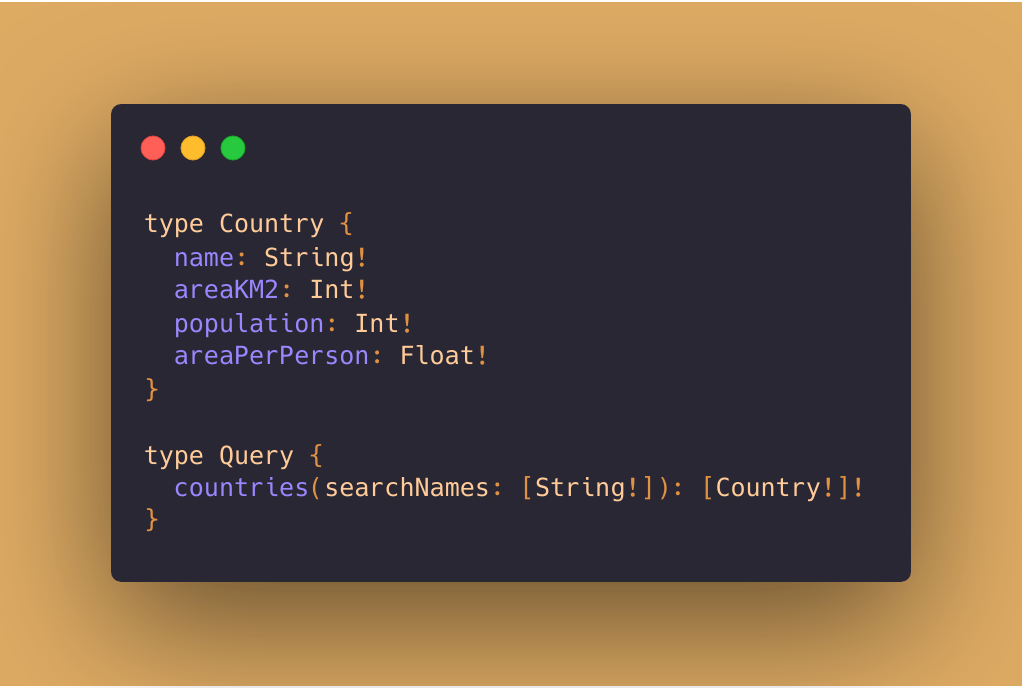
Obviously, there is something going wrong in edge case scenarios when
- a line is longer than a certain threshold
- ... where that threshold has something to do with the font size
- auto-width adjustment is on
I should point out that in all cases, the preview looks correct - only the exported image is sometimes broken.
For comparison I tested in Firefox (69.0) and all scenarios render correctly.
 oliversturm
on 11 Sep 2019
oliversturm
on 11 Sep 2019
Small addition: using this URL, the issue can also be reproduced with Firefox 69.0 on Linux.
oliversturm
on 11 Sep 2019
@oliversturm would you be able to push a PR that fixes the issue on Firefox Linux? It is working appropriately for Firefox macOS
mfix22
on 11 Sep 2019
I have no idea at this time what the cause of the issue is. If I had to guess I would say that some kind of width calculation is very slightly off, so it renders incorrect results when certain combinations of fonts, font sizes and rendering engines are used.
oliversturm
on 11 Sep 2019
@oliversturm are you able to reproduce it locally? If so, you can probably just add logic here: https://github.com/carbon-app/carbon/blob/master/components/Editor.js#L154 to add 1 or 2 pixels when the user-agent is Linux/Window & Firefox
mfix22
on 12 Sep 2019
Noticing an incorrect linewrap of my own on Chrome 77.0.3865.90 (linux) with:
// Big Step Operational Semantics

impl Expression for Add {
    fn evaluate(&self, environment: &Environment) -> Expr {
        match (
            self.0.evaluate(environment).as_value(),
            self.1.evaluate(environment).as_value(),
        ) {
            (Some(Value::Number(a)), Some(Value::Number(b))) => Value::Number(a + b).into(),
            _ => panic!("Unexpected values"),
        }
    }
}

Seems like there should be a linebreak before the _ => panic!("Unexpected values"), instead of just following on as a continuation.
 onelson
on 30 Sep 2019
onelson
on 30 Sep 2019
Related issues
 jakedex
·
5Comments
jakedex
·
5Comments
 TitoMikani
·
4Comments
TitoMikani
·
4Comments
 UlisesGascon
·
3Comments
UlisesGascon
·
3Comments
 Gaojianli
·
3Comments
Gaojianli
·
3Comments
 raphamorim
·
4Comments
raphamorim
·
4Comments