Canvasblocker: anti-FP feature request: enumerating history
From here: https://github.com/ghacksuserjs/ghacks-user.js/issues/458#issuecomment-402264058 and kkapsner's reply
these APIs would also allow the history.length to be spoofed in a sneaky fashion. To be honest: it would be really simple to include this in CanvasBlocker... ;)
Since this extension now seems to be growing beyond canvas (audio now added), and only looking IMO to fill gaps in the market, I think this would be a good extra
-- background--
FF has a pref, from our user.js
/* 0804: limit history leaks via enumeration (PER TAB: back/forward) - PRIVACY
 * This is a PER TAB session history. You still have a full history stored under all history
 * default=50, minimum=1=currentpage, 2 is the recommended minimum as some pages
 * use it as a means of referral (e.g. hotlinking), 4 or 6 or 10 may be more practical ***/
user_pref("browser.sessionhistory.max_entries", 10);
I'm not knowledgeable as to how JS can use this. Sure, it can get a count, but can it read the values? JonDoNym recommends 2, and to reset it on every domain change (doesn't matter if it is higher on the same domain)
I use 10 in my FF profile (workflow needs it), but have for years obfuscated the real value using a user script https://github.com/ghacksuserjs/ghacks-user.js/wiki/4.2.1-User-Scripts. Note that there can be issues with @run-at document-start but not in this case with VM (GM will fail). It's a very simple script
You can test the history value at http://browserspy.dk/document.php or take the JonDoNym test ( http://ip-check.info/?lang=en ). The result is under Tab History

If this could be built into CB, without affecting FF internally (so you still usefully go back per tab as many as the pref value), this would remove the need for the user script (which can leak it's function name). And, if the history length can be enumerated (am I using the right word here?), then limit that to (the last) 2 as well?
 Thorin-Oakenpants
All 30 comments
PS: If you wanted to add in more features, those other two scripts are prime examples as well.
- In the case of protecting windows.name, I'm 99% positive nothing else does it.
- For clearing windows.opener, earthlng's approach is superior IMO (I'll let him explain it - @earthlng - see https://github.com/ghacksuserjs/ghacks-user.js/issues/401#issuecomment-385253005 and subsequent comments ). Due to the run at doc start issues, he actually built an extension - https://github.com/earthlng/testpages/ , it's in the root folder.
I'm sure he wouldn't mind if it was built into CB and maintained (new features, improved/tested etc e.g. with <form>?)
Thorin-Oakenpants
on 16 Aug 2018
All three points seem reasonable and doable.
 kkapsner
on 20 Aug 2018
kkapsner
on 20 Aug 2018
All three are in, but window is disabled by default. I think it may break to many pages...
kkapsner
on 27 Aug 2018
:+1:
I have a question. Does whitelisting include these three, or are they just global options.
eg, in uBlock Origin, there are some global switches in the dashboard for eg disable pre-fetching, and no way to allow a per-site exception - that's because there can't be any breakage
So far in my experience (but I am but one person), the 3 scripts I ran, I never had an issue. But there could be breakage, so, thinking ahead for tweaks down the track if required, how would one create an exception for say windows.name but still block canvas?
Just something to think about, but we need to let it get used and get some feedback :)
Thorin-Oakenpants
on 27 Aug 2018
Whitelisting will include these.
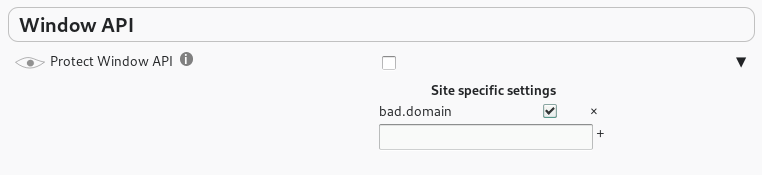
You could completely deactivate the window.name protection over the API-Whitelist. Or you could disabled the window-API protection for that site only - it's a URL specific setting.
Every setting that has a triangle next to it can be set individually by domain or URL (RegExp):
kkapsner
on 27 Aug 2018
Oh, cool :)
Thorin-Oakenpants
on 27 Aug 2018
kkapsner
on 27 Aug 2018
I'm sure he wouldn't mind if it was built into CB
actually I'd very much prefer if CB would stick to just doing canvas (and maybe audio-api) blocking.
The (recently added?) dataURL stuff is already problematic because it can interfere with other extensions or it will just be ignored because another extensions listener will be triggered after CB ones.
IMHO it would be better to revert some of these things and release a new extension that has all this additional stuff included but under a new name. Until then I'll just stick with CB v0.4.5.
 earthlng
on 28 Aug 2018
earthlng
on 28 Aug 2018
Until then I'll just stick with CB v0.4.5.
I'm on 0.5.2b, which doesn't have the new features yet, so you would be fine with that for ESR60
My understanding is that these 3 features can be globally enabled/disabled, or am I missing something - the objection is about something else?
Obviously I'm not a dev, and I hate feature creep (hence I spoke against screen/res/window spoofing and font anti-FP'ing). But I'm also aware of extensions conflicting (and the run @ doc start issues), so I actually thought these were a good idea and fit for purpose. Sorry :-(
Thorin-Oakenpants
on 28 Aug 2018
Yes - all these additional features can be disabled. But even when disabled there will be some effect that could potentially interfere with other extensions (with the drop of ESR52 I may reduce them...).
I always try to make things configurable so different needs can be met.
Actually 0.5.2 is not a good choice to stick with when you want to use the dataURL protection.
kkapsner
on 28 Aug 2018
Actually I think I have to remove the name protection or add a strong warning: it seems as it breaks reCaptchas.
kkapsner
on 28 Aug 2018
Can you please test https://www.google.com/recaptcha/api2/demo with your user script?
kkapsner
on 28 Aug 2018
@kkapsner How am I supposed to whitelist websites (that use reCaptchas which won't open), when I generally want to protect the Window API? Un-ticking the box (is this the command for "whitelisting"?) next to "dhl.de" in my example doesn't have an effect: http://www.bilder-upload.eu/upload/33dd79-1535532869.jpg
 spodermenpls
on 29 Aug 2018
spodermenpls
on 29 Aug 2018
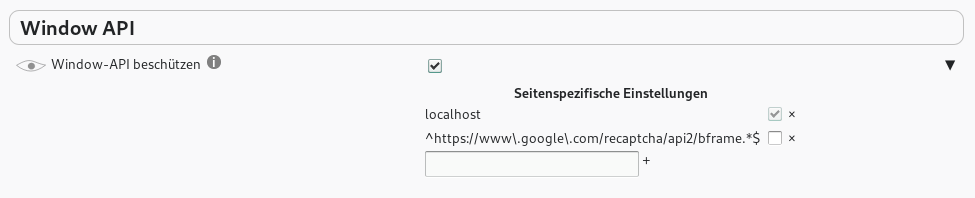
You have to whitelist a google URL: ^https://www.google.com/recaptcha/api2/bframe.*$
kkapsner
on 29 Aug 2018
@kkapsner Yes, that does the trick, thanks. The URL you typed in above has two \ too much though, only the URL in the screenshot works.
spodermenpls
on 29 Aug 2018
You're right. I corrected it.
kkapsner
on 29 Aug 2018
Actually I think I have to remove the name protection or add a strong warning: it seems as it breaks reCaptchas.
if(/^https:\/\/www\.google\.com\/recaptcha\/api2\/(?:anchor|frame)\?.+$/.test(window.location.href)&&/^I[0-1]_[1-9][0-9]+$/.test(_window.name))
That was built into the user script (so I assumed you would code it in). Is it possible to have this included by default in the whitelist i.e ^https://www\.google\.com/recaptcha/api2/bframe.*$ ? I don't think too many people would be able to work out what to put in
Thorin-Oakenpants
on 30 Aug 2018
Looking at the user script again I kind of remember seeing this line... but obviously did not when implementing...
I think I will add a user question to whitelist reCAPTCHA when activating the protection. I do not want to add a google URL somewhere in a whitelist without the user accepting.
kkapsner
on 30 Aug 2018
Comparing the URL pattern in your user script and mine raises some questions:
- Why are they different?
- How did you get your pattern?
- Where did you find the "anchor" part?
- Does your exception still work at https://www.google.com/recaptcha/api2/demo ?
kkapsner
on 30 Aug 2018
It came from here (and chris rider is linked and credited on the wiki)
I'll have to set up VM in a nilla and test that demo later
Edit: Oooh, comment 83 links to TBB's patch (2 yrs old) and comment 87 has an unsigned extension as an attachment (9 months old) - might be worth having a look what they did
Thorin-Oakenpants
on 30 Aug 2018
The extension just deleted the name without any exception. The TBB patch is kind of interesting: they only delete the name if the window is the top window (no nested (i)Frames) and if the referrer is empty (not sure why they make this).
But I think I will stick with my plan. There will be a RC2 soon that will have the user confirmation.
kkapsner
on 31 Aug 2018
Hm... just released the RC2 and now noticed that the user confirmation does not work properly...
kkapsner
on 31 Aug 2018
Well... this was a kind of embarrassing error...
kkapsner
on 31 Aug 2018
kkapsner
on 31 Aug 2018
@kkapsner is this new edition compatible with Waterfox?
Or should I stick with 0.5.3-Alpha3: RC1 and use the 'Conceal history.length' userscript which is now considered to be "easily detectable"?
Thanks for your time. :disappointed: :8ball:
 L-a-n-g-o-l-i-e-r-s
on 1 Sep 2018
L-a-n-g-o-l-i-e-r-s
on 1 Sep 2018
If 0.5.3-Alpha3 works the actual released 0.5.3 should also work.
kkapsner
on 1 Sep 2018
@kkapsner
I don't know if it does, that's why I'm asking, I'm basing it on "- removed active support for Firefox < 60" as far as I am aware, webapis from 56 are in, but not 57? I don't remember, they don't make it easy. Your last two releases said "- removed active support for Firefox < 60" WF is not based on 60 as far as I know, currently. 60 api has not been imported.
L-a-n-g-o-l-i-e-r-s
on 1 Sep 2018
I just removed active support. This means I will not test it and will not provide the "a" version for it any more (FF ESR 52 runs out in 4 days). CB still works for the most part in FF 52 (the icons in the tool bar popup do not work properly, but they do in Waterfox) - especially the protection is still fine.
No support does not mean it does not work. It just means I do not check if it works.
I have three versions I usually test: ESR, current and nightly (development is on nightly). And I do not have the time to add another one.
kkapsner
on 2 Sep 2018
@kkapsner The setting "block dataURL sites" seems to be pretty unreliable on my system, I caught it now twice (despite being activated at all times) at not actually blocking dataURL frames when testing it on the CB testing page. It only began to protect my fingerprint again after un-ticking and re-ticking its box in the settings. Is this an issue of other interfering add-ons, or what could be behind this?
spodermenpls
on 5 Sep 2018
Yes. It interferes with other extensions like uBlock and NoScript. I even opened an issue for NoScript so they will always overwrite other extension: https://github.com/hackademix/noscript/issues/6 (I think their protection is way more important than CBs).
214 was the first time I realized that. There are some issues for Firefox open related to this problem.
kkapsner
on 5 Sep 2018
Related issues
 nkestrel
·
7Comments
nkestrel
·
7Comments
 prog-amateur
·
8Comments
prog-amateur
·
8Comments
 DRigby26
·
5Comments
DRigby26
·
5Comments
 MPeti1
·
4Comments
MPeti1
·
4Comments
 ghost
·
6Comments
ghost
·
6Comments
Most helpful comment
Looking at the user script again I kind of remember seeing this line... but obviously did not when implementing...
I think I will add a user question to whitelist reCAPTCHA when activating the protection. I do not want to add a google URL somewhere in a whitelist without the user accepting.