Canvasblocker: Firefox 58 asking to allow/restrict the use of HTML5 canvas image data
Hello, first of all, thank you for your web extension, it is very useful.
I meet a new case, and I would like to know which action should I take :
As you can see below, since Firefox 58, I have this specific message :
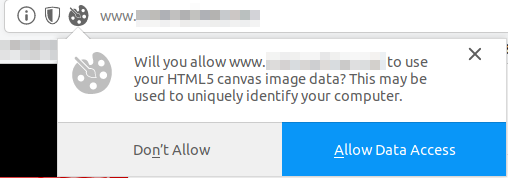
Another problem is that it happens very often. So we have to decide always.
Last but not least, sometimes, the CanvasBlocker fingerprint icon appears, sometimes not. I would like to know why ? In which case, shall it appear/disappear ? Am I still protected when the icon isn't displayed ?
Thank you very much.
Your Environment
- CanvasBlocker Version used: 0.4.4
- Firefox version incl. 32- or 64-bit : v58, 64 bits
- Operating System and version (desktop or mobile): Linux
- Installed addons: Noscrpit, ublock origin
Your Settings
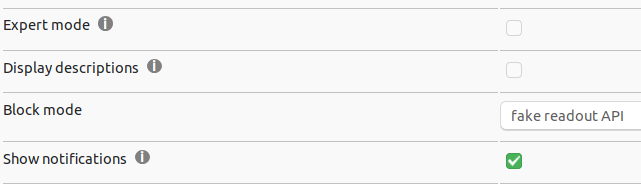
 prog-amateur
All 8 comments
Yeah, that’s a new feature they’ve added to protect from canvas fingerprinting. Basically this is equivalent to blocking readout by default I think, and you can then allow access (permanently or temporarily) or deny (permanently, temporarily makes no sense here). I don’t use CB anymore currently since we have this.
 ArchangeGabriel
on 24 Jan 2018
ArchangeGabriel
on 24 Jan 2018
^^Blocking still can lead to breakages. I am more to constant or persistent CB method, but cannot decide yet which is better between constant and persistent.
 crssi
on 24 Jan 2018
crssi
on 24 Jan 2018
So what is the behavior if I click on :
- Don't Allow : will it disable CB ? What will the website see ?
- Allow Data Access : will it allow fake fingerprint from CB, or real fingerprint ?
Also, please fee free to answer about the icon displayed/not displayed.
Thank you for your help.
prog-amateur
on 24 Jan 2018
The "Don't allow" option will disable CB and the website will see a complete white canvas. When you allow the access the behaviour is like in old Firefox: CB will jump in.
Regarding the second point: this has to be addressed by Mozilla as this is a built in feature.
The icon only appears on pages where any canvas is faked. If it does not appear nothing has been faked but this does not mean you are not protected (depending on your settings).
@ArchangeGabriel: I think this feature is too black/white: if you have a page that uses canvas in both ways (fingerprinting and using it for useful purposes) you are not able to use it without getting tracked.
@crssi: with persistent rng you can be tracked until the persistent data is cleared (new browser session/time/clearing by hand - depending on your settings). I prefer/use non persistent with the canvas cache. But this is not a recommendation as it depends on the use case.
 kkapsner
on 24 Jan 2018
kkapsner
on 24 Jan 2018
@kkapsner Thank you
But isnt't non persistent a bit odd, when the page tries to fingerprint twice and the result is different?
It would be nice to actually have persistent per session only and then when all tabs are closed for single domain to do a new random,
crssi
on 24 Jan 2018
The canvas cache solves this double readout issue.
The session per domain is a nice idea - have to think about it since I'm not sure how to implement this effectively.
kkapsner
on 25 Jan 2018
The canvas cache solves this double readout issue.
Even when disk and memory cache is disabled in Firefox to get rid of ETags?
The session per domain is a nice idea - have to think about it since I'm not sure how to implement this effectively
Maybe the way @mrdokenny did in his WE Cookie-AutoDelete
where he deletes the cookies after last session to the specific domain is closed.
Cheers
crssi
on 25 Jan 2018
The canvas cache is build in CB.
kkapsner
on 25 Jan 2018
Related issues
 MPeti1
·
4Comments
MPeti1
·
4Comments
 DRigby26
·
5Comments
DRigby26
·
5Comments
 ChromeExtensionsOperator
·
3Comments
kkapsner
·
8Comments
ChromeExtensionsOperator
·
3Comments
kkapsner
·
8Comments
 Kherby
·
6Comments
Kherby
·
6Comments
Most helpful comment
The canvas cache is build in CB.